
1. 서론
This manual provides comprehensive instructions for the installation, operation, and maintenance of your Lloyd's Smart Full HD 1080P Video Intercom System. This system is designed to provide secure access control for your home or office, allowing you to monitor, communicate with, and grant access to visitors remotely.
Please read this manual thoroughly before using the product to ensure proper function and safety. Keep this manual for future reference.
2. 안전 정보
제품 손상이나 본인 또는 타인의 부상을 방지하기 위해 다음 안전 수칙을 준수해 주십시오.
- 설치나 유지관리를 하기 전에 모든 전원이 차단되었는지 확인하세요.
- 전기 배선에 익숙하지 않은 경우 자격을 갖춘 전기 기술자가 설치 작업을 수행해야 합니다.
- 제품을 극심한 온도, 습도, 직사광선에 노출시키지 마세요.
- 제공된 전원 어댑터와 액세서리만 사용하세요.
- 제품을 물이나 기타 액체에 닿지 않게 보관하세요.
- 제품을 직접 분해하거나 수리하려고 하지 마십시오. 도움이 필요하시면 고객 지원 센터에 문의하십시오.
3. 패키지 내용
패키지에 모든 품목이 들어 있는지 확인하세요.
- 1 x Monitor (7'' Color LCD Touchscreen)
- 1 x Outdoor Unit (Doorbell with Camera and Keypad)
- 1 x 사용자 가이드
- 1 x 하우징
- 1 x Rain Cover Bracket
- 1 x Recessed Box
- 1 x AC / DC 어댑터
- 1 x 장착 브래킷
- Wall Plugs and Mounting Screws
- 3 x 커넥터
- 1 x Allen Screwdriver
- 연결 케이블 4개

그림 3.1: 이상view of the Lloyd's Smart Video Intercom System components and packaging.
4. 제품 오버view
4.1. Monitor (Indoor Unit)
- 표시하다: 7-inch color LCD touchscreen with 1020 x 600 px resolution.
- 조정 가능한 설정: Brightness, contrast, and volume.
- 기능: Hands-free intercom, call transfer (requires additional monitor), date, time, and weather display.
- 저장: Integrated memory for up to 30 photos, supports up to 128 GB memory card (not included).
- 연결성: 2.4 GHz Wi-Fi for stable connection in large areas.
4.2. Outdoor Unit (Doorbell)
- 카메라: 2MP Full HD (1920x1080) resolution.
- 야간 투시경: Yes, with LED numeric panel.
- View각도: 120도.
- 동작 감지: Detection distance of less than or equal to 3 meters.
- 오디오: 2-way audio with adjustable microphone and speaker volume.
- 접근 제어: Works with a 12 VDC electric lock (not included), supports 4-6 digit password entry.
- Tamper Button: Sends alerts to your smartphone and triggers an alarm if the outdoor unit is forced.
- 내구성: IP65 rating for indoor or outdoor use.
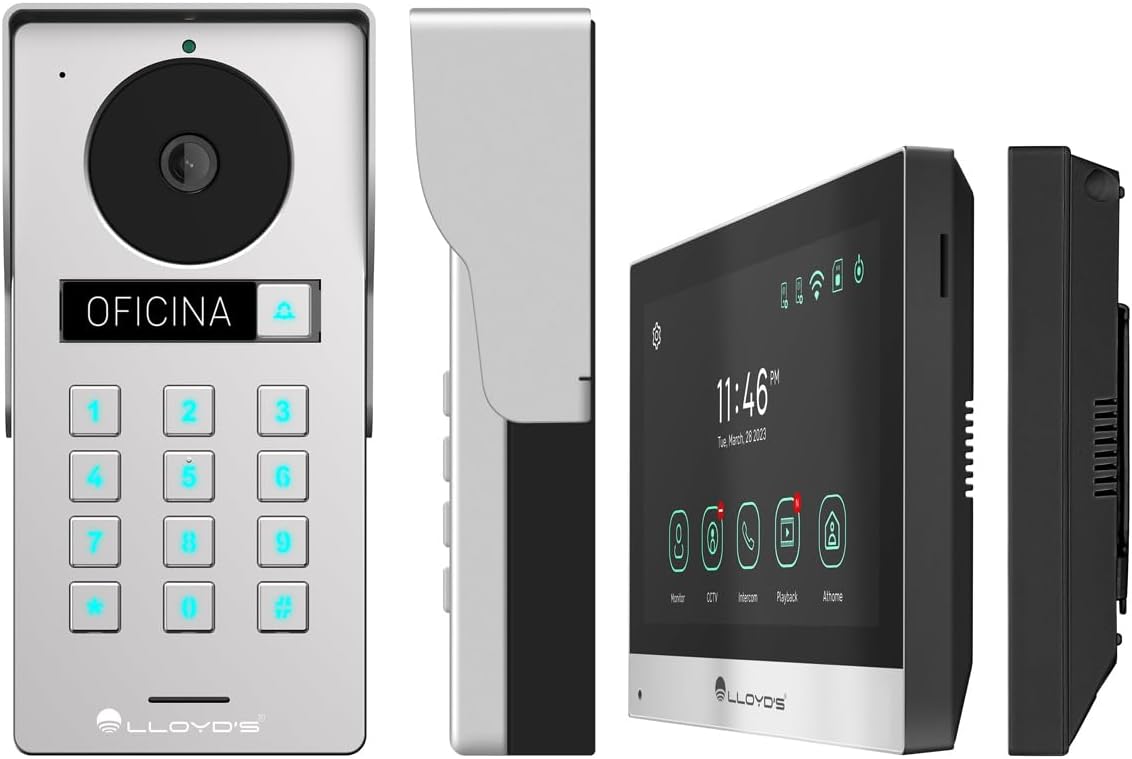
그림 4.1: 상세 views of the outdoor unit and monitor.

Figure 4.2: Key features of the Lloyd's Smart Video Intercom System.
5. 설정 및 설치
5.1. 배선 및 장착
The system requires a wired connection between the monitor and the outdoor unit. The maximum operating distance is 50 meters using a 4-wire cable (0.5 mm² not included). Follow the wiring diagram provided in the quick start guide for correct connections.
- 실외기 설치: Choose a suitable location near your entrance, ensuring clear camera view and easy access to the keypad. Use the provided mounting bracket, wall plugs, and screws. The unit is IP65 rated for outdoor use.
- 모니터 장착: Install the monitor indoors at a convenient height for viewing and interaction. Use the mounting bracket and screws.
- 전원 연결: Connect the AC/DC adapter to the monitor and a power outlet.
- Electric Lock Connection (Optional): If using an electric lock (12 VDC, not included), connect it to the outdoor unit as per the wiring diagram.
5.2. 앱 및 Wi-Fi 연결
To utilize smart features, download the Lloyd's smart home application on your smartphone (compatible with Android 5.0+ and iOS 11+).
- Power on the monitor and outdoor unit.
- On the monitor, navigate to the Wi-Fi settings and connect to your 2.4 GHz Wi-Fi network.
- Open the Lloyd's app on your smartphone and create an account or log in.
- Follow the in-app instructions to add your new video intercom system. This typically involves scanning a QR code displayed on the monitor or manually entering device details.
- Once connected, you will receive notifications and can control the system remotely via the app.
6. 사용 설명서
6.1. Answering Calls and Communication
- When a visitor presses the doorbell button, the monitor will ring, and you will receive a notification on your smartphone.
- On the monitor, tap the "Answer" icon to establish two-way audio and video communication.
- On your smartphone, open the app and tap the incoming call notification to answer.
- The intercom communication time is 60 seconds.

Figure 6.1: Communicate with visitors from anywhere using the app or monitor.

Figure 6.2: Receive instant notifications on your smartphone and monitor.
6.2. Door Opening
- 앱에서: During a call, tap the "Unlock" icon in the app to open the connected electric lock.
- From the Monitor: During a call, tap the "Unlock" icon on the monitor's touchscreen.
- From the Outdoor Unit: Visitors can enter a pre-set 4-6 digit password on the numeric keypad to open the door.
6.3. Motion Detection and Recording
- The system automatically captures photos and videos when motion is detected within 3 meters of the outdoor unit or when someone rings the doorbell.
- You will receive real-time alerts on your smartphone via the app when motion is detected.
- Review recorded events and snapshots through the app or on the monitor.
- The monitoring time for motion detection is 30 seconds.

Figure 6.3: Receive motion detection alerts directly on your smartphone app.

Figure 6.4: Automatic photo and video capture for events.
6.4. 시스템 확장
The system supports expansion for enhanced security and convenience:
- Up to 2 additional Outdoor Units (Doorbell)
- Up to 3 additional Monitors
- Up to 2 additional Cameras
- Up to 2 additional Sensors
(Additional units and sensors are not included and must be purchased separately.)
You can also integrate the system with other Lloyd's smart home products to create customized routines and share device access with family members.
7. 유지관리
- 청소: Use a soft, dry cloth to clean the monitor screen and outdoor unit. Do not use abrasive cleaners or solvents.
- 소프트웨어 업데이트: Periodically check the Lloyd's app for firmware updates to ensure optimal performance and security.
- 스토리지 관리: If using a memory card, regularly back up important recordings and delete old file공간을 확보합니다.
8. 문제 해결
| 문제 | 가능한 원인 | 해결책 |
|---|---|---|
| No image or sound from outdoor unit. | Loose wiring, power issue, unit malfunction. | Check all cable connections. Ensure power adapter is properly connected. Restart the system. |
| 와이파이 연결이 불안정하거나 연결이 끊어졌습니다. | 와이파이 신호가 약하거나, 비밀번호가 잘못되었거나, 공유기에 문제가 있을 수 있습니다. | Ensure the monitor is within Wi-Fi range. Re-enter Wi-Fi password. Restart your router. |
| Cannot open door via app/monitor. | Electric lock not connected, lock malfunction, wiring issue. | Verify electric lock connection and functionality. Check wiring between outdoor unit and lock. |
| 움직임 감지 알림이 없습니다. | Motion detection disabled, incorrect sensitivity, app notification settings. | Enable motion detection in app settings. Adjust sensitivity. Check smartphone notification permissions for the app. |
| 비디오 품질이 좋지 않습니다. | Dirty camera lens, poor lighting, network bandwidth. | 카메라 렌즈를 청소하세요. 조명이 충분한지 확인하세요. 인터넷 속도를 확인하세요. |
9. 사양
| 특징 | 세부 사항 |
|---|---|
| 모델 번호 | LC-1373 |
| 모니터 디스플레이 | 7인치 컬러 LCD 터치스크린 |
| 모니터 해상도 | 1020 x 600 픽셀 |
| Outdoor Unit Camera Resolution | 2MP Full HD (1920x1080) |
| View잉 각도 | 120도 |
| 나이트 비전 범위 | 최대 10미터 |
| 움직임 감지 범위 | ≤ 3 미터 |
| 무선 연결 | 2.4GHz Wi-Fi |
| 저장 | Integrated (30 photos), supports up to 128 GB MicroSD (not included) |
| 전원 공급 장치 | 12 VDC (via AC/DC adapter) |
| 전력 소비량(대기) | 4W |
| 전력 소비(작동) | 10와트 |
| 작동 거리(유선) | Up to 50m (with 0.5 mm² 4-wire cable) |
| Ingress Protection (Outdoor Unit) | IP65 |
| Monitor Dimensions (H x W x D) | 12.4cm x 18cm x 2.1cm |
| 실외기 크기 (높이 x 너비 x 깊이) | 18cm x 8.7cm x 3.2cm |
| 호환 장치 | 안드로이드 5.0 이상, iOS 11 이상 |

Figure 9.1: Dimensions of the Monitor and Outdoor Unit.
10. 보증 및 지원
For warranty information, please refer to the warranty card included with your product or visit the official Lloyd's website. If you encounter any issues or require technical assistance, please contact Lloyd's customer support.
고객 지원: Refer to the contact information provided on the product packaging or the official Lloyd's web대지.
온라인 리소스: 방문하다 Lloyd's Official Store on Amazon 추가 제품 정보 및 지원은 여기를 참조하세요.
11. 공식 제품 영상
사용 가능한 데이터에는 이 제품에 대한 공식 판매자 비디오가 제공되지 않았습니다.