
1. 서론
This manual provides detailed instructions for the installation, operation, and maintenance of your CHACON Wi-Fi Wired Video Intercom, Model 34895. Please read this manual thoroughly before installation and use to ensure proper functionality and safety.
2. 제품 오버view
The CHACON Wi-Fi Wired Video Intercom system allows you to see and communicate with visitors at your entrance via an indoor monitor or your smartphone. It features high-quality video, remote call answering, and the ability to remotely open a gate or door lock.
주요 특징:
- High-quality video display on indoor monitor and smartphone.
- Remote video call answering via smartphone.
- Remote gate/door lock release (requires wired installation with a 12V electric lock or dry contact).
- Visitor message recording capability when you are absent.
- Automatic photo recording of each visitor on the monitor's internal memory.
- Standalone system, not compatible with DiO 1.0 ecosystem.
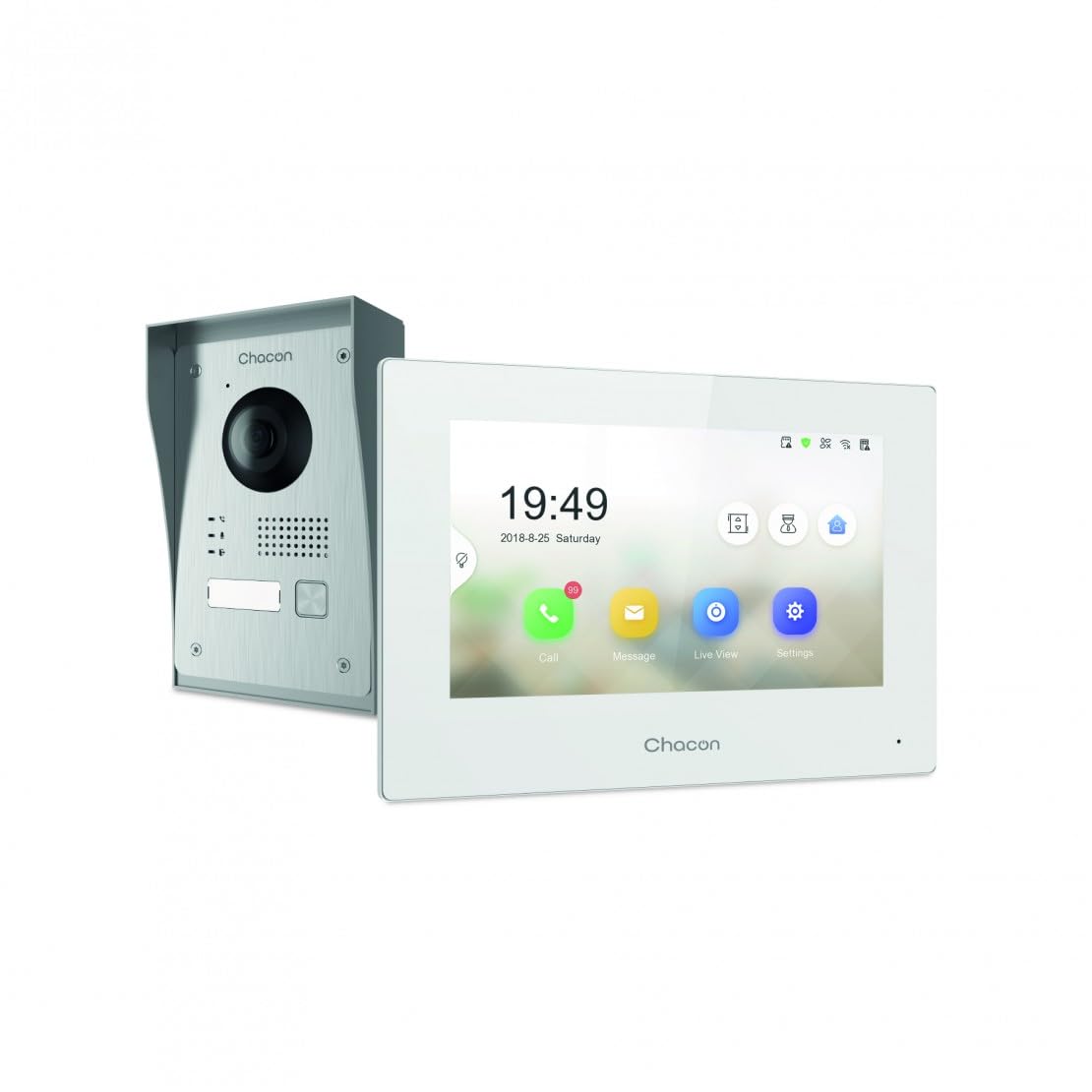
Figure 2.1: Indoor Monitor Unit. This image shows the indoor monitor with its user interface displaying time, date, and icons for call, message, live view, 및 설정.
3. 패키지 내용
다음 품목이 패키지에 포함되어 있는지 확인하세요.
- 실내 모니터링 장치
- 실외용 초인종
- 장착 액세서리(나사, 벽면 플러그)
- 전원 어댑터
- 사용 설명서 (본 문서)
- Wiring cables

Figure 3.1: Outdoor Doorbell Unit. This image displays the outdoor unit, featuring a camera lens, microphone, speaker, and doorbell button, designed for external installation.
4. 안전 정보
Read all safety warnings and instructions carefully before installing and operating this device. Failure to follow these instructions may result in electric shock, fire, or serious injury.
- Ensure power is disconnected before any installation or wiring.
- Installation should be performed by a qualified electrician if you are unsure about wiring.
- Do not expose the outdoor unit to extreme temperatures, direct sunlight for prolonged periods, or heavy rain without proper protection.
- 제공된 전원 어댑터와 케이블만 사용하세요.
- 장치를 물과 습기로부터 멀리하십시오.
5. 설정
5.1. Installation of Outdoor Unit
The outdoor unit can be surface-mounted or flush-mounted. Ensure the unit is installed at a height that allows the camera to capture visitors clearly.
- Choose a suitable location near your entrance, protected from direct weather if possible.
- 장착 브래킷을 템플릿으로 사용하여 드릴링 지점을 표시합니다.
- 구멍을 뚫고 벽 플러그를 삽입합니다.
- 마운팅 브래킷을 벽에 고정합니다.
- Connect the necessary wiring (power, indoor monitor, electric lock if applicable) to the outdoor unit. Refer to the wiring diagram in section 5.3.
- Attach the outdoor unit to the mounting bracket.

그림 5.1: 예ample of Outdoor Unit Installation. This image shows the outdoor doorbell unit mounted on a wall next to a gate, demonstrating a typical installation scenario.
5.2. Installation of Indoor Monitor
The indoor monitor should be installed in a convenient location within your home, preferably near a power outlet.
- Choose a wall location for the indoor monitor.
- 드릴링 지점을 표시하십시오.
- 구멍을 뚫고 벽 플러그를 삽입합니다.
- Secure the monitor's mounting plate to the wall.
- Connect the wiring from the outdoor unit and the power adapter to the indoor monitor.
- Mount the indoor monitor onto its plate.

Figure 5.2: Indoor Monitor in a Home Environment. This image shows the indoor monitor installed on a wall in a modern kitchen setting, illustrating its discreet integration into a living space.
5.3. 배선도
Connect the outdoor unit to the indoor monitor using the provided 2-wire cable. If connecting an electric lock or gate opener, ensure it is a 12V electric lock or a dry contact system. Consult a professional if you are unsure about electrical wiring.
메모:
- The system requires a wired connection for the outdoor unit to the indoor monitor.
- For remote gate/door opening, a separate wired connection from the indoor monitor to a 12V electric lock or dry contact is necessary.
5.4. Wi-Fi 연결 및 앱 설정
To enable smartphone connectivity, connect the indoor monitor to your home Wi-Fi network and set up the CHACON app.
- 실내 모니터의 전원을 켜세요.
- Navigate to the 'Settings' menu on the monitor.
- Select 'Wi-Fi' and choose your home network. Enter the password.
- Download the CHACON app from your smartphone's app store (iOS/Android).
- Register an account and follow the in-app instructions to add your video intercom device. This typically involves scanning a QR code displayed on the monitor or entering a device ID.
- Once connected, you can receive calls, view live feed, and control the lock remotely via the app.
6. 사용 설명서
6.1. 전화 받기
방문객이 실외 초인종 버튼을 누르면:
- The indoor monitor will ring and display the visitor's video feed. Tap the 'Call' icon to answer.
- Your smartphone (if connected to Wi-Fi and the app is running) will receive a notification. Tap the notification to answer the video call.
6.2. Remote Lock Release
During an active call (either on the indoor monitor or smartphone app), you can unlock your gate or door:
- On the indoor monitor, tap the 'Unlock' icon.
- On the smartphone app, tap the corresponding 'Unlock' button.
Ensure your electric lock or gate opener is correctly wired to the system as described in Section 5.3.
6.3. 라이브 View
당신은 할 수 있습니다 view the outdoor camera feed at any time:
- On the indoor monitor, tap the 'Live View' 아이콘.
- On the smartphone app, select the device and choose the 'Live View' option.
6.4. Visitor Message Recording
If you are unavailable to answer a call, visitors can leave a message:
- After a set period of no answer, the outdoor unit will prompt the visitor to leave a message.
- These messages can be accessed and played back from the 'Message' menu on the indoor monitor or via the smartphone app.
6.5. Photo Recording
The system automatically captures a photo of each visitor when the doorbell is pressed. These photos are stored in the internal memory of the indoor monitor and can be reviewed via the 'Message' or 'History' menu.
7. 유지관리
- 청소: 실내 모니터와 실외기는 부드럽고 마른 천으로 닦으십시오. 연마성 세제나 용제를 사용하지 마십시오.
- 실외기 보호: Regularly check the outdoor unit for any debris or obstructions around the camera lens, microphone, and speaker.
- 소프트웨어 업데이트: Check the indoor monitor's settings or the smartphone app for available firmware updates to ensure optimal performance and security.
- 배선 점검: Periodically inspect all wiring connections for any signs of wear or damage.
8. 문제 해결
| 문제 | 가능한 원인 | 해결책 |
|---|---|---|
| 실내 모니터에 화면이 나오지 않습니다. | Power issue, loose wiring, outdoor unit malfunction. | Check power supply to indoor monitor. Verify all wiring connections between outdoor and indoor units. Ensure outdoor unit is powered. |
| 통화 중에는 소리가 나지 않습니다. | Microphone/speaker obstruction, volume too low, wiring issue. | Check for obstructions on outdoor unit's microphone/speaker. Adjust volume settings on indoor monitor. Inspect audio wiring. |
| Smartphone app not receiving calls/notifications. | No Wi-Fi connection, incorrect app settings, network issues. | Ensure indoor monitor is connected to Wi-Fi. Check smartphone's internet connection. Verify app notification settings. Restart app and monitor. |
| Remote lock release not working. | Incorrect wiring to lock, incompatible lock, power issue to lock. | Confirm electric lock/gate opener is a 12V system or dry contact. Check wiring between monitor and lock. Ensure lock has power. |
| 비디오 품질이 좋지 않습니다. | Dirty camera lens, poor lighting, network bandwidth. | Clean the camera lens on the outdoor unit. Ensure adequate lighting. Check Wi-Fi signal strength. |
9. 사양
| 상표 | 차콘 |
| 모델 번호 | 34895 |
| 색상 | 하얀색 |
| 품목 무게 | 1.3 킬로그램 |
| 패키지 크기 | 38 x 24.5 x 17cm |
| 연결성 | Wired (2-wire), Wi-Fi |
| 잠금 호환성 | 12V Electric Lock or Dry Contact |
| 제조업체 | 차콘 |
| 원산지 | 중국 |
10. 보증 및 지원
For warranty information and technical support, please refer to the official CHACON web사이트를 방문하거나 고객 서비스에 직접 문의하세요. 보증 청구를 위해 구매 증빙 자료로 구매 영수증을 보관하세요.
온라인 리소스: Visit the CHACON official web자주 묻는 질문(FAQ), 업데이트된 설명서 및 지원 연락처 정보를 제공하는 사이트입니다.
고객 서비스: Contact details can typically be found on the manufacturer's web사이트 또는 제품 포장에 표시되어 있습니다.