
1. 서론
Thank you for choosing the AVATTO WT410-BH-3A-W Smart Thermostat. This device is designed to provide intelligent control over your gas boiler system, allowing you to manage your home's heating efficiently. With Wi-Fi connectivity, you can remotely adjust temperatures via a mobile application, integrate with popular voice assistants, and utilize advanced scheduling options. This manual provides detailed instructions for installation, operation, and maintenance to ensure optimal performance and energy savings.
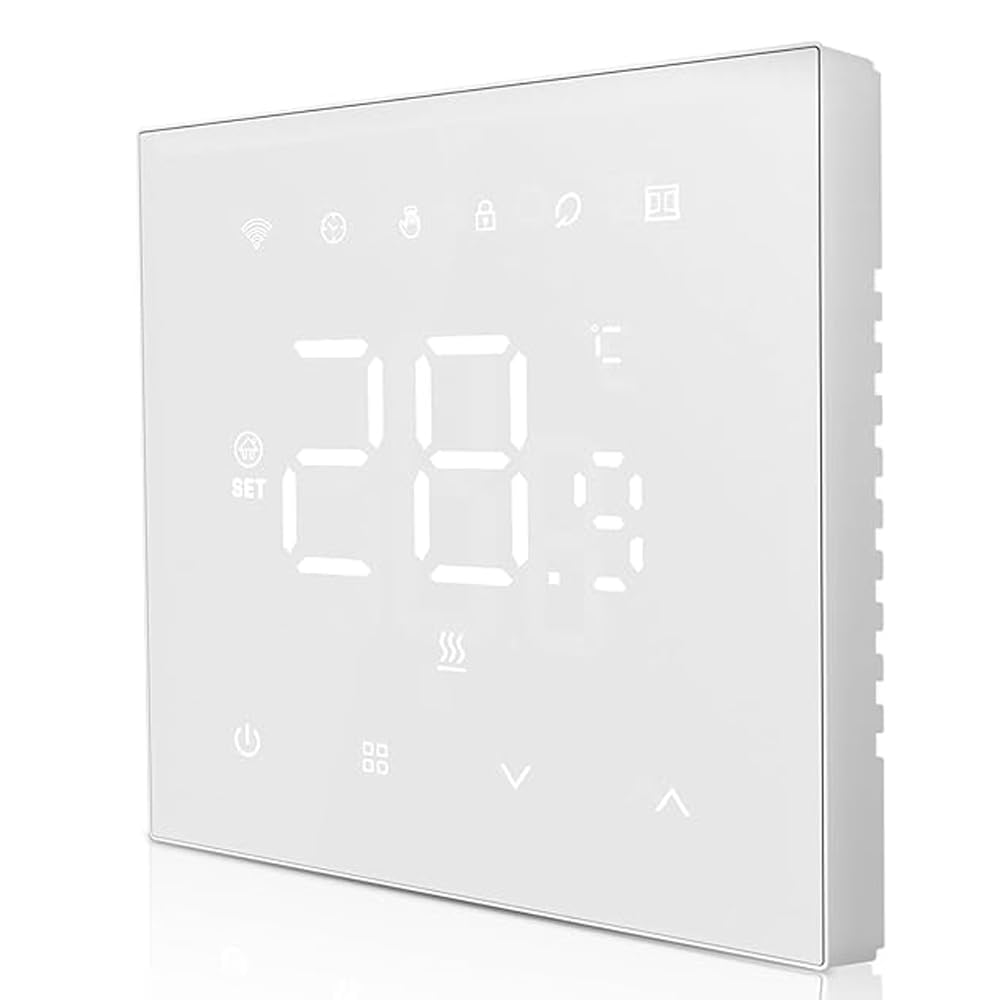
그림 1: 앞쪽 view of the AVATTO WT410-BH-3A-W Smart Thermostat, showing its sleek design and LED display.
2. 안전 정보
- 전기적 위험: Installation must be performed by a qualified electrician. Disconnect power at the circuit breaker before installation to prevent electrical shock.
- 권tage 호환성: 온도 조절 장치의 볼륨을 확인하십시오.tage requirements match your electrical system.
- 보일러 호환성: This thermostat is designed for gas boiler systems with a maximum load of 3A. Verify compatibility with your boiler before installation.
- 환경 조건: Do not install in areas with high humidity, direct sunlight, or extreme temperatures.
- 어린이 안전: 기기를 어린이의 손이 닿지 않는 곳에 보관하세요.
3. 패키지 내용
다음 품목이 패키지에 포함되어 있는지 확인하세요.
- AVATTO WT410-BH-3A-W Smart Thermostat Unit
- 장착 나사(2개)
- 사용 설명서 (본 문서)
4. 설치
중요한: Installation should only be carried out by a qualified professional. Ensure the main power supply to your heating system is turned off before proceeding.
- 전원 차단: Turn off the main power supply to your boiler system at the circuit breaker. Verify that the power is off using a voltag전자 테스터.
- (해당되는 경우) 기존 온도 조절기를 제거하십시오. 기존 온도 조절기를 벽에서 조심스럽게 분리하세요. 배선 연결 상태를 잘 기억해 두었다가 분리하십시오.
- Mounting the Base Plate: Separate the front panel of the AVATTO thermostat from its base plate. Secure the base plate to the wall using the provided mounting screws. Ensure it is level.
- 배선: Connect the wires from your boiler system to the appropriate terminals on the thermostat's base plate. Refer to the "Wiring Diagram" section for detailed instructions. Ensure all connections are secure.
- Attach Thermostat Unit: Carefully attach the front panel of the thermostat onto the mounted base plate, ensuring it clicks securely into place.
- 복원력 : Turn the main power supply back on at the circuit breaker. The thermostat display should illuminate.
5. 배선도
The AVATTO WT410-BH-3A-W thermostat typically requires connections for power supply and boiler control.
Standard Wiring (Gas Boiler 3A):
- L(라이브): 전원 공급 장치의 활선에 연결하십시오.
- N (중립): 전원 공급 장치의 중성선에 연결하십시오.
- 아니오(보통 열려 있음): Connect to the boiler's control input (often labeled as 'SW' or 'COM' on the boiler).
- COM(공통): Connect to the other boiler control input.
Note: Always refer to your boiler's specific wiring diagram and consult a qualified electrician if you are unsure about any connections. Incorrect wiring can damage the thermostat or your boiler system.
6. App and Wi-Fi Setup
To unlock the full potential of your AVATTO Smart Thermostat, connect it to your home Wi-Fi network and the compatible mobile application.
- 앱 다운로드: 검색 "Smart Life" or "Tuya Smart" in your mobile app store (iOS or Android) and download the application.
- 등록/로그인: 앱을 열고 새 계정을 등록하거나 이미 계정이 있다면 로그인하세요.
- 장치 추가: In the app, tap the "+" icon (usually in the top right corner) to add a new device. Select "Thermostat" or "Heater" from the device list.
- 페어링 모드 : On the thermostat, press and hold the Wi-Fi icon button (or a similar pairing button) until the Wi-Fi indicator light starts blinking rapidly. This indicates it's in pairing mode.
- Wi-Fi에 연결: Follow the on-screen instructions in the app. You will need to enter your home Wi-Fi network name (SSID) and password. Ensure your phone is connected to a 2.4GHz Wi-Fi network (5GHz networks are generally not supported by smart home devices).
- 확인: Once connected, the Wi-Fi indicator on the thermostat will become solid, and the app will confirm successful pairing. You can now control your thermostat remotely.
For voice assistant integration (e.g., Amazon Alexa, Google Assistant), follow the instructions within the "Smart Life" or "Tuya Smart" app to link your account.
7. 작동 모드
The AVATTO WT410-BH-3A-W thermostat supports four main operating modes to suit your heating needs:
- 수동 모드: In this mode, the thermostat maintains a constant temperature set by the user until manually changed. It overrides any programmed schedules.
- 프로그래밍 모드: The thermostat follows the pre-set weekly schedule, automatically adjusting the temperature at specified times.
- Temporary Programming Mode: While in Programming Mode, you can temporarily adjust the temperature. The thermostat will maintain this new temperature until the next scheduled program change, then revert to the schedule.
- Absence Mode (Holiday Mode): Designed for extended periods away from home. You can set a lower, energy-saving temperature for a specified duration, and the thermostat will automatically resume normal operation afterward.
Switch between modes using the dedicated mode button on the thermostat or through the mobile application.
8. 주간 프로그램
The thermostat allows for advanced weekly programming, enabling you to set different temperatures for specific time periods throughout the week. This helps optimize comfort and energy efficiency.
You can set up to 6 개 기간 for weekdays (Monday-Friday) and 2 개 기간 for weekends (Saturday-Sunday).
- 액세스 프로그래밍: Press and hold the "M" (Mode) button or navigate to the "Schedule" section in the mobile app.
- 평일 일정 설정: For Monday to Friday, define up to 6 time periods (e.g., Wake, Leave, Return, Sleep) and their corresponding desired temperatures.
- 주말 일정 설정: For Saturday and Sunday, define up to 2 time periods and their desired temperatures.
- 설정 저장: Confirm and save your programming. The thermostat will now follow this schedule when in Programming Mode.
The thermostat offers high precision with temperature settings, accurate to 0.5°C, and displays temperature with 0.1°C precision. An adjustable hysteresis function (0.5°C to 10°C) allows fine-tuning of temperature deviation.
9. 유지관리
The AVATTO WT410-BH-3A-W Smart Thermostat requires minimal maintenance to ensure long-term performance.
- 청소: 디스플레이를 부드럽게 닦아주세요.asin부드럽고 마른 천으로 닦아주십시오. 연마성 세척제, 용제 또는 화학 스프레이는 기기를 손상시킬 수 있으므로 사용하지 마십시오.
- 장애물을 피하십시오: Ensure no objects are blocking the thermostat's vents or sensors, as this can affect temperature readings.
- 소프트웨어 업데이트: Periodically check the mobile application for firmware updates for your thermostat. Updates can improve performance and add new features.
10. 문제 해결
| 문제 | 가능한 원인 | 해결책 |
|---|---|---|
| 온도 조절기 디스플레이가 비어 있습니다. | 전원 공급이 없습니다. | Check the circuit breaker for your heating system. Ensure wiring is correct and secure. |
| 온도 조절 장치가 Wi-Fi에 연결되지 않습니다. | Incorrect Wi-Fi password; 5GHz network; thermostat too far from router. | Ensure correct 2.4GHz Wi-Fi password. Move thermostat closer to router or use a Wi-Fi extender. Re-enter pairing mode. |
| Boiler not responding to thermostat. | Incorrect wiring; boiler issue; thermostat not in heating mode. | Verify wiring connections. Check boiler's power and status. Ensure thermostat is set to a temperature higher than the current room temperature and is in an active heating mode. |
| 온도 판독값이 부정확합니다. | Thermostat placed near heat sources/drafts; sensor obstruction. | Relocate thermostat if possible. Ensure no objects are blocking the internal sensor. |
If you encounter issues not listed here or require further assistance, please contact AVATTO customer support.
11. 사양
| 특징 | 세부 사항 |
|---|---|
| 상표 | 아바토 |
| 모델 번호 | WT410-BH-3A-W |
| 호환성 | Gas Boiler (3A Max Load) |
| 연결성 | 와이파이(2.4GHz) |
| 온도 정확도 | 0.5도 |
| 온도 표시 정밀도 | 0.1도 |
| Hysteresis Range | 0.5°C ~ 10°C |
| 프로그램 작성 | 6 periods (Mon-Fri), 2 periods (Sat-Sun) |
| 음성 지원 지원 | Yes (via Smart Life/Tuya Smart app integration) |
12. 보증 및 지원
AVATTO products are manufactured to the highest quality standards. For information regarding warranty coverage, please refer to the warranty card included with your purchase or visit the official AVATTO web대지.
For technical support, troubleshooting assistance, or any questions about your AVATTO WT410-BH-3A-W Smart Thermostat, please contact AVATTO customer service through their official channels.
Web대지: www.avatto.com (참고: 이것은 플레이스홀더입니다. URL as no official support link was provided.)


