
소개
Thank you for choosing the Thunderobot K87 Wired Mechanical Keyboard. This manual provides essential information for the proper setup, operation, maintenance, and troubleshooting of your new keyboard. Please read this manual thoroughly before using the product to ensure optimal performance and longevity.

그림 1: 각도 view of the Thunderobot K87 Mechanical Keyboard.
설정
패키지 내용
진행하기 전에 패키지에 다음 항목이 모두 포함되어 있는지 확인하십시오.
- Thunderobot K87 Wired Mechanical Keyboard
- USB 케이블
- 사용 설명서 (본 문서)
키보드 연결
- Unpack the Thunderobot K87 keyboard and the included USB cable.
- Connect the USB-C end of the cable to the port located on the keyboard.
- 케이블의 USB-A 끝을 컴퓨터의 사용 가능한 USB 포트에 연결합니다.
- 키보드는 운영 체제에서 자동으로 인식됩니다. 기본 기능을 사용하는 데는 일반적으로 추가 드라이버가 필요하지 않습니다.

그림 2: 하단 view of the keyboard, illustrating adjustable feet and cable management options.
작동 지침
기본 기능
The Thunderobot K87 is a standard 87-key (TKL) layout mechanical keyboard. Simply plug it into your computer, and it is ready for typing. The keyboard features Red mechanical switches, known for their linear feel and quiet operation, making them suitable for both typing and gaming.
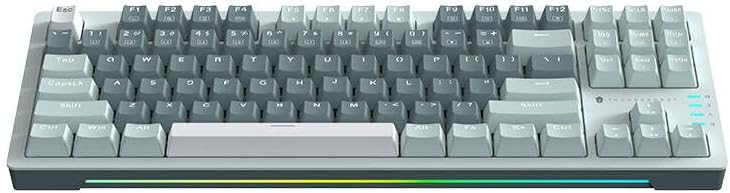
그림 3: 상향식 view of the Thunderobot K87 keyboard layout.
멀티미디어 및 기능 키
The keyboard includes a Function (Fn) key, typically located near the right Alt key. This key, when pressed in combination with the F1-F12 keys, activates various multimedia and system functions. Refer to the keycap legends for specific functions.
- Fn + F1-F12: Typically control media playback, volume, and other system shortcuts.
- Fn + Windows 키: 게임 중 실수로 윈도우 키가 눌리는 것을 방지하기 위해 윈도우 키를 잠그거나 잠금 해제합니다.
백라이트 제어
The Thunderobot K87 keyboard features customizable RGB backlighting. Specific key combinations allow you to change lighting modes, brightness, and speed. Consult the keyboard's keycap legends or the manufacturer's website for detailed instructions on lighting customization.

그림 4: 전면 view showing the RGB lighting strip.

그림 5: 사이드 프로file view demonstrating keycap height and keyboard angle.
유지
키보드 청소
정기적으로 청소하면 키보드의 모양과 기능을 유지하는 데 도움이 됩니다.
- 연결 해제: 청소하기 전에 반드시 키보드를 컴퓨터에서 분리하세요.
- 먼지 제거: 압축 공기 캔을 사용하여 키캡 사이의 먼지와 이물질을 불어냅니다.
- 표면 청소: 부드럽고 보풀 없는 천으로 키캡과 키보드 표면을 살살 닦아주세요.amp물이나 순하고 마모성이 없는 세척액으로 세척하세요. 과도한 습기는 피하세요.
- 피하다: Do not use harsh chemicals, solvents, or abrasive materials, as these can damage the keyboard's finish or keycap legends.
저장
When not in use for extended periods, store the keyboard in a dry, cool place away from direct sunlight and extreme temperatures. Consider covering it to prevent dust accumulation.
문제 해결
If you encounter issues with your Thunderobot K87 keyboard, please refer to the following common solutions:
| 문제 | 가능한 원인 | 해결책 |
|---|---|---|
| 키보드가 응답하지 않습니다 | USB 연결이 느슨하거나, USB 포트에 결함이 있거나, 드라이버에 문제가 있습니다. | USB 케이블이 제대로 연결되어 있는지 확인하십시오. 컴퓨터의 다른 USB 포트를 사용해 보십시오. 컴퓨터를 재시작하십시오. |
| 특정 키가 작동하지 않습니다 | 키캡 아래에 이물질이 있거나 스위치가 오작동하는 경우입니다. | Use compressed air to clear debris. If the issue persists, contact customer support. |
| 백라이트가 작동하지 않거나 잘못되었습니다. | Lighting mode disabled, software conflict. | Check keyboard's lighting control key combinations (Fn + specific keys). Ensure no conflicting software is running. |
| 키보드 입력 지연 | USB port issues, system performance. | Try a different USB port. Close unnecessary background applications. |
If the problem persists after trying these solutions, please contact Thunderobot customer support for further assistance.
명세서
| 특징 | 세부 사항 |
|---|---|
| 모델 번호 | JM03NQ002 |
| 상표 | 썬더로봇 |
| 연결성 | 유선 (USB) |
| 스위치 유형 | 빨간색 기계식 스위치 |
| 공들여 나열한 것 | 87키(텐키리스) |
| 백라이트 | RGB |
| 제조업체 | 썬더로봇 |
| ASIN | B0CWS77B83 |
| 보증 | 2 years manufacturer |
보증 정보
The Thunderobot K87 Wired Mechanical Keyboard (Model JM03NQ002) comes with a 2년 제조사 보증 from the date of purchase. This warranty covers defects in materials and workmanship under normal use. It does not cover damage caused by accident, misuse, abuse, neglect, unauthorized modification, or improper installation.
To claim warranty service, please retain your proof of purchase. For detailed warranty terms and conditions, or to initiate a warranty claim, please contact Thunderobot customer support.
지원하다
For technical assistance, product inquiries, or warranty claims, please visit the official Thunderobot website or contact their customer support team. Please have your product model number (JM03NQ002) and proof of purchase ready when seeking support.
Official Thunderobot Web대지: www.thunderobot.com (참고: 이것은 플레이스홀더입니다. URL 구체적인 지원이 없기 때문에 URL was provided in the product data. Refer to your product packaging or official Thunderobot documentation for the correct support contact information.)

