
1. 설치 및 초기 설정
Before operating your new Candy Smart Pro Inverter washing machine, it is crucial to follow these installation steps carefully to ensure proper function and safety.
짐 풀기
- 스티로폼 받침대와 보호 필름을 포함한 모든 포장재를 조심스럽게 제거하십시오.
- Remove the transit bolts located at the rear of the machine. These bolts secure the drum during transport and must be removed before use. Keep them for future transport if needed.
위치 지정
- 세탁기를 단단하고 평평한 곳에 놓으세요. 통풍과 접근을 위해 세탁기 주변에 충분한 공간을 확보하세요.
- Adjust the leveling feet at the bottom of the machine to ensure it is perfectly stable and does not wobble. Use a spirit level for accuracy.
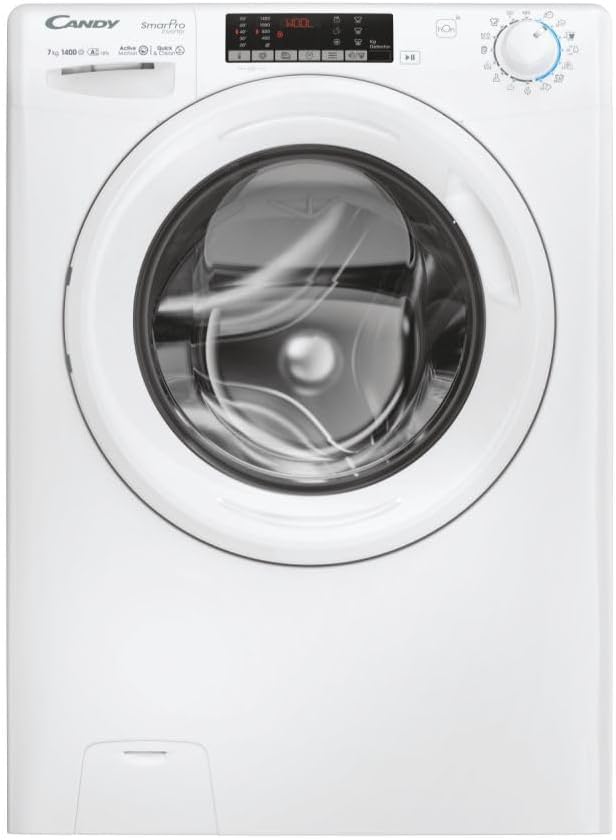
그림 1.1: 전면 view of the Candy Smart Pro Inverter washing machine. This image shows the overall design of the appliance, including the control panel, detergent drawer, and main door.
물 연결
- 물 공급 호스를 3/4인치 나사산이 있는 찬물 수도꼭지에 연결하세요. 누수를 방지하려면 연결 부분이 단단히 조여져 있는지 확인하세요.
- Position the drain hose into a suitable standpipe or sink, ensuring it is securely fixed to prevent displacement during operation.

Figure 1.2: The washing machine with its front-loading door open, revealing the stainless steel drum. This view is useful for checking the drum and ensuring no packing materials remain inside.
전기 연결
- 전원 코드를 접지된 콘센트에 꽂으세요. 볼륨을 확인하세요.tage and frequency match the specifications on the machine's rating plate.
- 연장코드나 어댑터를 사용하지 마세요.
2. 사용 설명서
This section provides a guide on how to use your Candy Smart Pro Inverter washing machine for optimal performance.
제어판 이상view
The control panel allows you to select wash programs, adjust settings, and monitor the wash cycle.

그림 2.1: 상세 view of the washing machine's control panel, showing the program selector dial, digital display, and various function buttons.
세탁물 적재
- 세탁기 문을여세요.
- Load laundry loosely into the drum, ensuring not to overload the machine. Refer to the maximum load capacity (7 kg) for different programs.
- 문을 단단히 닫아 딸깍 소리가 날 때까지 닫으세요.

그림 2.2: View of laundry placed inside the stainless steel drum of the washing machine, illustrating a typical load.
세제 및 첨가제 추가
The detergent dispenser has compartments for pre-wash, main wash, and fabric softener.
- 세제 투입구를 빼내세요.
- Add the appropriate amount of detergent to the main wash compartment (II).
- If using, add fabric softener to the designated compartment (flower symbol).
- 세제 투입구를 완전히 다시 밀어 넣으세요.

Figure 2.3: The detergent dispenser drawer pulled out, showing the different compartments for detergent and fabric softener.
프로그램 선택
- Turn the program selector dial to choose the desired wash program (e.g., Cotton, Synthetics, Delicates, Eco).
- 디스플레이에는 선택한 프로그램의 기본 온도와 회전 속도가 표시됩니다.
설정 조정
- Use the temperature button to adjust the wash temperature.
- Use the spin speed button to modify the spin speed.
- Select any additional functions (e.g., pre-wash, extra rinse) using the corresponding buttons.
세탁 사이클 시작하기
- 세탁 주기를 시작하려면 '시작/일시정지' 버튼을 누르세요.
- 기계가 자동으로 문을 잠그고 물을 채우기 시작합니다.
3. 유지관리 및 관리
정기적인 유지관리는 세탁기의 수명과 효율적인 작동을 보장합니다.
세제 디스펜서 청소
- Remove the detergent drawer by pressing the release lever (if present) and pulling it out.
- 세제 찌꺼기를 제거하기 위해 서랍을 흐르는 물에 헹구십시오.
- Clean the housing of the drawer with a brush to remove any build-up.
- 서랍을 다시 삽입하세요.
드럼 청소
- Periodically run a maintenance wash cycle (e.g., a hot wash with no laundry and a descaling agent or washing machine cleaner) to prevent odors and limescale build-up.
- 세탁 후에는 세탁조 문을 살짝 열어두어 세탁조 내부가 공기에 노출되어 건조되고 곰팡이가 생기는 것을 방지하십시오.
필터 청소
- 배수 펌프 필터는 일반적으로 기기 앞쪽 하단에 있습니다.
- 여과기 아래에 얕은 용기를 놓아 남아있는 물을 받으십시오.
- Carefully unscrew and remove the filter. Clean any lint, debris, or foreign objects.
- 필터를 다시 단단히 조여 넣으세요.
외부 청소
- 기기 외부 표면을 부드러운 천으로 닦으십시오.amp 옷감.
- 연마성 세척제나 용제를 사용하지 마십시오.
4. 문제 해결 가이드
이 섹션에서는 세탁기 사용 중 발생할 수 있는 일반적인 문제에 대한 해결책을 제공합니다.
| 문제 | 가능한 원인 | 해결책 |
|---|---|---|
| 기계가 시작되지 않습니다 | 전원 공급이 되지 않습니다. 문이 제대로 닫히지 않았습니다. 프로그램이 선택되지 않았습니다. | Check power plug and fuse; Ensure door is firmly closed; Select a wash program and press 'Start'. |
| 물이 채워지지 않음 | 수도꼭지가 닫혀 있음; 급수 호스가 꼬이거나 막혔음; 수압이 너무 낮음. | Open water tap; Straighten hose and check for blockages; Check household water pressure. |
| 기계가 배수되지 않음 | 배수 호스가 꼬이거나 막혔습니다. 배수 펌프 필터가 막혔습니다. | Straighten drain hose and check for blockages; Clean the drain pump filter. |
| 과도한 진동/소음 | Transit bolts not removed; Machine not level; Uneven laundry load. | 운송용 볼트를 제거하고, 수평 조절 다리를 조정한 후, 세탁조 안의 세탁물을 다시 펼쳐주세요. |
| 디스펜서에 세제 잔여물이 있습니다 | Insufficient water pressure; Detergent drawer blocked. | Check water pressure; Clean the detergent drawer and its housing. |
5. 기술 사양
Detailed specifications for the Candy Smart Pro Inverter CO 474TWM6/1-S washing machine.
| 특징 | 사양 |
|---|---|
| 상표 | 사탕 |
| 모델명 | CO 474TWM6/1-S |
| 용량 | 7 킬로그램 |
| 액세스 위치 | 전면 로드 |
| 색상 | 검은색 |
| 작동 모드 | 반자동 |
| 포함된 구성 요소 | 1개 패키지 |
| 설치 유형 | 독립형 |
| 드럼 소재 | 스테인리스 스틸 |
| 제조업체 | 사탕 |
6. 보증 및 고객 지원
보증 정보는 제품에 동봉된 보증 카드를 참조하거나 캔디 공식 웹사이트를 방문하십시오. web사이트. 보증 청구를 위해 구매 증빙 자료를 보관하세요.
If you require technical assistance or have questions not covered in this manual, please contact Candy customer support. Contact details can typically be found on the manufacturer's web사이트나 제품 설명서에서 확인하세요.
추가 지원이 필요하면 다음을 방문하세요. 공식 캔디 Web대지.