
JMDHKK K68+
JMDHKK K68+ 숨겨진 카메라 및 도청 탐지기 사용 설명서
Model: K68+
소개
The JMDHKK K68+ is an advanced multi-functional detector designed to enhance your privacy and security. It effectively identifies hidden cameras, listening devices, and magnetic trackers across various environments such as homes, offices, hotels, and vehicles. This device provides comprehensive protection against unauthorized surveillance, ensuring your peace of mind.
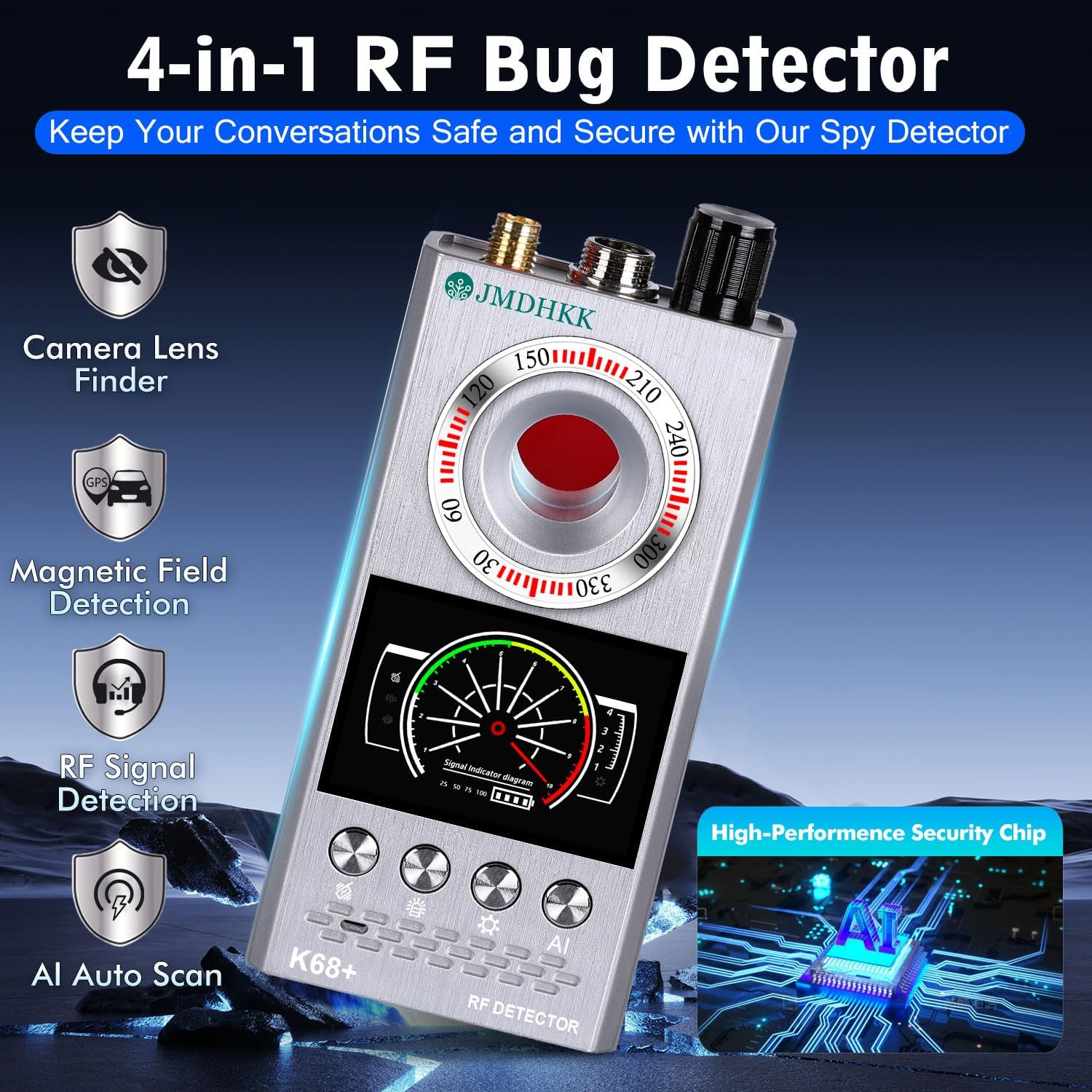
Figure 1: JMDHKK K68+ Detector highlighting its four primary detection functions.
상자 안에 무엇이 들어있나요?
상자를 풀 때 모든 구성품이 들어 있는지 확인하세요.
- 본체
- RF 안테나
- GS Probe
- 충전 케이블
- 사용자 설명서

Figure 2: The JMDHKK K68+ detector and its included accessories.
설정
- 장치 충전: Connect the provided charging cable to the device's charging port and a compatible USB power source. The device's indicator will show charging status. Ensure the device is fully charged before first use for optimal performance.
- Attaching the RF Antenna: Screw the RF Antenna into the designated port on the top of the main unit. This antenna is crucial for wireless signal detection.
- Attaching the GS Probe: Connect the GS Probe (Magnetic Field Probe) to its dedicated port on the top of the main unit. This probe is used for detecting magnetic trackers.
작동 지침
1. Wireless Signal Detection (RF Detection)
This mode detects radio frequency signals emitted by wireless cameras, listening devices, GPS trackers, and other transmitting bugs. It is ideal for sweeping rooms, offices, or vehicles for active surveillance devices.
- 활성화: Turn on the device and select the RF detection mode.
- 감도 조정 : Use the sensitivity control knob to adjust the detection range. Start with higher sensitivity in open areas and decrease it as you narrow down a signal source.
- 스캐닝: Slowly sweep the device across the area of interest, paying close attention to walls, furniture, electronic devices, and hidden compartments. The signal strength indicator on the display will increase as you approach a signal source.
- 알림: The device will provide visual (LED indicators) and/or audible/vibration alerts when a signal is detected.
Figure 3: Wireless Signal Detection in action, identifying various transmitting devices.
2. 자기장 감지
This function is specifically designed to locate magnetic GPS trackers and other devices that attach using magnets, commonly found on vehicles or metallic surfaces.
- 활성화: Ensure the GS Probe is attached. Select the magnetic field detection mode.
- 스캐닝: Slowly move the GS Probe along surfaces where magnetic devices might be hidden, such as under car chassis, wheel wells, or metallic furniture.
- 알림: The device will indicate the presence of a magnetic field through visual and/or audible alerts. The closer the probe is to a magnetic source, the stronger the indication.

Figure 4: Magnetic Field Detection for locating hidden GPS trackers on vehicles.
3. Hidden Camera Lens Finder (Infrared Scanning)
This mode helps identify hidden pinhole cameras, even if they are not actively transmitting, by detecting their reflective lenses using infrared light.
- 활성화: Select the camera lens finder mode. The device will emit a red infrared light.
- 스캐닝: 붉은색 너머를 보세요 viewing window on the device while slowly scanning the area. Pay attention to objects like smoke detectors, air vents, picture frames, electrical outlets, and small holes.
- 신분증: A hidden camera lens will appear as a bright, reflective red dot when viewed through the device's window.

Figure 5: Hidden Camera Lens Finder in use, revealing concealed camera lenses.
4. AI Auto Scan Mode
The AI Auto Scan mode provides an intelligent, automated scan for various threats, simplifying the detection process.
- 활성화: Select the AI Auto Scan mode. The device will automatically cycle through detection methods.
- 모니터링: Place the device in an area you wish to monitor. It will continuously scan for signals and alerts you to any detected threats.
유지
- 청소: 부드럽고 마른 천을 사용하여 기기를 닦으세요. 연마성 세제나 용제는 사용하지 마세요.
- 저장: 본 기기는 직사광선과 극한의 온도를 피해 시원하고 건조한 곳에 보관하세요.
- 배터리 관리 : 배터리 수명을 연장하려면 배터리를 자주 완전히 방전시키지 마십시오. 배터리 수명을 유지하려면 사용하지 않을 때에도 정기적으로 기기를 충전하십시오.
- 조심스럽게 다루십시오: 기기를 떨어뜨리거나 강한 충격을 주지 마세요. 내부 구성 요소가 손상될 수 있습니다.
문제 해결
| 문제 | 가능한 원인 | 해결책 |
|---|---|---|
| 장치가 켜지지 않습니다. | 배터리가 부족하거나 충전되지 않았습니다. | 제공된 충전 케이블을 사용하여 기기를 완전히 충전하십시오. |
| Poor RF signal detection. | Antenna not properly attached or low sensitivity setting. | Ensure the RF antenna is securely attached. Increase sensitivity using the control knob. |
| 자기 감지 기능이 작동하지 않습니다. | GS Probe not attached or damaged. | Verify the GS Probe is securely connected. If still not working, the probe may be damaged and require replacement. |
| Camera lens finder not showing red dots. | Not scanning correctly or no hidden cameras present. | 빨간색 부분을 통해 보고 있는지 확인하십시오. viewing window and slowly scanning the area. Test with a known camera (e.g., phone camera) to verify function. |
명세서
- 모델: K68+
- 제품 크기: 4.84 x 2.44 x 0.87 인치
- 품목 무게: 7.4 온스
- 배터리: 1개의 리튬 이온 배터리(포함)
- 제조업체: Biznlink
- 원산지: 중국

Figure 6: Product dimensions for the JMDHKK K68+ detector.
보증 및 지원
For warranty information and technical support, please refer to the contact details provided on the product packaging or visit the official JMDHKK web대지. 보증 청구를 위해 구매 영수증을 보관하십시오.
추가 리소스와 FAQ도 다음에서 찾을 수 있습니다. JMDHKK Store on Amazon.
Ask a question about this manual
Ask about setup, troubleshooting, compatibility, parts, safety, or missing instructions. Manuals+ will review the question and use this page’s manual context to help answer it.