
1. 서론
This manual provides instructions for the proper use and maintenance of the SUNMI V2SE Smart Mobile Terminal. The V2SE is a versatile device designed for various business applications, featuring an integrated 58mm thermal printer, 1D/2D barcode recognition, NFC capabilities, and running on Android 12.0.
주요 특징은 다음과 같습니다.
- Integrated 58mm thermal printer with 80mm/s print speed.
- 1D/2D Barcode recognition for efficient scanning.
- NFC for contactless transactions.
- Android 12.0 operating system with a Quad Core 2.0 GHz CPU.
- 2 GB RAM and 8 GB ROM for smooth operation.
- Connectivity: 4G/3G/2G, 2.4G/5G Wi-Fi, Bluetooth 2.1/3.0/4.2.
- Removable Lithium Ion battery.
2. 장치 구성 요소
Familiarize yourself with the main components of your SUNMI V2SE terminal.
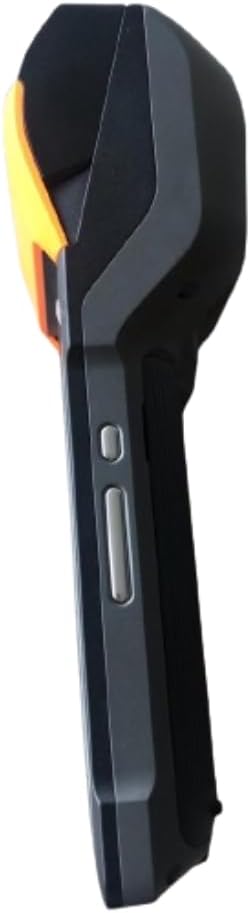
그림 2.1: 전면 및 측면 View. This image displays the device's screen, the integrated barcode scanner at the top, and the power and volume buttons located on the side.

그림 2.2: 옆 View이 이미지는 측면 모습을 보여줍니다.file of the terminal, including the cover for the SIM card slot and additional buttons.

그림 2.3: 뒤쪽에 View. This image illustrates the rear of the device, featuring the thermal printer cover, the 0.3 MP camera, and the charging contact points.
구성품 목록:
- 디스플레이 화면: Touch-sensitive LCD for user interaction.
- 바코드 스캐너: Integrated 1D/2D scanner for data capture.
- 열전사 프린터: For printing receipts and other documents.
- 전원 버튼: To turn the device on/off or wake/sleep.
- 볼륨 버튼: 오디오 레벨을 조정합니다.
- 카메라: 0.3 MP front photo sensor.
- SIM 카드 슬롯: Supports 1 Nano SIM.
- 배터리 칸: Houses the removable Lithium Ion battery.
- Charging Port/Contacts: 장치를 충전합니다.
3. 초기 설정
3.1. 배터리 설치
- 장치의 전원이 꺼져 있는지 확인하세요.
- 기기 뒷면에 있는 배터리함 덮개를 찾으십시오(그림 2.3 참조).
- 표시된 부분을 따라 덮개를 밀거나 들어 올려 제거하십시오.
- Insert the provided Lithium Ion battery, ensuring the contacts align correctly.
- 배터리함 덮개를 단단히 다시 닫으십시오.
3.2. SIM 카드 설치
- Ensure the device is powered off and the battery is installed.
- Locate the SIM card slot cover on the side of the device (refer to Figure 2.2).
- 덮개를 엽니다.
- Insert a Nano SIM card into the designated slot with the gold contacts facing down and the notched corner aligned.
- Close the SIM card slot cover firmly.
3.3. Thermal Paper Loading
- Locate the printer cover release latch, typically on the top or side of the printer compartment (refer to Figure 2.3).
- 프린터 덮개를 엽니다.
- Insert a 58mm thermal paper roll into the compartment, ensuring the paper feeds from the bottom and the leading edge extends out of the printer slot.
- 프린터 덮개를 딸깍 소리가 날 때까지 단단히 닫으십시오. 용지 롤에 여유가 없는지 확인하십시오.
3.4. 초기 충전 및 전원 켜기
- 제공된 전원 어댑터를 기기의 충전 포트에 연결하십시오.
- Plug the adapter into a power outlet. Allow the device to charge fully before first use.
- To power on, press and hold the Power button (refer to Figure 2.1) until the SUNMI logo appears on the screen.
4. 사용 설명서
4.1. 전원 켜기/끄기 및 절전 모드
- 전원 켜기: 기기가 진동하고 화면이 켜질 때까지 전원 버튼을 길게 누르세요.
- 전원 끄기 : Press and hold the Power button until a power menu appears. Select "Power Off" and confirm.
- 잠자기/깨우기: 전원 버튼을 짧게 누르면 기기가 절전 모드로 전환되거나 다시 켜집니다.
4.2. Using the Thermal Printer
The integrated 58mm thermal printer can be used to print receipts, tickets, and other documents.
- Ensure thermal paper is correctly loaded (refer to Section 3.3).
- Open the application that requires printing (e.g., POS software).
- Initiate the print command within the application. The device will automatically print the content.
- Tear off the printed paper against the serrated edge.
4.3. 바코드 스캐닝
The V2SE supports 1D and 2D barcode recognition.
- Open an application that requires barcode input.
- Point the scanner window (located at the top of the device, refer to Figure 2.1) at the barcode.
- Press the dedicated scan button (if available) or trigger the scan function within the application.
- 바코드가 스캐너의 필드 내에 있는지 확인하십시오. view and well-lit for optimal performance.
4.4. NFC 기능
The device supports Near Field Communication (NFC) for contactless operations.
- Ensure NFC is enabled in the device settings (Settings > Connected devices > NFC).
- Open an application that utilizes NFC (e.g., payment app, data transfer app).
- Hold the NFC-enabled card or device close to the NFC detection area on your terminal (typically near the top or back of the device).
- Follow the on-screen prompts to complete the transaction or data transfer.
4.5. 네트워크 연결성
- 와이파이: 설정 > 네트워크 및 인터넷 > Wi-Fi로 이동하여 사용 가능한 무선 네트워크에 연결하세요.
- Mobile Data (4G/3G/2G): Ensure a valid SIM card is installed and mobile data is enabled in Settings > Network & internet > Mobile network.
- 블루투스: 설정 > 연결된 기기 > 블루투스로 이동하여 다른 블루투스 기기와 페어링하세요.
5. 유지관리
5.1. 장치 청소
- 청소하기 전에 장치의 전원을 끄십시오.
- 부드럽고 털이 없는 천을 살짝 사용하세요.ampened with water or a mild, non-abrasive cleaner to wipe the exterior.
- 디스플레이를 청소할 때는 화면 전용 클리너와 극세사 천을 사용하십시오.
- Do not use harsh chemicals, solvents, or abrasive materials. Avoid spraying liquids directly onto the device.
5.2. 배터리 관리
- Charge the battery regularly, avoiding complete discharge whenever possible.
- 배터리를 극한의 온도에 노출시키지 마십시오.
- 장시간 기기를 사용하지 않을 경우, 배터리를 약 50%까지 충전하고 서늘하고 건조한 곳에 보관하세요.
- Use only the original or approved charger and battery.
5.3. Printer Head Cleaning
Regular cleaning of the printer head can prevent print quality issues.
- Power off the device and open the printer cover.
- 면봉을 이용하여 가볍게 닦아주세요.ampened with isopropyl alcohol to gently wipe the thermal print head.
- Allow the print head to dry completely before closing the cover and powering on the device.
6. 문제 해결
| 문제 | 가능한 원인 | 해결책 |
|---|---|---|
| 장치 전원이 켜지지 않음 | 배터리 부족; 배터리 불량; 전원 버튼 문제 | Charge the device for at least 30 minutes. Ensure battery is correctly installed. Try a different charger. |
| 프린터가 인쇄하지 않음 | No paper; Paper jammed; Printer head dirty; Application error | Check and load paper. Clear any paper jams. Clean the printer head (Section 5.3). Restart the application or device. |
| Barcode scanner not working | Scanner window obstructed; Barcode damaged; Application error | Ensure scanner window is clean. Try scanning a different barcode. Restart the application or device. |
| Wi-Fi 연결이 없습니다 | Wi-Fi off; Incorrect password; Out of range | Enable Wi-Fi in settings. Re-enter password. Move closer to the Wi-Fi router. |
| No mobile data | SIM card not installed; Mobile data off; No network coverage | Check SIM card installation. Enable mobile data in settings. Check for network coverage in your area. |
7. 사양
| 특징 | 세부 사항 |
|---|---|
| 모델 | V2SE |
| 운영 체제 | 안드로이드 12.0 |
| CPU | 쿼드코어 2.0GHz |
| 숫양 | 2GB (XNUMX기가바이트) |
| 집시 남자 | 8GB (XNUMX기가바이트) |
| 표시하다 | LCD, 1920 x 1080 resolution, 16:9 Aspect Ratio |
| 인쇄기 | 58 mm thermal printer, 80 mm/s print speed |
| 바코드 인식 | 1D / 2D Barcode recognition |
| 카메라 | 0.3 MP Front Photo Sensor |
| SIM 슬롯 | 1 Nano SIM (Dual SIM support) |
| 연결성 | 4G/3G/2G Cellular, Wi-Fi (2.4G/5G), Bluetooth 2.1/3.0/4.2, NFC |
| GPS | True, Supports GPS satellite navigation system |
| 배터리 | 리튬 이온 배터리 1개 (탈착식, 포함) |
| 치수 | 22 x 9 x 9cm |
| 무게 | 400g |
| 제조업체 | 선미 |
8. 보증 및 지원
For warranty information and technical support, please refer to the documentation provided with your purchase or contact your vendor. Keep your proof of purchase for warranty claims.