1. 서론
Thank you for choosing the Vortex T10M Pro+ Tablet. This manual will guide you through the features and functions of your new device, ensuring a smooth and enjoyable user experience. Please read this manual carefully before using your tablet.
상자 안에 무엇이 들어있나요?
Upon unboxing your Vortex T10M Pro+ Tablet, please verify that all the following items are present:
- Vortex T10M Pro+ Tablet
- 충전기
- 스크린 보호기
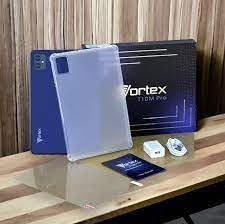
Image: Contents of the Vortex T10M Pro+ Tablet box. This includes the tablet, a clear protective case, the power adapter, and a screen protector, all neatly arranged on a wooden surface.
2. 제품 오버view
Familiarize yourself with the physical components and key features of your Vortex T10M Pro+ Tablet.
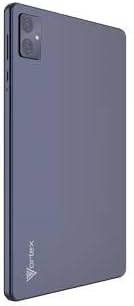
이미지: 후면 view of the Vortex T10M Pro+ Tablet. The tablet has a sleek, dark finish with the 'Vortex' logo subtly placed at the bottom. The camera module is visible in the upper left corner.

이미지: 상세 view of the back of the Vortex T10M Pro+ Tablet, highlighting its specifications. Printed details include '10.1-inch Brilliant Display', '5MP Front Camera', '8MP Rear Camera', 'MTK6766 Processor', 'Quad-Core, 4GB+64GB', '5000mAh Mega Battery', and 'Android 12'.
3. 설정
3.1. 장치 충전
Before first use, fully charge your tablet. Connect the provided charger to the tablet's charging port and plug it into a power outlet. The battery indicator on the screen will show charging progress.
3.2. SIM/MicroSD 카드 삽입
The Vortex T10M Pro+ supports 4G LTE connectivity and expandable storage. To insert a SIM card (for mobile data) or a microSD card (for additional storage):
- 태블릿 측면에서 SIM/microSD 카드 트레이를 찾으세요.
- 제공된 SIM 꺼내기 도구를 사용하여 트레이를 엽니다.
- Carefully place the SIM card(s) and/or microSD card into the designated slots, ensuring correct orientation.
- 트레이를 태블릿에 다시 살짝 밀어 넣어 딸깍 소리가 나면서 제자리에 고정되도록 합니다.
3.3. 초기 전원 켜기
Press and hold the Power button located on the side of the tablet until the Vortex logo appears. Follow the on-screen prompts to complete the initial setup, including language selection, Wi-Fi connection, and Google account setup.
4. 사용 설명서
4.1. 기본 탐색
태블릿은 안드로이드 13.0에서 실행됩니다. 터치 제스처를 사용하여 탐색하세요.
- 수도꼭지: 항목을 선택하거나 앱을 엽니다.
- 강타: 화면이나 목록을 스크롤합니다.
- 핀치 투 줌: 사진을 확대하거나 축소하고 web 페이지.
- 길게 누르기: 상황에 맞는 메뉴에 접근하거나 아이콘을 이동합니다.
4.2. Wi-Fi에 연결하기
Wi-Fi 네트워크에 연결하려면:
- 이동하다 설정 > 네트워크 및 인터넷 > 인터넷.
- Wi-Fi를 켜세요.
- 목록에서 원하는 네트워크를 선택하고 메시지가 표시되면 비밀번호를 입력하세요.
4.3. Using Mobile Data (4G LTE)
If you have inserted a valid SIM card with an active data plan:
- 이동하다 설정 > 네트워크 및 인터넷 > SIMs.
- Ensure Mobile data is enabled for your SIM.
4.4. 카메라 작동
이 태블릿은 8MP 후면 카메라와 5MP 전면 카메라를 탑재하고 있습니다.
- 카메라 앱을 엽니다.
- 셔터 버튼을 탭하여 사진을 촬영하세요.
- 카메라 토글 아이콘을 사용하여 전면 카메라와 후면 카메라를 전환합니다.
4.5. 스토리지 관리
Your tablet comes with 64GB of internal storage. You can expand this using a microSD card up to 128GB. To view 저장 공간 사용량으로 이동 설정 > 저장.
5. 유지관리
5.1. 청소
부드럽고 보풀이 없는 천을 사용하여 태블릿 화면과 본체를 닦으세요. 강한 화학 물질이나 연마재는 사용하지 마세요.
5.2. 소프트웨어 업데이트
태블릿에 최신 기능과 보안 패치가 설치되어 있는지 확인하기 위해 소프트웨어 업데이트를 정기적으로 확인하세요. 설정 > 체계 > 시스템 업데이트.
5.3. 배터리 관리
배터리 수명을 연장하려면:
- 극한의 온도를 피하세요.
- 배터리가 자주 완전히 방전되지 않도록 하세요.
- 배터리가 충전되면 충전기를 분리하세요.
6. 문제 해결
이 섹션에서는 태블릿에서 발생할 수 있는 일반적인 문제에 대해 설명합니다.
| 문제 | 가능한 해결책 |
|---|---|
| 태블릿 전원이 켜지지 않습니다 | 배터리가 충전되어 있는지 확인하세요. 전원 버튼을 10~15초 이상 길게 눌러 강제로 다시 시작하세요. |
| Wi-Fi 연결 문제 | 태블릿과 Wi-Fi 공유기를 재시작하세요. 설정에서 네트워크를 삭제한 후 다시 연결하세요. |
| 앱이 느리거나 충돌합니다 | Close background apps. Clear app cache (Settings > Apps > [App Name] > Storage > Clear cache). Restart the tablet. |
| Storage full message | 불필요한 삭제 files or apps. Move media to a microSD card. |
7. 사양
Detailed technical specifications for the Vortex T10M Pro+ Tablet.
| 특징 | 사양 |
|---|---|
| 모델명 | T10M Pro+ Tablet (Unlocked) Blue 10.1" 64GB 4GB GSM 4G LTE + Wifi 8MP |
| 디스플레이 크기 | 10.1 인치 |
| 최대 화면 해상도 | 1280 x 800 픽셀 |
| 새로 고침 빈도 | 120Hz |
| 프로세서 | 미디어텍, 2GHz |
| 숫양 | 4GB (XNUMX기가바이트) |
| 내부 저장소 | 64GB (XNUMX기가바이트) |
| 확장 가능한 스토리지 | MicroSD (최대 128GB) |
| 운영 체제 | 안드로이드 13.0 |
| 후방 카메라 | 8 MP |
| 전면 카메라 | 5 MP |
| 연결성 | 4G LTE, Wi-Fi, 블루투스, GPS |
| 배터리 유형 | 리튬이온 |
| 평균 배터리 수명 | 18시간 |
| 제품 치수 | 10.1 x 5 x 3 인치 |
| 색상 | 검은색 |
8. 보증 정보
This product is covered by a manufacturer's warranty. Please refer to the warranty card included with your purchase or visit the manufacturer's official web보증 범위, 기간 및 청구 절차에 대한 자세한 약관은 해당 사이트에서 확인하세요.
9. 지원
For further assistance, technical support, or service inquiries, please contact the manufacturer's customer support. Contact information can typically be found on the product packaging, the manufacturer's web해당 사이트 또는 보증서.


