
1. 서론
This manual provides essential information for the safe and efficient operation of your Sharp GX-BT190 Portable Bluetooth Speaker. Please read it thoroughly before using the device and retain it for future reference.
2. 안전 정보
- 스피커를 극한의 온도, 직사광선 또는 높은 습도에 노출시키지 마세요.
- 스피커를 분해, 수리 또는 개조하지 마십시오. 이는 보증을 무효화하고 안전상의 위험을 초래할 수 있습니다.
- Ensure the charging port cover is securely closed when using the speaker near water to maintain its IP67 rating.
- 제공된 충전 케이블이나 인증된 동등 제품만 사용하세요.
- 스피커를 어린이와 애완동물의 손이 닿지 않는 곳에 보관하세요.
- 청력 손상을 방지하려면 장시간 높은 볼륨으로 청취하지 마십시오.
3. 패키지 내용
- Sharp GX-BT190 Portable Bluetooth Speaker
- USB 충전 케이블
- 매는 밧줄
- 사용 설명서
4. 제품 오버view

앞쪽 view of the Sharp GX-BT190 speaker, showing the central speaker grille with the Sharp logo and the LED light ring.

옆 view of the Sharp GX-BT190 speaker, highlighting the textured speaker grille and the integrated lanyard.
뒤쪽 view of the Sharp GX-BT190 speaker, showing the control buttons and the sealed charging port cover.
제어 및 표시기:
- 전원 버튼: 길게 누르면 켜거나 끌 수 있습니다.
- 볼륨 높이기/다음 트랙 버튼(+): 짧게 누르면 볼륨이 커지고, 길게 누르면 다음 트랙이 됩니다.
- 볼륨 낮추기/이전 트랙 버튼(-): 짧게 누르면 볼륨이 낮아지고, 길게 누르면 이전 트랙으로 돌아갑니다.
- Play/Pause / Call Button (►||): Short press to play/pause, answer/end calls. Long press to reject calls.
- Mode / Light Button (M): Short press to cycle through LED light modes. Long press to turn off LED lights.
- USB-C 충전 포트: For charging the speaker. Ensure the rubber cover is sealed when not charging.
- LED 표시등: 충전 상태와 블루투스 페어링 상태를 표시합니다.
5. 설정
5.1 스피커 충전
- Open the rubber cover on the back of the speaker to access the USB-C charging port.
- 제공된 USB 충전 케이블을 스피커의 USB-C 포트에 연결하십시오.
- USB 케이블의 다른 쪽 끝을 USB 전원 어댑터(포함되지 않음) 또는 컴퓨터의 USB 포트에 연결합니다.
- 충전 중에는 LED 표시등이 켜지고, 충전이 완료되면 꺼집니다.
- Close the rubber cover securely after charging to maintain the speaker's waterproof rating.
5.2 전원 켜기/끄기
- 전원을 켜려면: 전원 버튼을 약 3초 동안 길게 누르세요. 음성 안내가 나오고 LED 표시등이 깜빡입니다.
- 전원을 끄려면: 전원 버튼을 약 3초 동안 길게 누르세요. 음성 안내가 나오고 LED 표시등이 꺼집니다.
5.3 블루투스 페어링
- Ensure the speaker is powered on and the LED indicator is flashing, indicating it is in pairing mode.
- 모바일 기기에서 블루투스를 활성화하고 사용 가능한 기기를 검색하세요.
- Select "GX-BT190" from the list of devices.
- 페어링이 완료되면 LED 표시등이 깜빡임을 멈추고 계속 켜져 있으며, 확인음이 들립니다.
- 스피커의 전원을 켜면 해당 기기가 범위 내에 있고 Bluetooth가 활성화되어 있는 경우 마지막으로 페어링된 기기에 자동으로 다시 연결됩니다.
5.4 True Wireless Stereo(TWS) 페어링
TWS allows you to pair two GX-BT190 speakers together for a stereo audio experience.

Two Sharp GX-BT190 speakers, one red and one blue, positioned together, illustrating the True Wireless Stereo (TWS) pairing feature.
- Ensure both GX-BT190 speakers are powered on and not connected to any Bluetooth device.
- 스피커 중 하나(기본 스피커)의 전원 버튼을 두 번 누르세요. 그러면 스피커가 TWS 페어링 모드로 진입합니다.
- The two speakers will automatically search for and connect to each other. You will hear a confirmation tone once TWS pairing is successful.
- Once TWS paired, connect your mobile device to the primary speaker via Bluetooth as described in section 5.3.
- TWS 연결을 해제하려면 두 스피커 중 하나의 전원 버튼을 두 번 누르십시오.
6. 운영
6.1 오디오 재생
- 재생/일시 중지: 재생/일시 정지 버튼을 짧게 누릅니다.
- 볼륨 업: '+' 버튼을 짧게 누르세요.
- 볼륨 작게 : '-' 버튼을 짧게 누르세요.
- 다음 트랙: '+' 버튼을 길게 누르세요.
- 이전 트랙 : '-' 버튼을 길게 누르세요.
6.2 핸즈프리 통화
- 전화 받기: 수신 전화가 울리면 재생/일시 정지 버튼을 짧게 누르세요.
- 통화 종료: 통화 중에 재생/일시 정지 버튼을 짧게 누르세요.
- 전화 거부: 수신 전화가 울리면 재생/일시 정지 버튼을 길게 누르세요.
6.3 LED 무드등
- Short press the 'M' (Mode/Light) button to cycle through the 6 available LED mood light modes.
- Long press the 'M' button to turn off the LED lights.
6.4 방수 및 방진 기능 (IP67)

The Sharp GX-BT190 speaker partially submerged in water, demonstrating its IP67 waterproof and dustproof capabilities.
The GX-BT190 speaker is rated IP67, meaning it is protected from dust ingress and can withstand immersion in water up to 1 meter for 30 minutes. To ensure this protection:
- Always ensure the rubber cover for the charging port is fully and securely sealed before exposing the speaker to water or dust.
- 스피커를 의도적으로 장시간 물에 담그거나 지정된 깊이 이상으로 물에 잠기게 하지 마십시오.
- 물에 노출된 경우, 충전하기 전에 부드러운 천으로 스피커를 닦으세요.
7. 유지관리
7.1 청소
- 부드러운 천으로 스피커를 닦고 damp 옷감.
- 연마성 세척제, 알코올, 화학 용제는 사용하지 마세요.
- 충전이나 보관하기 전에 스피커가 건조한지 확인하세요.
7.2 보관
- 스피커는 직사광선과 극한의 온도를 피해 시원하고 건조한 곳에 보관하세요.
- 장기간 보관할 경우, 배터리 수명을 유지하기 위해 주기적으로(예: 3개월마다) 배터리를 충전하세요.
8. 문제 해결
| 문제 | 해결책 |
|---|---|
| 스피커의 전원이 켜지지 않습니다. | 배터리가 충전되어 있는지 확인하십시오. USB 케이블을 사용하여 스피커를 전원에 연결하십시오. |
| 블루투스로 페어링할 수 없습니다. | Ensure the speaker is in pairing mode (LED flashing). Turn off and on Bluetooth on your device. Move the speaker closer to your device. Clear previous Bluetooth connections on your device. |
| 소리가 나지 않거나 볼륨이 작습니다. | 스피커와 연결된 기기의 볼륨을 모두 높이세요. 스피커가 제대로 페어링되었는지 확인하세요. |
| 음질이 좋지 않습니다. | Move the speaker closer to your device. Ensure there are no obstructions between the speaker and your device. Try playing a different audio source. |
| TWS 페어링이 실패합니다. | Ensure both speakers are GX-BT190 models and are not connected to any other Bluetooth device. Try powering both speakers off and on, then re-attempt TWS pairing. |
9. 사양

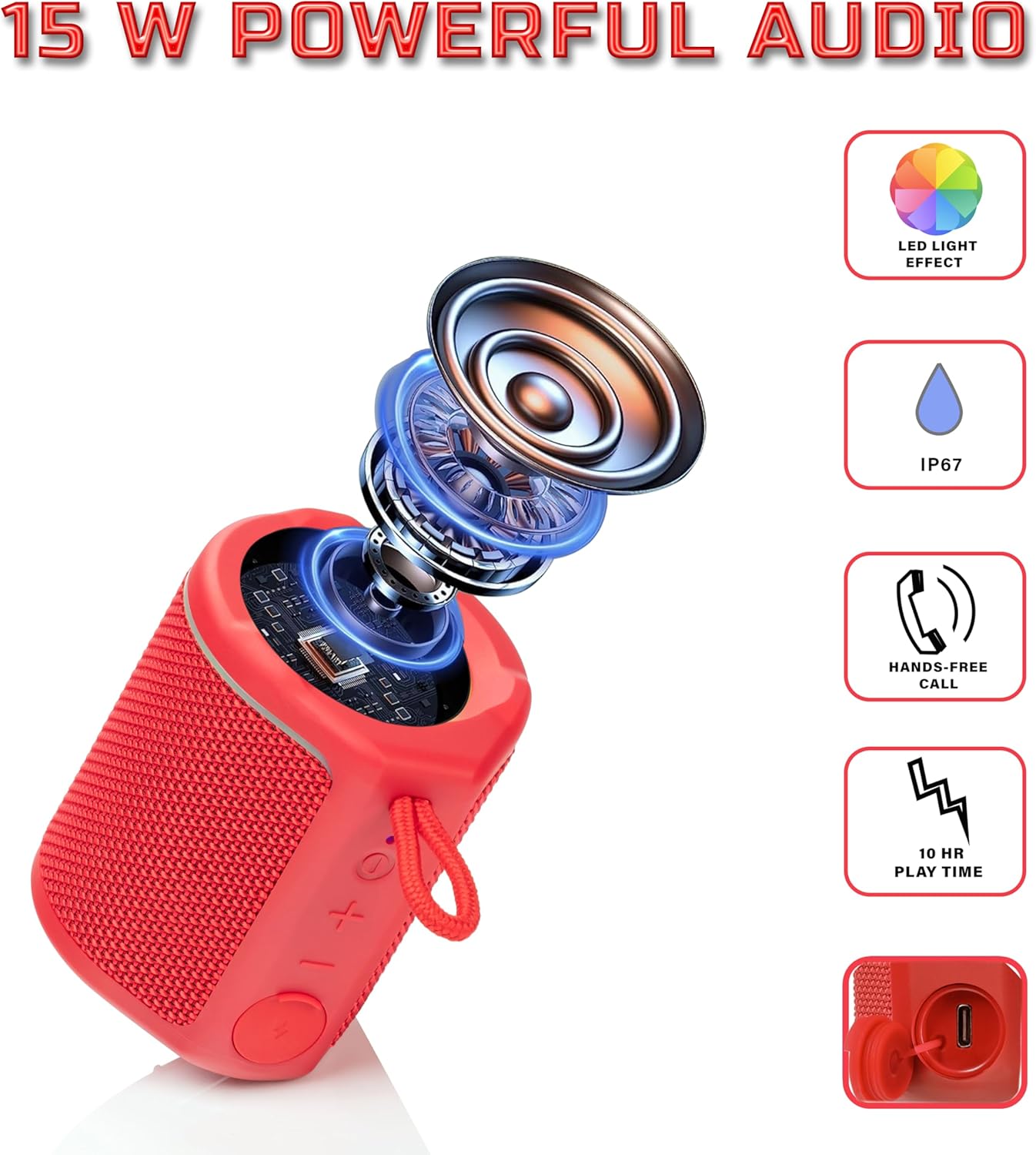
Diagram illustrating the internal components of the Sharp GX-BT190 speaker, including the speaker driver, and highlighting features like LED light effect, IP67 rating, hands-free call function, and battery life.
| 특징 | 세부 사항 |
|---|---|
| 모델 번호 | GX-BT190 |
| 연결 기술 | 블루투스 |
| 스피커 최대 출력 전력 | 10 와트 |
| 방수 등급 | IP67 |
| 배터리 수명 | 최대 15시간 |
| 배터리 유형 | 리튬 이온 1개(포함) |
| 배터리 용량 | 1200mAh |
| 제품 크기(D x W x H) | 7.5 x 7.5 x 7.5cm (대략) |
| 품목 무게 | 226.8g (8온스) |
| 무선 범위 | 최대 33피트 |
| 추가 기능 | LED Light, True Wireless Stereo (TWS), Hands-Free Calling |
10. 보증
The Sharp GX-BT190 Portable Bluetooth Speaker comes with a 1-Year Limited Warranty from the date of purchase. This warranty covers manufacturing defects under normal use. It does not cover damage caused by misuse, accidents, unauthorized modifications, or normal wear and tear. Please retain your proof of purchase for warranty claims.
11. 지원
For technical assistance, warranty inquiries, or further information regarding your Sharp GX-BT190 speaker, please contact Sharp Inc. customer support:
- 제조사 연락처: Sharp Inc
- 핸드폰: 1-800-BE-샤프