
1. 서론
The Gustard H26 is a high-performance discrete Class A headphone amp리퍼와 프리amplifier designed for audiophiles. It features a fully balanced circuit design, robust power delivery, and versatile input/output options for an exceptional audio experience. This manual provides detailed instructions for setting up, operating, and maintaining your H26 amp리퍼.
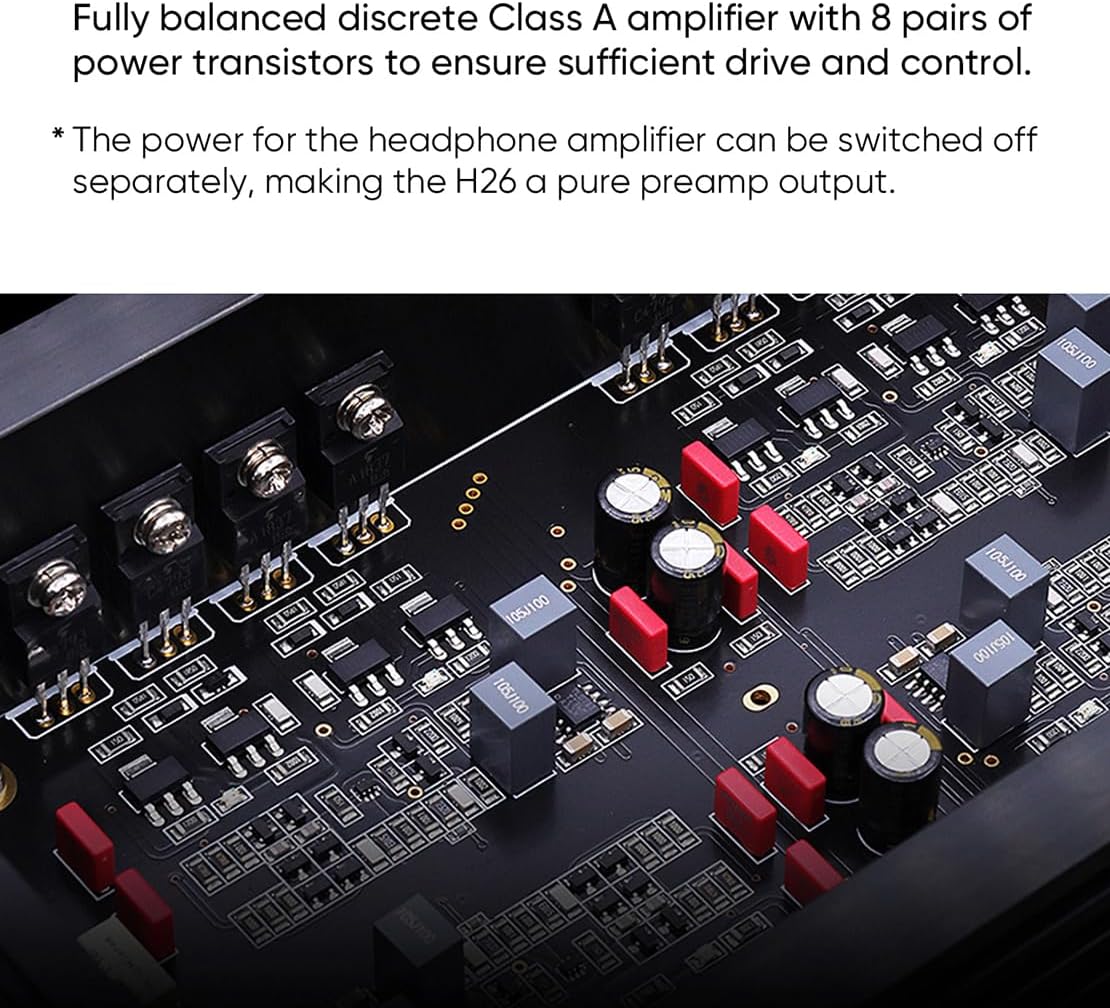
그림 1.1: 앞쪽 view of the Gustard H26 headphone amp리파이어, 쇼크asing its sleek black design with a central volume knob and headphone jacks.
2. 제품 특징
- Fully Balanced Discrete Class A Amp정수기: Utilizes 8 pairs of power transistors for sufficient drive and control, ensuring high-fidelity audio reproduction.
- Versatile Headphone Connectivity: Equipped with 6.35mm unbalanced, 4.4mm balanced, and 4-pin XLR balanced headphone outputs.
- Precision Volume Control: Features a matrix relay volume system, ensuring consistent 4-way volume adjustment without distortion or bias.
- Dual Toroidal Transformers: Incorporates two custom 50W audio-specific toroidal transformers, one for each channel, to prevent interference and provide stable power.
- High-Performance Preamp정수기: 사전amp리퍼tage uses two direct-inserted LME49720 dual op-amps for clear signal processing.
- 다양한 출력 모드: 헤드폰 amplifier power can be switched off separately, allowing the H26 to function as a pure preamplifier output. Preamplifier outputs can also be deactivated for easy switching between headphone and speaker listening.

그림 2.1: 내부 view of the Gustard H26, highlighting the eight pairs of power transistors used in its fully balanced discrete Class A amp리퍼 디자인.

그림 2.2: Close-up of the two 50W audio-specific custom toroidal transformers inside the Gustard H26, designed to prevent channel interference.

그림 2.3: 내부 view illustrating the matrix relay volume control and the LME49720 dual op-amps used in the preamp리퍼tage of the Gustard H26.
3. 설정
3.1 풀기
Carefully remove the Gustard H26 from its packaging. Inspect the unit for any signs of damage during transit. Retain the packaging for future transport or storage.
3.2 장치 연결
Refer to the diagram below for a clear understanding of the rear panel connections. Ensure all connections are secure before powering on the device.

그림 3.1: Detailed diagram of the Gustard H26 rear panel, showing all input and output ports, power connections, and controls.
- 입력 연결:
- RCA Input (x1): Connect your single-ended audio source (e.g., DAC, CD player) to the RCA input jacks (Right/Left).
- XLR Input (x2): Connect your balanced audio sources to the XLR input jacks. The H26 provides two sets of balanced XLR inputs (XLR1 and XLR2).
- 사전amplifier Output Connections:
- RCA 프리ampliifier 출력: 전원에 연결하세요 ampRCA 케이블을 사용하는 앰프 또는 액티브 스피커.
- XLR 사전ampliifier 출력: Connect to your balanced power amplifier or active speakers using XLR cables.
- 전원 연결:
- AC 전원 입력: Connect the provided power cable to the AC input.
- 권tage 선택: 볼륨을 확보하세요tage 선택 스위치가 올바른 볼륨으로 설정되어 있습니다.tage for your region (100-120V or 220-240V). 잘못된 볼륨tag선택하면 장치가 손상될 수 있습니다.
- 전원 스위치: Use this to turn the unit on or off.
- 퓨즈: The fuse holder is integrated into the AC input for protection.
3.3 초기 전원 켜기
After all connections are made and the voltage is correctly selected, press the power switch on the rear panel to turn on the H26. The front panel display will illuminate.
4. 사용 설명서
4.1 볼륨 조절
The H26 features a precise matrix relay volume control. Rotate the large knob on the front panel clockwise to increase volume and counter-clockwise to decrease it. The current volume level will be displayed on the front panel.
4.2 입력 선택
Use the input selector button (typically on the front panel, refer to the device for exact location) to cycle through the available RCA and XLR inputs. The selected input will be indicated on the display.
4.3 Headphone Output Usage
Connect your headphones to one of the three front panel jacks: 6.35mm (unbalanced), 4.4mm (balanced), or 4-pin XLR (balanced). Ensure your headphones are compatible with the selected output type. The H26 can drive a wide range of headphones.
4.4 사전amp증폭기 기능
The H26 can function as a dedicated preamplifier. To use it as a pure preamplifier, you can switch off the headphone amplifier power separately. Consult the front panel controls or menu options (if available) for this setting. This ensures that only the preamplifier section is active, optimizing performance for connected power amp리파이어 또는 액티브 스피커.

그림 4.1: The Gustard H26 integrated into a home audio system, demonstrating its use with a remote control for convenient operation.
5. 유지관리
5.1 청소
To clean the exterior of the H26, use a soft, dry, lint-free cloth. Do not use abrasive cleaners, solvents, or chemical sprays, as these can damage the finish. Ensure the unit is powered off and unplugged before cleaning.
5.2 환경 고려 사항
Place the H26 in a well-ventilated area to prevent overheating, especially given its Class A operation. Avoid direct sunlight, heat sources, and areas with high humidity or dust. Do not block the ventilation openings.
6. 문제 해결
If you encounter issues with your Gustard H26, please refer to the following common troubleshooting steps:
- 전원 없음:
- Check if the power cable is securely connected to both the H26 and the wall outlet.
- 후면 패널의 전원 스위치가 '켜짐' 위치에 있는지 확인하십시오.
- 볼륨을 확보하세요tage 선택 스위치가 해당 지역에 맞게 올바르게 설정되어 있습니다.
- Check the fuse in the AC input. If blown, replace it with a fuse of the same type and rating.
- 소리 없음:
- Confirm that the correct input source is selected on the H26.
- Check all audio cables (RCA, XLR, headphone) for secure connections.
- 음량이 최소로 설정되어 있거나 음소거되어 있지 않은지 확인하십시오.
- 사전 용도로 사용하는 경우amplifier, ensure the connected power amp앰프 또는 액티브 스피커의 전원이 켜져 있고 정상적으로 작동하고 있습니다.
- If using headphones, ensure they are properly plugged into the correct jack and are functional.
- 왜곡된 소리 또는 잡음:
- 오디오 케이블이 헐거워지거나 손상되었는지 확인하십시오.
- Ensure the input source is not sending an excessively strong signal that could cause clipping.
- Verify that the H26 is placed away from potential sources of electromagnetic interference (e.g., Wi-Fi routers, mobile phones).
- If using balanced connections, ensure both ends are properly balanced.
7. 사양
The following table details the technical specifications of the Gustard H26 Discrete Class A Headphone Amp정수기:

그림 7.1: Official technical specifications table for the Gustard H26, detailing input, preamp리파이어, 헤드폰 amplifier performance metrics.
| 범주 | 사양 |
|---|---|
| Input (RCA x1) | Typical Input Sensitivity: 2-3Vrms; Input Impedance: 4kΩ |
| Input (XLR x2) | Typical Input Sensitivity: 4-6Vrms (max 12Vrms); Input Impedance: 8kΩ |
| 사전amplifier Output (RCA/XLR) | 출력 임피던스: 100Ω |
| 사전ampliifier 주파수 응답 | 20-80 kHz /-0.1 dB |
| 사전amplifier SNR | >123dB |
| 사전amplifier Crosstalk | 123kHz에서 <-1dB |
| 사전amplifier THD+N | <0.0002% |
| 사전amplifier IMD | <0.0003% |
| 헤드폰 Amp 출력 임피던스(6.35mm) | 0.05Ω |
| 헤드폰 Amp Output Impedance (Balanced XLR 4PIN or 4.4) | 0.1Ω |
| 헤드폰 Amp 주파수 응답 | 20-80 kHz /-0.1 dB |
| 헤드폰 Amp 신호대잡음비 | 20-80 kHz/-0.1 dB |
| 헤드폰 Amp 크로스토크 | 120kHz에서 <-1dB |
| 헤드폰 Amp 총 고조파 왜곡률 + N | <0.0005% at 9700 mW into 32 Ω LOAD |
| 헤드폰 Amp 인디아나주 | <0.0005% at 9700 mW into 32 Ω LOAD |
| Max Undistorted Power Output | 6000mW into 32Ω LOAD |
| 최대 전력 출력 | 12000mW @32Ω (THD=1%) |
| Load Power (Per channel) | 64Ω: 7350mW; 150Ω: 3125mW; 300Ω: 1576mW; 600Ω: 788mW |
| AC 전원 입력 | 100V-240V (manually adjusted) |
| 전체 전력 소비 | <30W |
| 치수(폭*깊이*높이) | 330 * 260 * 65mm (protrusion not included) |
| 패키지 크기(폭*깊이*높이) | 420 * 360 * 175mm |
| 무게(패키지 포함) | 7.0kg(XNUMXkg) |
| 제조업체 | 구스타드 |
| 제품 ASIN | B0CTWXKVF3 |
| 첫 번째 가능한 날짜 | 23년 2024월 XNUMX일 |
8. 보증 및 지원
8.1 보증 정보
The Gustard H26 is covered by a manufacturer's warranty against defects in materials and workmanship. The specific terms and duration of the warranty may vary by region and retailer. Please retain your proof of purchase for warranty claims. For detailed warranty information, refer to the documentation provided with your purchase or contact your retailer.
8.2 기술 지원
If you require technical assistance or have questions not covered in this manual, please contact your authorized AOSHIDA retailer or the manufacturer's support channels. When contacting support, please have your product model (H26) and purchase information readily available.