
소개
This manual provides detailed instructions for the installation, operation, and maintenance of your Eiszuso 150M USB2.0 Wireless Network Card. This device is designed to provide wireless connectivity for computers running Windows, Linux, and Android operating systems, featuring a detachable 2dBi antenna for enhanced signal reception.

Image: The Eiszuso 150M USB2.0 Wireless Network Card with its detachable 2dBi antenna.
패키지 내용
패키지에 모든 품목이 들어 있는지 확인하세요.
- Eiszuso 150M USB2.0 Wireless Network Card
- Detachable 2dBi Omnidirectional Antenna
- 드라이버 CD (포함된 경우)
설치 지침
- 안테나 부착: Carefully screw the detachable 2dBi omnidirectional antenna onto the USB wireless network card. Ensure it is securely fastened but do not overtighten.
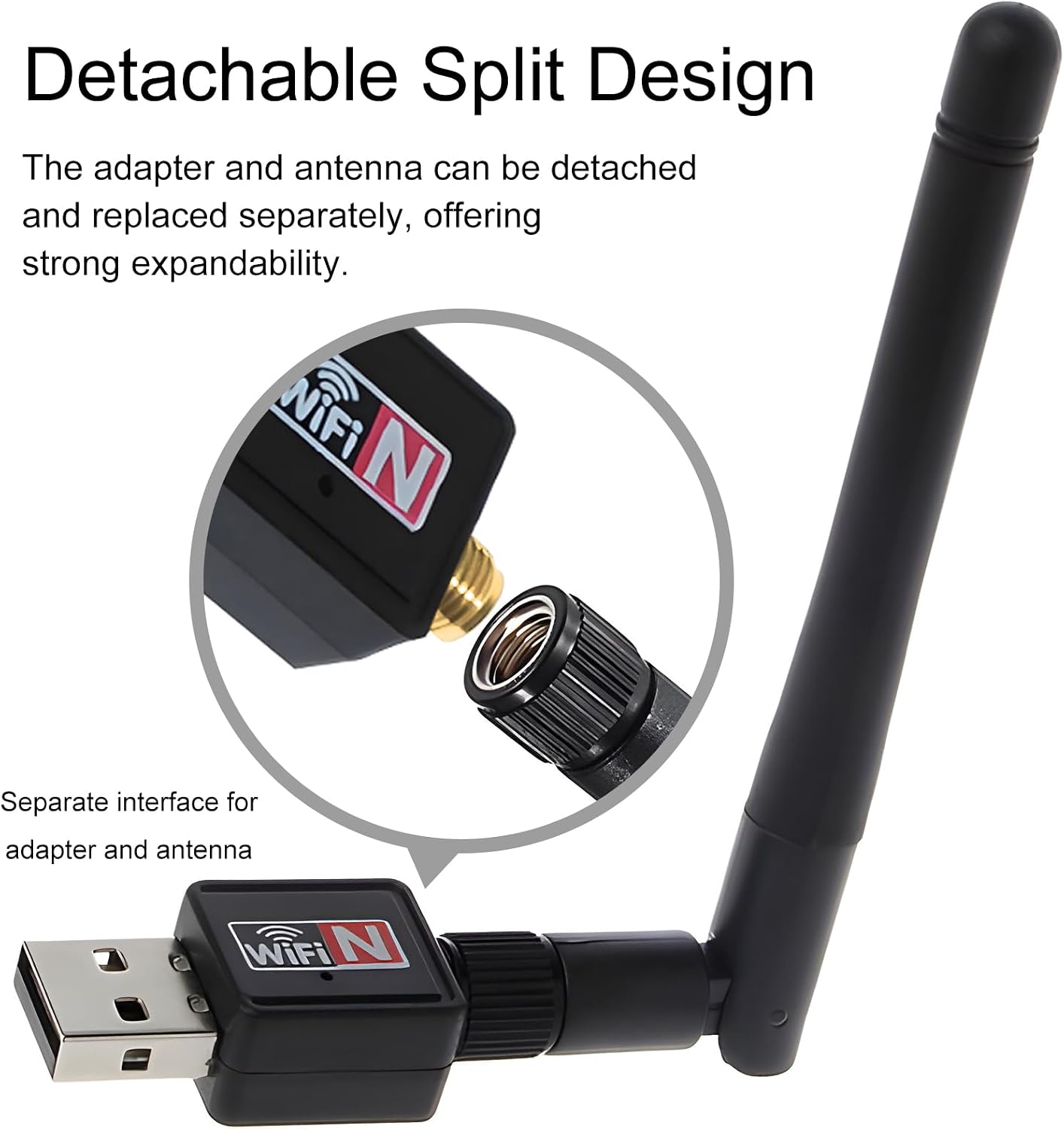
Image: Illustration of how to attach the detachable antenna to the USB adapter.
- USB 포트에 삽입하세요: Plug the assembled wireless network card into an available USB 2.0 port on your computer or compatible device.
- 드라이버 설치:
- 윈도우:
For most modern Windows operating systems (Windows 10/11), the driver may install automatically. If not, insert the provided driver CD and follow the on-screen instructions. Alternatively, download the latest driver from the Eiszuso support website (if available) by searching for "RTL8188ETV driver".
- 리눅스:
Linux distributions often have built-in support for the RTL8188ETV chipset. If the device is not recognized automatically, you may need to install specific kernel modules or drivers. Consult your distribution's documentation or community forums for "RTL8188ETV Linux driver installation".
- 기계적 인조 인간:
For Android devices, driver support is typically integrated into the device's firmware. Ensure your Android device supports external USB Wi-Fi adapters. No separate driver installation is usually required.

Image: The network card is compatible with Windows, Linux, and Android operating systems.
- 윈도우:
작동 지침
- Connect to a Wireless Network (Windows/Linux):
- Once the driver is installed, your system should detect the wireless network card.
- 운영체제의 네트워크 설정 또는 Wi-Fi 메뉴를 여세요.
- 사용 가능한 네트워크 목록에서 원하는 Wi-Fi 네트워크(SSID)를 선택하세요.
- Enter the network password (security key) if prompted.
- The device should now connect to the wireless network.
- Adjusting Antenna Position: The antenna supports multi-dimensional rotation (360° vertical, 90° horizontal) to optimize signal reception. Adjust its position for the best signal strength and stability.

Image: The antenna can be rotated 360 degrees vertically and 90 degrees horizontally for optimal signal reception.
- Using with Android Devices:
For Android devices, ensure the device supports USB OTG (On-The-Go) and external Wi-Fi adapters. Once plugged in, the Android system should automatically recognize and use the adapter for wireless connectivity.
유지
- 청소: 부드럽고 마른 천으로 기기를 닦으십시오. 액체 세척제나 용제를 사용하지 마십시오.
- 안테나 관리: Handle the detachable antenna with care. Avoid excessive force when attaching or detaching it.
- 저장: 사용하지 않을 때에는 직사광선이나 극한의 온도를 피해 서늘하고 건조한 곳에 장치를 보관하십시오.
- 펌웨어/드라이버 업데이트: Periodically check the Eiszuso support website for updated drivers or firmware to ensure optimal performance and compatibility.
문제 해결
- 장치가 감지되지 않음:
- Ensure the device is fully plugged into a functional USB port.
- 다른 USB 포트를 사용해보십시오.
- 드라이버를 다시 설치하세요.
- 컴퓨터를 다시 시작하세요.
- Wi-Fi에 연결할 수 없습니다:
- Verify that the correct Wi-Fi password has been entered.
- 라우터의 전원이 켜져 있고 신호를 송출하고 있는지 확인하세요.
- 다른 기기가 동일한 Wi-Fi 네트워크에 연결할 수 있는지 확인하세요.
- 신호 수신을 개선하려면 안테나 위치를 조정하십시오.
- Restart your router and the computer.
- 느린 연결 속도:
- Ensure the antenna is positioned optimally.
- 다른 전자 장치의 간섭을 확인하십시오.
- Update the device drivers.
- Verify that your internet service provider is delivering the expected speed.
명세서
| 특징 | 세부 사항 |
|---|---|
| 모델 | RTL8188ETV |
| 인터페이스 | USB 2.0 |
| 무선 표준 | IEEE 802.11n/g/b |
| 데이터 전송 속도 | 최대 150Mbps |
| 안테나 유형 | Detachable 2dBi Omnidirectional Antenna |
| 운영 체제 | 윈도우, 리눅스, 안드로이드 |
| 칩셋 | RTL8188ETV |
| 크기(대략) | 5.16 x 3.19 x 0.75인치(패키지) |
| 무게(대략) | 0.634 온스 |

Image: Approximate dimensions of the Eiszuso USB Wireless Network Card.
보증 및 지원
For warranty information and technical support, please refer to the documentation provided with your purchase or visit the official Eiszuso web대지. 보증 청구를 위해 구매 영수증을 보관하십시오.