
SHARP XL-B530(BK)
SHARP XL-B530 마이크로 컴포넌트 시스템
사용자 설명서
소개
구매해주셔서 감사합니다asing the SHARP XL-B530 Micro Component System. This system is designed to provide high-quality audio playback from various sources, including Bluetooth wireless streaming, CD, USB, AM/FM radio, and auxiliary input. This manual provides detailed instructions for setting up, operating, and maintaining your new audio system to ensure optimal performance and longevity.
중요한 안전 정보
- 사용하기 전에 모든 지침을 주의 깊게 읽으세요.
- 이 설명서를 향후 참고용으로 보관하세요.
- 본 제품을 비나 습기에 노출시키지 마십시오.
- 장치 주변의 환기가 잘 되도록 하세요. 환기구를 막지 마세요.
- 라디에이터, 난방 조절기, 스토브 또는 기타 장치(다음 포함)와 같은 열원 근처에 장치를 두지 마십시오. amp열을 생성하는 발전기.
- 전원 코드가 밟히거나 끼지 않도록 보호하세요.
- 제조사가 지정한 부속품/액세서리만 사용하세요.
- 번개 폭풍 시 또는 장기간 사용하지 않을 때는 기기의 플러그를 뽑아두세요.
- 모든 서비스는 자격을 갖춘 서비스 담당자에게 의뢰하세요.
패키지 내용
다음 품목이 모두 패키지에 포함되어 있는지 확인하세요.
- 본체(마이크로 컴포넌트 시스템)
- Speaker Units (x2)
- 원격 제어
- 전원 코드
- FM 안테나
- AM 루프 안테나
- 사용 설명서 (본 문서)
제품 끝view
Familiarize yourself with the components and controls of your SHARP XL-B530 system.
Main Unit and Speakers

전반적인 view of the SHARP XL-B530 Micro Component System, including the main unit, two speakers, and the remote control.
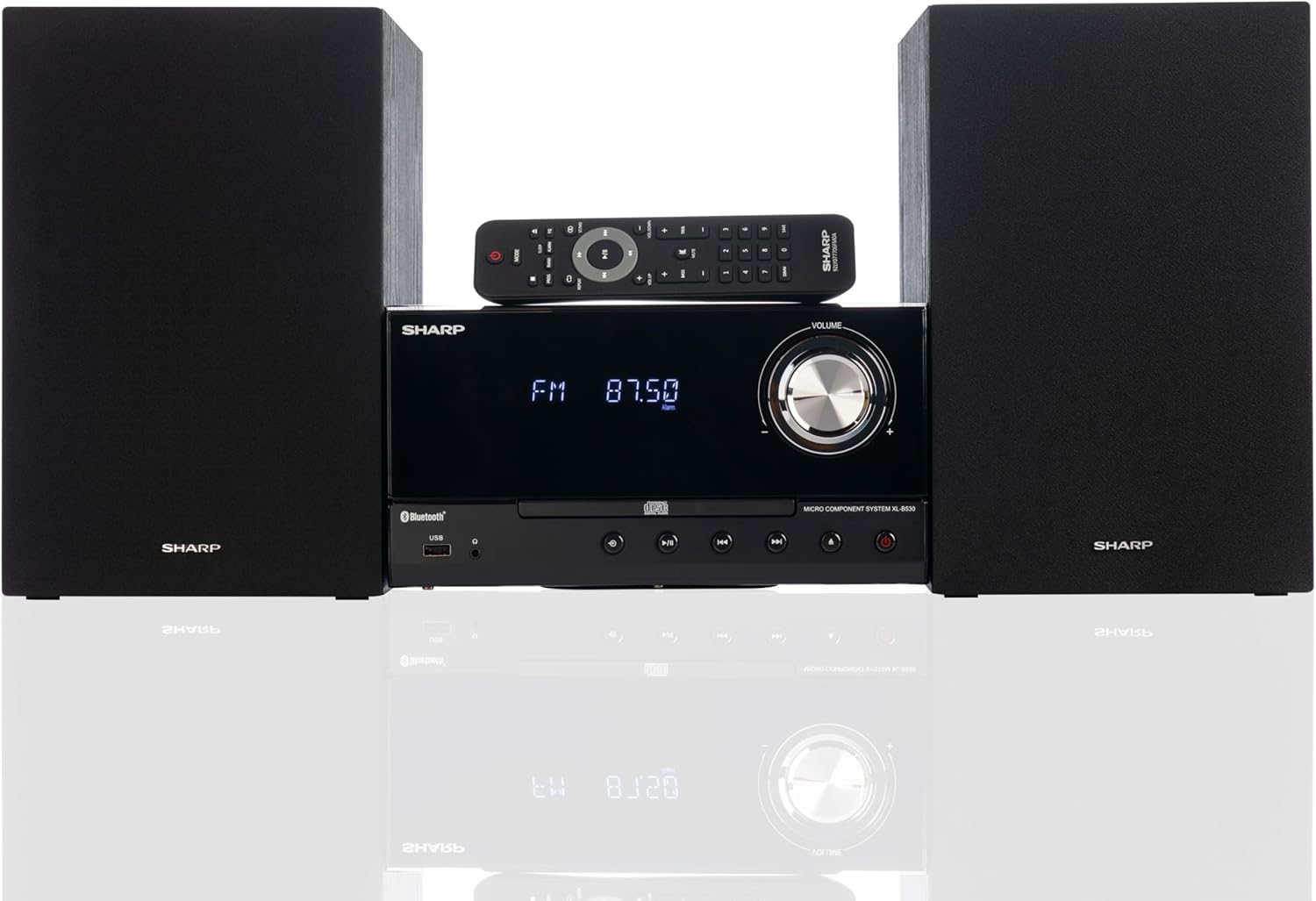
Front panel of the main unit, showing the LCD display, volume knob, CD tray, and control buttons.
후면 패널 연결

The rear panel of the main unit, featuring speaker terminals, FM antenna input, AM antenna input, and auxiliary input ports.
원격 제어
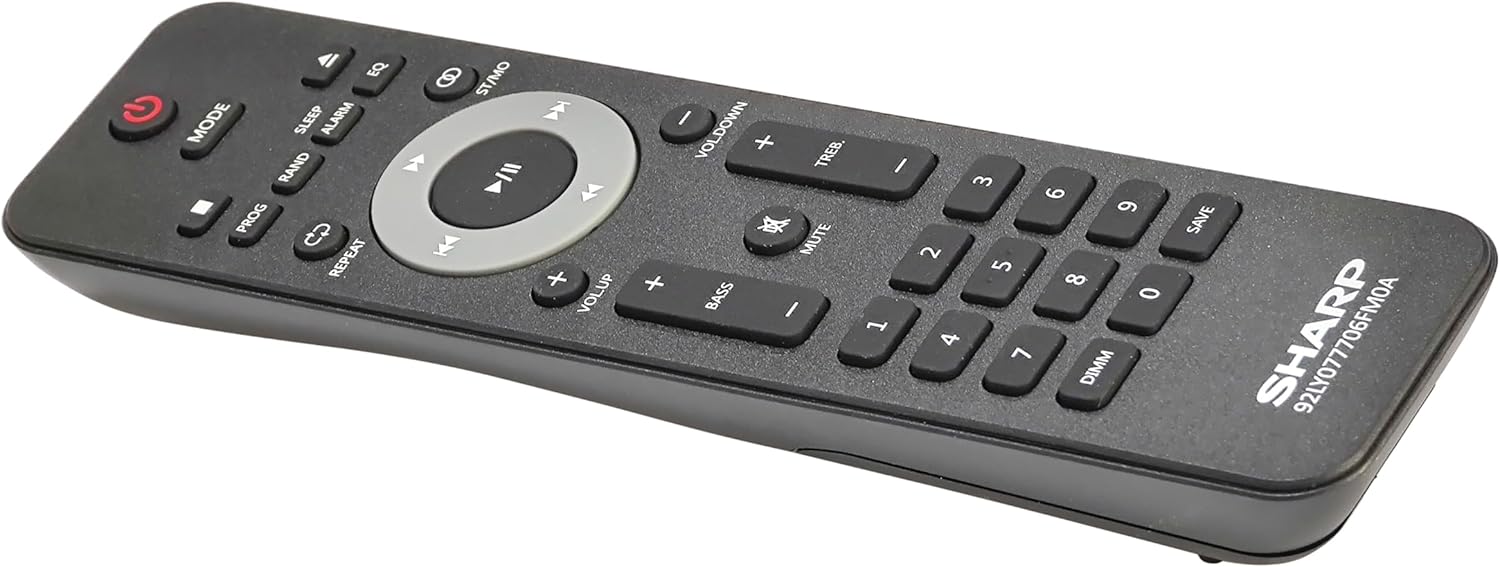
상세한 view of the remote control, showing various function buttons for power, mode, playback, volume, and sound adjustments.
설정
Follow these steps to set up your micro component system.
1. 스피커 연결
- Identify the left and right speaker cables.
- Connect the red (+) wire from each speaker to the red (+) terminal on the main unit's rear panel.
- Connect the black (-) wire from each speaker to the black (-) terminal on the main unit's rear panel.
- Ensure a secure connection for both speakers.
2. 안테나 연결
- FM 안테나: Connect the supplied FM wire antenna to the FM antenna jack on the rear panel. Extend the wire fully for best reception.
- AM 안테나: Assemble the AM loop antenna and connect its wires to the AM antenna terminals on the rear panel. Rotate the antenna for optimal AM reception.
3. 전원 연결
- Ensure all other connections are made.
- 전원 코드를 본체 뒷면의 AC 입력 단자에 꽂으십시오.
- 전원 코드의 다른 쪽 끝을 벽면 콘센트에 꽂으세요.
작동 지침
This section details how to use the various functions of your SHARP XL-B530 system.
전원 켜기/끄기
- 를 누르세요 힘 시스템을 켜거나 끄려면 본체나 리모컨의 버튼을 누르세요.
소스 선택
- 를 누르세요 방법 button on the main unit or remote control repeatedly to cycle through available sources: CD, Bluetooth, USB, FM, AM, AUX.
CD 재생
- 를 누르세요 방법 button to select 'CD' mode.
- 를 누르세요 열기/닫기 CD 트레이를 여는 버튼입니다.
- Place a CD (CD/MP3/WMA/CD-R/CD-RW) with the label side up into the tray.
- 를 누르세요 열기/닫기 버튼을 다시 눌러 트레이를 닫습니다. 재생이 자동으로 시작됩니다.
- 사용 재생/일시정지, 멈추다, 건너뛰다 (앞으로/뒤로) 그리고 찾다 제어를 위한 버튼.
블루투스 페어링
- 를 누르세요 방법 button to select 'Bluetooth' mode. The display will show 'BT' and flash, indicating it's ready for pairing.
- Bluetooth 기기(스마트폰, 태블릿 등)에서 Bluetooth를 활성화하고 사용 가능한 기기를 검색하세요.
- Select 'SHARP XL-B530' from the list.
- Once paired, the display will stop flashing and show 'BT CONNECTED'. You can now stream audio from your device.
USB 재생
- 전면 패널의 USB 포트에 USB 플래시 드라이브를 삽입합니다.
- 를 누르세요 방법 'USB' 모드를 선택하는 버튼입니다.
- 시스템이 호환되는 오디오를 자동으로 감지하고 재생을 시작합니다. file(MP3/WMA).
- Use playback controls similar to CD mode.
AM/FM 라디오

The SHARP XL-B530 system displaying an FM radio frequency, highlighting its digital tuner capabilities.
- 를 누르세요 방법 button to select 'FM' or 'AM' mode.
- 자동 스캔: 를 누르고 계세요 재생/일시정지 버튼을 눌러 사용 가능한 방송국을 자동으로 스캔하고 저장합니다.
- 수동 조정 : 사용하세요 건너뛰다 원하는 주파수로 수동으로 조정할 수 있는 버튼이 있습니다.
- 사전 설정된 방송국: Use the number buttons on the remote to directly select saved preset stations.
Volume and Sound Adjustment

A close-up of one of the SHARP XL-B530 speakers, illustrating the adjustable bass and treble sound output.
- 용량: 회전하다 용량 본체의 조절 노브를 사용하거나 VOL + / VOL- 리모컨의 버튼.
- 저음/고음: 사용하세요 베이스+ / 베이스- 그리고 TREB+ / TREB- buttons on the remote control to adjust sound characteristics.
- 음량 : 를 누르세요 라우드니스 button on the remote to enhance bass and treble at low volumes.
- EQ : 를 누르세요 EQ button on the remote to cycle through preset equalizer modes.
유지
적절한 관리를 통해 시스템의 수명을 연장할 수 있습니다.
- 청소: Use a soft, dry cloth to clean the exterior of the unit. For stubborn stains, dampen the cloth lightly with water. Do not use abrasive cleaners or solvents.
- CD 관리: CD는 가장자리를 잡고 다루세요. 더러워진 CD는 부드럽고 보풀 없는 천으로 중앙에서 바깥쪽으로 닦아주세요.
- 통풍: 환기구가 먼지나 이물질로 막히지 않도록 하십시오.
- 저장: 장기간 보관할 경우, 전원 콘센트에서 플러그를 뽑고 서늘하고 건조한 곳에 보관하세요.
문제 해결
시스템 사용 중 문제가 발생하면 다음의 일반적인 문제 및 해결 방법을 참조하십시오.
| 문제 | 가능한 원인 | 해결책 |
|---|---|---|
| 전원이 없습니다 | 전원 코드가 연결되지 않았습니다. 전원 콘센트가 활성화되지 않았습니다. | 전원 코드가 제대로 꽂혀 있는지 확인하십시오. 다른 콘센트에 꽂아 보십시오. |
| 소리가 나지 않습니다 | 볼륨이 너무 작습니다. 스피커가 연결되지 않았습니다. 잘못된 소스가 선택되었습니다. | 볼륨을 높이세요. 스피커 연결을 확인하세요. 올바른 입력 소스를 선택하세요. |
| CD가 재생되지 않습니다 | CD inserted incorrectly; CD is dirty or scratched; Incorrect mode | Insert CD correctly (label side up); Clean or replace CD; Select CD mode |
| 블루투스가 페어링되지 않습니다 | Bluetooth mode not selected; Device too far; Device already paired to another unit | Select Bluetooth mode; Move device closer; Disconnect from other devices and try again |
| 라디오 수신 불량 | 안테나가 연결되지 않았거나 위치가 부적절함; 간섭 발생 | 안테나를 연결하고 위치를 조정하십시오. 기기를 다른 전자 기기에서 멀리 떨어뜨려 놓으십시오. |
| 리모컨이 작동하지 않습니다 | 배터리가 방전되었거나 잘못 삽입되었습니다. 리모컨과 본체 사이에 장애물이 있습니다. | Replace batteries, check polarity; Remove any obstructions; Ensure remote is pointed at the unit's sensor |
명세서
| 특징 | 사양 |
|---|---|
| 모델 번호 | XL-B530(BK) |
| 출력 전력 | 최대 200W(100W RMS) |
| 연결성 | Bluetooth, USB, Aux Input |
| 디스크 호환성 | CD, CD-R/RW, MP3, WMA |
| 조율사 | AM/FM Stereo Digital Tuner (50 station presets) |
| 스피커 유형 | 스테레오 재생 |
| 제품 크기(L x W x H) | 25 x 11 x 9.6 인치 |
| 품목 무게 | 18파운드 |
| 색상 | 블랙 오크 |
보증 및 지원
For warranty information and technical support, please refer to the warranty card included with your product or visit the official SHARP web사이트. 보증 청구에 대비해 구매 증빙 자료로 구매 영수증을 보관하세요.
For further assistance, you may contact SHARP customer service through their official channels.
Ask a question about this manual
Ask about setup, troubleshooting, compatibility, parts, safety, or missing instructions. Manuals+ will review the question and use this page’s manual context to help answer it.