
1. 서론
Welcome to the user manual for your ZOMBIES CAT Transformers TF-T06 Wireless Earbuds. This guide provides detailed instructions on how to set up, operate, maintain, and troubleshoot your new earbuds. Please read this manual carefully to ensure optimal performance and longevity of your device.
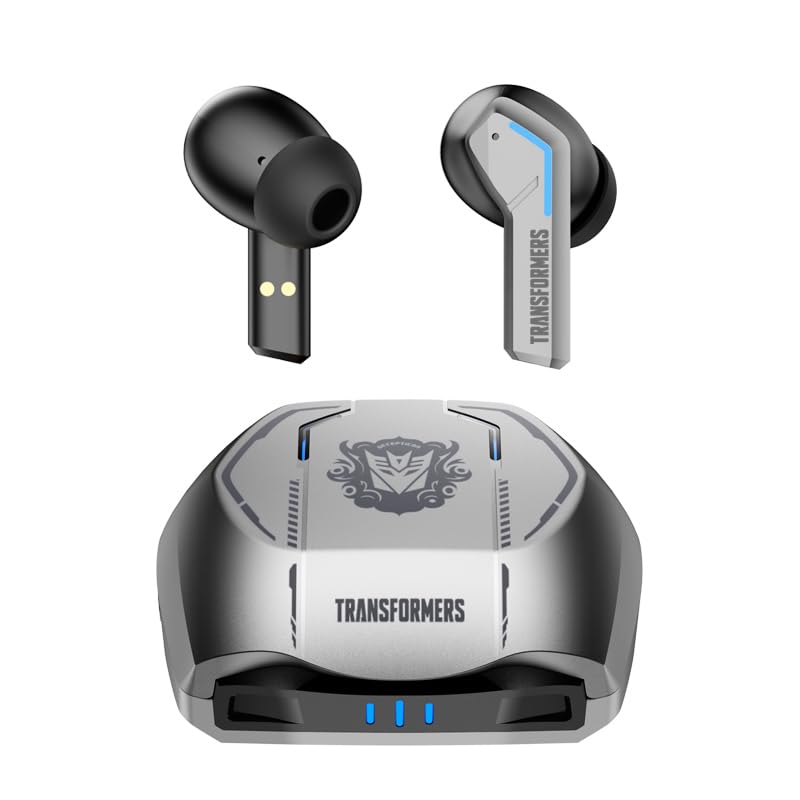
Image 1.1: The Transformers TF-T06 Wireless Earbuds and their charging case.
2. 패키지 내용
패키지에 모든 품목이 들어 있는지 확인하세요.
- Transformers In-Ear Headphones (2 units)
- Earbuds Charging Case (1 unit)
- Type-C 충전 케이블(1개)
- 사용 설명서(본 문서)

Image 2.1: The TF-T06 Earbuds, charging case, and packaging.
3. 제품 오버view
3.1 Earbud Design and Ergonomics
The TF-T06 earbuds are designed for a comfortable and secure fit within the ear, ensuring stability during various activities. Their lightweight and skin-friendly construction allows for extended wear without discomfort.

Image 3.1: An earbud shown in an ear, highlighting its ergonomic design for comfortable wear.
3.2 스마트 터치 컨트롤
Each earbud features a touch-sensitive area for controlling various functions without needing to access your connected device. The controls are intuitive and responsive.

Image 3.2: Visual representation of the smart touch control functions on the earbuds.
- 재생/일시 중지: 양쪽 이어버드를 한 번 탭하세요.
- 다음 트랙: 오른쪽 이어버드를 두 번 탭하세요.
- 이전 트랙 : 왼쪽 이어버드를 두 번 탭하세요.
- 볼륨 업: 오른쪽 이어버드를 세 번 탭하세요.
- 볼륨 작게 : 왼쪽 이어버드를 세 번 탭합니다.
- 전화 받기/종료: 수신 전화나 통화 중일 때 한쪽 이어버드를 한 번 탭합니다.
- 전화 거부: 전화가 오는 동안 한쪽 이어버드를 2초간 길게 누르세요.
- Voice Assistant 활성화 : 통화 중이 아닐 때 한쪽 이어버드를 2초간 길게 누릅니다.
4. 설정
4.1 이어버드와 케이스 충전
처음 사용하기 전에 이어버드와 충전 케이스를 완전히 충전하세요.
- 이어버드를 충전 케이스에 넣으세요. 이어버드가 제대로 장착되었는지 확인하세요. 자석 접촉면이 이어버드를 제자리에 고정합니다.
- Type-C 충전 케이블을 케이스의 충전 포트에 연결하고 다른 쪽 끝을 USB 전원 어댑터(포함되지 않음)에 연결합니다.
- The indicator lights on the charging case will illuminate to show charging status. A full charge typically takes approximately 3 hours for the case.
- Once fully charged, disconnect the charging cable. The earbuds will charge automatically when placed in the powered case.
4.2 장치와의 초기 페어링
TF-T06 이어버드는 간편한 원스텝 페어링 기능을 제공합니다.
- 충전 케이스를 여세요. 이어버드가 자동으로 켜지고 페어링 모드로 진입합니다.
- 스마트폰, 태블릿 또는 기타 Bluetooth 지원 기기에서 Bluetooth 설정으로 이동합니다.
- 검색 available devices and select "TF-T06" from the list.
- 연결되면 확인음이 들리고 이어버드를 사용할 준비가 됩니다.

Image 4.1: The earbuds in their open charging case, indicating they are ready for Bluetooth pairing.
메모: After the initial pairing, the earbuds will automatically connect to the last paired device when removed from the charging case, provided Bluetooth is enabled on the device and it is within range.
5. 사용 설명서
5.1 전원 켜기/끄기
- 전원 켜기: 충전 케이스를 열거나, 양쪽 이어버드의 터치 영역을 3초 동안 길게 누르세요.
- 전원 끄기 : 이어버드를 충전 케이스에 다시 넣고 뚜껑을 닫거나, 양쪽 이어버드의 터치 영역을 5초 동안 길게 누르세요.
5.2 음악 재생
Use the smart touch controls as described in Section 3.2 to manage your music.
5.3 통화 관리
Handle incoming and active calls using the smart touch controls as described in Section 3.2. The built-in ENC noise-cancelling microphone ensures clear communication.
5.4 음성 어시스턴트
Activate your device's voice assistant (e.g., Siri, Google Assistant) by pressing and holding the touch area on either earbud for 2 seconds (when not on a call).
5.5 음질
The TF-T06 earbuds feature 10mm double-layer diaphragm drivers, delivering powerful bass, clear midrange, and bright treble for a high-fidelity audio experience.

Image 5.1: An illustration of the 10mm dynamic driver, responsible for the earbud's sound quality.
6. 유지관리
- 청소: 부드럽고 마른 천으로 이어버드와 충전 케이스를 정기적으로 닦으세요. 연마성 세제나 용제는 사용하지 마세요.
- 방수 기능: The earbuds have an IPX4 waterproof rating, meaning they are resistant to splashing water and sweat. Do not submerge them in water or expose them to heavy rain. Ensure they are dry before placing them back in the charging case.
- 저장: 사용하지 않을 때는 이어버드를 충전 케이스에 보관하여 보호하고 충전 상태를 유지하세요. 서늘하고 건조한 곳에 극한의 온도를 피해 보관하세요.
- 배터리 관리 : 배터리 수명을 연장하려면 이어버드와 충전 케이스를 자주 완전히 방전시키지 마세요. 계속 사용하지 않더라도 정기적으로 충전하세요.
7. 문제 해결
If you encounter issues with your TF-T06 earbuds, refer to the following common solutions:
- 이어버드가 페어링되지 않음:
- 양쪽 이어버드가 모두 충전되어 있는지 확인하세요.
- 기기의 Bluetooth를 껐다가 다시 켜세요.
- Forget "TF-T06" in your device's Bluetooth settings and attempt to pair again.
- 기기를 다시 시작하세요.
- 이어버드가 하나만 작동합니다:
- 양쪽 이어버드가 모두 충전되어 있는지 확인하세요.
- 이어버드 두 개를 모두 충전 케이스에 넣고 뚜껑을 닫은 후 몇 초간 기다렸다가 뚜껑을 열고 이어버드를 꺼내세요.
- Try resetting the earbuds (refer to specific reset instructions if available in a separate quick start guide, or try forgetting the device and re-pairing).
- 소리가 나지 않거나 볼륨이 낮음:
- 이어폰과 연결된 기기의 볼륨 레벨을 모두 확인하세요.
- 이어버드가 기기에 제대로 연결되었는지 확인하세요.
- 이어버드 스피커 메시에서 이물질을 청소하세요.
- 충전 문제:
- 충전 케이블이 케이스와 전원에 모두 단단히 연결되어 있는지 확인하세요.
- 다른 충전 케이블이나 전원 어댑터를 사용해 보세요.
- 이어버드와 케이스 내부의 충전 접점을 청소하세요.
8. 사양
| 모델명 | TF-T0602 |
| 상표 | ZOMBIES CAT |
| 연결 기술 | 무선(블루투스 5.3) |
| 블루투스 버전 | 5.3 |
| 오디오 드라이버 유형 | 다이내믹 드라이버(10mm) |
| 배터리 수명(케이스 포함 총) | 최대 30시간 |
| 이어버드 재생 시간(1회 충전) | 3-4시간 |
| 충전 시간 | Approx. 3 Hours (Case) |
| 제어 방법 | 만지다 |
| 방수 레벨 | IPX4(방수) |
| 소음 제거 | ENC (Environmental Noise Cancellation) Mic |
| 호환 장치 | Most Bluetooth-enabled devices (smartphones, tablets, laptops, smartwatches) |
| 최대 작동 거리 | 10 미터 |
| 품목 무게 | 132g |
| 제품 치수 | 3.3 x 2.18 x 1.83cm |
9. 보증 및 지원
보증 정보 및 고객 지원에 대한 문의는 구매 시 제공된 설명서를 참조하시거나 판매점에 문의해 주세요. 보증 청구를 위해 구매 증빙 자료를 보관해 주세요.