
STF Kronos Trek Smartwatch User Manual
Model: ST-W78527
1. 서론
Thank you for choosing the STF Kronos Trek Smartwatch. This manual provides essential information for setting up, operating, maintaining, and troubleshooting your device. Please read it carefully to ensure optimal performance and longevity of your smartwatch.
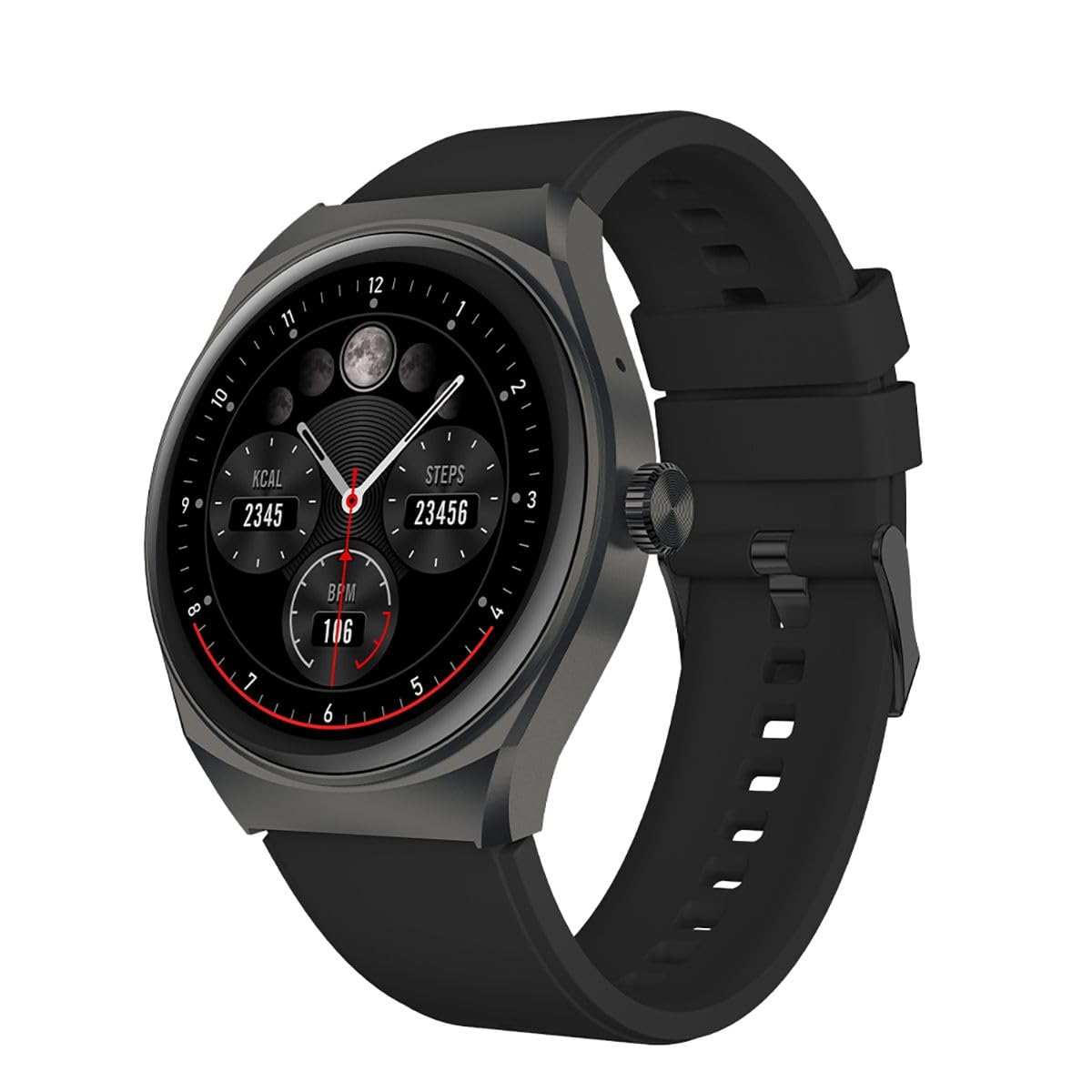
이미지 1.1: 앞면 view of the STF Kronos Trek Smartwatch.
2. 패키지 내용
- STF Kronos Trek Smartwatch
- 충전 케이블
- 사용 설명서 (본 문서)
3. 디바이스 오버view
The STF Kronos Trek Smartwatch features a 1.38-inch IPS display and a durable design. It includes various sensors for health monitoring and supports multiple sports modes.

Image 3.1: Smartwatch display showing health metrics like calories, steps, and BPM.

이미지 3.2: 후면 view of the smartwatch, highlighting the health sensors and charging contacts.
4. 설정
4.1 스마트워치 충전
- Connect the charging cable to the charging pins on the back of the smartwatch.
- Plug the USB end of the charging cable into a compatible USB power adapter (not included) or a computer's USB port.
- The smartwatch display will indicate charging status.
- Allow approximately 2-3 hours for a full charge. A full charge provides up to 7 days of battery life under normal usage.
4.2 스마트폰과 페어링
- Download the official STF companion application from your smartphone's app store (iOS or Android).
- 스마트폰에서 Bluetooth가 활성화되어 있는지 확인하세요.
- Open the STF companion application and follow the on-screen instructions to create an account or log in.
- In the app, select 'Add Device' or 'Pair New Device' and choose 'Kronos Trek' from the list of available devices.
- 스마트워치와 스마트폰 모두에서 페어링 요청을 확인하세요.
Note: For optimal performance, keep the smartwatch and smartphone within Bluetooth range during initial setup and regular use.
5. 사용 설명서
5.1 기본 탐색
- 터치 스크린: 메뉴와 기능을 탐색하려면 왼쪽, 오른쪽, 위, 아래로 스와이프하세요. 옵션을 선택하려면 탭하세요.
- 측면 버튼: 측면 버튼을 눌러 홈 화면으로 돌아가거나 기기를 켜세요.
Video 5.1: Demonstrates basic interaction with the STF Kronos Trek Smartwatch, including screen navigation and multi-sport mode selection. This video highlights how to stay active and healthy by tracking your workouts.
5.2 전화 걸기 및 받기
The Kronos Trek Smartwatch allows you to answer calls directly from your wrist when connected to your smartphone via Bluetooth.
- 전화 받기: When a call comes in, tap the green icon on the smartwatch screen.
- 전화 걸기: Access the dialer or contact list through the smartwatch menu to initiate a call.

Image 5.2: The smartwatch screen indicating the ability to answer calls directly.
5.3 멀티 스포츠 모드
The smartwatch supports over 100 multi-sport modes to track various physical activities. To access:
- Swipe on the home screen to find the 'Sports' or 'Workout' icon.
- 아이콘을 탭하세요 view the list of available sports modes (e.g., running, walking, cycling, swimming).
- Select your desired activity to start tracking. The watch will record duration, calories burned, and other relevant metrics.

이미지 5.3: 이상view of the multi-sport mode feature with various activity icons.
Video 5.4: Illustrates how to use the multi-sport mode to time efforts and record progress during workouts. This video focuses on the male user's experience.
5.4 상태 모니터링
The Kronos Trek Smartwatch includes sensors to monitor various health metrics:
- 심박수: 하루 종일 지속적으로 심박수를 모니터링합니다.
- 수면 추적: 깊은 수면, 얕은 수면, 깨어 있는 시간 등 수면 패턴을 분석합니다.
- 활동 추적: 걸음 수, 거리, 소모 칼로리를 기록합니다.
Note: The health monitoring features are for general fitness and wellness purposes only and are not intended for medical diagnosis or treatment.
5.5 알림
Receive notifications from your smartphone directly on your smartwatch. Ensure the companion app is running in the background and notification permissions are granted.
5.6 방수(IP67)
The smartwatch is rated IP67, meaning it is resistant to dust and can withstand immersion in water up to 1 meter for 30 minutes. It is suitable for daily use and light water activities but not recommended for diving or high-pressure water exposure.
Image 5.5: Icon representing the IP67 water resistance feature.
6. 유지관리
6.1 청소
- 스마트워치와 스트랩을 부드러운 천으로 정기적으로 닦아주세요.amp 옷감.
- 강한 화학 물질, 연마 세척제 또는 용제의 사용을 피하세요.
- 충전하기 전에 충전 접점이 깨끗하고 건조한지 확인하세요.
6.2 물 노출
- After exposure to water, especially saltwater, rinse the smartwatch with fresh water and dry it thoroughly.
- Do not press buttons or operate the touchscreen underwater.
6.3 배터리 관리
- 기기를 충전하거나 보관할 때 극심한 온도 변화를 피하십시오.
- 배터리를 장시간 완전히 방전된 상태로 두지 마세요.
7. 문제 해결
7.1 장치가 켜지지 않음
- 스마트워치가 완전히 충전되었는지 확인하십시오. 최소 30분 동안 충전기에 연결해 두세요.
- 측면 버튼을 10~15초 동안 길게 눌러 강제 재시작을 시도해 보세요.
7.2 페어링 문제
- 스마트폰과 스마트워치에서 블루투스가 켜져 있는지 확인하세요.
- 스마트폰과 스마트워치를 모두 다시 시작하세요.
- Try unpairing the device from your smartphone's Bluetooth settings and then re-pairing through the STF companion app.
- Ensure the STF companion app is updated to the latest version.
7.3 부정확한 건강 데이터
- 스마트워치가 손목에 편안하게 착용되도록 하되, 너무 꽉 조이지 않도록 하십시오.
- 시계 뒷면의 센서를 청소하세요.
- 환경적 요인과 개인의 생리적 특성은 센서의 정확도에 영향을 미칠 수 있습니다.
7.4 짧은 배터리 수명
- 화면 밝기를 낮추세요.
- 심박수 모니터링이 필요하지 않은 경우 비활성화하세요.
- 수신되는 알림의 수를 제한합니다.
- Ensure the smartwatch is not constantly searching for a Bluetooth connection.
8. 사양
| 특징 | 사양 |
|---|---|
| 모델명 | ST-W78527 |
| 디스플레이 크기 | 1.38 인치 |
| 디스플레이 유형 | 디지털 |
| 해결 | 240 x 240 |
| 연결 기술 | 블루투스 |
| 무선 통신 표준 | 블루투스 |
| 배터리 수명(평균) | 168시간(7일) |
| 배터리 용량 | 300mAh |
| 배터리 셀 구성 | 리튬폴리머 |
| 방수성 | IP67 |
| 특별 기능 | Notifications, Multi-sport Mode, Health Monitors |
| 휴먼 인터페이스 입력 | 터치스크린 |
| 제품 치수 | 25 x 3 x 2 cm; 210g |
9. 보증 및 지원
For warranty information and customer support, please refer to the documentation provided with your purchase or visit the official STF website. You may also contact the seller, Stuffactory, for assistance.
This product is eligible for a 30-day free return policy through Amazon. Please check Amazon's return policy for details.