
VEVOR NLF64-5280
VEVOR NLF64-5280 Incubator for Hatching
사용자 설명서
제품 끝view
The VEVOR NLF64-5280 Incubator is designed for hatching various poultry eggs, including chicken, duck, and quail. It features automatic egg turning, precise temperature and humidity control, and a transparent shell for easy observation. This manual provides essential information for the safe and effective operation and maintenance of your incubator.

Image: The VEVOR NLF64-5280 Incubator, showing its transparent base filled with eggs and several newly hatched chicks around it. An egg candler is visible on the top lid.
안전 지침
- 인큐베이터는 항상 접지된 전원 콘센트에 연결하십시오.
- Do not immerse the incubator or its electrical components in water or any other liquid.
- 부화기를 직사광선, 바람, 그리고 극심한 온도 변화를 피해 두십시오.
- 장치 주변의 적절한 환기를 확인하십시오.
- Unplug the incubator from the power source before cleaning or performing any maintenance.
- 어린이와 애완동물의 손이 닿지 않는 곳에 보관하세요.
- Handle eggs and newly hatched chicks with care and proper hygiene.
패키지 내용
아래 나열된 모든 품목이 패키지에 포함되어 있는지 확인하세요.
- 1 x Egg Incubator
- 1 x 사용자 설명서
- 1 x 스프레이 병
- 1 x Spray Nozzle
- 1 x Needle Nozzle Water Bottle
- 1 x Needle Nozzle Cap
- 1 x Battery Cable (for 12V power source)
설치 가이드
- 짐 풀기: Carefully remove all components from the packaging. Inspect for any damage. Retain the styrofoam packing for potential additional insulation if operating in a cold environment.
- 놓기: Place the incubator on a stable, level surface in a room with a consistent ambient temperature, away from direct sunlight, drafts, and heat sources.
- Assemble Egg Turning Bars: Insert the provided egg turning bars into the designated slots in the base of the incubator. Ensure they are securely in place. The product image suggests 5 bars are typically used, with one extra provided.
- 전원 연결:
- Standard Power (110V/220V AC): Connect the power adapter to the incubator's power input port, then plug the adapter into a suitable wall outlet.
- Battery Backup (12V DC): 정전이 발생한 경우tage, connect the provided battery cable to the incubator's 12V input port and to a 12V battery (not included).
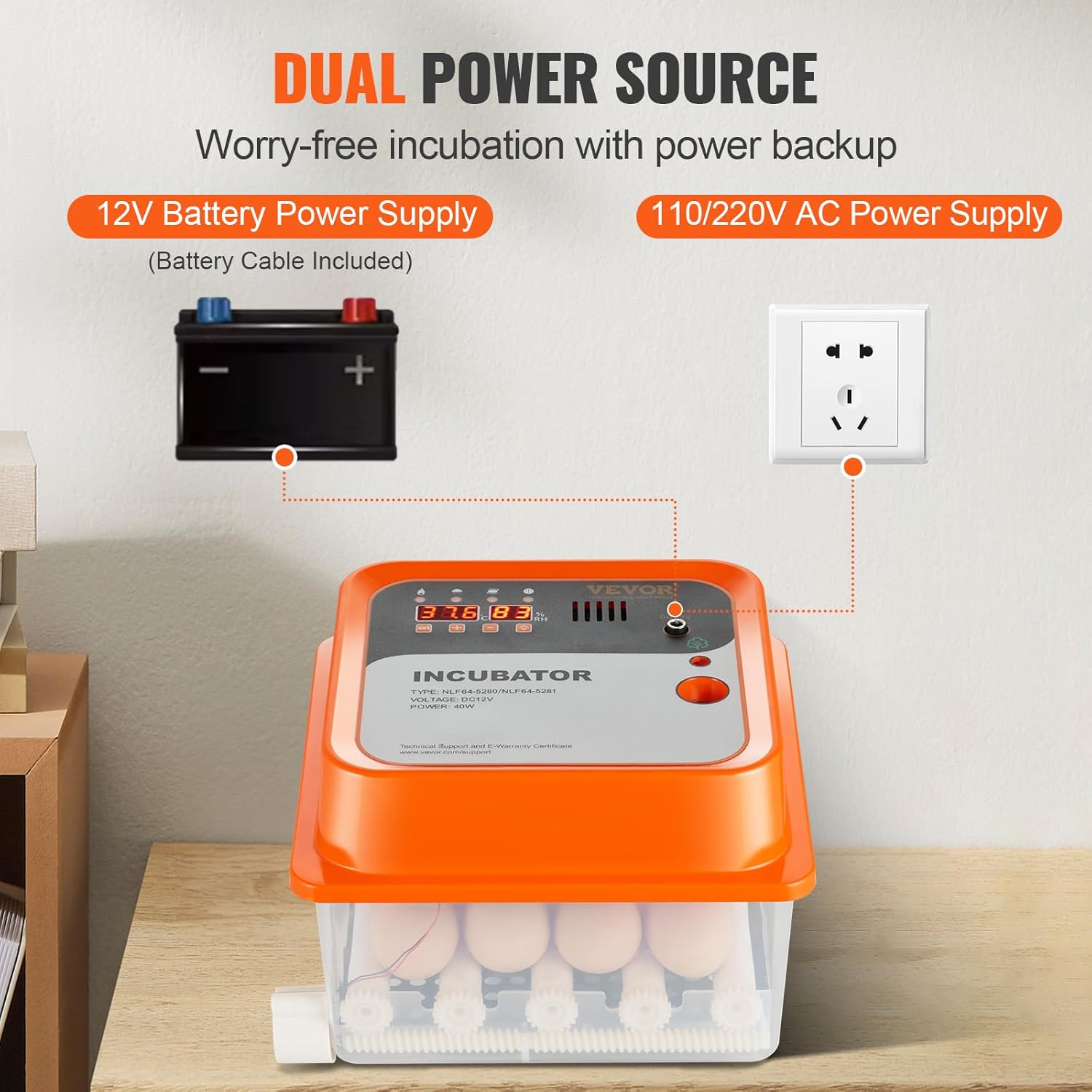
Image: Diagram illustrating the dual power source capability of the incubator, showing connections for both a standard AC wall outlet and a 12V battery.
- Add Water for Humidity: Using the provided needle nozzle water bottle, carefully add water to the designated water channels at the bottom of the incubator. Do not overfill. This will help maintain the required humidity levels.
작동 지침
- 전원 켜기: Once connected to power, the incubator's display will illuminate, showing the current temperature and humidity.
- 온도 및 습도 제어:
The incubator features an integrated sensor for real-time monitoring. The default temperature is pre-set for optimal hatching. While minor fluctuations (e.g., 0.9°F) are normal and do not affect incubation, you can adjust settings if necessary:
- "를 누르세요세트" button to enter temperature adjustment mode.
- "를 사용하세요+" 그리고 "-" buttons to adjust the desired temperature.
- 누르다 "세트" again to save the setting.
Humidity is displayed in real-time. Maintain appropriate humidity by manually refilling the water channels as needed. Refer to specific egg type requirements for ideal humidity levels during different stages of incubation.

Image: The incubator's control panel displaying precise temperature and humidity readings, indicating an optimal hatching environment.
- 계란 배치: Carefully place up to 12 eggs between the egg turning rollers. Ensure eggs are positioned correctly for the automatic turning mechanism.
- Automatic Egg Turning: The incubator features a 360° automatic egg turning design. This mechanism will gently rotate the eggs periodically to ensure even heating and proper embryo development, eliminating the need for manual turning.
- 공기 순환: The 360° air circulation design ensures uniform temperature and humidity distribution throughout the incubator, promoting healthy embryo growth and a higher hatching rate.

Image: Diagram illustrating the 360° air circulation within the incubator, showing how air flows to minimize temperature variations and ensure even distribution.
- 계란 캔들링: The built-in lighting allows you to observe the embryo's development without opening the lid. This high transparency feature enables close monitoring of the growth process.

Image: The transparent shell of the incubator, highlighting the built-in egg candler feature which allows users to observe the internal development of an egg.
- 부화: As the hatching date approaches, ensure humidity levels are appropriate for the specific species. Once chicks begin to hatch, avoid opening the incubator frequently to maintain stable conditions. Allow chicks to dry and strengthen before transferring them to a brooder.
유지
- 청소: After each hatching cycle, unplug the incubator and thoroughly clean all internal surfaces with a mild disinfectant solution. Ensure all components are completely dry before reassembly or storage.
- 수로: Regularly check and clean the water channels to prevent algae or bacterial growth.
- 저장: Store the incubator in a clean, dry place, away from direct sunlight and extreme temperatures, when not in use.
문제 해결
| 문제 | 가능한 원인 | 해결책 |
|---|---|---|
| 인큐베이터 전원이 켜지지 않음 | Loose power connection; power outage; faulty adapter/cable. | Check all power connections. Ensure power outlet is functional. Try the 12V battery backup if AC power is unavailable. |
| Temperature/Humidity alarms going off randomly | Sensor malfunction; extreme ambient temperature fluctuations; insufficient water for humidity. | Ensure the incubator is in a stable environment. Check water levels. If issues persist, contact VEVOR support. |
| Automatic egg turning not working | Egg turning bars not correctly installed; motor issue. | Verify that the egg turning bars are properly seated and that the correct number of bars are used (typically 5, with one extra provided). Ensure no obstructions. |
| Low hatching rate | Incorrect temperature/humidity settings; infertile eggs; improper egg handling. | Review recommended temperature and humidity for your specific egg type. Ensure eggs are fresh and fertile. Follow proper egg handling and sanitation procedures. |
명세서
| 특징 | 세부 사항 |
|---|---|
| 품목 모델 번호 | NLF64-5280 |
| 계란 용량 | 12개 |
| 전원 공급 장치 | Dual Power Source (Adapter + Battery Cable) |
| Automatic Egg Turning | Yes (360° rotation) |
| 습도 표시 | 예 |
| 물 보충 | 수동 |
| 온도 정확도 | ±0.5°C |
| 기본 자료 | PP(폴리프로필렌) |
| 제품 무게 | 1.4kg / 3.1파운드 |
| 전원 어댑터 | 12V, 5A |
| 팬 | 8025 / DC12V |
| 직류 모터 | 5V |
| 제품 크기(L x W x H) | 250 x 225 x 180mm / 9.8 x 8.9 x 7.1인치 |
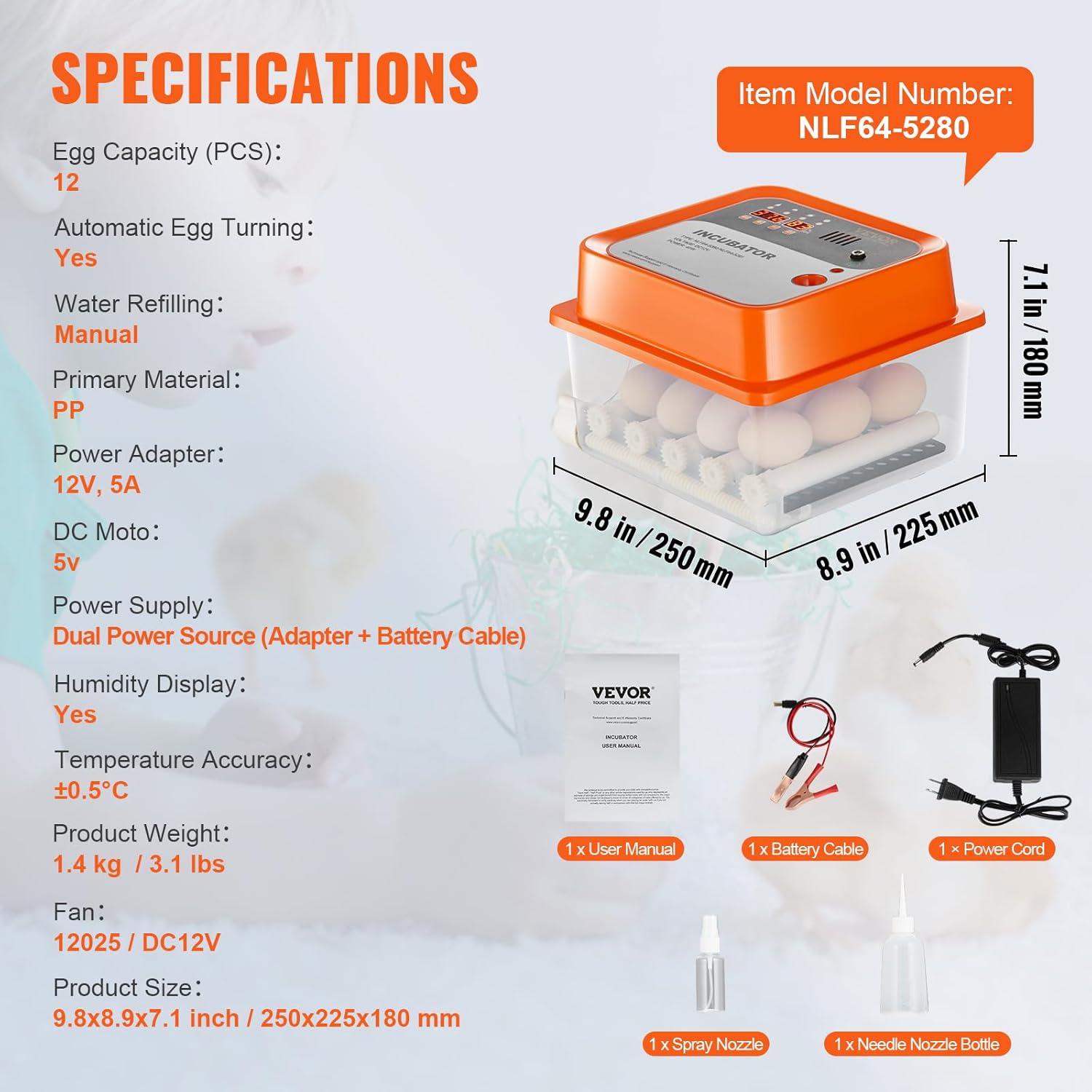
Image: A visual representation of the incubator's key specifications, including dimensions, weight, and included accessories.
보증 및 지원
For warranty information, technical support, or any inquiries regarding your VEVOR NLF64-5280 Incubator, please refer to the official VEVOR web사이트를 방문하거나 고객 서비스에 직접 문의하세요. 보증 청구를 위해 구매 영수증을 보관하세요.
자세한 내용은 VEVOR 스토어에서 확인하세요. 베보르 공식 스토어
Ask a question about this manual
Ask about setup, troubleshooting, compatibility, parts, safety, or missing instructions. Manuals+ will review the question and use this page’s manual context to help answer it.