
1. 중요한 안전 정보
Please read these safety instructions carefully before operating your TV and retain them for future reference. This manual provides important information regarding the safe installation, use, and maintenance of your Sharp 40FH2EA television.
- 전원: TV는 AC 220-240V, 50Hz 전원에만 연결하십시오.
- 통풍: TV 주변의 통풍이 잘 되도록 하세요. 통풍구를 막지 마세요.
- 물과 습기: TV를 비나 습기에 노출시키지 마세요. 꽃병 등 액체가 담긴 물건을 TV 위에 올려놓지 마세요.
- 열원: 텔레비전을 라디에이터, 난방기, 스토브 또는 기타 열을 발생시키는 기기와 같은 열원에서 멀리 두십시오.
- 청소: 청소하기 전에 벽면 콘센트에서 TV 플러그를 뽑으세요. 부드럽고 마른 천을 사용하세요. 액체 세제나 에어로졸 세제는 사용하지 마세요.
- 설치: When wall-mounting, ensure the wall mount is suitable for the TV's weight and installed by qualified personnel.
- 어린이들: 아이들이 텔레비전을 가지고 놀지 않도록 잘 살펴봐 주세요.
2. 패키지 내용
모든 품목이 포장에 들어 있는지 확인하세요.
- Sharp 40FH2EA 40-inch Full HD LED Android TV
- 원격 제어
- TV 스탠드 (2개)
- TV 스탠드용 나사
- 전원 케이블
- 빠른 시작 가이드
- 안전 정보 안내문

이미지: 앞면 view of the Sharp 40FH2EA television, showcasin얇은 베젤 디자인이 특징입니다.
3. 설정
3.1 TV 스탠드 부착
- 화면 손상을 방지하려면 부드럽고 깨끗한 표면에 TV를 뒤집어서 조심스럽게 놓으세요.
- 각 스탠드를 TV 하단의 해당 슬롯에 맞춰 정렬하세요.
- 제공된 나사를 사용하여 스탠드를 고정하세요. 나사가 단단히 조여졌는지 확인하세요.

Image: The Sharp 40FH2EA television viewed from an angle, showing the two attached stand feet supporting the unit.
3.2 외부 장치 연결
The Sharp 40FH2EA offers various connection options for your external devices.
- HDMI : Connect Blu-ray players, game consoles, or set-top boxes to the HDMI ports. This model features 3 HDMI inputs.
- USB: Insert USB drives for media playback or software updates into the 2 USB ports.
- 안테나/케이블: 안테나 또는 케이블 TV 신호를 RF 입력 단자에 연결하세요.
- 이더넷(LAN): 안정적인 인터넷 연결을 위해 이더넷 케이블을 LAN 포트에 연결하십시오.
- 오디오 출력: Use the optical digital audio output for connecting to a soundbar or home theater system.

이미지: 사이드 프로file of the Sharp 40FH2EA TV, highlighting the accessible USB and HDMI ports on the left side.
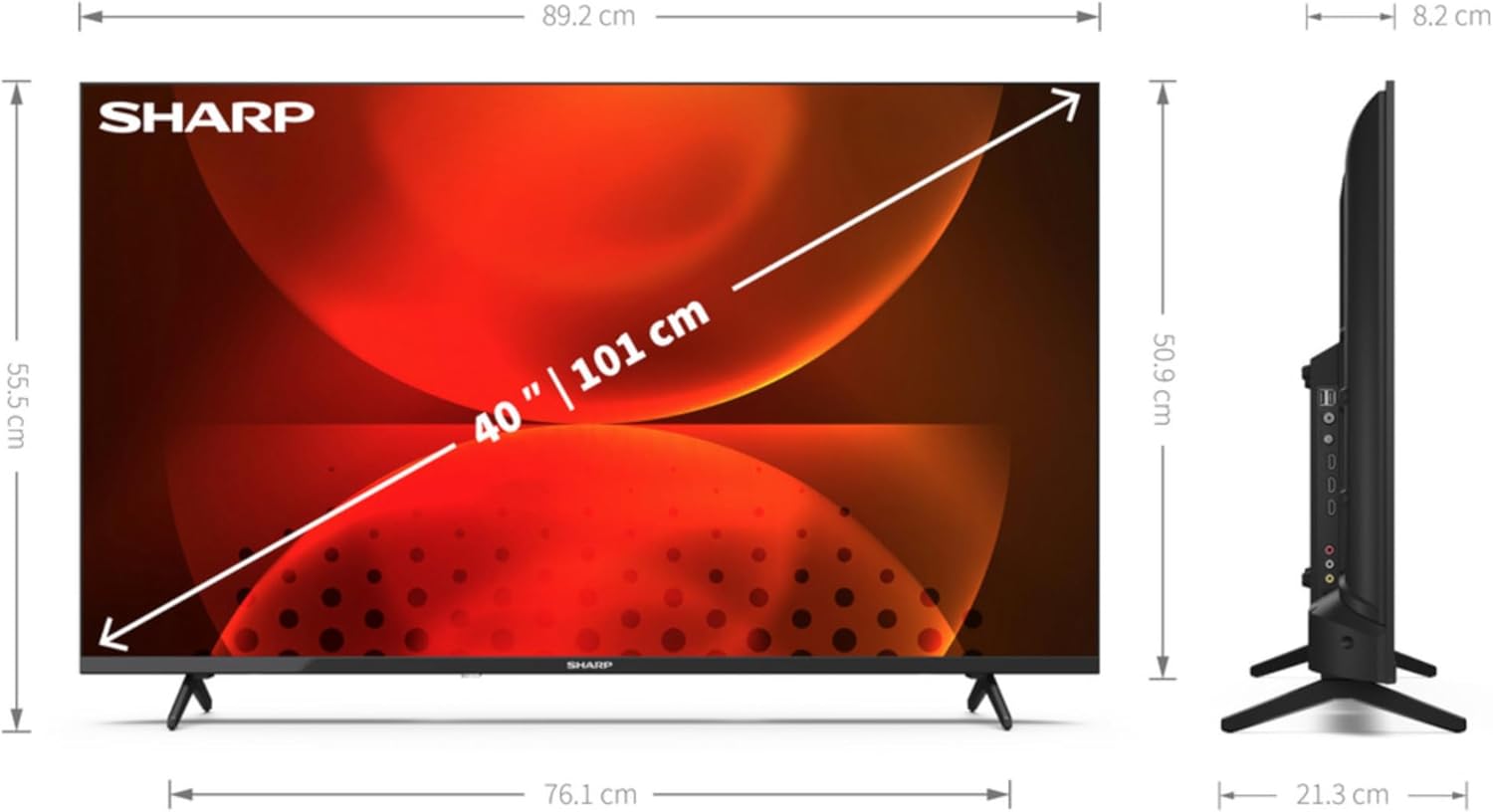
이미지: 후면 view of the Sharp 40FH2EA TV, displaying the various input and output ports including HDMI, USB, and antenna connections.
3.3 초기 전원 켜기 및 최초 설정
- 전원 케이블을 TV에 연결한 다음 벽면 콘센트에 연결하세요.
- 리모컨이나 TV의 전원 버튼을 누르세요.
- 화면의 지시에 따라 언어, 국가 및 네트워크 설정(Wi-Fi 또는 이더넷)을 선택하십시오.
- Perform a channel scan for DVB-T/T2/C/S/S2 signals to find available TV channels.
- Log in with your Google account to access Android TV features and download apps.
4. TV 작동
4.1 리모콘 기능
리모컨을 사용하면 TV의 다양한 기능을 조작할 수 있습니다. 주요 버튼들을 숙지해 두세요.
- 전원(빨간색 버튼): TV를 켜거나 끕니다.
- 원천: 입력 소스(HDMI 1, HDMI 2, TV 등)를 선택합니다.
- 숫자 버튼(0-9): 직접 채널 선택.
- 볼륨 (+/-): 볼륨 레벨을 조절합니다.
- 채널(CH +/-): TV 채널을 변경합니다.
- 탐색 패드(위/아래/왼쪽/오른쪽/확인): 메뉴를 탐색하고 선택 사항을 확인합니다.
- 뒤쪽에: 이전 화면 또는 메뉴로 돌아갑니다.
- 집: Android TV 홈 화면에 접속합니다.
- 넷플릭스, 프라임 비디오, 유튜브, 구글 플레이: 스트리밍 서비스에 빠르게 접속할 수 있는 전용 버튼이 있습니다.

Image: The remote control for the Sharp 40FH2EA TV, showing its layout with navigation buttons and dedicated streaming service buttons.
4.2 스마트 TV 기능(안드로이드 TV)
Your Sharp 40FH2EA TV runs on Android TV, providing access to a wide range of apps and services.
- 홈 화면: The central hub for your apps, recommended content, and settings.
- 구글 플레이 스토어: 추가 앱, 게임, 콘텐츠를 다운로드하세요.
- 음성 제어: Use the built-in Google Assistant (if available on your remote) to search for content, control smart home devices, and more.
- Chromecast 내장: 스마트폰이나 태블릿의 콘텐츠를 TV로 바로 전송하세요.
- 스트리밍 서비스: Access popular services like Netflix, YouTube, Amazon Prime Video, Hulu, Disney+, and more.

Image: The Android TV home screen displayed on the Sharp 40FH2EA, featuring various streaming app icons and content recommendations.
5. 유지관리
5.1 TV 청소
- 청소하기 전에는 항상 TV의 플러그를 뽑아 두세요.
- 부드럽고 마른 보풀 없는 천으로 화면과 본체를 닦으세요.
- 화면에 잔뜩 묻은 자국은 가볍게 닦아내세요ampen the cloth with water or a specialized screen cleaner (ensure it's safe for LED screens) and wipe gently.
- Never spray cleaners directly onto the screen or cabinet.
5.2 소프트웨어 업데이트
Your Android TV may receive software updates periodically. It is recommended to keep your TV's software updated for optimal performance and security. Updates can usually be found in the TV's settings menu under 'About' or 'System Update'.
6. 문제 해결
TV에 문제가 발생하면 다음의 일반적인 문제와 해결 방법을 참조하세요.
| 문제 | 가능한 원인 / 해결책 |
|---|---|
| 전원이 없습니다 | Ensure the power cable is securely connected to the TV and the wall outlet. Check if the outlet is working. Try a different outlet. |
| 화면은 나오지 않지만 소리는 나옵니다 | 입력 소스를 확인하세요. 외부 장치의 전원이 켜져 있고 올바르게 연결되어 있는지 확인하세요. 다른 HDMI 케이블을 사용해 보세요. |
| 소리는 나지 않지만 화면은 나옵니다 | Check the volume level. Ensure the TV is not muted. Check audio settings and external audio device connections. |
| 리모컨이 작동하지 않습니다 | 배터리를 교체하세요. 리모컨과 TV IR 센서 사이에 장애물이 없는지 확인하세요. |
| Wi-Fi에 연결할 수 없습니다 | Wi-Fi 라우터가 켜져 있고 작동하는지 확인하세요. Wi-Fi 비밀번호를 다시 입력하세요. TV와 라우터를 다시 시작해 보세요. |
| 앱이 느리거나 충돌합니다 | Close unused apps. Clear app cache (in TV settings). Restart the TV. Ensure sufficient internet speed. |
If the problem persists, consult the full user manual available on the Sharp support web사이트를 방문하거나 고객 지원팀에 문의하세요.
7. 사양
Detailed technical specifications for the Sharp 40FH2EA 40-inch Full HD LED Android TV:
| 특징 | 사양 |
|---|---|
| 모델명 | 40FH2EA |
| 내부 모델 번호 | 2T-C40FHx |
| 화면 크기 | 40인치(101.6cm) |
| 디스플레이 해상도 | 1920 x 1080픽셀(풀 HD) |
| 디스플레이 기술 | 주도의 |
| 화면 모양 | 평평한 |
| 스마트 TV 플랫폼 | 안드로이드 티비 |
| Motion Interpolation Technology | AMR (Active Motion Rate) 400 |
| 네이티브 화면 비율 | 16시 9분 |
| 디지털 신호 형식 | DVB, DVB-C, DVB-S, DVB-S2, DVB-T, DVB-T2 |
| 무선 연결 | 와이파이, 블루투스 |
| 유선 연결 | 이더넷 랜 |
| HDMI 포트 | 3 |
| USB 포트 | 2 |
| 색상 | 검은색 |
| 지원되는 인터넷 서비스 | Netflix, YouTube, Amazon Prime Video, Hulu, Disney+, etc. |
8. 보증 및 지원
보증 정보는 제품에 동봉된 보증 카드를 참조하거나 샤프 공식 웹사이트를 방문하십시오. website for your region. For technical support, product registration, or to download the full user manual, please visit the Sharp support portal or contact their customer service department.
온라인 지원: www.sharpconsumer.com