
소개
Thank you for choosing the AAJK 120-inch Portable Projection Screen with Stand. This product is designed to provide a high-quality viewing experience for both indoor and outdoor environments, featuring 4K Ultra HD clarity and a wide 160-degree viewing angle. This manual provides detailed instructions for assembly, operation, maintenance, and troubleshooting to ensure optimal performance and longevity of your projection screen.
패키지 내용
패키지에 다음 구성품이 모두 포함되어 있는지 확인하세요.
- 1 x Projector Screen (120 inches)
- 2 x Triangle Brackets (Stand Legs)
- 10 x Cross Bars (Frame components)
- 2 x Top Connecting Bars
- 4 x Ropes (for wind stability)
- 6개입 지지못 (말뚝)
- 1 x 보관 가방
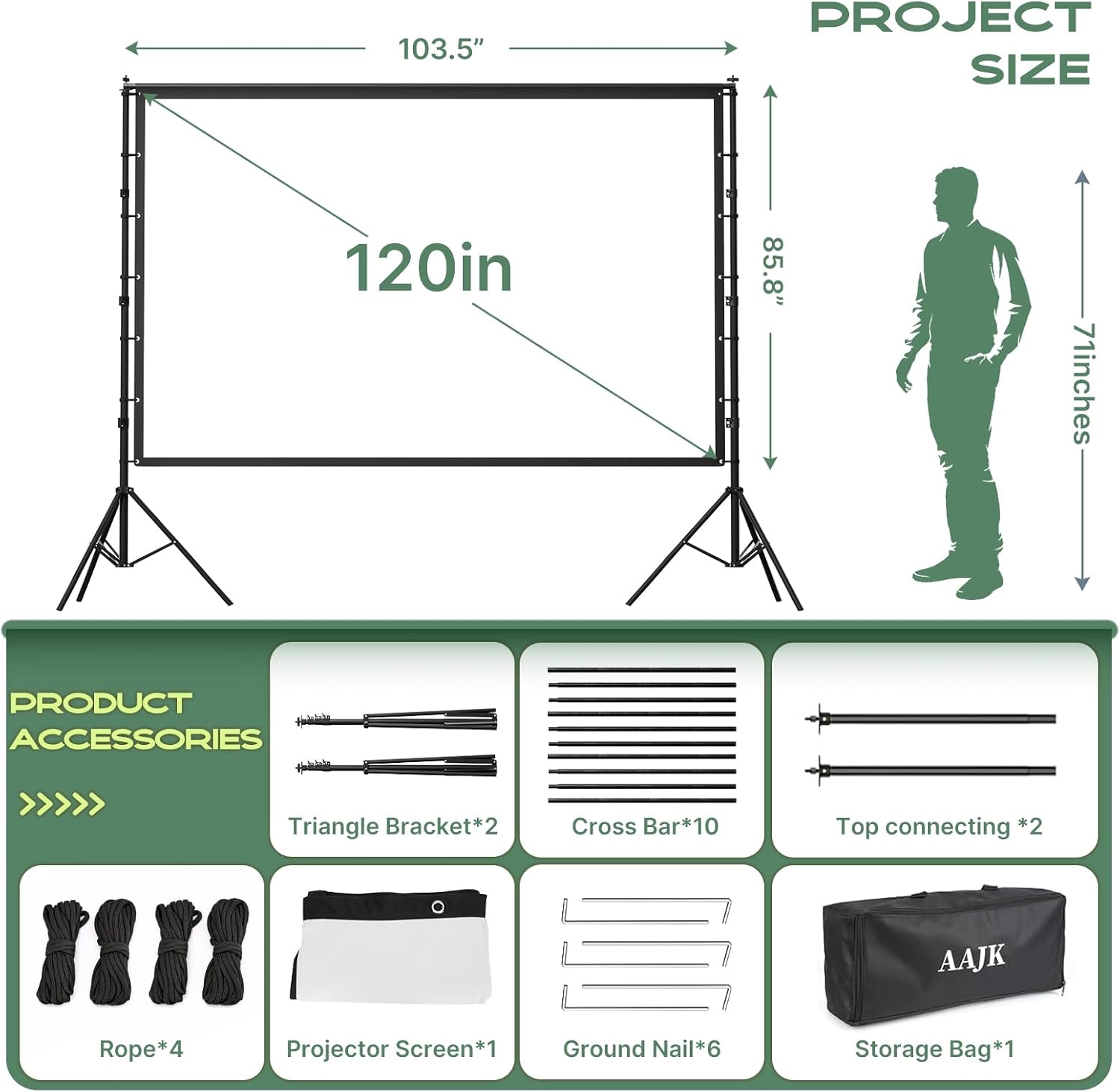
Figure 1: Included Accessories and Screen Dimensions. The diagram illustrates the 120-inch screen size (103.5 inches wide, 85.8 inches high) and lists all components: two triangle brackets, ten cross bars, two top connecting bars, four ropes, six ground nails, one projector screen, and one storage bag.
설치 지침
Follow these steps to assemble your projection screen. Assembly can typically be completed in under 5 minutes without tools.
- Assemble the Stand Legs: Unfold the two triangle brackets. Ensure they are fully extended to form a stable base.
- 틀을 구성하세요: Connect the cross bars and top connecting bars to form the rectangular frame for the screen. The metal support is designed to be anti-rust and durable.
- 화면을 첨부하세요: Carefully unroll the 120-inch projection screen. Attach the screen to the assembled frame using the integrated Velcro straps. Ensure the screen is taut and wrinkle-free. The elastic, high-density polyester fabric is designed to maintain a smooth surface.
- 화면 위치를 조정하세요: 조립된 스크린과 스탠드를 원하는 위치에 놓으세요. view위치.
- Ensure Stability (Outdoor Use): For outdoor stability, extend the reinforced triangular base of the stand. Secure the stand further by attaching the four wind ropes to the frame and anchoring them to the ground using the six provided ground nails. On hard surfaces, ensure the non-slip pads on the stand feet provide adequate grip.

Figure 2: Stand Stability Features. This image highlights the reinforced triangular base (01) of the stand and a ground nail (02) used to secure the screen with ropes for enhanced outdoor stability.

Figure 3: Stability and Image Quality Comparison. This image compares the AAJK screen's stable triangle bracket and clear, bright colors with other screens that may have unstable designs and blurry, dim images. It also shows the thicker 33mm frame tubing of the AAJK screen compared to finer 22mm tubing.
작동 지침
The AAJK projection screen is designed for versatile use with various projectors and environments.
- 투사: The screen supports 4K Ultra HD clarity, delivering deep blacks and vivid colors. It is compatible with all standard, short-throw, and ultra-short-throw projectors.
- View각도: Enjoy a wide 160-degree viewing angle, ensuring that everyone in your audience has an optimal view, whether seated directly in front or to the side.
- Double-Sided Projection: The opaque, high-density polyester fabric blocks background interference and supports projection from both the front and rear, offering flexibility for different setups.
- 환경적 용도: The screen's material maintains contrast and color accuracy even in bright indoor or outdoor environments, unlike ordinary screens that may wash out in daylight.
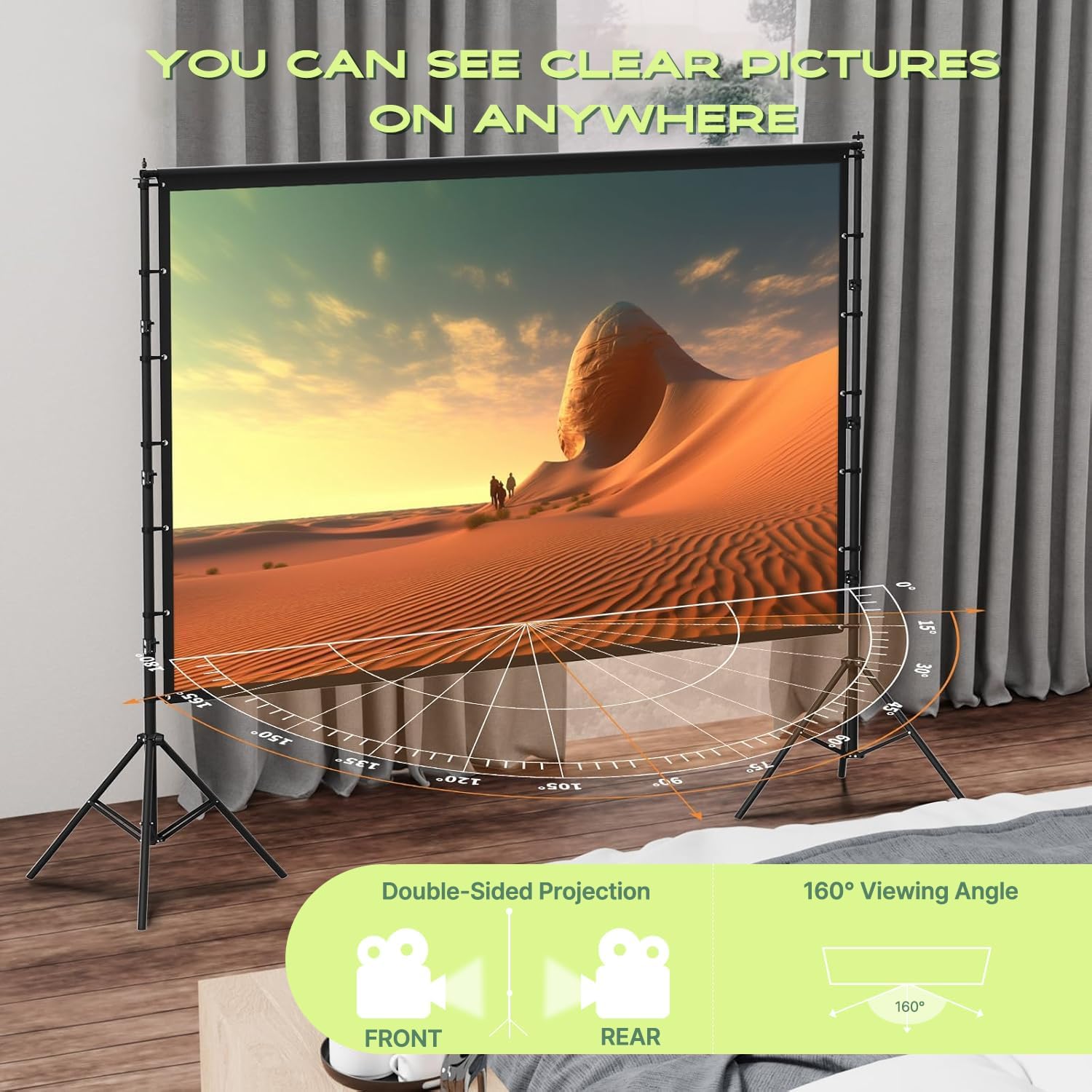
Figure 4: Clear Pictures Anywhere. This image demonstrates the screen's ability to display clear pictures in various settings, highlighting its double-sided projection feature and a wide 160-degree view잉 각도.
유지
Proper care and storage will extend the life of your projection screen.
- 청소: The screen is easy to clean. Wipe the surface gently with a damp cloth or sponge. Avoid harsh chemicals or abrasive materials that could damage the fabric.
- Wrinkle-Free Fabric: The elastic fabric is designed to be wrinkle-free. After folding, it should return to a perfectly smooth surface without the need for ironing or steaming.
- 저장: When not in use, disassemble the screen and stand. Fold the screen neatly and store all components in the compact carry bag (approximately 19.8 x 45 cm). This allows for easy transport and storage.

Figure 5: Easy to Store and Carry. This image shows the compact storage bag for the AAJK projector screen, highlighting its portability and ease of storage in a car trunk. The total weight is approximately 5.6 kg.
문제 해결
일반적으로 발생할 수 있는 문제에 대한 해결책은 다음과 같습니다.
- Screen Appears Wrinkled: The screen fabric is designed to be wrinkle-free. If minor creases appear from prolonged storage, they should naturally smooth out when the screen is stretched taut on the frame. Ensure the Velcro straps are securely fastened to pull the screen tight. Avoid ironing or steaming.
- 스탠드 불안정성: Ensure all parts of the triangular stand base are fully extended and locked into position. For outdoor use, always utilize the provided wind ropes and ground nails to anchor the stand securely, especially in windy conditions. On smooth indoor surfaces, verify that the non-slip pads are clean and making full contact.
- Dim or Washed-Out Image: Ensure your projector settings are optimized for brightness and contrast. The screen's opaque, high-density polyester fabric is designed to minimize light interference and maintain color accuracy even in brighter environments. If the issue persists, check for external light sources directly hitting the screen.
명세서
| 상표 | AAJK |
| 모델 번호 | 120 inch-stand |
| 화면 크기 | 120 인치(대각선) |
| 제품 크기 (가로 x 세로) | 2.63m x 2.18m (approx. 103.5 x 85.8 inches) |
| 재료 | 폴리에스터 |
| 화면 표면 설명 | 매트 |
| View잉 각도 | 160도 |
| 작동 모드 | 수동 |
| 장착 유형 | Foldable, Freestanding, Indoor Mount, Outdoor Mount |
| 품목 무게 | 7.27파운드(약 3.3kg) |
| 색상 | 하얀색 |
보증 및 지원
AAJK is committed to providing high-quality products and customer satisfaction. Your purchase is backed by a satisfaction guarantee.
- 고객 서비스: For any questions, concerns, or assistance with your product, please contact our 24/7 customer support team. Refer to your purchase documentation or the retailer's web구체적인 연락처 정보는 해당 사이트를 참조하세요.
- 만족 보장: If you are not completely satisfied with your AAJK projection screen, please contact us, and we will work to resolve the issue.
