
1. 서론
구매해주셔서 감사합니다asing the Kaiser Professional 15-inch Speaker System, Model GEM-9520. This manual provides essential information for the safe and efficient operation of your new speaker system. Please read it thoroughly before use and retain it for future reference.
2. 안전 정보
- 전원: 지정된 전원 어댑터만 사용하세요. 볼륨을 확인하세요.tage는 귀하의 지역 전원 공급 장치와 일치합니다.
- 물과 습기: Do not expose the speaker to water, rain, or high humidity. Avoid placing liquid-filled objects on the speaker.
- 통풍: 스피커 주변에 적절한 환기가 이루어지도록 하십시오. 환기구를 막지 마십시오.
- 열: 스피커를 라디에이터, 난방기, 스토브 또는 기타 열을 발생시키는 기기와 같은 열원에서 멀리 두십시오.
- 청소: 청소하기 전에 전원을 차단하십시오. 마른 부드러운 천을 사용하십시오. 액체 세척제나 스프레이형 세척제는 사용하지 마십시오.
- 서비스: 이 제품을 직접 수리하려고 하지 마십시오. 모든 서비스는 자격을 갖춘 서비스 담당자에게 문의하십시오.
- 놓기: Place the speaker on a stable, flat surface or securely mount it on the provided tripod. Avoid placing it in direct sunlight or near strong magnetic fields.
3. 패키지 내용
패키지에 모든 품목이 들어 있는지 확인하세요.
- Kaiser GEM-9520 Professional 15-inch Speaker System
- 유선 마이크
- 스피커 삼각대 스탠드
- 전원 케이블
- 사용 설명서 (본 문서)

Image: Kaiser GEM-9520 speaker system with included microphone and tripod stand.
4. 제품 오버view
The Kaiser GEM-9520 is a versatile 15-inch professional speaker system designed for various audio applications. It features multiple input options, LED lighting, and a robust design.
전면 패널
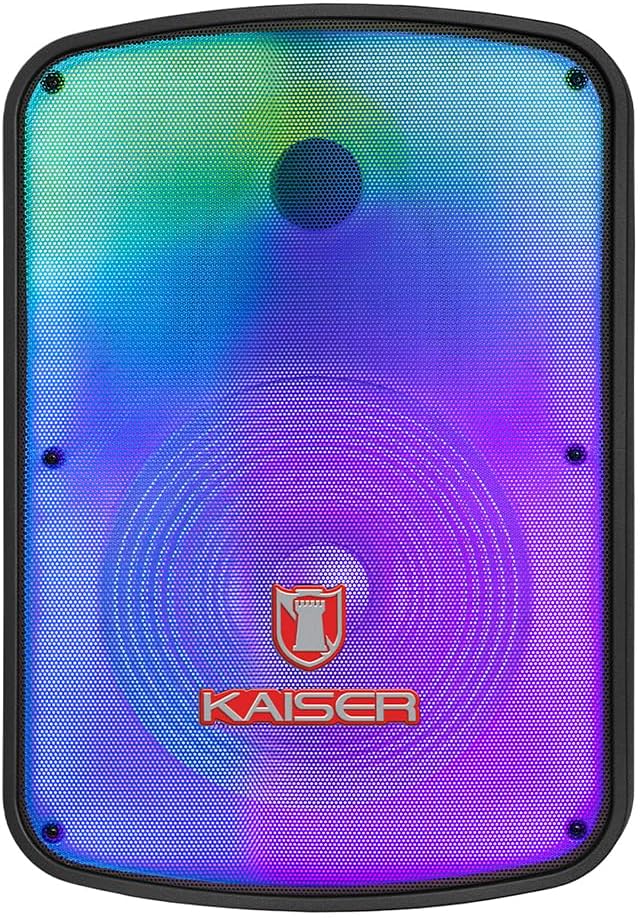
이미지: 앞면 view of the Kaiser GEM-9520 speaker, showcasing the 15-inch driver and integrated LED lighting.
후면 제어판
The rear panel houses all input/output connections and control knobs.

이미지: 후면 view of the Kaiser GEM-9520 speaker, displaying the control panel with various inputs and adjustments.

이미지: 상세 view of the control panel, showing the display, volume, equalizer, and input ports.
Included Microphone and Tripod

Image: The wired microphone included with the Kaiser GEM-9520 speaker system.
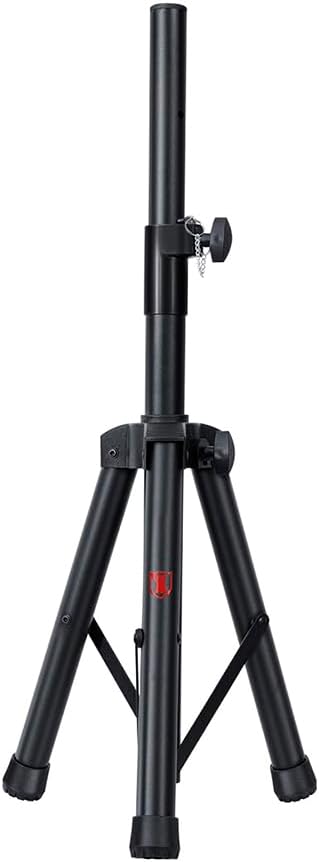
Image: The adjustable tripod stand for mounting the speaker.
5. 설정
5.1 풀기 및 초기 배치
- 포장에서 모든 구성 요소를 조심스럽게 제거합니다.
- Place the speaker on a flat, stable surface or prepare for tripod mounting.
5.2 Tripod Assembly and Speaker Mounting
- Unfold the tripod legs and extend them to a stable position. Ensure all locking mechanisms are secure.
- Adjust the height of the tripod to your desired level and secure the locking pin and knob.
- Carefully lift the speaker and place its bottom mounting hole onto the tripod pole. Ensure it is seated firmly.

Image: Close-up of the tripod stand, showing its adjustable components.
5.3 Power Connection and Initial Charge
- Connect the provided power cable to the speaker's power input port on the rear panel.
- 전원 케이블의 다른 쪽 끝을 적절한 콘센트에 꽂으십시오.
- For optimal battery life, fully charge the speaker before its first use. The charging time is approximately 3 hours.
6. 사용 설명서
6.1 전원 켜기/끄기
Locate the power switch on the rear control panel. Flip it to the 'ON' position to power on the speaker. Flip it to 'OFF' to power off.
6.2 모드 선택
Press the 'MODE' button on the control panel to cycle through available input modes: Bluetooth, USB, Micro SD, AUX, and FM Radio.
6.3 Volume and Equalizer Controls
- 용량: Rotate the 'VOLUME' knob to adjust the overall output volume.
- Treble (Agudos): Use the 'AGUDOS' knob to adjust the high-frequency response.
- Bass (Bajos): Use the 'BAJOS' knob to adjust the low-frequency response.
6.4 블루투스 연결
- Switch the speaker to Bluetooth mode. The display will show 'BLUE' and a pairing indicator will flash.
- 모바일 기기(스마트폰, 태블릿, 노트북)에서 Bluetooth를 활성화하고 사용 가능한 기기를 검색하세요.
- Select 'Kaiser GEM-9520' (or similar name) from the list.
- 페어링이 완료되면 스피커에서 확인음이 나고 블루투스 표시등이 깜빡임을 멈춥니다.
6.5 USB/Micro SD 재생
- MP3 오디오가 미리 저장된 USB 플래시 드라이브 또는 마이크로 SD 카드를 삽입하세요. files) 해당 포트로.
- The speaker will automatically switch to USB/Micro SD mode and begin playback. If not, press the 'MODE' button.
- Use the playback controls (Play/Pause, Next/Previous Track) on the control panel to manage your music.
6.6 AUX 입력
- Connect an external audio device (e.g., MP3 player, computer) to the 'AUX' input port on the speaker using a 3.5mm audio cable.
- 'MODE' 버튼을 사용하여 스피커를 AUX 모드로 전환하세요.
- 연결된 기기에서 재생과 볼륨을 제어하세요.
6.7 마이크 사용
- Connect the wired microphone to the 'MIC' input port on the rear panel.
- Adjust the microphone volume using the 'VOL MIC' knob.
- Adjust the echo effect using the 'ECO' knob.

Image: Close-up of the wired microphone, showing its ON/OFF switch.
6.8 Microphone Audio Priority Function
This function automatically lowers the background music volume when the microphone is in use, making the voice clearer and more prominent. To activate/deactivate this function, refer to the specific button or switch on the control panel labeled for 'Mic Priority' or similar.

Image: Diagram illustrating the microphone audio priority function, which lowers music volume when the microphone is active.
6.9 KSR-LINK Function
The KSR-LINK function allows you to wirelessly connect two compatible Kaiser speakers for a stereo sound experience. Refer to the specific instructions for KSR-LINK pairing, usually involving pressing a dedicated button on both speakers simultaneously.
7. 유지관리
- 청소: Wipe the speaker's exterior with a soft, dry cloth. Do not use abrasive cleaners, waxes, or solvents.
- 저장: 장시간 사용하지 않을 경우, 스피커를 직사광선과 극한의 온도를 피해 시원하고 건조한 곳에 보관하세요.
- 배터리 관리 : 배터리 수명을 연장하려면 배터리를 자주 완전히 방전시키지 마십시오. 사용하지 않을 때에도 스피커를 정기적으로 충전하십시오.
8. 문제 해결
| 문제 | 가능한 원인 | 해결책 |
|---|---|---|
| 전원이 없습니다 | 전원 케이블이 연결되지 않았습니다. 배터리가 방전되었습니다. 전원 스위치가 꺼져 있습니다. | Ensure power cable is securely connected and plugged in. Charge the battery. Turn the power switch to 'ON'. |
| 소리가 나지 않습니다 | Volume too low; Incorrect input mode; External device not playing. | Increase the master volume. Select the correct input mode. Ensure the connected device is playing and its volume is up. |
| 블루투스가 연결되지 않습니다 | Speaker not in pairing mode; Device too far; Previously paired device connected. | Ensure speaker is in Bluetooth pairing mode. Move device closer to speaker. Disconnect from other Bluetooth devices. |
| 마이크가 작동하지 않습니다 | Microphone not connected; Microphone volume too low; Microphone switch off. | Ensure microphone is securely plugged in. Increase 'VOL MIC' knob. Turn the microphone's ON/OFF switch to 'ON'. |
| FM 라디오 수신 불량 | 신호가 약합니다. 외부 안테나가 없습니다. | Reposition the speaker. Extend any built-in antenna or connect an external one if available. |
9. 사양
| 특징 | 사양 |
|---|---|
| 모델 | 젬-9520 |
| 출력 와트tage | 25000와트(PMPO) |
| 스피커 크기 | 15인치 |
| 전원 | 배터리 |
| 배터리 수명(평균) | 6시간 |
| 충전 시간 | 3시간 |
| 연결 기술 | AUX, 블루투스, USB |
| 오디오 입력 | Microphone, USB, Micro SD, 3.5 mm, 6.3 mm |
| 특별 기능 | High-resolution audio, LED light, USB port, Microphone Audio Priority, KSR-LINK |
| 장착 유형 | Floor Mount (Tripod included) |
| 재료 | 플라스틱 |
| 제품 크기(L x W x H) | 45 x 35 x 64cm |
| 제품 무게 | 10.85kg |
10. 보증 및 지원
This Kaiser product is covered by a manufacturer's warranty. For specific warranty terms and conditions, please refer to the warranty card included in your product packaging or contact Kaiser customer support. For technical assistance or service inquiries, please visit the official Kaiser web사이트 또는 고객 서비스 부서에 문의하십시오.