
1. 서론
This manual provides detailed instructions for the installation, operation, and maintenance of the IXITAB KWS-AC301 and KWS-AC300 series Digital AC Power Energy Meters. These devices are designed to measure and display various electrical parameters including voltage, current, power, energy consumption (Kwh), timing, temperature, frequency, and power factor (for KWS-AC301 models). Please read this manual thoroughly before use to ensure proper and safe operation.
2. 안전 정보
- Ensure all power is disconnected before installation or wiring to prevent electric shock.
- 설치는 자격을 갖춘 사람만 수행해야 합니다.
- 물기가 있거나 습기가 있는 곳에서 장치를 작동하지 마십시오.amp 정황.
- 지정된 볼륨을 초과하지 마십시오tage and current ratings of the meter.
- 전원을 연결하기 전에 모든 연결이 안전한지 확인하세요.
3. 제품 특징
The IXITAB KWS-AC300 and KWS-AC301 series meters offer comprehensive monitoring of AC electrical parameters:
- Real-time display of AC Voltage (V), Current (A), and Active Power (W).
- Measurement of cumulative Electrical Energy (Kwh) and Timing (H).
- 온도 측정.
- Frequency measurement (Hz).
- Power Factor measurement (PF) (KWS-AC301 models only).
- Electrical energy and timing reset function.
- Power-down memory function for electrical energy and timing.
- Optional 485 communication interface for data transmission (KWS-AC301L models).
4. 사양
KWS-AC300 Series
| 매개변수 | AC300-20A | AC300-100A |
|---|---|---|
| 권tage | 교류 50-300V | 교류 50-300V |
| 현재의 | 0-20A | 0-100A |
| 힘 | 0-3000W | 0-30KW |
| Capacity (Kwh) | 0.01-19999kWh | 0.01-19999kWh |
| 타이밍 | 0-200H | 0-200H |
| 온도 | -10°C ~ 99°C | -10°C ~ 99°C |
| 빈도 | 45~65Hz | 45~65Hz |
KWS-AC301 Series
| 매개변수 | AC301-20A / AC301L-20A | AC301-100A / AC301L-100A |
|---|---|---|
| 권tage | 교류 50-300V | 교류 50-300V |
| 현재의 | 0-20A | 0-100A |
| Shunt Way | 내장형 | 내장형 |
| 485 커뮤니케이션 | AC301-20A: No, AC301L-20A: Yes | AC301-100A: No, AC301L-100A: Yes |
| 힘 | 0-4400W | 0-22KW |
| Capacity (Kwh) | 0.01-99999kWh | 0.01-99999kWh |
| 타이밍 | 0-999H | 0-999H |
| 온도 | -10°C ~ 150°C | -20°C ~ 150°C |
| 빈도 | 50~60Hz | 50~60Hz |
| 역률 | 0.01-1PF | 0.01-1PF |
Note: Dimensions for KWS-AC300 are approximately 79mm x 37.5mm x 20.7mm. Dimensions for KWS-AC301 are approximately 73mm x 44mm x 24mm. Both models use a CT coil with a diameter of 15mm.

Figure 4.1: Physical dimensions of KWS-AC300 and KWS-AC301 models, including CT coil measurements.
5. 패키지 내용
- 1 x Digital AC Power Energy Meter (KWS-AC300 or KWS-AC301 model)
- 1 x 사용자 설명서
- For 100A models: 1 x 100A Shunt / CT Coil
- For 20A models: No external shunt/CT Coil (built-in)
6. 설정 및 설치
올바른 설치를 위해 다음 단계를 주의 깊게 따르세요.
6.1 Wiring Diagram (KWS-AC301L-100A Examp르)
The following diagram illustrates the wiring for the KWS-AC301L-100A model with a closed sensor (CT coil). Ensure all connections are made correctly before applying power.

Figure 6.1: Wiring connections for the KWS-AC301L-100A model, showing input voltage (IN-AC), load connection, and CT coil placement around the live wire.
- 전원 입력: Connect the AC 50-300V power supply to terminals L and N (typically labeled 3 and 4 on the meter).
- 부하 연결: Connect the load in series with the live wire (L). The CT coil should be placed around the live wire that feeds the load.
- CT Coil: Connect the CT coil wires to the designated CT terminals on the meter (typically labeled 1 and 2). Ensure the direction of the CT coil is correct as indicated by any arrows on the coil or meter.
- 20A Models: For 20A models without an external CT coil, the current measurement is internal. Connect the AC 50-300V power supply to the meter's input terminals, and the load directly through the meter's designated load terminals.
6.2 485 Communication and Temperature Sensor (KWS-AC301L Models)
For KWS-AC301L models, additional interfaces are available for 485 communication and an external temperature sensor.

Figure 6.2: KWS-AC301L model showing the dedicated interfaces for the temperature sensor and 485 communication (RS485 A+ and B- terminals).
- 온도 센서: Connect the external temperature sensor to the dedicated interface.
- 485 인터페이스: Connect the RS485 A+ and B- terminals to your 485 communication network for data acquisition. PC software may be available for data logging and analysis (refer to product documentation or manufacturer's website for download links).
7. 운영
The meter features a clear digital display and intuitive buttons for navigation and settings.
7.1 디스플레이 오버view
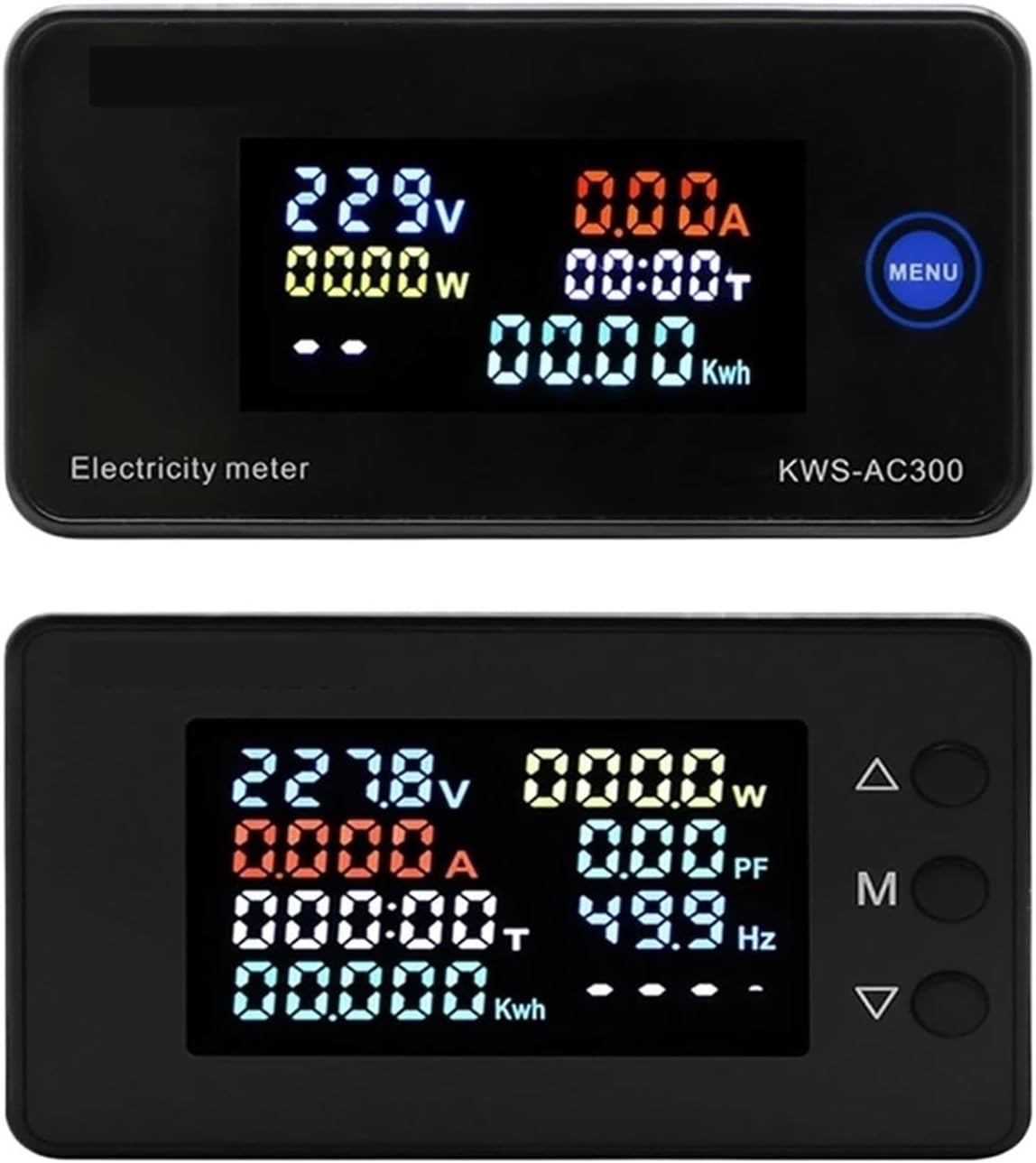
Figure 7.1: Top display shows KWS-AC300 with Voltage, Current, Power, Timing, and Kwh. Bottom display shows KWS-AC301 with Voltage, Current, Power, Timing, Kwh, Power Factor, and Frequency.
The display shows various parameters simultaneously. The KWS-AC300 typically displays Voltage, Current, Power, Timing, and Kwh. The KWS-AC301 models additionally display Frequency and Power Factor.
7.2 버튼 기능
The meters typically feature one or more buttons for interaction:
- KWS-AC300: Features a "MENU" button. Pressing this button allows cycling through display modes or accessing settings.
- KWS-AC301: Features three buttons: Up (Δ), Middle (M), and Down (∇).

Figure 7.2: KWS-AC301 button interaction. Pressing the 'M' button for 3 seconds allows entry into setting or alarm value adjustment modes.
- "M" Button (KWS-AC301):
- 짧은 보도: Cycles through different display parameters (e.g., Voltage, Current, Power, Kwh, Timing, Temperature).
- 길게 누르기(3초): Enters the setting mode or alarm value adjustment mode. Use the Up (Δ) and Down (∇) buttons to navigate and adjust values.
- Up (Δ) and Down (∇) Buttons (KWS-AC301): Used to navigate menus, increase or decrease values in setting modes.
7.3 Resetting Electrical Energy and Timing
To reset the cumulative electrical energy (Kwh) and timing (H) values, typically a long press on a specific button (often the "M" or "MENU" button) while in the Kwh or Timing display mode will initiate the reset process. Confirm the reset if prompted by the display.
8. 유지관리
- Keep the meter clean and free from dust. Use a soft, dry cloth for cleaning.
- 기기를 극한 온도, 직사광선 또는 부식성 환경에 노출시키지 마십시오.
- 직접 계측기를 열거나 수리하려고 하지 마세요. 보증이 무효화되고 안전 위험이 발생할 수 있습니다.
- Ensure all wiring connections remain secure over time.
9. 문제 해결
- 디스플레이 없음:
- Check if the power supply (AC 50-300V) is connected correctly and active.
- 입력 볼륨을 확인하세요tage는 지정된 범위 내에 있습니다.
- Incorrect Current/Power Reading:
- For 100A models, verify the CT coil is correctly installed around the live wire and connected to the meter.
- Ensure the CT coil direction is correct.
- Check if the load is properly connected.
- Parameters Not Resetting:
- Refer to Section 7.3 for the correct procedure to reset Kwh and Timing. Ensure the button is pressed for the required duration.
- 485 통신 문제 (KWS-AC301L):
- Verify the A+ and B- connections are correct.
- Check communication settings (baud rate, parity, stop bits) on both the meter and the connected device.
10. 보증 및 지원
보증 정보, 기술 지원 또는 서비스 문의는 제조업체 또는 공인 대리점에 문의하십시오. 구매 영수증을 보관하여 구매 증빙 자료로 활용하십시오.
Manufacturer: IXITAB