
1. 서론
Thank you for choosing TTQ Open Ear Headphones, Model CT26. These true wireless sports earbuds are designed to provide a comfortable listening experience while allowing you to remain aware of your surroundings. Featuring Bluetooth 5.3 connectivity, IPX7 waterproofing, and crystal-clear call quality, they are ideal for various activities including running, cycling, workouts, and driving. This manual will guide you through the setup, operation, and maintenance of your new headphones.
2. 패키지 내용
패키지에 모든 품목이 들어 있는지 확인하세요.
- TTQ Open Ear Headphones (Left and Right Earbuds)
- 충전 케이스
- USB-C 충전 케이블
- 사용자 설명서

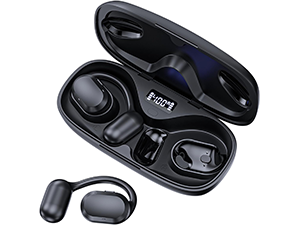
영상: The TTQ Open Ear Headphones, Model CT26, displayed within their open charging case. The case features an LED digital power display indicating the battery level of both the case and the individual earbuds.
3. 제품 오버view
The TTQ CT26 headphones feature an innovative open-ear design with flexible earhooks, ensuring comfort and stability during extended use. This design allows ambient sounds to be heard, enhancing safety in outdoor environments.

영상: A person wearing the TTQ Open Ear Earbuds, demonstrating how the open-ear design sits comfortably outside the ear canal, allowing for situational awareness.

영상: Two individuals cycling outdoors, both wearing TTQ Open Ear Headphones. This illustrates the product's suitability for sports and activities where awareness of surroundings is crucial for safety.
4. 설정
4.1 헤드폰 및 케이스 충전
Before first use, fully charge the headphones and the charging case. Connect the provided USB-C charging cable to the charging port on the case and a power source. The LED display on the charging case will show the battery percentage, and individual earbud charge indicators will light up during charging.
- A full charge provides up to 8 hours of music playtime or 9 hours of call time for the earbuds.
- The charging case extends total playtime to up to 36 hours.

영상: The TTQ charging case with its lid open, showcasing the digital LED display that indicates the battery percentage of the case and the charging status of the earbuds. A USB-C charging port is visible at the front.
4.2 기기와 페어링
- 헤드폰이 충전되어 있는지 확인하십시오.
- Open the charging case. The earbuds will automatically enter pairing mode, indicated by a flashing light (if applicable, refer to product specific light indicators).
- 기기(스마트폰, 태블릿, 컴퓨터)에서 Bluetooth 설정으로 가서 Bluetooth를 켜세요.
- 검색 available devices and select "CT26" from the list.
- 연결되면 이어버드는 페어링 성공을 알려줍니다(예: 음성 안내 또는 표시등 점등).
헤드폰을 케이스에서 꺼내면 기기에서 블루투스가 활성화된 경우 마지막으로 페어링된 장치에 자동으로 다시 연결됩니다.

영상: A visual representation of Bluetooth 5.3 technology, showing a smartphone's Bluetooth settings screen with 'CT26' listed as a connected device, illustrating the stable and fast connection capability.
5. 사용 설명서
The TTQ CT26 headphones feature a physical button for easy control of various functions.
영상: A diagram illustrating the single button controls on the earbud, detailing actions for pause/play, answer/hang up, rejection, volume adjustment, switching songs, and activating Siri.
5.1 음악 재생
- 재생/일시 중지: Press the button once (x1).
- 다음 노래: Press the button twice (x2).
- 이전 노래: Press the button three times (x3).
- 볼륨 높이기/낮추기: Press and hold the button for 2 seconds (Hold 2s).
5.2 통화 관리
- 전화 받기/종료: Press the button once (x1).
- 전화 거부: Press and hold the button for 2 seconds (Hold 2s).
The headphones feature dual-mic noise-cancelling technology for clearer calls by reducing environmental noise.

영상: A man wearing TTQ Open Ear Headphones while holding a smartphone, illustrating the intelligent noise cancellation feature that boosts human voice and reduces environmental noise for clearer calls.
5.3 음성 어시스턴트
- 음성 지원 기능(Siri, Google Assistant 등)을 활성화합니다. Press the button three times (x3).
6. 유지관리
To ensure the longevity and optimal performance of your TTQ Open Ear Headphones, follow these maintenance guidelines:
- 청소: 이어버드와 충전 케이스는 부드럽고 마른 천으로 정기적으로 닦아주세요. 연마재나 강한 화학 물질은 사용하지 마세요.
- 방수 기능: The headphones are IPX7 waterproof, meaning they can withstand submersion in up to 1 meter of water for 30 minutes. They are resistant to sweat and rain, making them suitable for workouts. However, they are not designed for swimming or prolonged submersion. Ensure the charging port is dry before charging.
- 저장: 사용하지 않을 때는 먼지와 손상으로부터 보호하기 위해 충전 케이스에 보관하세요. 서늘하고 건조한 곳에 보관하고 극한의 온도는 피해 주세요.

영상: TTQ Open Ear Headphones and their charging case on a wet surface with water splashes, demonstrating their IPX7 waterproof rating, indicating resistance to rain and sweat.
7. 문제 해결
If you encounter issues with your TTQ Open Ear Headphones, please refer to the following common solutions:
- 소리가 나지 않음/볼륨이 낮음:
- 헤드폰이 제대로 페어링되어 장치에 연결되어 있는지 확인하세요.
- 헤드폰과 연결된 기기의 볼륨 레벨을 확인하세요.
- 이어버드가 충전되어 있는지 확인하세요.
- 페어링 문제:
- 기기에서 Bluetooth가 활성화되어 있는지 확인하세요.
- Ensure the headphones are in pairing mode (flashing indicator).
- 근처에 연결을 시도하는 다른 기기의 Bluetooth를 끕니다.
- Forget/remove "CT26" from your device's Bluetooth list and try pairing again.
- Restart both your device and the headphones (by placing them back in the case and taking them out).
- 충전 문제:
- 충전 케이블이 케이스와 전원에 모두 단단히 연결되어 있는지 확인하세요.
- 다른 USB-C 케이블과 전원 어댑터를 사용해 보세요.
- 이어버드와 케이스의 충전 접점이 깨끗하고 이물질이 없는지 확인하십시오.
- 간헐적인 연결:
- Ensure your device is within the Bluetooth range (up to 10 meters/33 feet).
- Avoid physical obstructions between the headphones and your device.
- 다른 무선 장치의 간섭을 최소화하세요.
위 단계를 시도한 후에도 문제가 지속되면 고객 지원팀에 문의하십시오.
8. 사양
| 특징 | 사양 |
|---|---|
| 모델명 | CT26 |
| 연결 기술 | 무선(블루투스) |
| 무선 통신 기술 | 블루투스 5.3 |
| 블루투스 범위 | 10미터(33피트) |
| 방수 레벨 | IPX7 방수 |
| 귀 위치 | 오픈 이어 |
| 폼 팩터 | 트루 와이어리스 |
| 배터리 수명(이어버드) | 8 Hours (Music) / 9 Hours (Calls) |
| 충전 케이스를 사용한 총 재생 시간 | 최대 36시간 |
| 오디오 드라이버 유형 | 동적 드라이버 |
| 오디오 드라이버 크기 | 16.2 밀리미터 |
| 주파수 범위 | 20Hz - 20,000Hz |
| 소음 제어 | 능동 소음 제거(통화용) |
| 제어 방법 | 물리적 버튼 |
| 충전 포트 | USB-C |
| 품목 무게 | 7.8온스(0.22킬로그램) |
| 재료 | 플라스틱 |
| 한국어: | 717977781312 |
9. 고객 지원
For any questions, concerns, or if you receive a defective product, please do not hesitate to contact TTQ customer support. We are committed to providing solutions within 24 hours.
Please visit the official TTQ store on Amazon for more information and support resources: TTQ Store