
SANPTENT B0CSFSRW39
SANPTENT Portable 9-inch FHD Touch Screen Car Stereo User Manual
Model: B0CSFSRW39
1. 제품 오버view
The SANPTENT Portable 9-inch FHD Touch Screen Car Stereo is designed to enhance your in-car entertainment and navigation experience. It features wireless Apple CarPlay and Android Auto, Mirror Link functionality, Bluetooth connectivity, an FM transmitter, and support for a rear camera. This manual provides instructions for proper installation, operation, and maintenance.

이미지 1.1: 이상view of the SANPTENT Portable Car Stereo, showing the 9-inch display, included backup camera, and wireless connectivity options for Android Auto and Apple CarPlay.
2. 패키지 내용
설치를 진행하기 전에 패키지에 모든 품목이 들어 있는지 확인하세요.
- 1 x 9-Inch Portable Car Stereo
- 1 x Waterproof AHD Rear Camera with 26.2ft cable
- 1 x 4.65피트 AUX 케이블
- 1 x 4.92ft Car Charger Cable
- 1 x 데스크탑 브래킷

Image 2.1: Visual representation of the package contents, including the main unit, cables, and rear camera.
3. 설정 및 설치
3.1 디스플레이 장치 장착
The portable car stereo can be mounted on your dashboard using the provided desktop bracket. Ensure the mounting location does not obstruct your view 또는 차량 제어를 방해합니다.
- Attach the display unit to the desktop bracket.
- Clean the desired mounting surface on your dashboard thoroughly.
- Apply the provided gel sticker to the base of the desktop bracket.
- Securely press the bracket onto the cleaned dashboard surface. The gel sticker allows for secure attachment without drilling.

Image 3.1: The portable car stereo mounted on a dashboard, demonstrating its placement and integration with the car's interior.
3.2 전원 연결
Connect the car charger cable to the portable stereo and plug the other end into your vehicle's 12V power outlet (cigarette lighter socket).
3.3 오디오 출력 연결
There are three primary methods to output audio from the portable stereo to your car's audio system:
- FM 송신기 : Tune the portable stereo's FM transmitter to an unused FM frequency, then tune your car's radio to the same frequency.
- 보조 케이블: Connect the provided 4.65ft AUX cable from the portable stereo's AUX output to your car's AUX input.
- 내장 스피커: The unit has a local 4Ω 3W speaker for direct audio output.

Image 3.2: Illustration of the three audio output methods: FM transmission, AUX connection, and the unit's internal speaker.
3.4 후방카메라 설치
The included waterproof AHD rear camera provides a 170° viewing angle and supports HD color night vision. Professional installation is recommended for optimal performance.
- 차량 후면에 후방 카메라를 장착하여 선명한 영상을 확보하십시오. view.
- Route the 26.2ft camera cable from the rear of the vehicle to the portable stereo unit.
- Connect the camera cable to the "Rear Camera In" port on the portable stereo.
- Connect the camera's power cable to your vehicle's reverse light circuit so it activates automatically when shifting into reverse.

Image 3.3: Details of the backup camera, highlighting its waterproof design, wide-angle lens, night vision, and 1080P resolution.
4. 사용 설명서
4.1 전원 켜기/끄기
- 전원 켜기: The unit will power on automatically when connected to the car's power supply and the vehicle is started.
- 전원 끄기 : Disconnect the car charger cable or turn off your vehicle's ignition.
4.2 무선 Apple CarPlay / Android Auto
This unit supports wireless connectivity for both Apple CarPlay and Android Auto, providing access to your phone's features on the 9-inch display.
- 스마트폰에서 Bluetooth가 활성화되어 있는지 확인하세요.
- On the portable stereo, navigate to the CarPlay or Android Auto interface.
- On your phone, search for and connect to the portable stereo's Bluetooth device name.
- Follow any on-screen prompts on both your phone and the stereo to complete the pairing process.
- Once connected, your phone's CarPlay or Android Auto interface will appear on the stereo display.

Image 4.1: Step-by-step guide for wirelessly connecting an iPhone to Apple CarPlay on the SANPTENT stereo.

Image 4.2: Step-by-step guide for wirelessly connecting an Android phone to Android Auto on the SANPTENT stereo.
4.3 미러 링크 기능
Mirror Link allows you to display your smartphone's screen directly onto the portable stereo. This feature is useful for viewing content not natively supported by CarPlay or Android Auto, such as certain video streaming applications.
- Connect your iPhone and the portable stereo to the same Wi-Fi network.
- On your iPhone, access the Control Center and select "Screen Mirroring."
- Choose the portable stereo from the list of available devices (often labeled "SmartScreen").
- Your iPhone's screen will now be mirrored on the stereo display.
- For Android devices, connect via USB cable and follow on-screen prompts for screen mirroring.
메모: This unit does not support Netflix via Mirror Link.

Image 4.3: Demonstration of Mirror Link, showing a smartphone screen duplicated on the car stereo display.
4.4 음성 제어(시리/구글 어시스턴트)
Utilize voice commands for hands-free operation through Siri (for Apple CarPlay) or Google Assistant (for Android Auto). The built-in microphone ensures clear voice input.
- Activate Siri or Google Assistant by saying "Hey Siri" or "Hey Google," or by pressing the voice command button on the screen.
- Issue commands such as "Play music," "Get directions to [destination]," "Send message to [contact]," or "Make a phone call."
4.5 후방 카메라 작동
When the rear camera is properly installed and connected to your vehicle's reverse light circuit, the display will automatically switch to the camera view when you shift into reverse gear. This provides a visual aid for parking and reversing maneuvers.
중요한: The backup camera is an auxiliary reversing aid and does not record video. Always check your surroundings manually before and during reversing.
4.6 디스플레이 설정
The 9-inch HD touchscreen offers various display adjustments for optimal view주고받음.
- 명도: Adjust screen brightness through the settings menu to suit ambient light conditions.
- 낮/밤 모드: The unit may automatically switch between day and night display modes or allow manual selection for improved visibility.
- 해결: The screen supports 1080P video playback for a clear view경험.

Image 4.4: Comparison of 1080P Full HD display quality versus 720P, highlighting the clarity of the SANPTENT unit's screen.
5. 유지관리
To ensure the longevity and optimal performance of your SANPTENT Portable Car Stereo, follow these maintenance guidelines:
- 화면 청소: 부드럽고 보풀이 없는 천을 사용하여 터치스크린을 부드럽게 닦으세요. 잘 지워지지 않는 얼룩은 가볍게 닦아주세요.amp천에 물이나 화면에 안전한 세척제를 묻혀 닦아주세요. 강한 화학 물질이나 연마재는 사용하지 마세요.
- 케이블 관리 : 케이블이 걸리거나 과도하게 구부러져 손상되지 않도록 모든 케이블을 깔끔하게 정리하고 고정하십시오.
- 온도 노출: Avoid exposing the unit to extreme temperatures for prolonged periods. While designed for automotive use, extreme heat or cold can affect performance and lifespan.
- 소프트웨어 업데이트: 제조사 확인해보세요 web최상의 성능과 호환성을 보장하기 위해 정기적으로 사이트에서 사용 가능한 펌웨어 업데이트를 확인하십시오.
6. 문제 해결
If you encounter issues with your portable car stereo, refer to the following common troubleshooting steps:
- 전원 없음:
- Ensure the car charger cable is securely plugged into both the unit and the vehicle's 12V power outlet.
- 차량의 12V 전원 소켓이 제대로 작동하는지 확인하십시오 (예: 다른 기기를 연결해 보는 방식).
- Verify the vehicle's fuse for the 12V power outlet is not blown.
- 오디오 출력 없음:
- FM 송신기 : Confirm the stereo's FM frequency matches your car radio's frequency and that the chosen frequency is clear of other broadcasts.
- 보조 케이블: Ensure the AUX cable is fully inserted into both the portable stereo and your car's AUX input. Select the correct AUX input source on your car's audio system.
- 블루투스: Verify your phone is connected via Bluetooth and the volume on both the phone and the stereo is turned up.
- Check the volume settings on the portable stereo itself.
- CarPlay/Android Auto 연결 안 됨:
- 휴대폰과 스테레오에서 블루투스가 켜져 있는지 확인하세요.
- 휴대폰의 Bluetooth 설정에서 해당 기기를 삭제하고 다시 페어링하세요.
- Restart both your phone and the portable stereo.
- Confirm your phone's operating system is up to date and supports CarPlay/Android Auto.
- Touchscreen Unresponsive or Slow:
- 전원을 차단했다가 다시 연결하여 장치를 재시작하십시오.
- 화면이 깨끗하고 이물질이 없는지 확인하세요.
- 후방 카메라 영상이 표시되지 않음:
- Check all camera cable connections, ensuring they are secure.
- Verify the camera's power connection to the reverse light circuit is correct.
- 차량이 후진 기어에 있는지 확인하십시오.
이러한 단계를 거쳐도 문제가 해결되지 않으면 고객 지원팀에 문의하세요.
7. 사양
| 특징 | 세부 사항 |
|---|---|
| 제품 치수 | 10 x 4 x 6 인치 |
| 품목 무게 | 2파운드 |
| ASIN | B0CSFSRW39 |
| 연결 기술 | 보조, 블루투스 |
| 특별 기능 | Built-In Microphone, Reverse Assist, Siri/Google Assistant Voice Control, Touch Screen, Wireless & Wired Apple CarPlay Android Auto |
| 기타 디스플레이 기능 | 무선 전화 |
| 색상 | 검은색 |
| 제조업체 | SANPTENT |
| 차량 서비스 유형 | 자동차, 트럭 |
| Video Capture Resolution (Camera) | 1080p |
| 장착 유형 | 대시 보드 마운트 |
| 분야의 View (카메라) | 175도 |
| 제어 방법 | 만지다 |
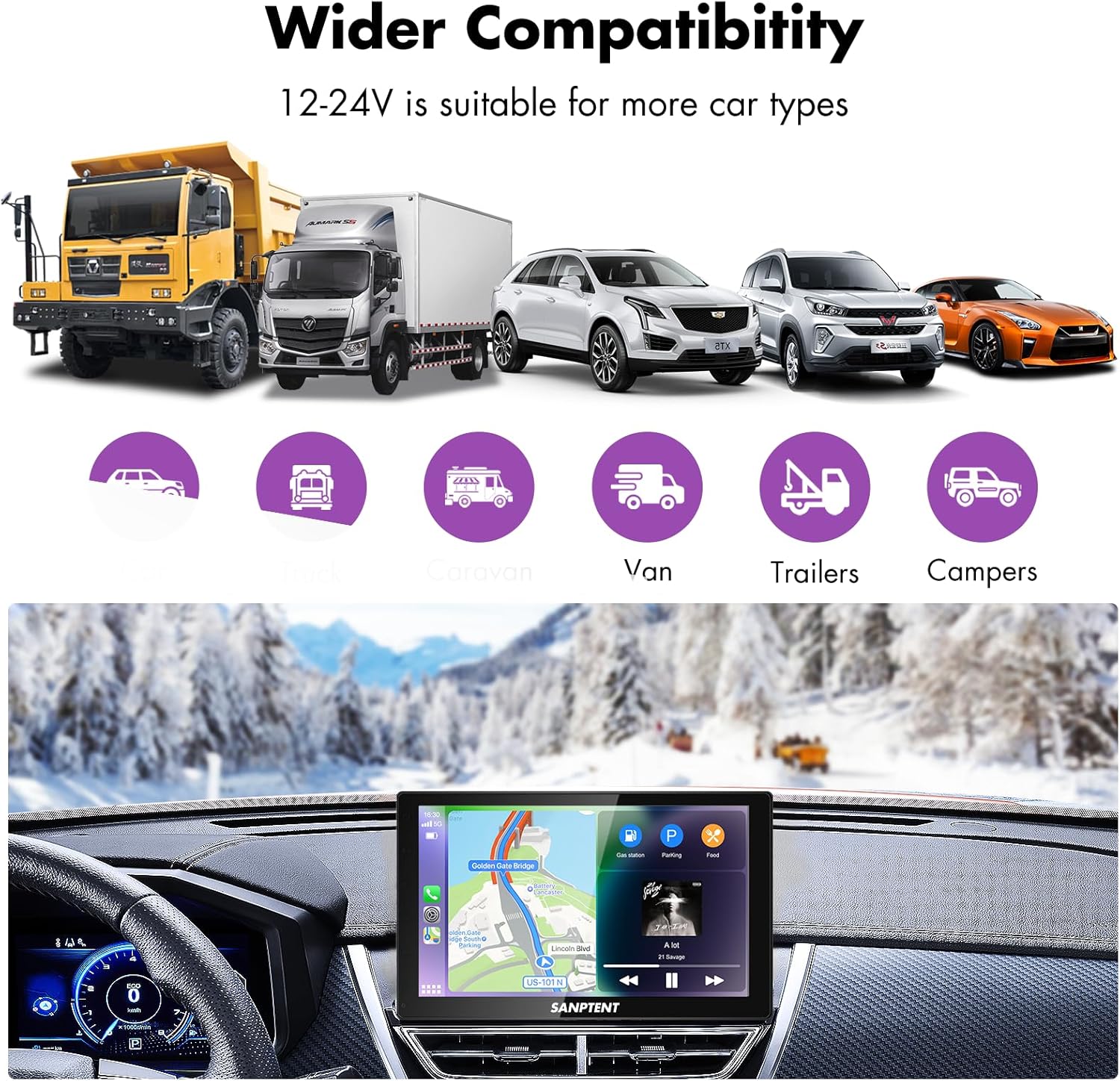
Image 7.1: The portable car stereo is compatible with 12-24V power systems, suitable for various vehicle types including cars, trucks, caravans, vans, trailers, and camp어.
8. 보증 및 지원
8.1 제한 보증
SANPTENT products are covered by a limited warranty against defects in materials and workmanship from the date of purchase. Please refer to the warranty card included in your package or visit the official SANPTENT web자세한 보증 약관은 해당 사이트를 참조하세요. 보증 청구를 위해 구매 증빙 자료를 보관하세요.
8.2 고객 지원
For technical assistance, troubleshooting, or warranty inquiries, please contact SANPTENT customer support. Contact information can typically be found on the product packaging, the official SANPTENT web사이트나 소매업체를 통해 구매할 수 있습니다.
Ask a question about this manual
Ask about setup, troubleshooting, compatibility, parts, safety, or missing instructions. Manuals+ will review the question and use this page’s manual context to help answer it.