
BEBANG WX-C03-651
BEBANG Pocket Microscope Instruction Manual
Model: WX-C03-651
1. 서론
The BEBANG Pocket Microscope is a compact and versatile scientific instrument designed to introduce users, especially children and students, to the fascinating world of microscopy. With its adjustable magnification from 60x to 120x, integrated LED illumination, and portable design, it allows for on-the-go exploration of various specimens. This manual provides essential information on setting up, operating, and maintaining your pocket microscope to ensure optimal performance and a rewarding learning experience.

Image 1.1: The BEBANG Pocket Microscope, a compact and portable device for microscopic observation.
2. 제품 특징
- 조정 가능한 배율: Offers a magnification range of 60x to 120x, allowing for detailed observation of various subjects.
- 이중 조명: Equipped with a bright LED light for clear viewing and a UV light source for specialized observations, such as currency verification.
- 휴대성 있는 디자인: Its compact and lightweight construction makes it easy to carry and use anywhere, fostering exploration in diverse environments.
- Easy Focusing: Features an adjustable focus wheel for precise and sharp image acquisition.
- 포함된 액세서리: Comes with five prepared microscope slides for immediate scientific exploration.

Image 2.1: Visual representation of 60x and 120x magnification capabilities, alongside the LED and UV light functions.
3. 상자 안에 무엇이 들어있나요?
Upon opening your BEBANG Pocket Microscope package, you should find the following items:
- 1 x BEBANG Pocket Microscope (Model: WX-C03-651)
- 5 x Prepared Microscope Slides Specimens
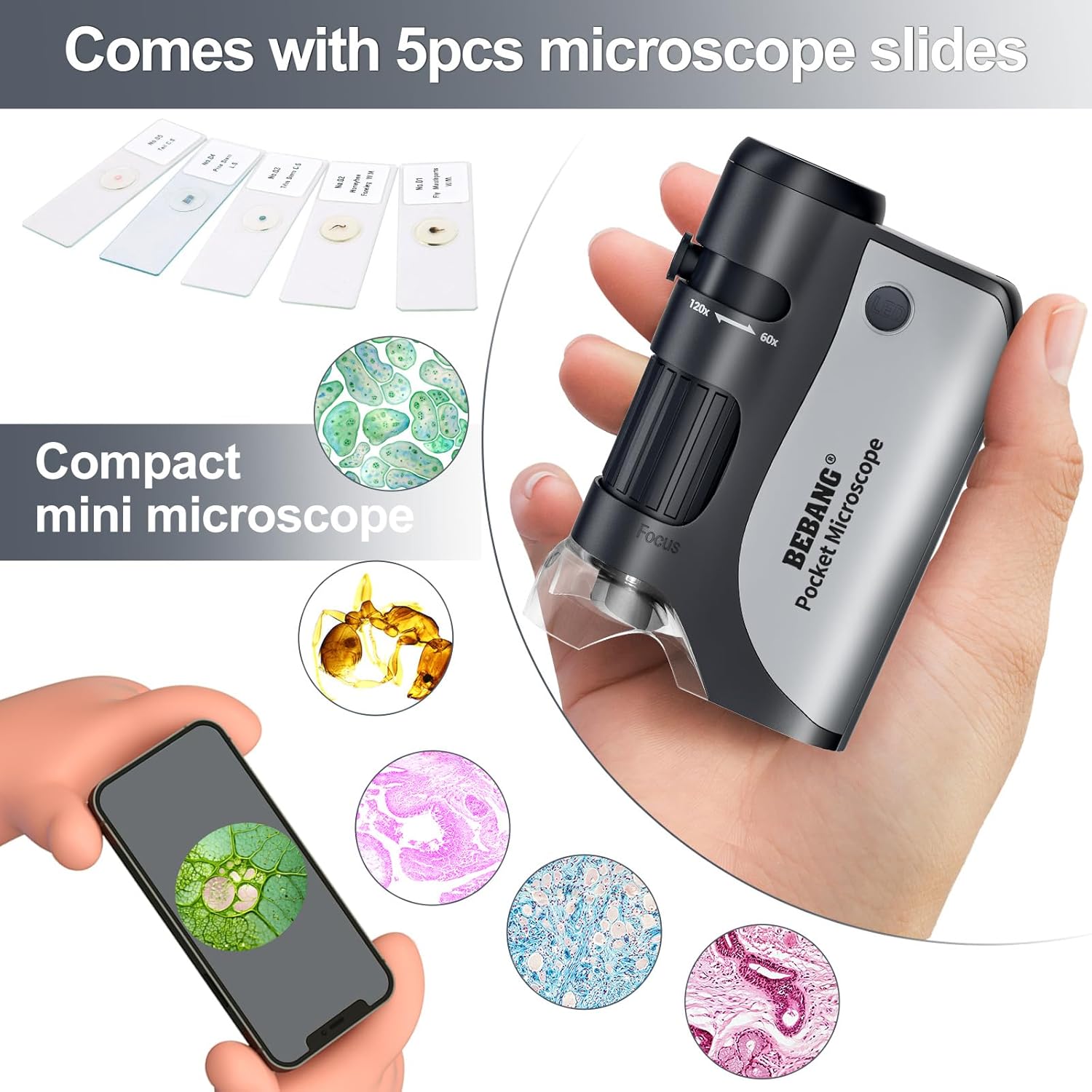
Image 3.1: Contents of the BEBANG Pocket Microscope package, including the microscope and prepared slides.
4. 설정
4.1 배터리 설치
The BEBANG Pocket Microscope requires one (1) AA battery for operation (battery not included). Follow these steps to install the battery:
- Locate the battery compartment cover on the side or back of the microscope.
- 덮개를 살짝 밀거나 풀어서 수납 공간을 엽니다.
- AA 배터리 1개를 넣고 양극(+)과 음극(-) 단자가 배터리 수납 공간 내부의 표시와 올바르게 맞춰지도록 합니다.
- 배터리 덮개를 단단히 닫으세요.
4.2 전원 켜기/끄기
To power on the microscope's LED light, press the 'LED' button located near the top of the microscope. Press it again to turn the light off. For the UV light, press and hold the dedicated UV button.
5. 사용 설명서
5.1 Observing a Specimen
- Place the microscope directly over the object you wish to observe. For prepared slides, place the slide on a flat, well-lit surface.
- Press the 'LED' button to turn on the illumination.
- 접안렌즈를 통해 살펴보세요.
- Adjust the focus wheel (typically located on the side) until the image appears clear and sharp.
- To change magnification, slide the zoom adjustment (marked 60x-120x) to your desired level and re-focus if necessary.

Image 5.1: Users engaging with the BEBANG Pocket Microscope to explore various subjects.
5.2 Using the UV Light
The UV light feature is useful for detecting fluorescent properties in certain materials, such as security features on currency. To activate the UV light, press and hold the dedicated UV button. Release the button to turn it off.

이미지 5.2: Examples of various specimens that can be observed using the microscope, including biological samples and everyday objects.
6. 유지관리
6.1 렌즈 청소
To maintain clear viewing, keep the lenses clean. Use a soft, lint-free cloth specifically designed for optical lenses. Avoid using abrasive materials or harsh chemicals, which can scratch or damage the lens coatings.
6.2 배터리 교체
When the LED light dims or fails to turn on, it's time to replace the battery. Follow the battery installation steps in Section 4.1.
6.3 보관
Store the microscope in a dry, dust-free environment when not in use. Keep it away from extreme temperatures and direct sunlight. The included pouch can help protect it during transport and storage.
7. 문제 해결
- Problem: Cannot see anything or image is blurry.
- 해결책:
- LED 표시등이 켜져 있는지 확인하세요.
- Adjust the focus wheel slowly until the image becomes clear.
- Make sure the microscope is placed directly over the specimen.
- Check if the lenses are clean. Refer to Section 6.1 for cleaning instructions.
- Verify that the battery is correctly installed and has sufficient power.
- Problem: LED light does not turn on.
- 해결책:
- 배터리가 극성이 올바르게 설치되었는지 확인하십시오.
- 배터리를 새 AA 배터리로 교체하세요.
8. 사양
| 특징 | 세부 사항 |
|---|---|
| 제품 유형 | Clip-type Microscope |
| 확대 범위 | 60배~120배 |
| 광원 유형 | LED, 자외선 |
| 재료 | ABS 아크릴 |
| 색상 | 검은색 |
| 전원 | 1 x AA Battery (3 Volts) |
| 제품 치수 | 2.37인치 길이 x 1.34인치 너비 x 3.55인치 높이(6cm x 3.4cm x 9cm) |
| 품목 무게 | 5.6 온스 |
| 모델 번호 | WX-C03-651 |
| 제조업체 | 베방 |

Image 8.1: Detailed dimensions and technical specifications of the BEBANG Pocket Microscope.
9. 보증 및 지원
For any questions, technical assistance, or support regarding your BEBANG Pocket Microscope, please contact BEBANG customer service. Please refer to the product packaging or the BEBANG official web최신 연락처 정보는 사이트에서 확인하세요.
Ask a question about this manual
Ask about setup, troubleshooting, compatibility, parts, safety, or missing instructions. Manuals+ will review the question and use this page’s manual context to help answer it.