
iKiKin V600
iKiKin V600 OBD2 Scanner User Manual
모델: V600
1. 제품 오버view
The iKiKin V600 OBD2 Scanner is a professional diagnostic tool designed to help identify and resolve issues with your vehicle's engine system. It provides comprehensive diagnostic functions, including reading and clearing fault codes, viewing live data, and performing various system tests. This manual will guide you through the setup, operation, and maintenance of your V600 scanner.
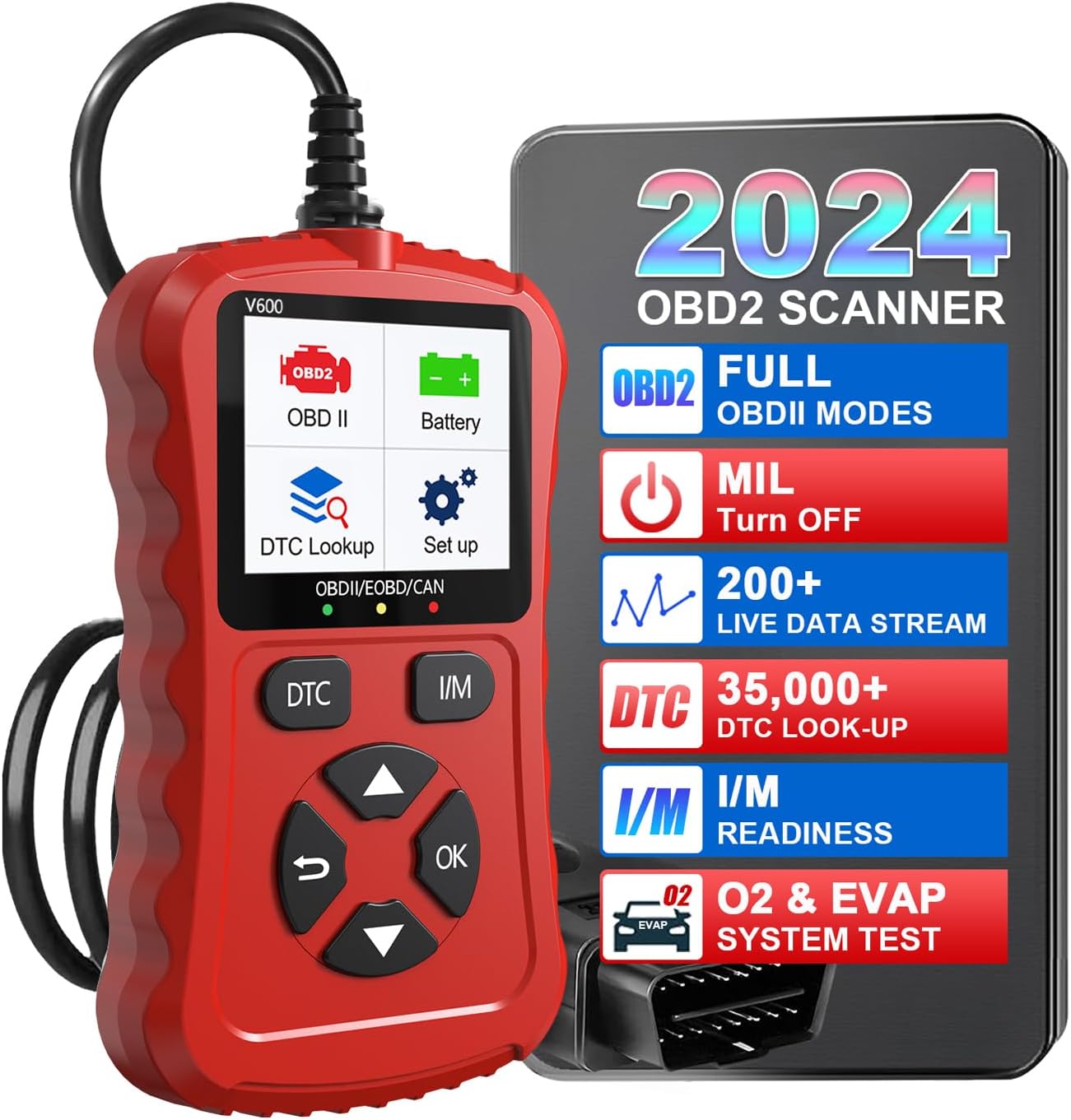
Image: The iKiKin V600 OBD2 Scanner, highlighting its main display and key features.

이미지: 상세 views of the V600 scanner's physical features, including its screen, indicator lights, and ergonomic design.
2. 패키지 내용
개봉 시 패키지 내용물을 확인하여 모든 품목이 들어 있는지 확인하세요.
- OBD2 Code Scanner
- 케이블
- 사용자 가이드
3. 주요 특징
- 다기능: Built-in OBD2 DTC lookup library, read and erase codes, view freeze frame, I/M readiness, vehicle information, data flow, real-time curve, vehicle speed, calculate load value, engine coolant temperature, engine speed.
- OBDII 호환성: Supports 9 protocols compatible with most 1996 US-Based, 2000 EU-Based, and Asian cars, and newer OBD II & CAN domestic or import vehicles.
- 다국어 지원: Supports 9 languages including English, German, Dutch, Spanish, French, Italian, Russian, Chinese, Japanese, and Korean.
- 사용자 친화적인 디자인: Clear 128 x 64 pixels LCD screen. No battery or charger needed; powered directly from the vehicle's OBDII Data Link Connector.
- 사용 편의성: Provides accurate and fast results, reads and clears engine trouble codes in seconds.
- Cost and Time Saving: Enables self-diagnosis of fault codes and definitions, reducing the need for mechanic visits.
4. Vehicle Compatibility and Language Support
The V600 scanner offers wide automotive compatibility, supporting vehicles from various regions and adhering to multiple communication protocols.
- 미국 기반 차량: Compatible with most vehicles manufactured since 1996.
- EU 기반 차량: Compatible with most vehicles manufactured since 2000.
- 아시아 자동차: Compatible with most vehicles manufactured since 2008.
- 지원되는 프로토콜 : SAE J1850 PWM, SAE J1850 VPW, ISO 9141-2, ISO14230-4 KWP (5 baud init), ISO14230-4 KWP (fast init), ISO15765-4 CAN (11bit ID, 500 Kbaud), ISO15765-4 CAN (29bit ID, 500 Kbaud), ISO15765-4 CAN (11bit ID, 250 Kbaud), ISO15765-4 CAN (29bit ID, 250 Kbaud).
- 지원 언어: English, German, Dutch, Spanish, French, Italian, Russian, Chinese, Japanese, Korean.

Image: Visual representation of the V600's broad vehicle compatibility and extensive language and protocol support.
5. 시작하기(설정)
Follow these steps to connect and power on your iKiKin V600 OBD2 Scanner:
- OBDII 포트를 찾으세요: The OBDII (On-Board Diagnostics II) port is typically located under the dashboard on the driver's side of the vehicle. Refer to your vehicle's owner's manual if you cannot find it.
- 스캐너 연결: Plug the V600 scanner's cable connector firmly into the vehicle's OBDII port.
- 전원 켜기: Once connected, the scanner will automatically power on, drawing power directly from the vehicle's battery via the OBDII port. No external power source or batteries are required.
- Start Vehicle (Optional): For some diagnostic functions, it may be necessary to turn the vehicle's ignition to the 'ON' position (engine off) or start the engine. Follow the on-screen prompts of the scanner.
6. Operating the V600 Scanner
메인 메뉴 탐색
The V600 scanner features a user-friendly interface with dedicated buttons for navigation:
- 위/아래 화살표: 메뉴 옵션을 탐색합니다.
- 좌/우 화살표: Move cursor or change values (if applicable).
- 확인 버튼: 선택을 확인하거나 하위 메뉴로 들어가세요.
- Return Button (U-turn arrow): 이전 화면으로 돌아가거나 기능을 종료합니다.
- DTC 버튼: 진단 문제 코드에 빠르게 접근할 수 있습니다.
- I/M 버튼: I/M 준비 상태에 빠르게 접근할 수 있습니다.
진단 기능
The V600 offers a range of diagnostic capabilities:
- 코드 읽기: Retrieves Diagnostic Trouble Codes (DTCs) from the vehicle's computer, indicating specific issues.
- 코드 지우기: Clears DTCs from the vehicle's computer and turns off the Check Engine Light (MIL). Ensure the underlying issue is resolved before clearing codes.
- View 정지 화면: Displays a snapshot of sensor data recorded by the vehicle's computer at the moment a fault code was set. This helps in diagnosing intermittent problems.
- I/M 준비: Checks the status of the vehicle's emission-related monitors to determine if they have completed their diagnostic cycles. Essential for emission testing.
- 데이터 스트림 : Displays real-time live data from the vehicle's sensors in numerical or graphical format, such as engine RPM, vehicle speed, coolant temperature, etc.
- Real-Time Curve: Graphically displays dynamic data parameters over time, allowing for visual analysis of sensor performance.
- EVAP 시스템 테스트: 차량의 증발가스 배출 제어 시스템에 대한 누출 테스트를 시작합니다.
- DTC 조회 라이브러리: Provides definitions for generic and manufacturer-specific Diagnostic Trouble Codes, helping you understand the meaning of each code.
- 차량 정보: 차량 식별 번호(VIN), 교정 ID 및 교정 확인 번호(CVN)를 검색합니다.
- 배터리 용량tage: Tests and displays the current voltag자동차 배터리의 실시간 가치.
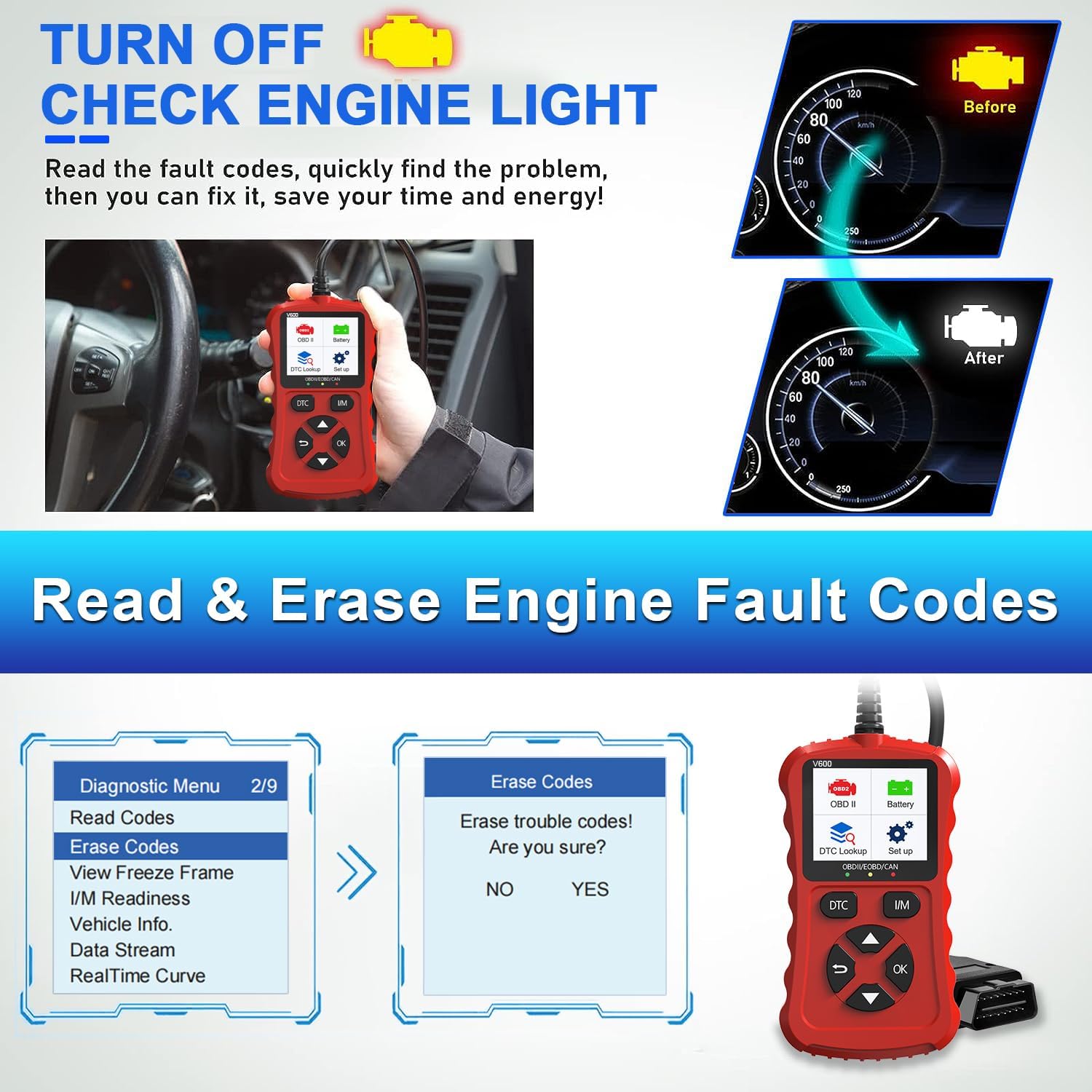
Image: Demonstrates how to read and clear engine fault codes, effectively turning off the check engine light.
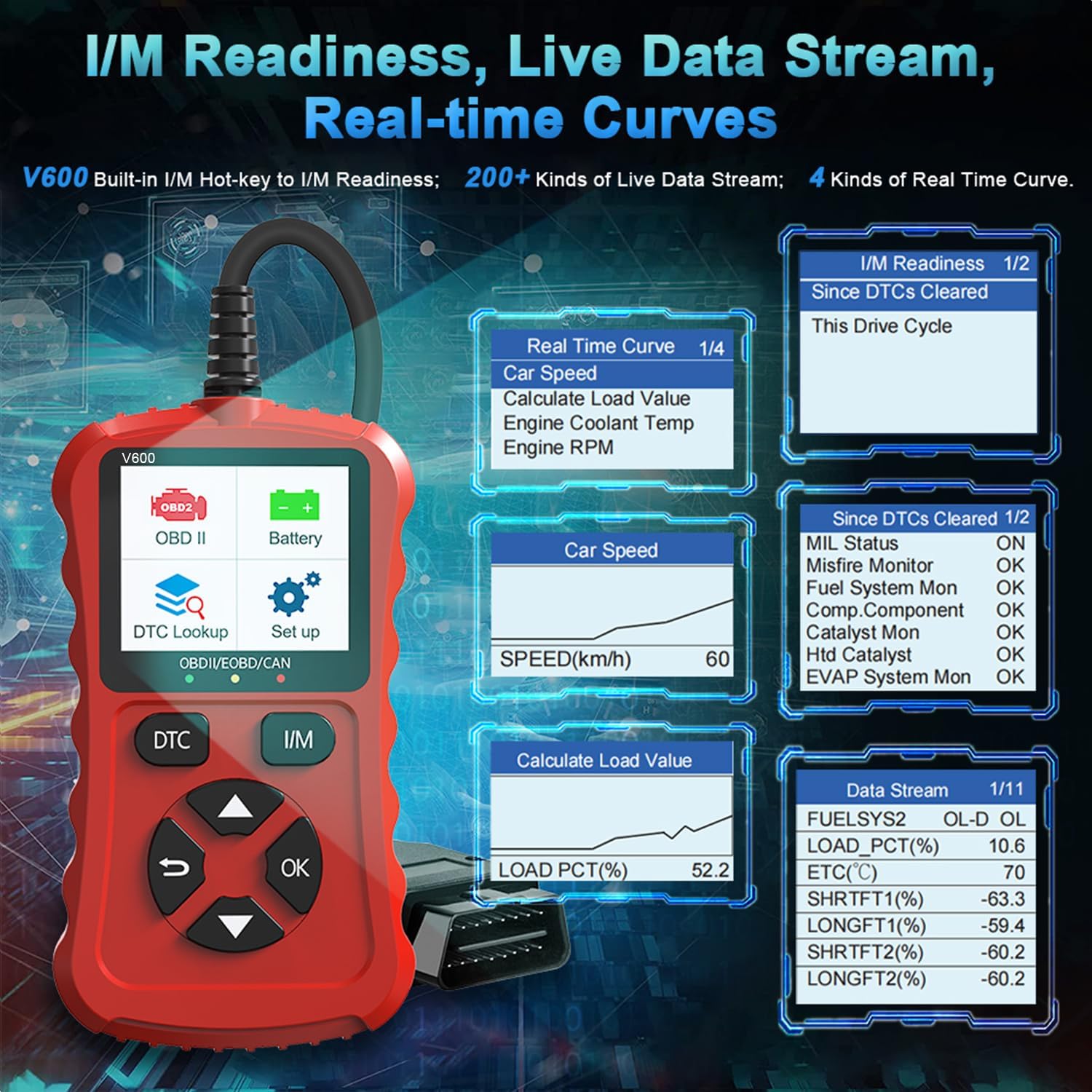
Image: Shows the I/M Readiness screen, examples of live data streams, and real-time curve displays for various vehicle parameters.
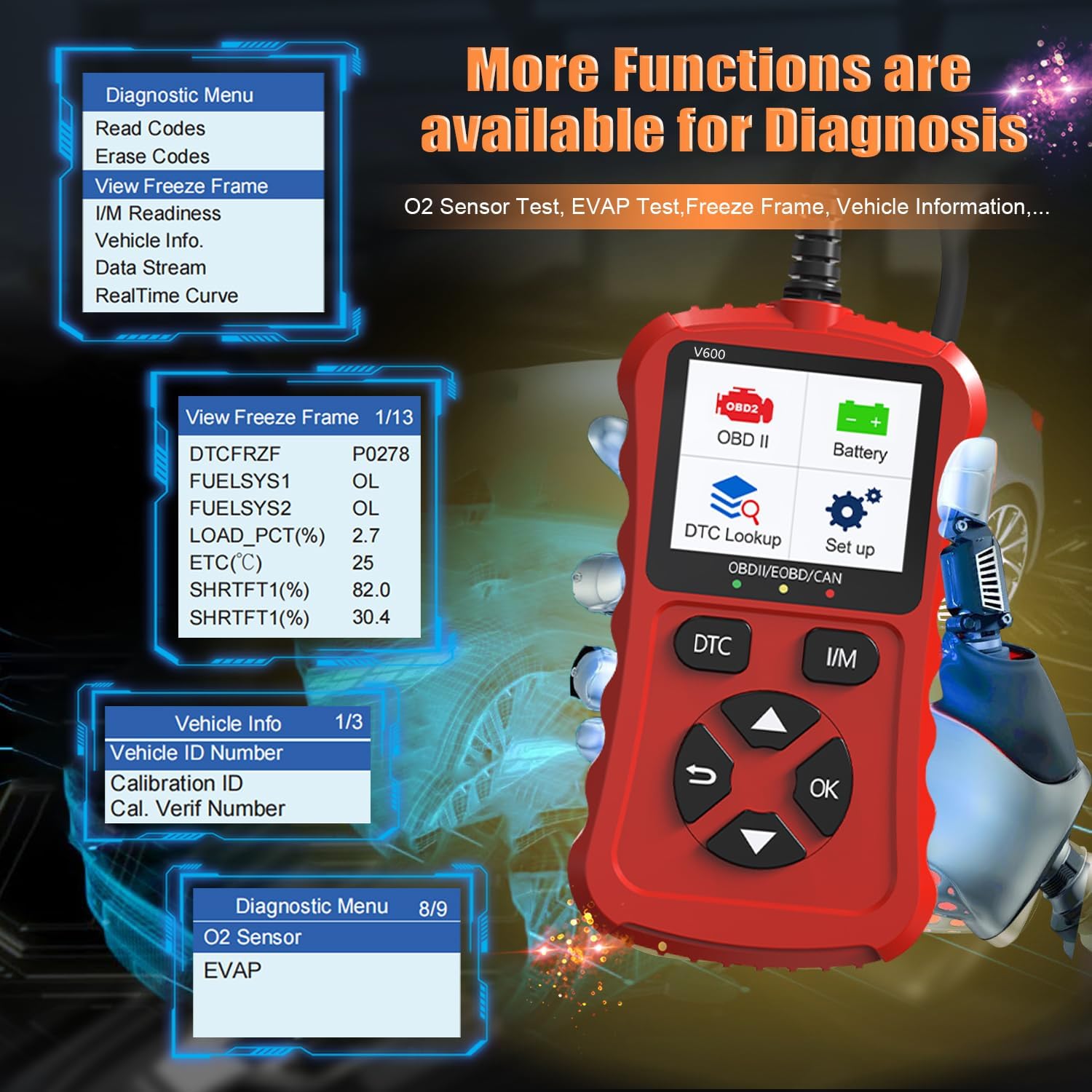
Image: Illustrates the availability of advanced diagnostic functions like Freeze Frame data, Vehicle Information retrieval, O2 Sensor tests, and EVAP system tests.
7. 관리 및 유지 보수
To ensure the longevity and optimal performance of your iKiKin V600 OBD2 Scanner, follow these maintenance guidelines:
- 청소: 스캐너 외부를 닦을 때는 부드럽고 마른 천을 사용하십시오. 연마성 세척제나 용제를 사용하지 마십시오.
- 저장: Store the scanner in a dry, cool environment, away from direct sunlight, excessive heat, or moisture. Keep it in its original packaging or a protective case when not in use.
- 케이블 관리: Avoid bending or crimping the diagnostic cable excessively. Always grasp the connector when plugging or unplugging it from the vehicle's OBDII port.
- 소프트웨어 업데이트: 제조사 확인해보세요 website periodically for any available software updates to ensure your scanner has the latest features and vehicle compatibility.
8. 일반적인 문제 해결
Common Scenarios Addressed by V600
The V600 scanner is designed to help diagnose and address various common vehicle issues, such as:
- Ignition ring failure
- Persistent flashing lights
- Difficulty finding car faults
- Car is difficult to start
- 엔진이 예기치 않게 꺼짐

Image: Illustrates common vehicle problems that the V600 scanner can help diagnose.
전원이 켜지지 않음/기기가 켜지지 않음
- 연결 확인: Ensure the scanner's cable is securely plugged into the vehicle's OBDII port.
- 차량 점화: Make sure the vehicle's ignition is turned to the 'ON' position (engine off) or the engine is running, as required by your vehicle.
- 차량 배터리: Verify that your vehicle's battery has sufficient charge. The scanner draws power from the vehicle.
- OBDII Port Fuse: Check the fuse for your vehicle's OBDII port. Refer to your vehicle's owner's manual for fuse box location and diagram.
통신 오류
- 호환성 확인: Ensure your vehicle is OBDII compliant (most 1996 US-based, 2000 EU-based, and 2008 Asian vehicles and newer).
- 점화 상태: Confirm the vehicle's ignition is in the correct position (usually 'ON' or engine running).
- 케이블 무결성: Inspect the diagnostic cable for any signs of damage or wear.
- 다른 차량을 이용해 보세요: If possible, test the scanner on another OBDII-compliant vehicle to rule out an issue with your specific vehicle's port.
9. 기술 사양
| 사양 | 값 |
|---|---|
| 상표 | 아이키킨 |
| 모델 | V600 |
| 품목 모델 번호 | V600 |
| 제조업체 부품 번호 | V600 |
| ASIN | B0CS6F5R3N |
| 운영 체제 | Android 4.0 (Note: This refers to the internal system, not user-facing OS) |
| 한국어: | 724873545856 |
| 첫 번째 이용 가능 날짜 | 12년 2024월 XNUMX일 |
10. 보증 및 고객 지원
The iKiKin V600 OBDII scan tool comes with a 12개월 보증 from the date of purchase. Additionally, lifetime free updates are offered to ensure your device remains current with the latest vehicle data and features.
For technical support, inquiries, or assistance, please feel free to contact our after-sale service team. You can reach us via the Q&A section on the product page, email, or hotline. Our team is dedicated to providing prompt and helpful support.
Ask a question about this manual
Ask about setup, troubleshooting, compatibility, parts, safety, or missing instructions. Manuals+ will review the question and use this page’s manual context to help answer it.