
1. 서론
Thank you for choosing the WORKPRO 7.2V Cordless Rotary Tool. This manual provides essential information for the safe and effective operation, maintenance, and troubleshooting of your tool. Please read it thoroughly before use and retain it for future reference.
The WORKPRO 7.2V Cordless Rotary Tool is a versatile and compact device designed for various DIY and craft projects. Its lightweight design and variable speed settings make it suitable for tasks such as sanding, engraving, cutting, drilling, grinding, and polishing.

Figure 1: WORKPRO 7.2V Cordless Rotary Tool with included accessories and storage bag.
2. 안전 정보
전동공구를 사용할 때는 화재, 감전 및 부상 위험을 줄이기 위해 기본적인 안전 수칙을 항상 준수하십시오.
- 모든 지침 읽기: 도구의 작동 및 안전 지침을 숙지하세요.
- 눈 보호 장비 착용: 항상 보안경 또는 측면 실드가 있는 보안경을 착용하십시오.
- 안전한 작업물: 항상 clamp 또는 작업 중에 움직이지 않도록 작업물을 고정합니다.
- 깨끗한 작업 공간 유지: 어수선한 지역은 사고를 유발합니다.
- 위험한 환경을 피하십시오: 전동공구를 사용하지 마십시오amp 젖은 장소 또는 비에 노출시키십시오. 작업 영역을 밝게 유지하십시오.
- 어린이의 접근을 차단하세요: 모든 방문자는 작업 영역에서 안전한 거리를 유지해야 합니다.
- 적절한 옷차림: Do not wear loose clothing or jewelry. They can be caught in moving parts. Non-skid footwear is recommended. Wear protective hair covering to contain long hair.
- 올바른 도구를 사용하십시오: 설계되지 않은 작업을 도구 또는 부착물에 강제로 수행하지 마십시오.
- 전원 분리: Disconnect the tool from its power source before making adjustments, changing accessories, or storing it.
- 지나치지 마십시오: 언제나 적절한 발판과 균형을 유지하세요.
- 도구를 주의해서 관리하세요: 더 좋고 안전한 성능을 위해 도구를 날카롭고 깨끗하게 유지하십시오. 부속품 윤활 및 교체 지침을 따르십시오.
- 손상된 부품 확인: 공구를 추가로 사용하기 전에 손상된 보호대 또는 기타 부품이 제대로 작동하고 의도한 기능을 수행하는지 신중하게 확인해야 합니다.
- 충전 중에는 작동하지 마십시오. For safety reasons, do not use the tool while it is being charged.
3. 제품 오버view
The WORKPRO 7.2V Cordless Rotary Tool is designed for precision work. Understanding its components is key to effective operation.
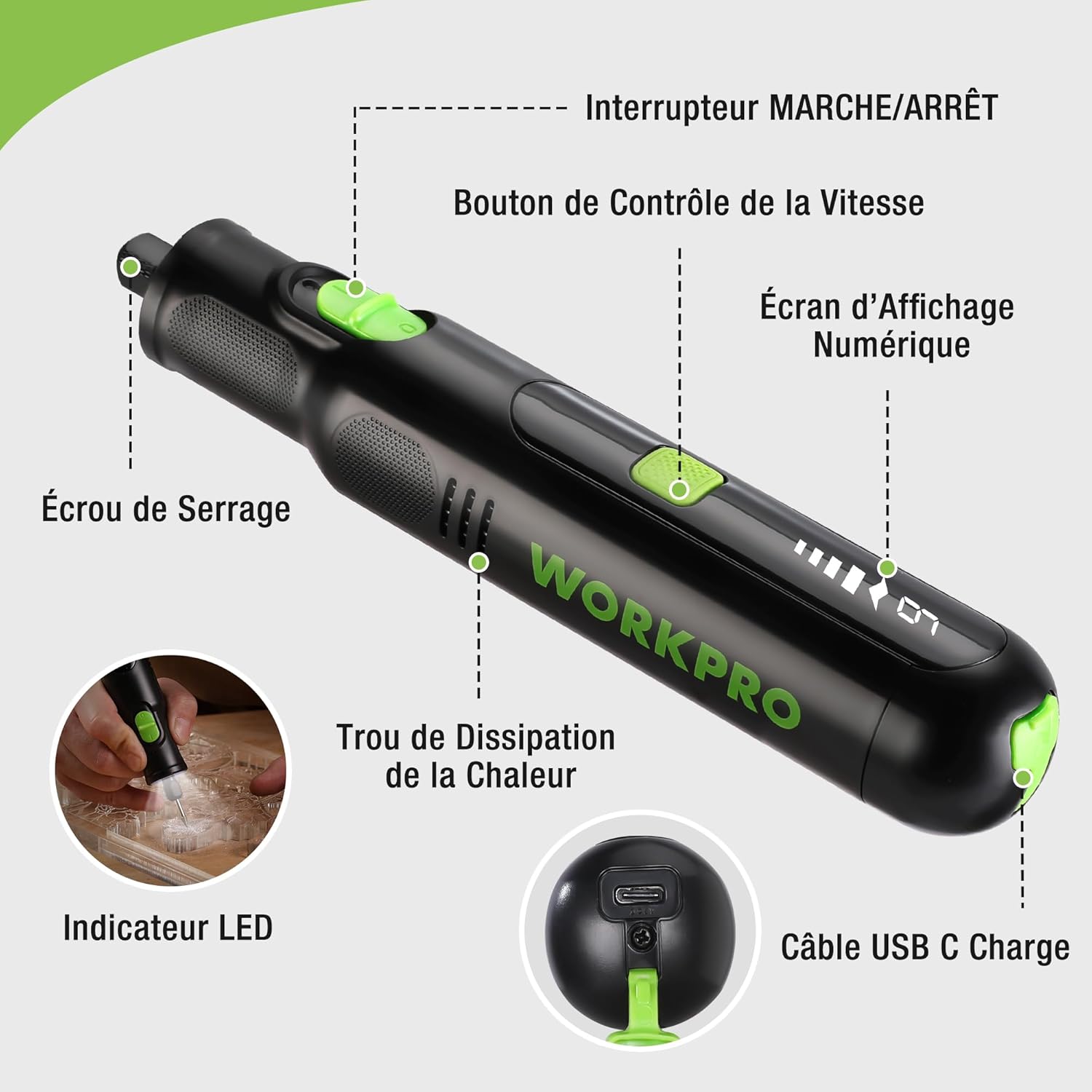
Figure 2: Key components of the rotary tool.
구성 요소:
- 온 / 오프 스위치: 도구를 활성화 및 비활성화합니다.
- 속도 제어 버튼: Adjusts the rotational speed of the tool.
- 디지털 디스플레이 화면: Shows the current speed setting.
- 콜릿 너트: Secures the accessory bits in place.
- 방열 구멍: Ensures proper cooling of the motor during operation.
- LED 표시등: 작업 공간에 조명을 제공합니다.
- USB-C 충전 포트: 내부 배터리를 충전합니다.
포함된 액세서리:
Your WORKPRO rotary tool comes with 117 diverse accessories, enabling a wide range of applications. These include:

그림 3: 이상view 포함된 액세서리 117개 중 일부입니다.
- 연마/날카롭게 하기: Grinding stones and wheels for material shaping and sharpening.
- 조각: Diamond bits for detailed carving and engraving.
- 세련: Wool felt wheels, felt wheels, screw mandrels, and metal brushes for achieving smooth, shiny finishes.
- 갈기: Milling bits for precise material removal.
- 절단: Cutting discs and saw blades for various cutting tasks, along with a cutting disc holder.
- 샌딩 : Sandpaper, rubber sanding drums, and sanding bands for surface preparation and finishing.
- 콜릿: 2.35mm and 3.2mm collets to accommodate different shank sizes.
- 교련: 2.35mm and 3.2mm drill bits for small-scale drilling.
- 렌치: For securing and loosening collet nuts.
4. 설정
4.1 도구 충전
The tool is equipped with a 7.2V 1100mAh Lithium-ion rechargeable battery. Before first use, fully charge the tool.
- Connect the provided USB-C charging cable to the tool's USB-C charging port.
- USB 케이블의 다른 쪽 끝을 호환되는 USB 전원(예: 컴퓨터, USB 벽면 어댑터)에 연결하십시오.
- The digital display will indicate charging status. A full charge typically takes approximately 2 hours.
- 완전히 충전되면 충전 케이블을 분리하세요.
Note: For optimal battery life, it is recommended to store the tool with the battery charged between 50% and 75%. Recharge the tool at least once every 3 to 6 months if not used regularly.

Figure 4: Charging the rotary tool via USB-C.
4.2 액세서리 설치
The WORKPRO rotary tool features an automatic spindle lock design for easy and secure accessory changes.
- 도구가 꺼져 있는지 확인하십시오.
- Unscrew the collet nut at the front of the tool.
- Select the appropriate collet size for your desired accessory (2.35mm or 3.2mm). Insert the collet into the tool if not already present.
- Insert the shank of the accessory bit into the center of the collet nut. Ensure the bit is fully seated.
- Hand-tighten the collet nut. For a secure fit, use the included wrench to tighten the collet nut firmly. Do not overtighten.

Figure 5: Two-step accessory replacement process.

Figure 6: Detailed installation steps for various accessories.
Note: The automatic spindle lock engages when the tool is off, allowing for accessory changes without needing to press a separate button. A slight clicking sound when the tool stops is normal due to this mechanism.
5. 사용 설명서
5.1 전원 켜기/끄기
공구를 켜려면 ON/OFF 스위치를 'ON' 위치로 밀어주세요. 끄려면 스위치를 'OFF' 위치로 밀어주세요.
5.2 속도 조정
The tool features 6 variable speed settings, ranging from 5000 RPM to 30000 RPM. Press the Speed Control Button to cycle through the speeds. The current speed setting will be displayed on the digital screen.
- Speed I: 5000 RPM
- Speed II: 10000 RPM
- Speed III: 15000 RPM
- Speed IV: 20000 RPM
- Speed V: 25000 RPM
- Speed VI: 30000 RPM
Choose the appropriate speed for your task and material. Lower speeds are generally suitable for polishing, delicate work, and softer materials, while higher speeds are for cutting, grinding, and harder materials.

Figure 7: Variable speed settings and powerful motor.
5.3 통합 LED 조명
The tool includes an integrated LED light that illuminates the work area, improving visibility in dimly lit spaces and for detailed tasks.

Figure 8: Using the LED light for precision engraving.
5.4 응용 프로그램
The WORKPRO rotary tool is highly versatile and can be used for:
- 절단: Use appropriate cutting discs for various materials.
- 조각/각인: Utilize diamond bits for intricate designs on wood, plastic, or soft metals.
- 세련: Apply felt wheels and polishing compounds to restore shine to surfaces.
- 샌딩 : Use sanding bands and drums for smoothing rough edges or preparing surfaces.
- 교련: Employ small drill bits for precision holes.

그림 9: 예amples of versatile applications.
6. 유지관리
6.1 청소
- Always disconnect the tool from any power source before cleaning.
- 부드러운 d를 사용하세요amp 천을 사용하여 도구 외부를 닦으세요. 강한 화학 물질이나 연마성 세척제는 사용하지 마세요.
- Use a small brush or compressed air to clear dust and debris from the heat dissipation holes and around the collet area.
6.2 배터리 관리 및 보관
- To prolong battery life, avoid completely discharging the battery regularly.
- For long-term storage, ensure the battery is charged to approximately 50-75%. Recharge the tool every 3 to 6 months to prevent deep discharge and maintain battery health.
- Store the tool in a cool, dry place, away from direct sunlight and extreme temperatures.
6.3 액세서리 보관함
Keep all accessories organized in the provided storage bag or a suitable container to prevent loss and damage.
7. 문제 해결
This section addresses common issues you might encounter with your WORKPRO rotary tool.
| 문제 | 가능한 원인 | 해결책 |
|---|---|---|
| 도구가 켜지지 않습니다. | 배터리가 방전되었습니다. | Charge the tool fully using the USB-C cable. |
| Tool stops unexpectedly during use. | 배터리가 부족하거나 도구가 과부하되었습니다. | Recharge the battery. Reduce pressure on the tool or use a lower speed setting for the task. |
| Clicking sound when turning off. | Normal operation of the automatic spindle lock. | This is a normal function and does not indicate a fault. |
| Accessory bit is loose or wobbles. | Collet nut not tightened sufficiently or incorrect collet size. | Ensure the correct collet size is used for the accessory. Tighten the collet nut firmly with the included wrench. |
| Reduced performance or short runtime. | Battery degradation or improper charging/storage. | Ensure proper charging and storage practices are followed (refer to Section 6.2). If the issue persists, the battery may need replacement. |
8. 사양
Below are the technical specifications for the WORKPRO 7.2V Cordless Rotary Tool (Model W123024A).
| 특징 | 사양 |
|---|---|
| 상표 | 워크프로 |
| 모델 번호 | W123024A |
| 권tage | 7.2 볼트 |
| 배터리 유형 | 리튬이온(1개 포함) |
| 배터리 용량 | 1100mAh |
| 최대 회전 속도 | 30000 RPM |
| 가변 속도 | 6(5000-30000 RPM) |
| 충전 시간 | 약 2시간 |
| 실행 시간(최대 속도) | 약 45분 |
| 무게 | 227그램 |
| 치수(길이 x 너비 x 높이) | 25.2 x 16.8 x 5.5cm |
| 특징 | Cordless, Integrated LED Light, Automatic Spindle Lock |
| 포함된 구성 요소 | 117 액세서리 |
| 제조업체 | 항저우 그레이트스타 산업 유한회사 |
9. 보증 및 지원
For warranty information, please refer to the documentation provided at the time of purchase or contact your retailer. WORKPRO is committed to providing quality products and customer satisfaction.
If you encounter any issues or have questions regarding your WORKPRO 7.2V Cordless Rotary Tool, please contact the seller or WORKPRO customer support through their official website or contact channels. Please have your model number (W123024A) and purchase details ready when seeking support.