소개
This manual provides detailed instructions for the installation, operation, and maintenance of your ARES WING Desk Monitor Mount (Model GDT1003LWH). Please read this manual thoroughly before installation and use to ensure proper function and safety. This monitor mount is designed to support a single monitor, compatible with screens ranging from 17 to 49 inches and weighing between 4.4 to 44 lbs.
안전 정보
- 조립하기 전에 모든 구성품이 있는지, 손상되지 않았는지 확인하십시오. 부품이 누락되었거나 불량인 경우 사용하지 마십시오.
- Verify that your monitor's weight and size are within the specified limits (4.4-44 lbs, 17-49 inches). Exceeding these limits can result in instability and damage.
- Confirm your monitor has compatible VESA mounting holes (75x75mm or 100x100mm). If not, a separate VESA adapter is required.
- Ensure your desk thickness is compatible with the chosen mounting method (C-clamp: 0.39-3.34 inches; Grommet: 0.39-1.8 inches).
- Adjust the gas spring tension according to your monitor's weight ~ 전에 attaching the monitor to prevent sudden drops or difficulty in adjustment.
- 설치하는 동안 어린이와 애완동물이 접근하지 못하도록 하세요.
- 나사를 너무 세게 조이지 마세요. 손상될 수 있습니다.
- For any issues or concerns, contact ARES WING customer support.
패키지 내용
다음 구성품이 모두 포함되어 있는지 패키지를 확인해 주십시오.
- 모니터 암 어셈블리
- 데스크 Clamp (C-clamp)
- 그로밋 마운트 베이스
- VESA 플레이트
- 하드웨어 키트(나사, 와셔, 스페이서)
- 앨런 렌치
- 사용 설명서 (본 문서)
설정 및 설치
1. Check Monitor Compatibility
Before proceeding, ensure your monitor meets the following criteria:
- 베사 패턴: 75x75mm or 100x100mm.
- 화면 크기: 17" to 49".
- 중량 용량: 4.4 lbs to 44 lbs.

Figure 1: Monitor and Desktop Compatibility Check
For monitors without VESA holes, a separate VESA adapter is required. Some Samsung G9 monitors may come with a VESA adapter; please check your monitor's documentation.

Figure 2: VESA Hole Check and Adapter Preparation
2. 설치 방법 선택
The ARES WING monitor mount supports two installation methods: C-clamp 그리고 그로밋 마운트.
- C-Clamp: Suitable for desk thickness between 0.39 inches (10mm) and 3.34 inches (85mm).
- 그로밋 마운트: Suitable for desk thickness between 0.39 inches (10mm) and 1.8 inches (45mm). Requires an existing hole in your desk.
3. Install the Desk Mount
Follow the instructions provided with your mount to securely attach the base to your desk using either the C-clamp or grommet method. Ensure the mount is stable before proceeding.
4. 가스 스프링 장력 조정
It is crucial to adjust the gas spring tension to match your monitor's weight ~ 전에 attaching the monitor. This prevents the arm from springing up or sagging.
- Use the provided Allen wrench to adjust the tension screw on the arm.
- 회전하다 반 시계 방향 for heavier monitors (to increase tension).
- 회전하다 시계 방향으로 for lighter monitors (to decrease tension).
- Adjust until the arm can hold its position freely when moved without a monitor attached.

Figure 3: Gas Spring Tension Adjustment
5. 모니터를 VESA 플레이트에 부착합니다.
Secure the VESA plate to the back of your monitor using the appropriate screws and spacers from the hardware kit. Ensure the screws are tightened securely but do not overtighten.
6. 모니터를 암에 장착하기
Carefully slide the VESA plate with the attached monitor onto the monitor arm's VESA head. Ensure it clicks into place or is secured with any locking mechanism provided.
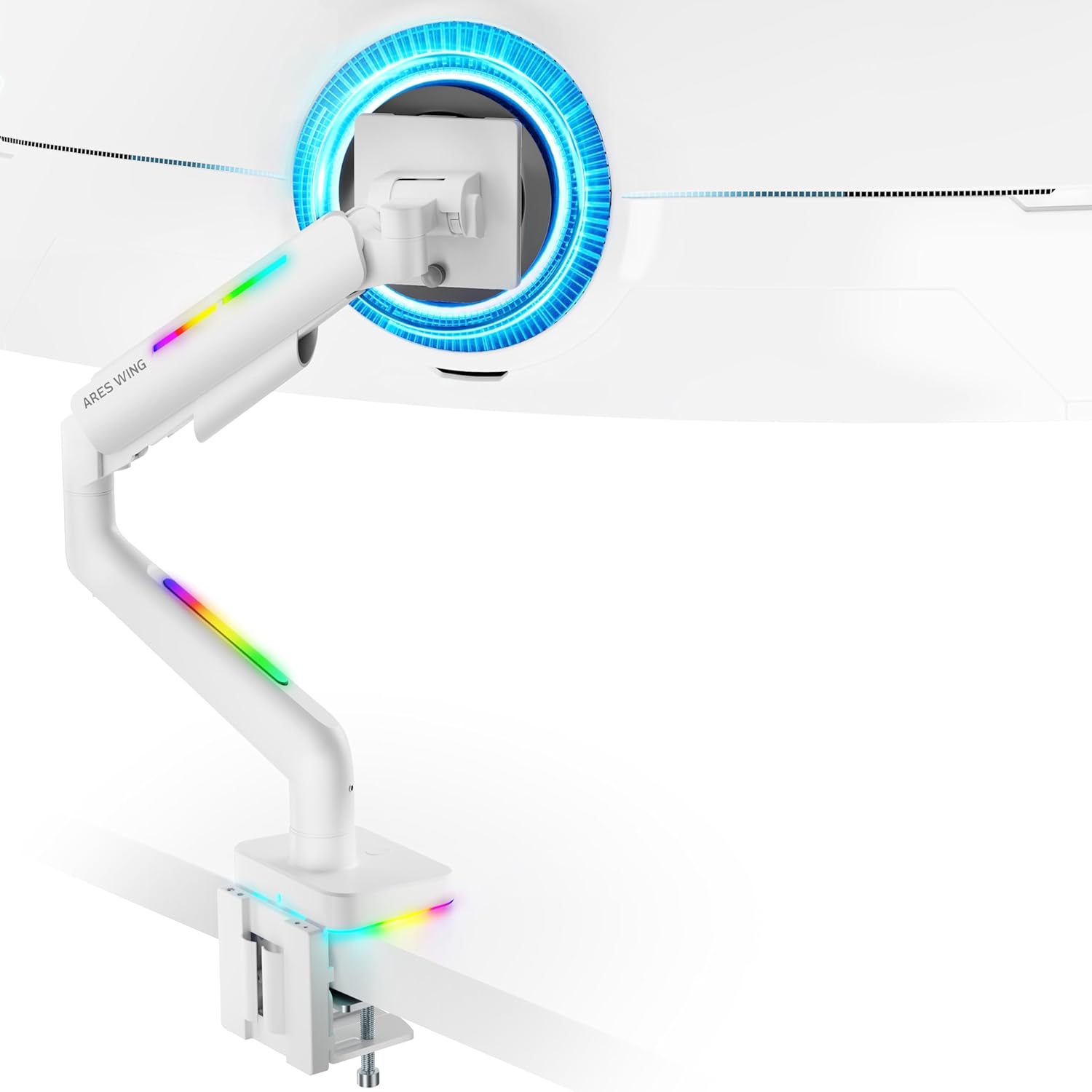
Figure 4: Monitor Mounted on ARES WING Arm
작동 지침
1. 모니터 위치 조정
The ARES WING monitor arm offers full motion capabilities for optimal ergonomic positioning:
- 높이 조정: The arm allows vertical movement to raise or lower your monitor to the desired eye level. The height can be adjusted from 8.5 inches to 19.7 inches.
- 경사: Tilt your monitor +50° upwards or -20° downwards to reduce glare and find the perfect view잉 각도.
- 받침: Swivel the monitor ±90° left or right to share your screen or adjust for different tasks.
- 회전: 모니터를 360° 회전하여 가로 모드와 세로 모드를 전환하세요.

Figure 5: Full Motion Adjustment Capabilities
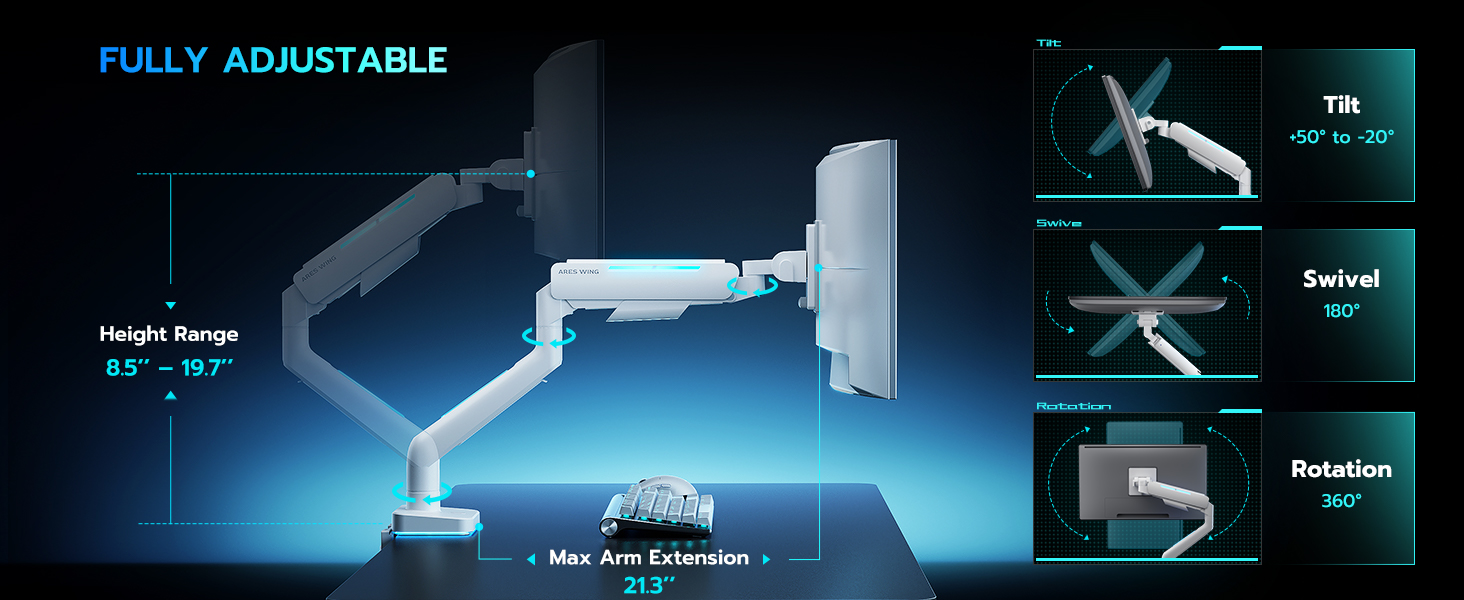
Figure 6: Tilting Ultrawide Monitors
2. RGB 조명 제어
The monitor arm features integrated RGB lighting with 20 dynamic lighting effects. To control the lighting:
- Connect the USB cable from the monitor arm to a USB port on your computer or a USB power adapter.
- Locate the light control button on the base of the monitor arm.
- 누르고 있으세요 the button for approximately 2-3 seconds to turn the RGB lighting ON or OFF.
- 짧게 누르기 to cycle through the 20 different lighting modes (Color Cycle, Chasing, Static, Wave, etc.).
- The lighting will remember the last mode used when turned back on.

Figure 7: RGB Lighting Control
3. 케이블 관리
Utilize the integrated cable management channels on the arm to route your monitor and power cables. This helps maintain a clean and organized workspace.
유지
- 청소: 모니터 암을 부드러운 천으로 닦으세요.amp 천으로 닦으세요. 마감재를 손상시킬 수 있는 연마성 세제나 용제는 사용하지 마세요.
- 정기 점검: 모든 나사와 연결부가 단단히 조여져 있는지 주기적으로 점검하십시오. 필요한 경우 다시 조이십시오.
- 가스 스프링: The internal gas spring is designed for long-term durability (fatigue tested 20,000+ times). No specific maintenance is required for the gas spring itself, but ensure its tension is correctly set for your monitor's weight.
문제 해결
| 문제 | 가능한 원인 | 해결책 |
|---|---|---|
| 모니터 암이 처지거나 고정되지 않습니다. | 가스 스프링 장력이 모니터 무게에 비해 너무 낮습니다. | Increase gas spring tension by turning the adjustment screw counter-clockwise. Refer to "Adjust Gas Spring Tension" section. |
| 모니터 암이 너무 뻑뻑하거나 아래로 내려가지 않습니다. | 가스 스프링 장력이 모니터 무게에 비해 너무 높습니다. | Decrease gas spring tension by turning the adjustment screw clockwise. Refer to "Adjust Gas Spring Tension" section. |
| RGB 조명이 켜지지 않습니다. | USB cable not connected or button not pressed correctly. | Ensure USB cable is securely connected. Press and 잡고 있다 the light control button for 2-3 seconds to activate. |
| 모니터가 흔들리거나 불안정합니다. | Mount not securely fastened to desk or VESA plate not tight. | Check desk clamp/grommet mount for tightness. Ensure VESA plate screws are securely fastened to the monitor and the plate is properly seated on the arm. |
| Monitor cannot tilt smoothly. | Tilt mechanism screw is too tight. | Loosen the tilt adjustment screw slightly until smooth tilting is achieved. Refer to Figure 6. |
명세서
| 모델 번호 | GDT1003LWH |
| 재료 | 알루미늄, 철 |
| VESA 호환성 | 75x75mm, 100x100mm |
| 화면 크기 호환성 | 17 - 49 inches (flat and curved monitors) |
| 중량 용량 | 4.4 - 44파운드(2 - 20kg) |
| 높이 조절 범위 | 8.5~19.7인치 |
| 기울기 각도 | +50° / -20° |
| 회전 각도 | ±90° |
| 회전 | 360° |
| Desktop Thickness (C-Clamp) | 0.39~3.34인치(10~85mm) |
| Desktop Thickness (Grommet) | 0.39~1.8인치(10~45mm) |
| RGB 조명 | 20 dynamic lighting effects |
보증 및 지원
ARES WING provides a 3년 제조사 보증 for this product. For any questions, technical assistance, or warranty claims, please contact ARES WING customer support through the retailer where you purchased the product or visit the official ARES WING web연락처 정보 사이트.
더 자세한 정보와 지원이 필요하시면 다음 웹사이트를 방문하세요. ARES WING Store on Amazon.