
써모프로 TP60S
ThermoPro TP60-3 디지털 무선 실내/실외 온도계 및 습도계 사용 설명서
1. 서론
ThermoPro TP60-3은 다양한 환경에서 온도와 습도를 측정하도록 설계된 디지털 무선 실내/실외 온도계 및 습도계입니다. 이 제품은 실내외 환경 모두에서 정확한 측정값을 제공하며, 넓은 무선 범위와 여러 개의 원격 센서 연결 기능을 자랑합니다. 가정, 아기방, 유아방, 지하실, 창고, 온실 등에서 최적의 환경 관리를 위해 사용하기에 적합합니다.
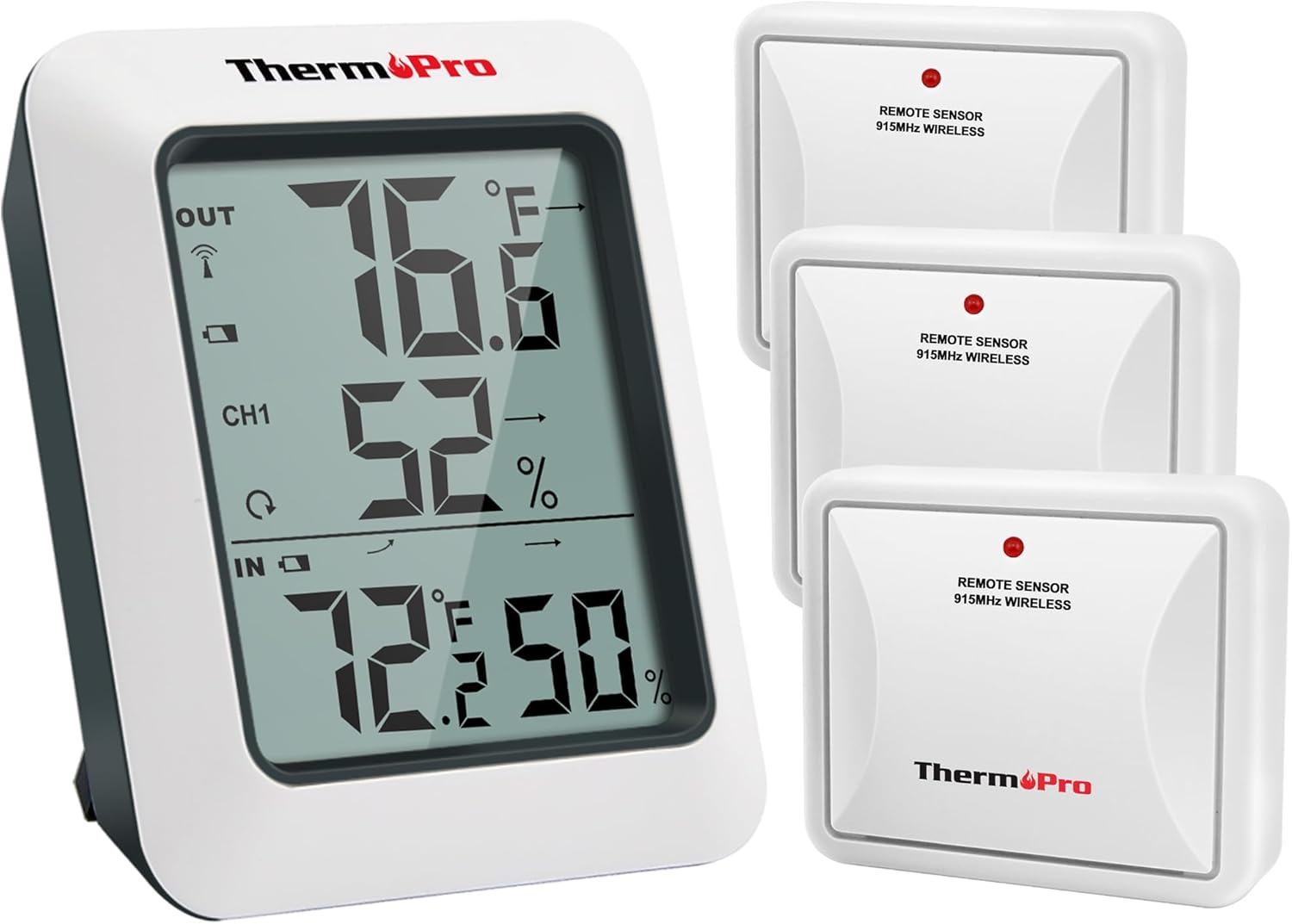
이미지: ThermoPro TP60-3 본체 디스플레이 장치와 3개의 무선 원격 센서가 포함된 전체 제품 구성도.
2. 상자 안에 무엇이 들어있나요?
- 1 x 메인 수신기 장치
- 원격 송신기 센서 3개
- AAA 배터리 8개
3. 제품 오버view
3.1 메인 수신기 장치
본체 수신기에는 실내 및 실외 온도와 습도를 백분율로 표시하는 크고 읽기 쉬운 LCD 화면이 있습니다.tag또한 온도 및 습도 변화 추이를 나타내는 화살표와 일일 최고/최저 기온 정보를 표시합니다. 이 제품은 내장 스탠드를 이용하여 탁상용으로 설계되었으며, 벽에 장착할 수도 있습니다.

이미지: 실외 온도 및 습도, 채널 표시기, 실내 온도 및 습도와 추세 화살표를 보여주는 메인 디스플레이 장치의 클로즈업 사진.
3.2 원격 송신기 센서
원격 센서는 온도와 습도 데이터를 무선으로 본체에 전송합니다. 각 센서는 실외용으로 설계되었으며 직사광선과 비를 피할 수 있는 장소에 설치해야 합니다. 이 시스템은 최대 3개의 원격 센서를 지원하여 여러 위치를 동시에 모니터링할 수 있습니다.

이미지: 침실, 창고, 정원에 설치된 세 개의 원격 센서로부터 데이터를 수신하는 본체를 보여주는 다이어그램으로, 다중 위치 모니터링 기능을 강조합니다.
4. 설정
4.1 배터리 설치
- 본체 수신기와 각 원격 센서 뒷면에 있는 배터리함을 여세요.
- 제공된 AAA 배터리를 삽입할 때, 극성(+/-)을 정확히 확인하십시오.
- 배터리함을 단단히 닫으십시오.
4.2 동기화 프로세스
배터리를 장착하면 본체와 원격 센서가 자동으로 동기화됩니다. 동기화 중에는 본체 디스플레이 왼쪽 상단의 RF 신호 아이콘이 깜빡입니다. 연결이 끊어졌거나 배터리를 교체한 경우에는 다음 단계를 따르십시오.
- 두 장치 모두에 배터리가 올바르게 설치되었는지 확인하세요.
- 원격 센서의 TX 버튼을 눌러 연결을 다시 설정하십시오.
4.3 배치 지침
- 메인 유닛: 본체는 내장 스탠드를 사용하여 실내 탁자 위에 놓거나 벽에 장착할 수 있습니다.
- 원격 센서 :
- 센서는 벽면 등의 장애물을 피하여 개방된 공간에 설치하십시오.
- 고주파 신호 간섭을 방지하기 위해 센서를 라우터 및 기타 전자 기기에서 멀리 떨어뜨려 놓으십시오.
- 직사광선에 노출되면 온도 측정값이 부정확해질 수 있으므로 피하십시오.
- 센서는 빗물이 통풍구를 통해 들어가지 않도록 항상 똑바로 세워 설치하십시오.
- 개방된 공간에서 무선 범위는 최대 500피트/150미터입니다.

이미지: 탁자 위에 놓인 본체와 외벽에 설치된 원격 센서를 보여주며, 다양한 배치 옵션을 제시합니다.
5. 사용 설명서
5.1 디스플레이 기능
- 실외 온도 및 습도: 화면 상단에 표시됩니다.
- 채널 표시기: 현재 표시되는 원격 센서의 데이터(CH1, CH2, CH3)를 보여줍니다.
- 실내 온도 및 습도: 화면 하단에 표시됩니다.
- 추세 화살표: 온도와 습도가 상승하는지, 하강하는지, 또는 안정적인 상태를 유지하는지 표시하십시오.
- 최대/최소 기록: 지난 24시간 동안 또는 마지막 재설정 이후 전체 기간 동안 기록된 최고 및 최저 온도와 습도 값을 보여줍니다.
5.2 단위 선택(°F/°C)
화씨(°F)와 섭씨(°C)를 전환하려면 수신기 본체 뒷면에 있는 °F/°C 버튼을 누르십시오.
5.3 View최대/최소 기록
본체 뒷면의 MAX/MIN 버튼을 눌러 24시간 최고/최저 온도 및 습도 기록과 전체 최고/최저 온도 기록을 순환하며 확인하세요. 기록을 삭제하려면 CLEAR 버튼을 길게 누르세요.
5.4 채널 선택
여러 개의 원격 센서를 사용하는 경우, 본체 뒷면의 채널 버튼을 눌러 센서 채널(CH1, CH2, CH3)을 전환할 수 있습니다. view 각각의 야외 측정값입니다.
6. 유지관리
- 청소: 부드러운 천으로 닦으십시오. damp 천. 물에 담그지 마십시오.
- 배터리 교체: 디스플레이에 배터리 부족 표시등이 켜지면 배터리를 교체하십시오. 극성을 반드시 확인하십시오.
- 저장: 장기간 기기를 보관할 경우, 누출을 방지하기 위해 배터리를 제거하세요.
7. 문제 해결
- 화면 안 켜짐/배터리 부족: 배터리 설치를 확인하고 필요한 경우 교체하십시오.
- 원격 센서 판독값 없음:
- 원격 센서가 작동 범위(500피트/150미터) 내에 있는지 확인하십시오.
- 원격 센서의 TX 버튼을 눌러 다시 동기화하세요.
- 다른 전자 장치의 간섭을 확인하십시오.
- 원격 센서 배터리를 교체하세요.
- 부정확한 판독:
- 원격 센서가 직사광선에 노출되거나 비에 젖지 않도록 하십시오.
- 열원이나 통풍구에서 멀리 떨어진 적절한 위치에 설치하십시오.
8. 사양
| 상표 | ThermoPro |
| 모델명 | TP60S |
| 실내 온도 범위 | -4°F ~ 158°F(-20°C ~ 70°C) |
| 실외 온도 범위 | -4°F ~ 158°F(-20°C ~ 70°C) |
| 습도 범위 | 10%에서 99%까지 |
| 무선 범위 | 최대 500피트/150미터 (개방된 공간 기준) |
| 연결 기술 | 무선 주파수(RF) - ASK 433MHz |
| 전원 | AAA 배터리 사용 |
| 디스플레이 유형 | 디지털 LCD |
| 재료 | 플라스틱 |
9. 보증 및 지원
보증 정보, 기술 지원 또는 기타 문의 사항은 ThermoPro 공식 웹사이트를 방문하십시오. web해당 웹사이트를 방문하거나 고객 서비스 센터에 문의하십시오. 자세한 내용은 일반적으로 제품 포장이나 제조업체의 안내문에 나와 있습니다. web대지.
방문할 수 있습니다 ThermoPro 스토어 더 많은 제품과 정보를 확인하세요.
관련 문서TP60S


Ask a question about this manual
Ask about setup, troubleshooting, compatibility, parts, safety, or missing instructions. Manuals+ will review the question and use this page’s manual context to help answer it.