
Waveshare Industrial Modbus RTU 8-Channel Relay Module (D) Instruction Manual
Model: Modbus RTU Relay (D)
1. 제품 오버view
The Waveshare Industrial Modbus RTU 8-Channel Relay Module (D) is a robust and versatile device designed for industrial control and automation applications. It features 8 relay outputs and 8 digital inputs, communicating via the RS485 bus using the Modbus RTU protocol. This module incorporates multiple isolation protection circuits, including power isolation, magnetic isolation, and TVS diode protection, ensuring stable, reliable, and safe operation. Its rail-mounted ABS plastic enclosure facilitates easy installation in various industrial environments.

Figure 1: Waveshare Industrial Modbus RTU 8-Channel Relay Module (D)
1.1. 제품 비디오 끝view
Video 1: Modbus RTU Relay Series Overview. This video provides a general introduction to the Waveshare Modbus RTU relay series, highlighting key features and different versions available.
2. 패키지 내용
아래 나열된 모든 품목이 패키지에 포함되어 있는지 확인하세요.
- Modbus RTU Relay (D) x1
- 드라이버 x1

그림 2: 패키지 내용물
3. 특징 및 사양
The Modbus RTU 8-Channel Relay Module (D) offers a comprehensive set of features for reliable industrial control:
- Configurable device address (1~255), allowing multiple devices to be cascaded on the RS485 bus.
- Features flash-on, flash-off function, enabling temporary relay activation with automatic closure.
- Onboard unibody power supply isolation provides stable isolated voltag즉, 절연 단자에 별도의 전원 공급 장치가 필요하지 않게 됩니다.
- Onboard unibody magnetic isolation ensures signal isolation, high reliability, strong anti-interference, and low power consumption.
- Onboard resettable fuse and TVS (Transient Voltage Suppressor) effectively suppress surge voltage 및 과도 스파이크 voltage, providing over-current/over-voltage protection, lightning protection, and anti-electrostatic capabilities.
- Onboard Optocoupler isolation prevents interference from high-voltag전자 회로.
- Adopts a dedicated relay driver chip with built-in flyback diode protection for stronger and more stable driving ability.
- Supports passive and active digital input with bi-directional optocoupler isolation and built-in debouncing algorithm. The relay supports digital input linkage control or toggle control.
- Reverse-proof circuit prevents accidental damage from incorrect power connection.
- High quality relay with contact rating: ≤10A 250VAC/30VDC.
- 레일 장착형 ABS 플라스틱 케이스로 설치가 간편하고 안전하게 사용할 수 있습니다.
- Multiple LEDs for indicating MCU status and signal transceiving status.

Figure 3: RS485 8-Channel Relay Module (D) with key features highlighted.
3.1. 기술 사양
| 매개변수 | 값 |
|---|---|
| 전원 공급 장치 | 7~36V |
| 통신 인터페이스 | RS485 |
| 전송 속도 | 4800, 9600, 19200, 38400, 57600, 115200, 128000, 256000 |
| 기본 통신 형식 | 9600, N, 8, 1 |
| 릴레이 채널 | 8 |
| 문의 양식 | 1아니요 1NC |
| 연락처 평가 | ≤10A 250VAC/30VDC |
| 디지털 입력 | 8DI, 5~36V, 수동/능동 입력(NPN 또는 PNP), 내장형 양방향 옵토커플러 절연 |
| 통신 프로토콜 | 표준 Modbus RTU 프로토콜 |
| RS485 주소 | 1-255 |
| LED 표시등 | STA: MCU 표시등으로, MCU가 정상 작동 중일 때 계속 깜빡입니다. TXD: TX 표시등, 데이터 전송 시 켜짐 RXD: RX 표시등, 데이터 수신 시 켜짐 |
| 제품 치수 | 6.89 x 3.54 x 1.57인치; 13.05온스 |
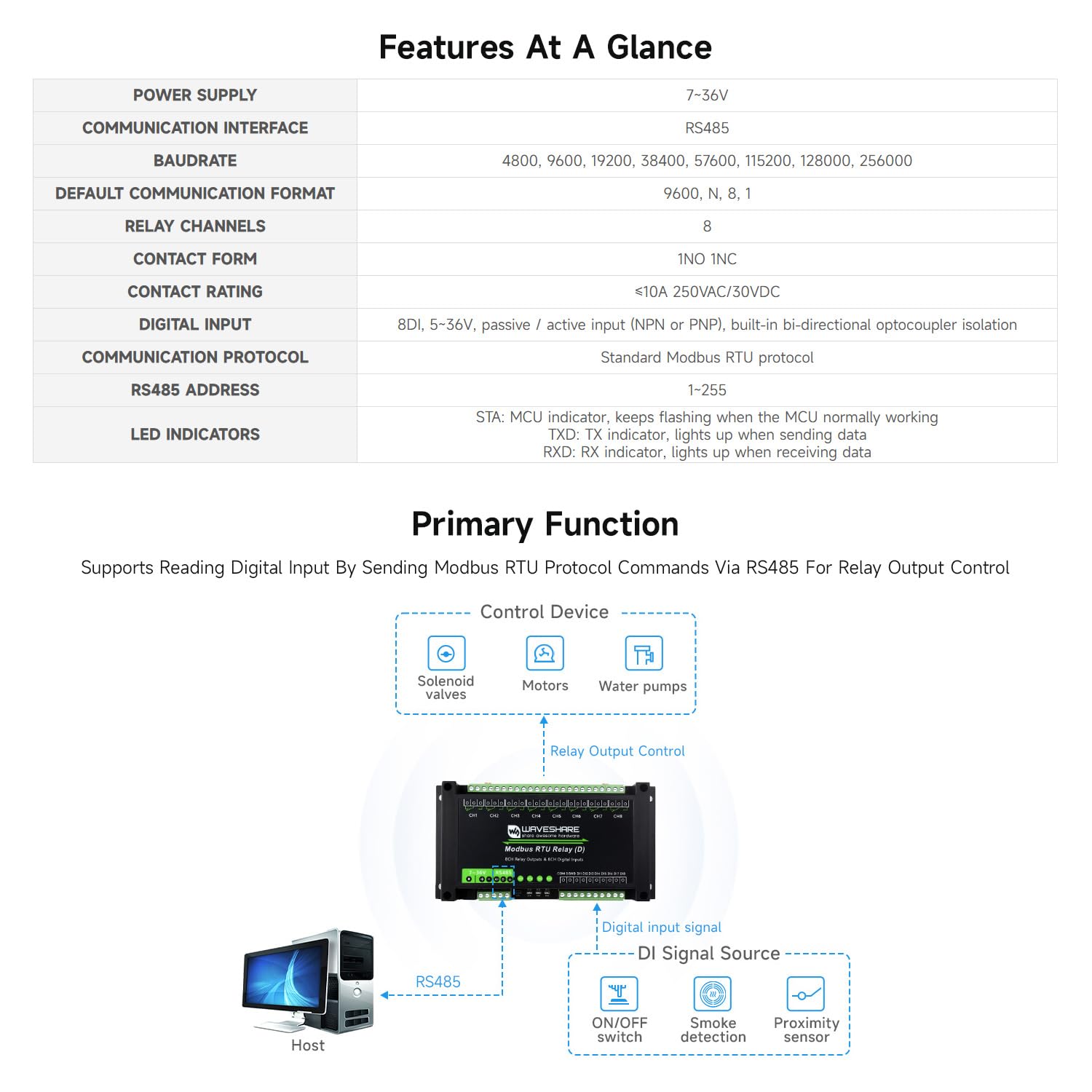
Figure 4: Detailed specifications and primary function diagram.
4. 하드웨어 오버view and Protection
The module is designed with multiple protection mechanisms to ensure safe and reliable operation:
- 전원 공급 장치 절연: 안정적이고 분리된 볼륨을 제공합니다tag즉, 절연 단자에 외부 전원 공급 장치가 필요하지 않게 됩니다.
- Magnetic Coupling Isolation: Ensures signal isolation, high reliability, strong anti-interference, and low power consumption.
- 옵토커플러 절연: Prevents interference from high-voltag전자 회로.
- TVS 낙뢰 및 정전기 방지 기능: 급증하는 거래량을 효과적으로 억제합니다.tage 및 과도 스파이크 voltage.
- 재설정 가능 퓨즈: Provides over-current/over-voltag전자 보호.
- Dedicated Relay Driver Chip: With built-in flyback diode protection for stronger and more stable driving.
- 역방향 오류 방지 회로: Prevents accidental damage from incorrect power connection.

Figure 5: Internal hardware components and protection circuits.
5. Digital Input Functionality
The module supports both passive (dry contact) and active (wet contact) digital inputs, with bi-directional optocoupler isolation and a built-in debouncing algorithm. This allows for flexible integration with various sensors and switches.
- Passive Digital Input (Dry Contact): Connects to devices like button switches (self-reset) or ON/OFF switches (status hold).
- Active Digital Input (Wet Contact): Connects to devices like NPN proximity sensors or IR curtain sensors.

Figure 6: Digital input types and connection diagrams.
6. 인터페이스 및 지표
The module features multiple LED indicators to monitor its operating status and communication activity:
- STA LED: MCU indicator, flashes when the MCU is operating normally.
- TXD LED: TX indicator, lights up when sending data.
- RXD LED: RX indicator, lights up when receiving data.
- Relay Working Indicators: Individual LEDs for each relay channel indicate its current state (ON/OFF).
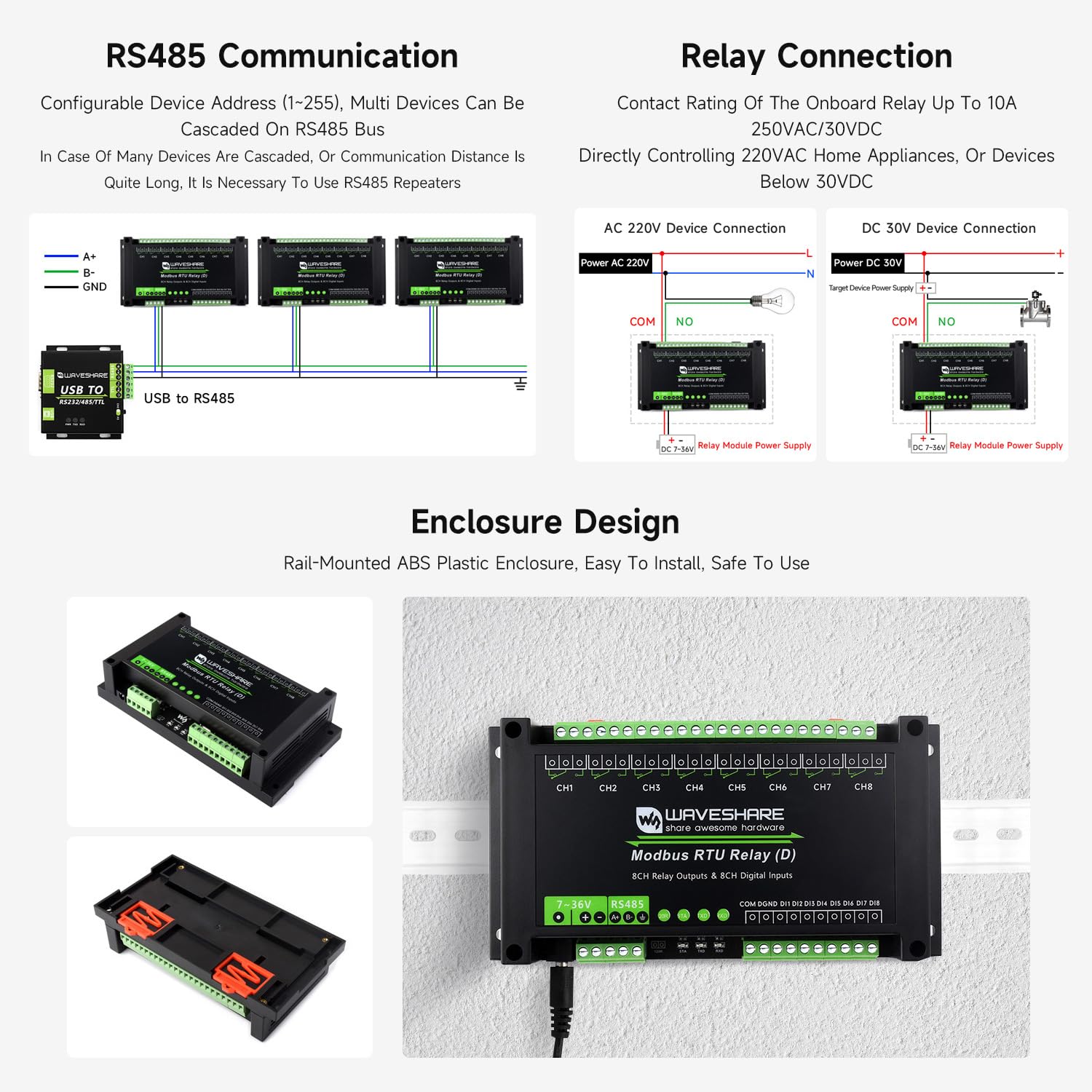
Figure 7: Module interfaces and LED indicators.
7. 작동 모드
The module supports multiple relay control modes for various automation scenarios, with each channel supporting independent control settings:
- 일반 모드(명령 직접 제어): Relays are controlled directly by sending Modbus commands.
- Flash ON / Flash OFF: Allows turning the relay ON for a specified duration and then automatically turning it OFF (Flash ON), or turning it OFF for a duration and then automatically turning it ON (Flash OFF). The duration is set by passing an argument to the command.
- Linkage Control: The output status of a relay follows the digital input status, enabling direct control based on sensor readings or switch states.
- 토글 모드: When a pulse is input, the output status of the relay will toggle once (ON to OFF, or OFF to ON).
8. RS485 Communication
The module communicates via the RS485 interface using the Modbus RTU protocol. It supports configurable device addresses (1-255), allowing multiple modules to be cascaded on a single RS485 bus. For long communication distances or a large number of cascaded devices, RS485 repeaters may be necessary to maintain signal integrity and system efficiency.

Figure 8: RS485 communication setup with multiple cascaded devices.
9. 릴레이 연결
The onboard relays have a contact rating of ≤10A 250VAC/30VDC, allowing direct control of various devices. Ensure proper wiring according to the load type:
- AC 220V Device Connection: Connect the AC load to the COM and NO (Normally Open) terminals of the relay.
- DC 30V Device Connection: Connect the DC load to the COM and NO (Normally Open) terminals of the relay.
Always ensure the power supply to the module is within the 7~36V range.
10. Enclosure and Installation
The module is housed in a rail-mounted ABS plastic enclosure, designed for easy installation and secure mounting on standard DIN rails. This design simplifies integration into industrial control cabinets and systems, providing both convenience and safety.
11. 응용 프로그램
The Waveshare Modbus RTU Relay series products are suitable for a wide range of applications requiring intelligent and automated control:
- 산업 제어: Valve control, pump station control, unattended industrial control systems.
- 똑똑한 집: Controlling appliances like air conditioners, access control, purifiers, water heaters, etc.
- 스마트 농업: 도어 커튼 모터, 송풍기 및 기타 농업 장비를 제어합니다.
- 번식 및 사육: Controlling ventilators, lighting, water supply, feeding systems, etc.
12. 외형 치수
The physical dimensions of the module are provided below for planning and integration purposes. All units are in millimeters (mm).
Figure 9: Outline dimensions of the Modbus RTU Relay (D) module.
13. 문제 해결
If you encounter issues with your Waveshare Industrial Modbus RTU 8-Channel Relay Module (D), please consider the following common troubleshooting steps:
- 전원 없음/표시등 꺼짐: 전원 공급 장치 연결을 확인하고 볼륨을 확인하십시오.tage is within the 7~36V range. Verify the power adapter is functioning correctly.
- 통신 실패: Ensure the RS485 A+, B-, and GND connections are correct and secure. Check the baudrate, parity, data bits, and stop bits settings on your Modbus master device match the module's default or configured settings. Verify the device address is unique and correctly set.
- 릴레이가 작동하지 않음: Confirm that the Modbus commands sent are correct for the desired relay action (ON/OFF, Flash, Linkage, Toggle). Check the load connected to the relay is within the specified contact rating (≤10A 250VAC/30VDC).
- Digital Input Not Responding: Ensure the digital input connections are correct for either passive (dry contact) or active (wet contact) input. Verify the external switch or sensor is functioning properly.
- 간헐적 작동: Check for loose connections or environmental interference. Ensure proper grounding.
For persistent issues, refer to the detailed product documentation available on the Waveshare website or contact Waveshare technical support.
14. 보증 및 지원
Waveshare products typically come with a standard manufacturer's warranty. For specific warranty terms and conditions, please refer to the warranty information provided with your purchase or visit the official Waveshare website. Technical support is available through the Waveshare support channels, including online documentation, forums, and direct contact options. Please have your product model and purchase details ready when seeking support.
For the latest drivers, software, and detailed technical resources, please visit the Waveshare official web대지: www.waveshare.com