
TECHPICCO CPJ-TY-ZW-BK
TECHPICCO 번호판 프레임 사용 설명서
Model: CPJ-TY-ZW-BK
For Ford Maverick 2022-2025 and other compatible vehicles
제품 끝view
The TECHPICCO License Plate Frame is a universal mounting solution designed for the front license plate of most vehicles, including the Ford Maverick 2022-2025. This bracket offers a no-drill installation, preserving your vehicle's integrity, and features an adjustable design for optimal positioning. Constructed from high-strength steel with an advanced powder coating, it provides strong rust protection and is built for all-weather durability.
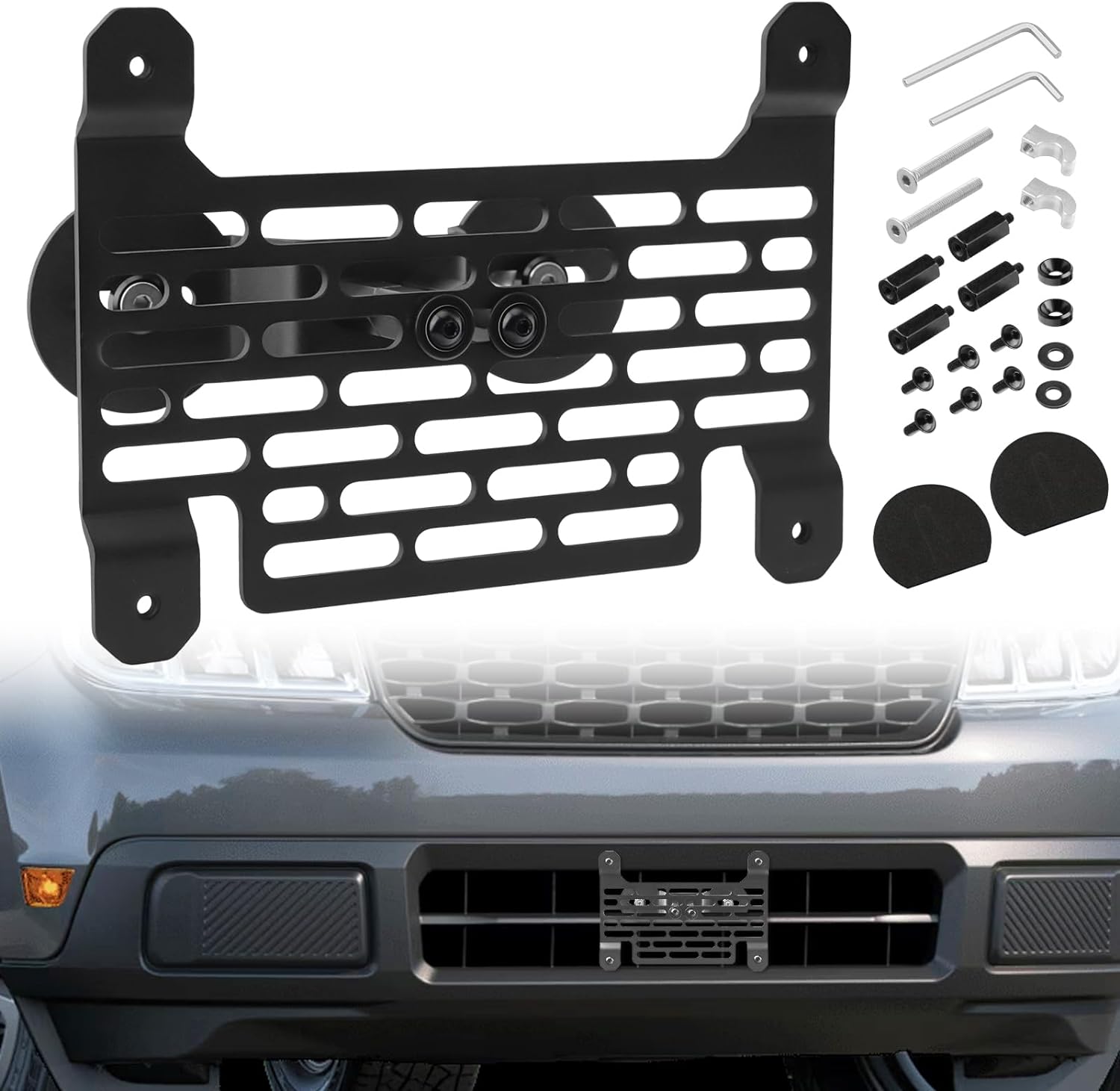
Image: The TECHPICCO License Plate Frame components and an illustration of the frame installed on a vehicle's front grille.
설정 및 설치
The TECHPICCO License Plate Frame is designed for a straightforward, no-drilling installation process. It can be mounted on the central grille or lower air intake of most compatible vehicles. Ensure your vehicle's grille structure allows for secure clamping without obstructing sensors or auxiliary lights.
설치 단계:
- 장착 브래킷을 준비하세요: Assemble the main bracket components as shown in the diagram, ensuring all screws are finger-tight initially.
- 브래킷 위치: Place the assembled bracket onto the desired section of your vehicle's front grille or lower air intake. The design allows for adjustment to fit various grille patterns.
- Cl을 확보amps: 제공된 cl을 사용하십시오.amps and screws to firmly attach the bracket to the grille. Tighten the screws evenly to ensure a secure grip without overtightening, which could damage the grille.
- Adjust for Optimal Angle: The bracket features an adjustable mounting mechanism. Once secured, you can fine-tune the angle of the license plate to your preference, ensuring it does not block any vehicle sensors or lights.
- 번호판을 부착하세요: Finally, mount your license plate to the frame using the appropriate screws.

Image: Detailed diagram illustrating the components and the step-by-step assembly for easy installation.

Image: Visual comparison highlighting the no-drill installation benefit of the TECHPICCO frame versus traditional drilling methods.
Video: An official demonstration of the universal license plate frame, showcasing its features and installation process. This video highlights the strong rust protection, no-drilling installation, adjustable mounting, and safe and reliable design.
운영 및 조정
Once installed, the TECHPICCO License Plate Frame operates as a secure and stable mount for your vehicle's front license plate. Its adjustable design allows for fine-tuning the plate's position to ensure optimal visibility and compliance with local regulations, while avoiding interference with vehicle sensors or lights.
To adjust the angle or position of the license plate after initial installation, gently loosen the adjustment screws on the bracket, reposition the plate as desired, and then re-tighten the screws firmly. Always ensure the plate is securely fastened before driving.

Image: The adjustable mounting feature of the license plate holder, allowing for horizontal positioning adjustments.
유지
The TECHPICCO License Plate Frame is designed for minimal maintenance due to its durable construction and powder-coated finish. This finish provides excellent resistance against rust, scratches, and various weather conditions.
- 청소: Periodically wipe down the frame with a soft, damp cloth to remove dirt and grime. Avoid abrasive cleaners or harsh chemicals that could damage the finish.
- 점검: Regularly check all mounting screws and connections to ensure they remain tight and secure. Re-tighten if necessary.
- 내후성: The frame is built to withstand diverse weather conditions, including rain, snow, and heat. No special weather-proofing treatments are required.

Image: The license plate frame's weather-resistant properties, including powder coating, scratch-free surface, heat resistance, and anti-rust protection, suitable for all weather conditions.
문제 해결
설치 또는 사용 중에 문제가 발생하면 다음의 일반적인 문제 해결 팁을 참조하십시오.
- Difficulty Achieving Level Mounting: The universal design allows for adjustment. Ensure the bracket is securely clamped to a stable part of the grille. Slight adjustments to the clamping points or the adjustable mounting mechanism can help achieve a level position.
- Screws Not Long Enough: In some vehicle models, the provided screws for attaching the bracket to the grille might be too short. If this occurs, longer bolts of the same thread type may be required, along with appropriate washers and nuts for secure fastening.
- Interference with Vehicle Components: If the license plate or bracket obstructs fog lamps, sensors, or other vehicle components, try adjusting the bracket's position on the grille. The adjustable nature of the mount is designed to help avoid such interferences. If obstruction persists, the product may not be suitable for that specific mounting location on your vehicle.
- 느슨한 장착: Ensure all screws are tightened firmly. If the bracket feels loose, re-check the clamping points and consider adding zip ties for extra stability if the grille structure allows, as suggested by some users for certain vehicle models.
명세서
| 기인하다 | 세부 사항 |
|---|---|
| 상표 | 테크픽코 |
| 모델 번호 | CPJ-TY-ZW-BK |
| 색상 | 검은색 |
| 품목 무게 | 0.64킬로그램(1.41파운드) |
| 마무리 유형 | 우아한 |
| 차량 서비스 유형 | Fit for Ford Maverick 2022-2025 (Universal compatibility for most cars) |
| 패키지 크기 | 8.7 x 6.42 x 2.05 인치 |
보증 정보
Specific warranty details for the TECHPICCO License Plate Frame are not provided in this manual. For information regarding product warranty, please refer to the product packaging, the original purchase receipt, or contact TECHPICCO customer support directly.
지원하다
For further assistance, technical support, or inquiries about your TECHPICCO License Plate Frame, please utilize the following resources:
- 온라인 리소스: Visit the official TECHPICCO store on Amazon for product details, FAQs, and additional support. TECHPICCO Store
- Amazon 제품 페이지: 고객님께views, Q&A, and direct messaging with the seller, refer to the product's Amazon listing: 제품 페이지
- 설치 설명서(PDF): A downloadable PDF version of the installation manual is available for detailed instructions: PDF 다운로드
Ask a question about this manual
Ask about setup, troubleshooting, compatibility, parts, safety, or missing instructions. Manuals+ will review the question and use this page’s manual context to help answer it.