
1. 서론
The Barracuda No Break SR600 is an Uninterruptible Power Supply (UPS) and voltage regulator designed to protect your electronic devices from power outages, 서지, 그리고 볼륨tage fluctuations. With a capacity of 600VA/240W, it provides reliable backup power and stable voltage for computers, monitors, gaming consoles, routers, and other sensitive equipment. This manual provides essential information for the proper setup, operation, maintenance, and troubleshooting of your SR600 unit.

Figure 1: Barracuda SR600 No Break Unit
This image shows the Barracuda SR600 No Break unit from an angled perspective, highlighting its compact design and front panel.
2. 안전 정보
Please read and follow all safety instructions carefully to prevent injury or damage to the unit and connected equipment.
- UPS c를 열지 마십시오.asing. 내부에는 사용자가 수리할 수 있는 부품이 없습니다.
- UPS를 비, 습기 또는 과도한 습도에 노출시키지 마십시오.
- Ensure the UPS is placed in a well-ventilated area, away from direct sunlight or heat sources.
- UPS는 접지된 AC 전원 콘센트에만 연결하십시오.
- Do not connect non-computer related equipment (e.g., medical equipment, life support systems) to the UPS.
- In case of fire, use a dry chemical extinguisher. Water may cause electrical shock.
3. 제품 오버view
3.1 전면 패널
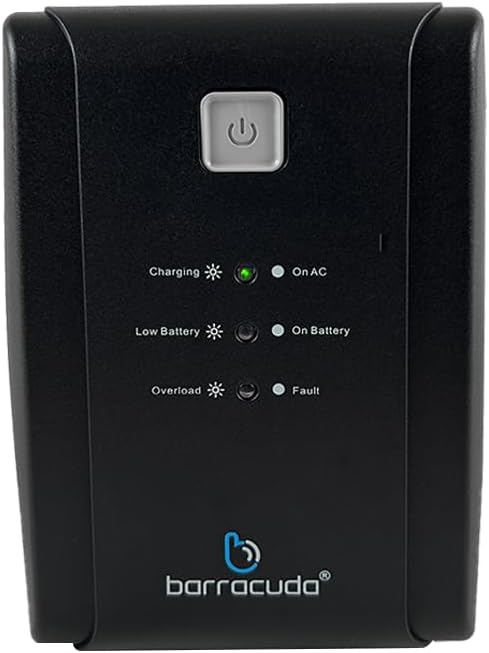
Figure 2: Front Panel of Barracuda SR600
This image displays a close-up of the Barracuda SR600's front panel, showing the power button and LED indicators for Charging, On AC, Low Battery, On Battery, Overload, and Fault.
- 전원 버튼: 버튼을 눌러 UPS를 켜거나 끄세요.
- LED 표시등:
- 충전 중: 배터리가 충전 중임을 나타냅니다.
- On AC: 무정전 전원 공급 장치(UPS)가 일반 전원을 사용하여 작동 중임을 나타냅니다.
- 배터리 부족: Indicates the battery level is low.
- 배터리 : Indicates the UPS is operating on battery power.
- 초과 적재: Indicates the connected load exceeds the UPS capacity.
- 잘못: Indicates a system error.
3.2 후면 패널

Figure 3: Rear Panel of Barracuda SR600
This image shows the rear panel of the Barracuda SR600, detailing the eight power outlets (four for AVR/Backup and four for Surge Only), the circuit breaker, the USB port, and the AC input.
- AVR/Backup Outlets (4): Provide battery backup power and surge protection. Connect critical devices like computers and monitors here.
- 서지 전용 콘센트(4개): Provide surge protection only. Connect non-critical devices like printers or scanners here.
- 회로 차단기: 재설정 가능한 과부하 보호 기능.
- USB 포트: For connecting to a computer for monitoring software (if applicable).
- AC 입력: 무정전 전원 공급 장치를 전원 콘센트에 연결합니다.
4. 설정
4.1 풀기
Carefully remove the UPS from its packaging. Inspect the unit for any shipping damage. Retain the original packaging for future use or return.
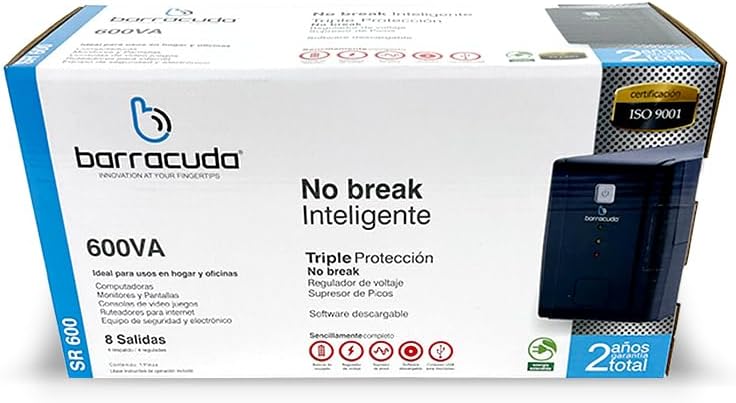
Figure 4: Barracuda SR600 Retail Packaging
This image displays the retail box for the Barracuda SR600, showing product information and branding.
4.2 배치
Place the UPS on a flat, stable surface in a clean, dry, and well-ventilated area. Avoid placing it near heat-emitting appliances or in direct sunlight. Ensure there is adequate space around the unit for proper airflow.
4.3 장치 연결
- Plug the UPS power cord into a grounded 120VAC wall outlet.
- Connect your critical devices (e.g., computer, monitor) to the AVR/Backup Outlets 후면 패널에.
- 중요하지 않은 장치(예: 프린터, 스캐너)는 다음 장치에 연결하십시오. 서지 전용 콘센트.
- Ensure all connected devices are turned off before plugging them into the UPS.
4.4 초기 충전
For optimal performance, charge the UPS battery for at least 8 hours before initial use. The unit will charge automatically when connected to AC power, even if the UPS is turned off.
5. 운영
5.1 전원 켜기/끄기
- 켜려면: Press and hold the power button on the front panel for approximately 3 seconds until you hear a beep and the 'On AC' LED illuminates.
- 끄기: Press and hold the power button for approximately 3 seconds until you hear a beep and all LEDs turn off.
5.2 AC 모드
When the UPS is connected to utility power and the 'On AC' LED is lit, it is operating in AC mode. In this mode, the UPS provides regulated power to connected devices and charges its internal battery.
5.3 배터리 모드
정전 중tage 또는 상당한 볼륨tage fluctuation, the UPS automatically switches to battery mode. The 'On Battery' LED will illuminate, and the unit will emit an audible alarm (beeping) to indicate it is running on battery power. The alarm will sound more frequently as the battery level becomes critically low.
5.4 LED Indicators Explanation
Refer to Section 3.1 for a detailed description of each LED indicator and its meaning during operation.
6. 유지관리
6.1 배터리 관리
- To maximize battery life, ensure the UPS is connected to AC power at all times to keep the battery fully charged.
- Avoid frequent deep discharges of the battery.
- If the UPS is to be stored for an extended period, fully charge the battery and then disconnect it from AC power. Recharge the battery every 3 months to prevent permanent damage.
6.2 청소
Disconnect the UPS from AC power and all connected devices before cleaning. Use a soft, dry cloth to wipe the exterior of the unit. Do not use liquid or aerosol cleaners.
6.3 보관
Store the UPS in a cool, dry place, away from direct sunlight and extreme temperatures. Ensure the battery is fully charged before storage and recharged periodically as mentioned above.
7. 문제 해결
If you experience issues with your Barracuda SR600, refer to the table below for common problems and their solutions.
| 문제 | 가능한 원인 | 해결책 |
|---|---|---|
| UPS가 켜지지 않습니다. | 배터리가 완전히 방전되었습니다. | Connect the UPS to AC power and allow it to charge for at least 8 hours. |
| UPS is on but provides no power to outlets. | 회로 차단기가 트립되었습니다. | Reduce the load on the UPS and press the circuit breaker button on the rear panel to reset. |
| UPS constantly beeps in AC mode. | 과부하 상태. | Disconnect non-essential equipment from the UPS. Ensure total load does not exceed 240W. |
| 백업 시간이 짧습니다. | Battery not fully charged or battery end-of-life. | Allow the battery to charge for 8 hours. If the problem persists, the battery may need replacement (contact support). |
| 오류 LED가 켜졌습니다. | 내부 오류입니다. | Turn off the UPS, disconnect all devices, and unplug from AC. Wait 5 minutes, then reconnect and restart. If the fault persists, contact customer support. |
8. 사양
Technical specifications for the Barracuda No Break SR600.
| 특징 | 사양 |
|---|---|
| 용량 | 600VA / 240W |
| 입력 Voltage | 120VAC |
| 입력 Voltag및 범위 | 120VAC -30% +25% |
| 출력 볼륨tage | 120VAC |
| 권tage Regulation (typical) | +- 10% |
| 빈도 | 50Hz 또는 60Hz |
| 주파수 규제 | +- 1% |
| 출력 접점 | 4 Energy Backup / 4 Surge Protection |
| 배터리 유형 | 12V/4.5Ah |
| 충전 시간 | 평균 5시간 |
| 치수(길이 x 너비 x 높이) | 60 x 30 x 25cm (대략적인 패키지 크기) |
| 무게 | 6kg (대략적인 패키지 무게) |
| 재료 | 금속 |
9. 보증 및 지원
The Barracuda No Break SR600 comes with a 2-year total warranty 구매일로부터 보증하며, 정상적인 사용 중 발생한 제조상의 결함 및 고장에 한합니다. 보증 청구를 위해 구매 증빙 서류를 보관해 주십시오.
For technical support, warranty service, or inquiries, please contact Barracuda customer service. Refer to the product packaging or the Barracuda official web최신 연락처 정보는 사이트에서 확인하세요.