
radius HP-H100BT
radius HP-H100BT Wireless Open-Ear Earphones
Model: HP-H100BT
Brand: radius
소개
구매해주셔서 감사합니다asing the radius HP-H100BT Wireless Open-Ear Earphones. This manual provides essential information for the safe and effective use of your new earphones. Please read it thoroughly before use and retain it for future reference.
The HP-H100BT earphones are designed for active use, allowing you to enjoy audio while remaining aware of your surroundings. Key features include:
- 오픈 이어 디자인: Allows ambient sounds to be heard for enhanced safety during outdoor activities.
- "Listen-While-You-Hear" Structure: Ensures your ears are not fully blocked.
- Carbon Fiber Paper Dome Dynamic Driver: Delivers rich bass and clear mid-high tones.
- 가볍고 컴팩트함: Features a shape-memory neckband for easy portability and storage.
- IPX4 Drip-Proof: Suitable for sports and exercise, resistant to sweat and light rain.
안전 정보
안전한 작동을 보장하고 손상을 방지하려면 다음 예방 조치를 준수하세요.
- Do not disassemble, modify, or attempt to repair the device. This may void the warranty and cause electric shock or fire.
- Keep the earphones away from water, moisture, and extreme temperatures.
- 청력 손상을 방지하려면 높은 볼륨 레벨에 장기간 노출되지 마십시오.
- Do not use the earphones in situations where inability to hear ambient sounds could be dangerous, such as driving or cycling in traffic. The open-ear design helps, but caution is still advised.
- 어린이와 애완동물의 손이 닿지 않는 곳에 보관하세요. 작은 부품은 질식 위험을 초래할 수 있습니다.
IPX4 Drip-Proof Rating
The HP-H100BT earphones are rated IPX4, meaning they are protected against splashing water from any direction. This makes them suitable for use during exercise where sweat may occur, or in light rain. 메모: IPX4 does not mean the device is fully waterproof. Do not submerge the earphones in water.

패키지 내용
패키지에 모든 품목이 들어 있는지 확인하세요.
- radius HP-H100BT Wireless Open-Ear Earphones
- Earpieces (S, M, L sizes - 1 set each)
- 충전 케이블
- 운반 케이스
- Instruction Manual (with Warranty Card)

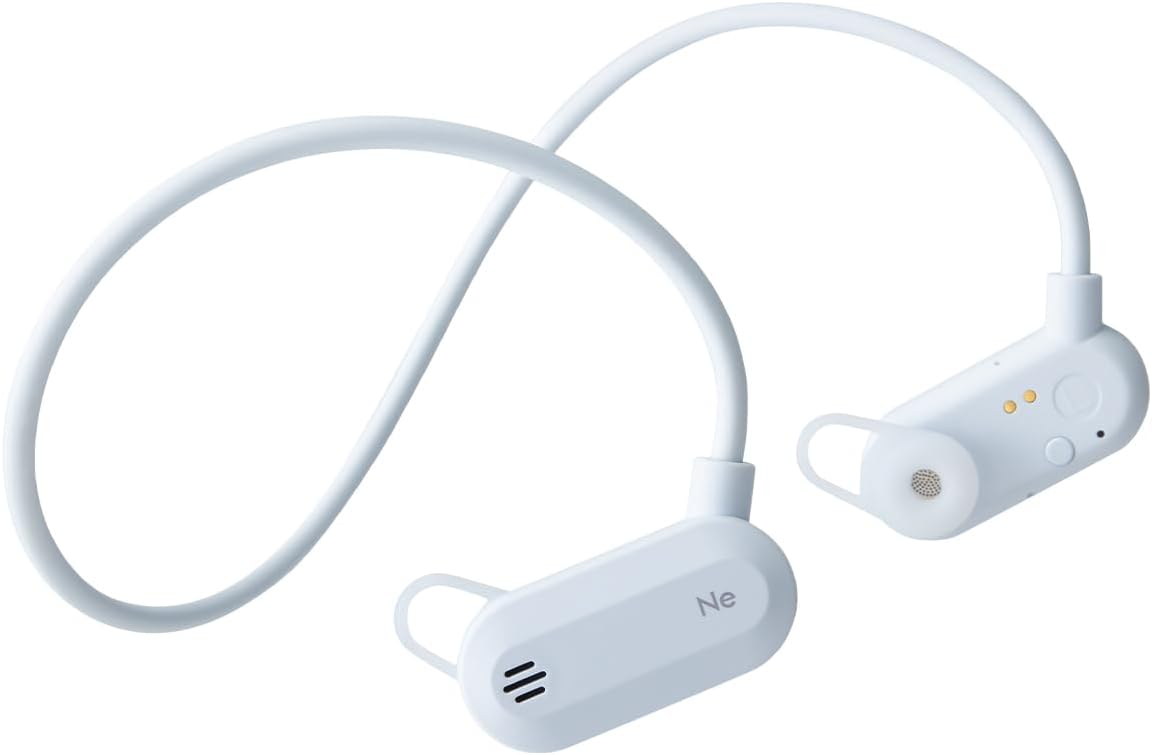
제품 끝view
Familiarize yourself with the components of your HP-H100BT earphones.

제어 및 표시기
The earphones feature intuitive controls for power, volume, and call management. Refer to the diagrams on the product packaging or official website for specific button locations.
설정
1. 이어폰 충전하기
Before first use, fully charge the earphones. Use the dedicated magnetic charging cable provided.
- 충전 케이블을 USB 전원(예: 컴퓨터 USB 포트, USB 벽면 어댑터)에 연결하세요.
- Align the magnetic end of the charging cable with the charging connector on the L-side earphone unit. The magnets will attract, and charging will begin.
- 표시등은 충전 상태를 나타냅니다(예: 빨간색은 충전 중, 파란색은 완충 시).

2. 블루투스 페어링
이어폰을 장치에 연결하려면:
- 이어폰의 전원이 꺼져 있는지 확인하세요.
- Press and hold the power button until the indicator light flashes (e.g., alternating red and blue), indicating pairing mode.
- 기기(스마트폰, 태블릿 등)에서 Bluetooth를 활성화하고 사용 가능한 기기를 검색하세요.
- Select "HP-H100BT" from the list of found devices.
- Once connected, the indicator light will change (e.g., solid blue) and a confirmation tone may sound.
3. 이어폰 착용하기
The HP-H100BT features an open-ear design with a neckband for a secure and comfortable fit.
- Place the neckband around the back of your neck.
- Position the earphone units over your ears, ensuring the earpieces rest gently without fully blocking your ear canals.
- Adjust the fit for comfort and stability. The flexible neckband will conform to your head shape.


작동 지침
전원 켜기/끄기
- 전원 켜기: 전원 표시등이 켜질 때까지 전원 버튼을 약 3초간 길게 누르세요.
- 전원 끄기 : 전원 버튼을 약 5초간 길게 눌러 표시등이 꺼지도록 합니다.
음악 재생
- 재생/일시 중지: 다기능 버튼을 한 번 누릅니다.
- 다음 트랙: 다기능 버튼을 두 번 누르세요.
- 이전 트랙 : 다기능 버튼을 세 번 누르세요.
통화 관리
- 전화 받기/종료: 수신 통화 또는 통화 중 다기능 버튼을 한 번 누릅니다.
- 전화 거부: 전화가 오는 동안 다기능 버튼을 2초간 길게 누릅니다.
볼륨 조절
- 볼륨 업: 볼륨 + 버튼을 누릅니다.
- 볼륨 작게 : 볼륨 - 버튼을 누르세요.
유지
청소
정기적인 청소는 성능과 위생을 유지하는 데 도움이 됩니다.
- Wipe the earphones with a soft, dry cloth.
- 잘 지워지지 않는 더러움에는 가볍게 dampen the cloth with water and wipe gently, then dry thoroughly.
- Do not use abrasive cleaners, alcohol, or solvents, as these can damage the surface.
- Clean the earpieces regularly with a soft cloth.
저장
When not in use, store the earphones in the provided carrying case to protect them from dust and damage. The shape-memory neckband allows for compact folding.

문제 해결
문제가 발생하면 다음 해결 방법을 시도해 보세요.
| 문제 | 가능한 원인 | 해결책 |
|---|---|---|
| 전원을 켤 수 없습니다 | 배터리가 부족하거나 방전되었습니다. | 이어폰을 완전히 충전하세요. |
| 기기와 페어링할 수 없습니다 | 이어폰이 페어링 모드가 아닙니다. 기기의 블루투스가 꺼져 있습니다. 기기가 너무 멀리 떨어져 있습니다. | Ensure earphones are in pairing mode. Turn on Bluetooth on your device. Move device closer to earphones. |
| 소리가 나지 않거나 볼륨이 작음 | Volume too low; earphones not connected; audio source issue. | Increase volume on earphones and device. Reconnect Bluetooth. Check audio source. |
| 소리가 끊김 | 간섭, 장치가 너무 멀리 있음, 배터리 부족. | Move closer to device. Avoid strong interference sources. Charge earphones. |
문제가 지속되면 지원 섹션을 참조하거나 고객 서비스에 문의하세요.
명세서
| 상표 | 반지름 |
| 모델 번호 | HP-H100BT |
| 색상 | 블루 그레이 |
| 귀 위치 | 오픈이어 |
| 헤드폰 스타일 | 이어폰 |
| 임피던스 | 16옴 |
| 포함된 구성 요소 | Earpieces (S, M, L) x 1 set each, Case, Charging Cable, Instruction Manual (Warranty Card) |
| 연령대 | 성인 |
| 소음 제어 | 없음 |
| 방수성 | IPX4(방수) |
| 추가 기능 | Sports & Exercise, Microphone, Shape Memory, Lightweight, Waterproof/Drip-proof |
| 연결 기술 | 무선 전화 |
| 무선형 | 블루투스 |
보증 및 지원
품질 보증
radius products undergo inspection, firmware updates, and periodic recharging before shipment to ensure quality. Therefore, some products may appear to have been temporarily opened; however, they are unused and their quality is not affected. We appreciate your understanding.
보증 정보
The warranty for radius products applies to items purchased from authorized radius retailers, such as the official radius store, Kojima, Sofmap, e☆earphone, and Yamada Denki. Products purchased from other sellers are not covered by our warranty. Please confirm the seller before making a purchase.
For detailed warranty terms and conditions, please visit the official radius web대지.
고객 지원
For further assistance or inquiries, please visit the official radius support page or contact your local authorized service center. Contact details can typically be found on the official radius website or your product's warranty card.
Ask a question about this manual
Ask about setup, troubleshooting, compatibility, parts, safety, or missing instructions. Manuals+ will review the question and use this page’s manual context to help answer it.