
1. 제품 오버view
The Level Lock+ (Wi-Fi) Smart Lock integrates advanced security features with a discreet design, allowing for keyless entry and remote access. It is designed to fit most American standard exterior doors and is compatible with various smart home platforms.
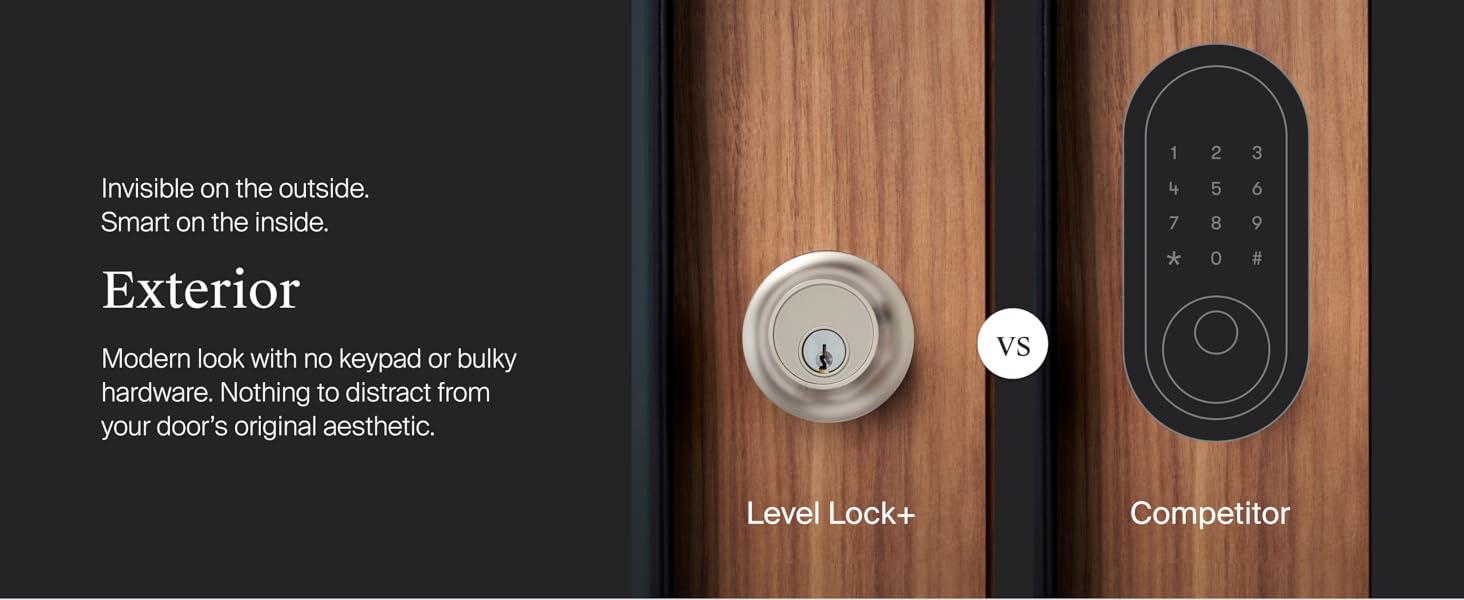
이미지 1: 외부 view of the Level Lock+ (left) showing its discreet design compared to a competitor's smart lock with a visible keypad (right). The Level Lock+ maintains a modern aesthetic without external technology.
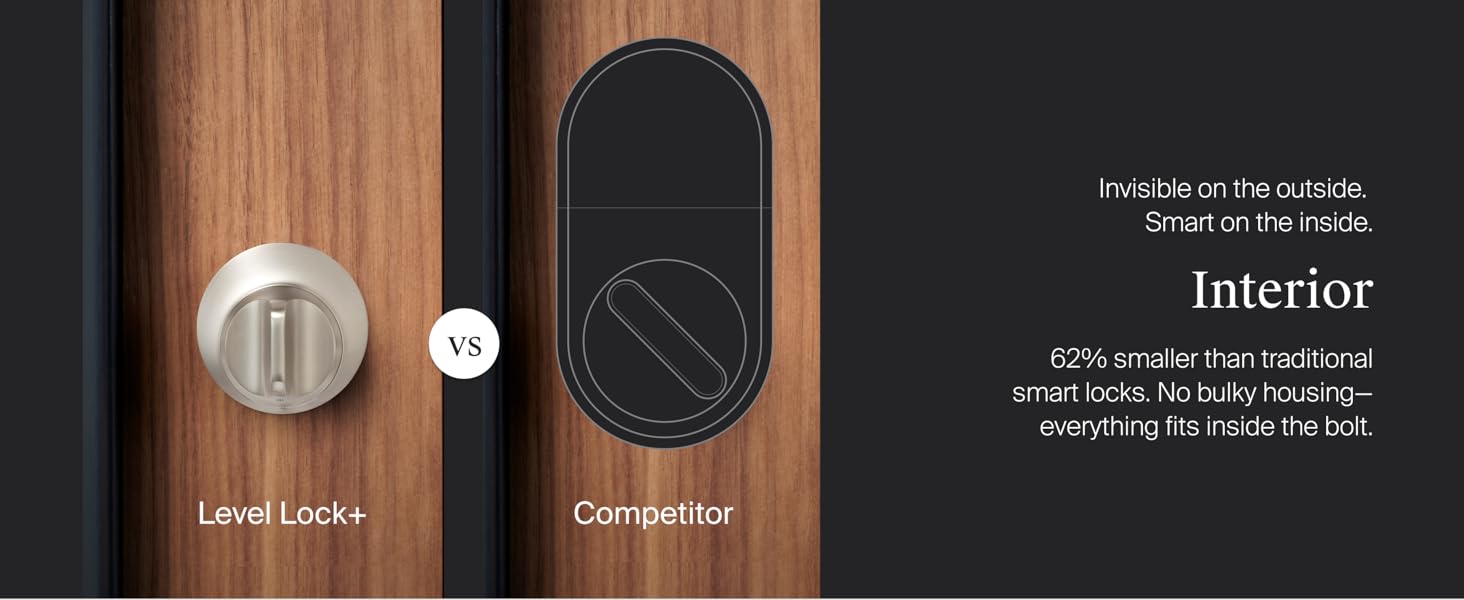
이미지 2: 내부 view of the Level Lock+ (left) demonstrating its compact size, which is 62% smaller than traditional smart locks. All components fit inside the bolt, eliminating bulky housing.
포함된 구성 요소:
- Level Lock+
- Level Connect Wi-Fi Bridge
- CR2 배터리
- 2 strike plates
- 열쇠고리 2개
- 2개의 키
- 나사 6개

이미지 3: A visual representation of all items included in the Level Lock+ package, such as the lock components, Wi-Fi bridge, battery, strike plates, key fobs, keys, and screws.
2. 설정 및 설치
The Level Lock+ is designed for DIY installation and is compatible with most American standard deadbolts. No locksmith is typically required.
설치 전 확인:
- Ensure your current deadbolt operates smoothly without resistance when pushing or pulling the door. If not, address any door alignment issues before proceeding.
- Verify door thickness is between 1.75 and 2 inches.
- Confirm standard profile deadbolt with a backset of 2.375 or 2.75 inches.
- Ensure ANSI standard 2.125 inch bore hole diameter.
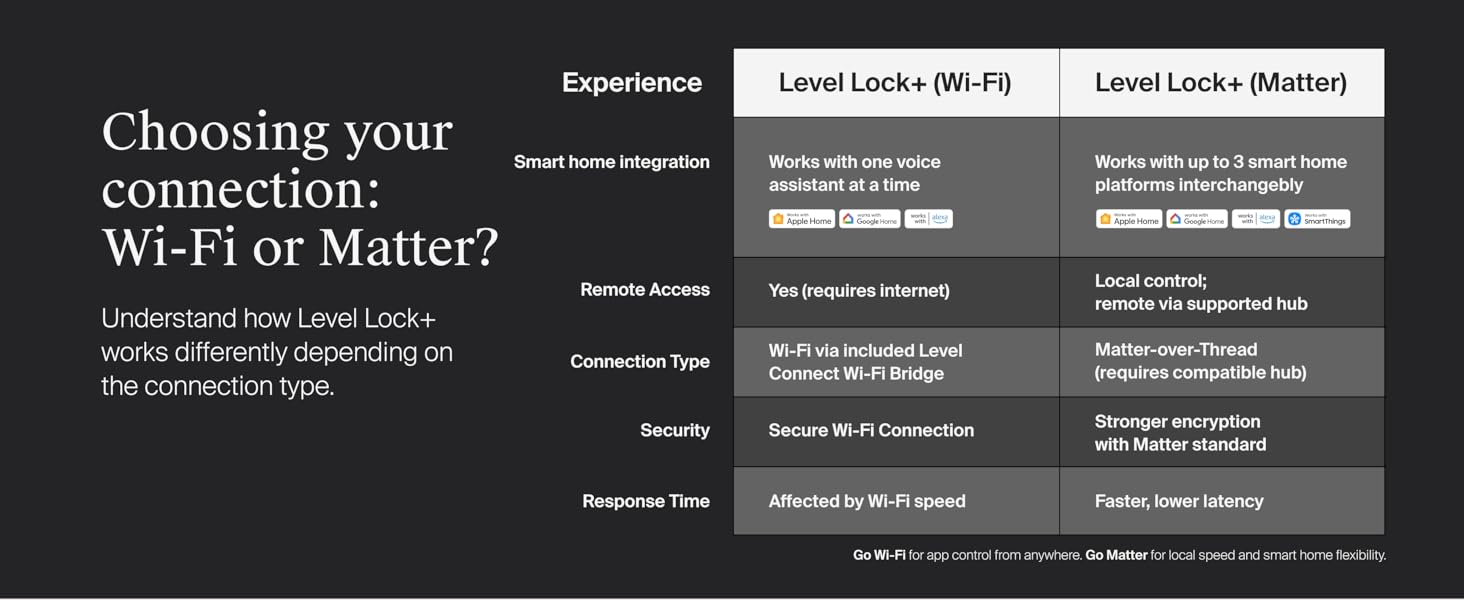
이미지 4: A diagram illustrating the necessary door measurements and compatibility for installing the Level Lock+, including bore hole diameter, backset, and door thickness.
설치 단계:
- Disassemble Existing Lock: Unscrew and remove your existing lock housing, deadbolt, and strike plate.
- Install Backset: Insert the Level Lock+ backset into the cross bore hole, ensuring the word 'TOP' faces upwards. Secure it to the door with the provided bolt plate screws using a Phillips screwdriver. Avoid using power tools or overtightening.
- 모터 설치: Slide the motor onto the backset and tighten the connecting screw.
- 스트라이크 플레이트를 설치하세요: 제공된 스트라이크 플레이트 나사를 사용하여 문설주에 가장 잘 맞는 스트라이크 플레이트를 고정하세요.
- 하우징 설치: Line up the tailpiece of the exterior housing with the horizontal opening in the tailpiece adapter and slide the housing through.
- Install Interior Plate: Line up the horizontal opening of the interior plate with the end of the tailpiece and connect it with the two supplied security screws.
- 잠금 활성화: Unscrew the cap on the end of the bolt and insert the CR2 battery with the negative end towards the cap. If using the long bolt position, use the included long cap. Screw the cap back in. You will hear a welcome chime upon successful activation.
동영상 1 : Official Level Lock+ installation guide demonstrating the step-by-step process of replacing an existing deadbolt with the Level Lock+, including securing the backset, installing the motor, and activating the battery.
앱 설정:
After physical installation, download the Level Home app for iOS or Android. Create an account and follow the in-app instructions to connect your Level Lock+.
3. 잠금 장치 작동
The Level Lock+ offers multiple convenient ways to lock and unlock your door.
Entry Options:
- 애플 홈 키: Tap your iPhone or Apple Watch to the lock to gain access.
- Level Home App: Use the Level Home app on your iOS or Android device to lock or unlock the door.
- 열쇠 고리: Utilize the provided key fobs for quick keyless entry.
- 물리적 키: A traditional key is included for manual operation.
- 음성 제어: Integrate with Apple HomeKit, Google Home, or Amazon Alexa to use voice commands for locking and unlocking.

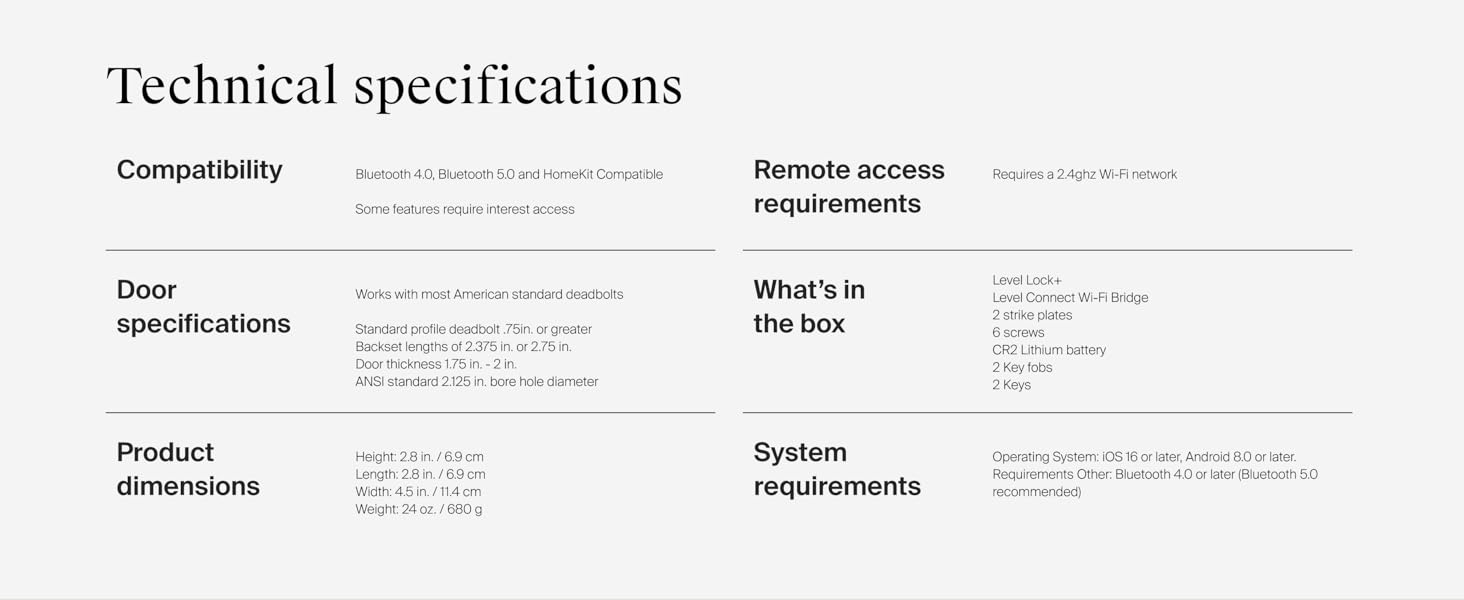
이미지 5: An illustration detailing the various methods for accessing the Level Lock+, including the Level App, Voice Control, Key Cards & Fobs, Apple Home Keys, Keypad (sold separately), and a Physical Key.
원격 접속:
With the included Level Connect Wi-Fi Bridge, you can remotely lock/unlock your door, view live activity history, and manage key codes from anywhere via the Level Home app. The Wi-Fi Bridge requires a 2.4 GHz Wi-Fi connection and should be plugged in within 20 feet of the lock.
이미지 6: A user demonstrating remote control of the Level Lock+ via the Level Home app on a smartphone, highlighting the ability to lock and unlock from any location.
스마트 홈 통합:
The Level Lock+ (Wi-Fi) integrates directly with Apple Home, Google Home, and Amazon Alexa. You can use voice commands to control your lock and incorporate it into your smart home routines.

이미지 7: Two individuals in a kitchen setting, with one using voice commands to control the Level Lock+ through a smart home device, illustrating compatibility with Apple Home, Google Home, and Alexa.
4. 유지관리
배터리 교체:
The Level Lock+ uses one CR2 battery (included). The Level Home app will notify you when the battery level is low. To replace the battery, unscrew the cap on the end of the bolt, remove the old battery, insert a new CR2 battery with the negative end towards the cap, and screw the cap back on.
5. 문제 해결
If you encounter any issues with your Level Lock+, consider the following:
- 설치 문제: If the deadbolt does not throw smoothly after installation, do not force it. Contact Level support for troubleshooting.
- 연결 문제: Ensure the Level Connect Wi-Fi Bridge is plugged in within 20 feet of the lock and connected to a 2.4 GHz Wi-Fi network. Check your router settings if necessary.
- 앱 기능: Ensure your Level Home app is updated to the latest version. Restarting the app or your smartphone can resolve minor glitches.
- 배터리 수명: If the lock is unresponsive, check the battery level in the app or replace the CR2 battery.
For further assistance, refer to the Level Home app's help section or visit the official Level support web대지.
6. 사양
| 특징 | 세부 사항 |
|---|---|
| 상표 | 수준 |
| 모델명 | 스마트락 |
| 모델 번호 | C-F11U-S1 |
| 잠금 유형 | 데드 볼트 |
| 재료 | 금속, 스테인리스 스틸 |
| 색상 | 새틴 크롬 |
| 품목 치수(L x W x H) | 4.5 x 2.75 x 2.75 인치 |
| 품목 무게 | 2.76 파운드 |
| 특징 | 날씨 저항성 |
| 연결 프로토콜 | Wi-Fi (via Level Connect Bridge) |
| 컨트롤러 유형 | Android, Apple HomeKit, Google Assistant, iOS |
| 제어 방법 | Voice, App, Key Fob, Physical Key, Apple Home Keys |
| 배터리 유형 | 1 CR2 Lithium Manganese Dioxide battery (included) |
| 보안 등급 | BHMA AAA rating, ANSI Grade 1/A |
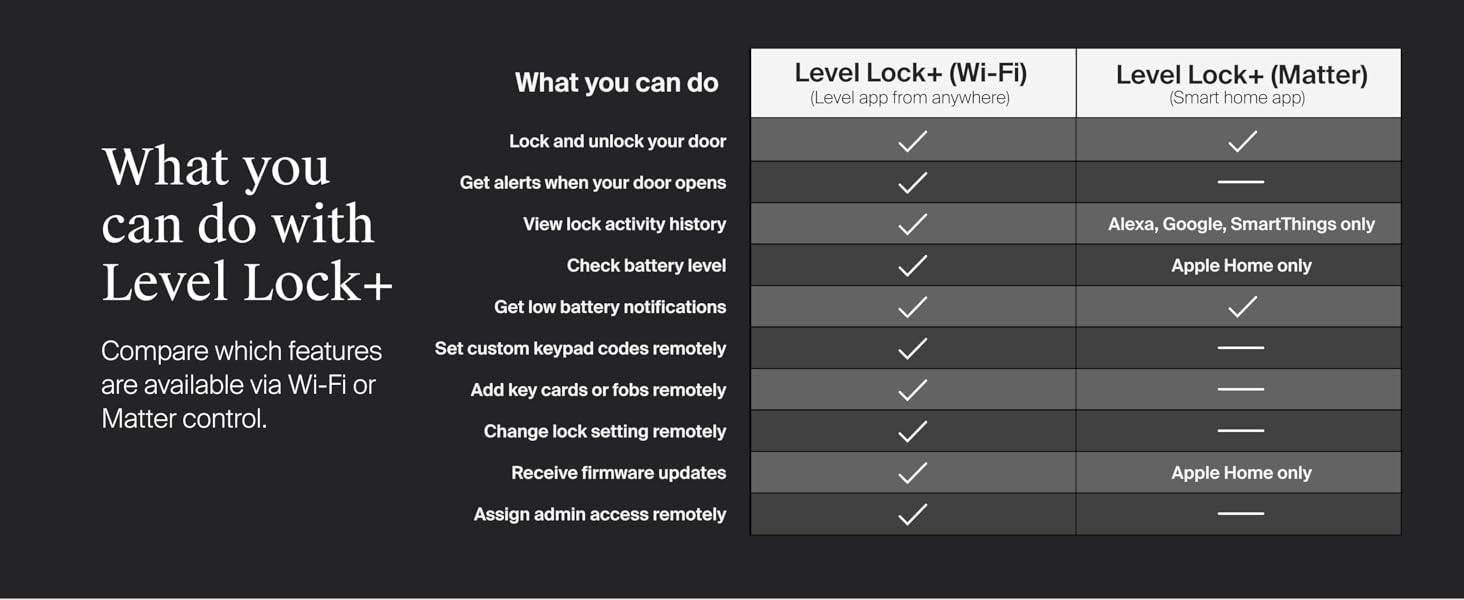
이미지 8: A detailed table outlining the technical specifications of the Level Lock+, including compatibility, door specifications, product dimensions, remote access requirements, what's in the box, and system requirements.
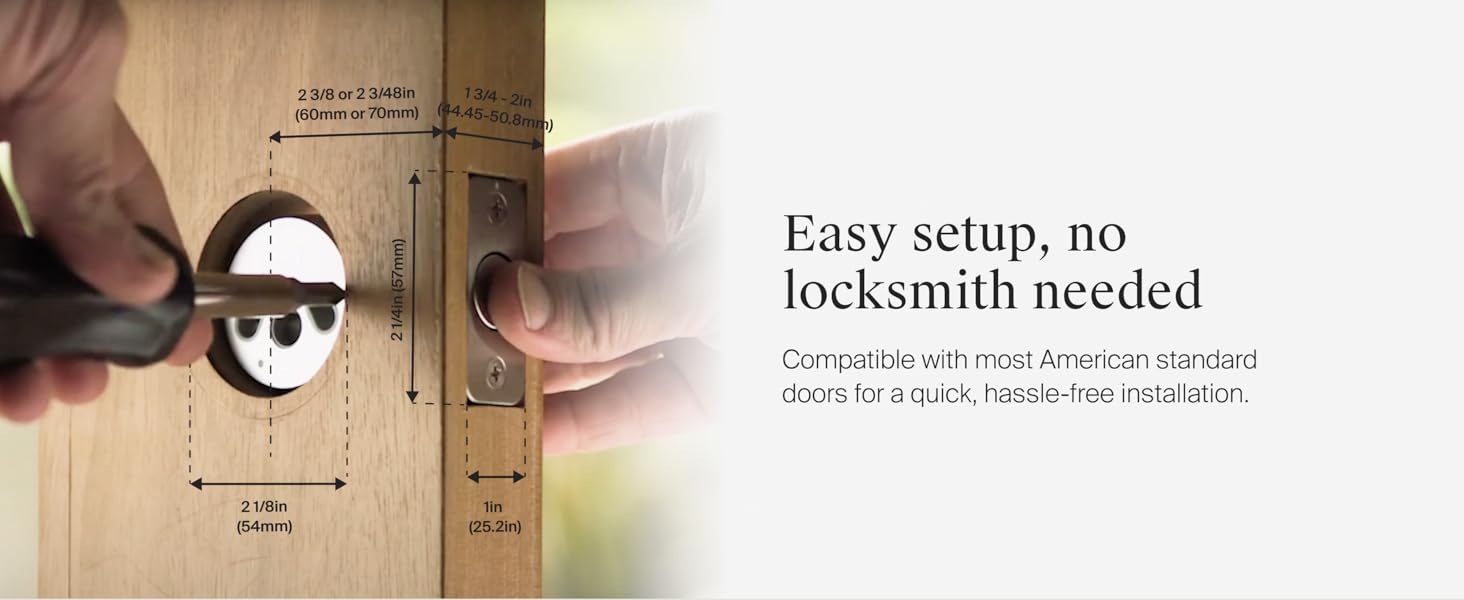
Connectivity Comparison: Level Lock+ (Wi-Fi) vs. Level Lock+ (Matter)
| 특징 | Level Lock+ (Wi-Fi) | Level Lock+ (Matter) |
|---|---|---|
| 스마트 홈 통합 | Works with one voice assistant at a time (Apple Home, Google Home, Alexa) | Works with up to 3 smart home platforms interchangeably (Apple Home, Google Home, Alexa, SmartThings) |
| 원격 접속 | Yes (requires internet) | Local control; remote via supported hub |
| 연결 유형 | Wi-Fi via included Level Connect Wi-Fi Bridge | Matter-over-Thread (requires compatible hub) |
| 보안 | 안전한 Wi-Fi 연결 | Stronger encryption with Matter standard |
| 응답 시간 | Affected by Wi-Fi speed | Faster, lower latency |
Go Wi-Fi for app control from anywhere. Go Matter for local speed and smart home flexibility.
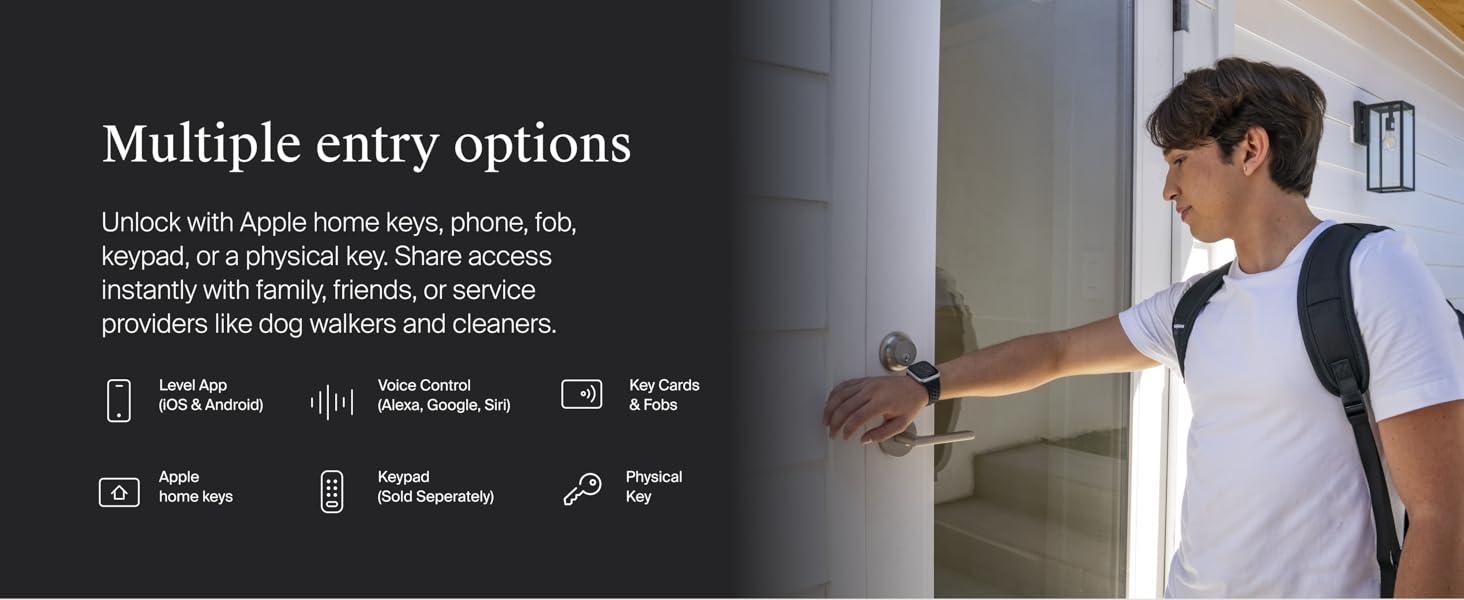
이미지 9: A comparative chart highlighting the differences between the Level Lock+ (Wi-Fi) and Level Lock+ (Matter) versions, focusing on smart home integration, remote access, connection type, security, and response time.
7. 보증 및 지원
The Level Lock+ is built with 440C stainless steel and strengthened metal alloys, providing high security, durability, and finish with a top AAA rating by BHMA (Builders Hardware Manufacturers Association) industry standards.
이미지 10: Details on the best-in-class security of the Level Lock+, including its construction with 440C stainless steel and strengthened metal alloys, BHMA AAA certification, and ANSI Grade 1/A rating for deadbolt security.
For warranty information, product registration, or technical support, please visit the official Level website or contact Level Home Inc customer service. You can also find additional resources and FAQs within the Level Home app.