
1. 서론
This manual provides essential information for the safe and efficient operation of your DOUGH Spectrum One 27-Inch Gaming Monitor. Please read this manual thoroughly before using the product and retain it for future reference.
2. 안전 정보
- 우발적인 낙하를 방지하기 위해 모니터를 안정적이고 수평인 표면에 놓으세요.
- 모니터를 비, 습기 또는 극한의 온도에 노출시키지 마세요.
- 모니터와 함께 제공된 전원 어댑터만 사용하세요.
- 과열을 방지하려면 환기구를 막지 마십시오.
- 모니터를 직접 수리하려고 하지 마십시오. 모든 수리는 자격을 갖춘 기술자에게 맡기십시오.
- 번개가 칠 때나 장기간 사용하지 않을 때는 전원 케이블을 콘센트에서 분리하세요.
3. 패키지 내용
패키지에 모든 구성품이 들어 있는지 확인하세요.
- DOUGH Spectrum One 27-Inch Gaming Monitor
- 전원 어댑터 및 케이블
- DisplayPort 케이블
- USB-C 케이블
- 빠른 시작 가이드(이 설명서에는 포함되지 않음)

이미지 3.1: 앞면 view of the DOUGH Spectrum One monitor.
4. 설정
4.1 물리적 설정
The DOUGH Spectrum One monitor can be used with its optional stand (if purchased) or a VESA-compatible mount (100x100mm). This manual focuses on the monitor unit itself.
- 짐 풀기: 모니터와 모든 액세서리를 포장에서 조심스럽게 꺼내세요.
- 놓기: Position the monitor on a stable, flat surface. Ensure adequate space for ventilation around the monitor.
- 연결 케이블:
- 전원 케이블을 모니터에 연결한 다음 전원 콘센트에 꽂으세요.
- Connect your computer or gaming console to the monitor using either an HDMI 2.1 cable, DisplayPort 1.4 cable, or USB-C cable.
- For USB hub functionality, connect a USB-B to USB-A cable from your computer to the monitor's upstream USB-B port.
- For USB-C docking, connect a compatible laptop to the monitor's USB-C port. This single connection can provide video, data, and up to 100W of power delivery.
- Optional: Connect headphones to the 3.5mm audio jack.

이미지 4.1: 후면 view of the monitor showing available ports including HDMI 2.1, DisplayPort 1.4, USB Type-C (100W), USB Type-B, USB Type-A, and 3.5mm AUX.
4.2 초기 전원 켜기
- 필요한 케이블이 모두 안전하게 연결되었는지 확인하세요.
- 모니터의 전원 버튼을 누르세요. 전원 표시등이 켜집니다.
- If no image appears, ensure your input source (computer/console) is powered on and correctly configured to output to the monitor.
5. 사용 설명서
5.1 화면 디스플레이(OSD) 탐색
The monitor features an On-Screen Display (OSD) menu for adjusting various settings. Use the physical buttons or joystick (if present) on the monitor to navigate the OSD. Typically, a central button or joystick allows for menu access and selection, while directional movements adjust values or navigate options.
5.2 영상 설정
The DOUGH Spectrum One monitor offers advanced picture settings for optimal visual experience:
- 해결: Supports 4K UHD (3840 x 2160 pixels).
- 새로 고침 빈도: 최대 144Hz로 부드러운 움직임을 구현합니다.
- 색상 정확도: Factory calibrated for Delta E 0.6 average accuracy, covering 98% DCI-P3 and 100% sRGB color gamuts.
- HDR: HDR10 support with a 10 million:1 dynamic contrast ratio for enhanced highlights and deep shadows.
- 명도: 450 nits (sustained), 750 nits (peak).

이미지 5.1: 이상view of the monitor's core display technologies and features.
5.3 게임 기능
이 모니터에는 게임 경험을 향상시키도록 설계된 여러 기능이 포함되어 있습니다.
- 적응형 동기화 기술: Supports AMD FreeSync Premium Pro, NVIDIA G-Sync, and VESA Adaptive-Sync compatibility to reduce screen tearing and stuttering by synchronizing the monitor's refresh rate with the graphics card's frame rate.
- Pixel-Perfect Upscaling: Uses integer-ratio pixel duplication for low-resolution input signals, preserving the look of pixel art and keeping retro games crisp.
- Crosshair Overlay: An on-screen crosshair can be enabled to assist aim in games.
- Frame Rate Counter: Displays the current frame rate on screen to monitor system performance.
- Blur Busters Presets: Pre-tuned settings for optimal motion clarity.

Image 5.2: The monitor displaying a high-performance gaming scene.
5.4 연결성
모니터는 다양한 연결 옵션을 제공합니다.
- HDMI 2.1(x2): For high-bandwidth connections to compatible devices, supporting 4K 144Hz.
- DisplayPort 1.4 (x1): Another high-bandwidth option for video input.
- USB-C 3.2 Gen 2 (x1): Supports video, data transfer (up to 10 Gb/s), and up to 100W power delivery over a single cable for compatible laptops.
- USB-A (x2 side-facing, x1 rear): 주변장치를 연결하는 데 사용됩니다.
- 3.5mm 오디오 잭: 헤드폰이나 외부 스피커를 연결하는 데 사용합니다.
- 분할 화면 모드: The display can show video from two separate sources simultaneously.
6. 유지관리
6.1 화면 청소
모니터 화면을 청소하려면:
- 모니터를 끄고 전원 코드를 뽑습니다.
- 부드럽고 보푸라기가 없는 천으로 화면을 부드럽게 닦습니다.
- 완고한 자국의 경우 가볍게 damp물이나 모니터 전용 화면 세척액을 천에 적셔 사용하십시오. 화면에 직접 액체를 분사하지 마십시오.
- 연마성 세척제, 알코올 또는 암모니아 기반 용액은 화면 표면을 손상시킬 수 있으므로 사용을 피하십시오.
6.2 C 청소asing
모니터를 닦으세요asin부드럽고 마른 천으로 닦아주세요. 필요한 경우, 약간 부드러운 천을 사용하세요.amp 천. 독한 화학 물질을 사용하지 마십시오.
7. 문제 해결
This section addresses common issues you might encounter with your DOUGH Spectrum One monitor.
| 문제 | 가능한 원인 / 해결책 |
|---|---|
| 화면에 아무것도 표시되지 않음 / 전원 LED 꺼짐 | Ensure the power cable is securely connected to both the monitor and the power outlet. Check if the power outlet is functional. Press the monitor's power button. |
| 이미지 없음 / "신호 없음" 메시지 | Verify the video cable (HDMI, DisplayPort, USB-C) is securely connected to both the monitor and your computer/console. Ensure the correct input source is selected in the monitor's OSD. Check if the computer/console is powered on and outputting video. |
| Monitor takes long to wake from sleep / Occasional black screen when changing resolution | This can sometimes be resolved by updating the monitor's firmware. Firmware updates typically require a Windows machine. Refer to the manufacturer's support website for instructions and the latest firmware. |
| 디스플레이 어둡게 하기 | Adjust brightness and contrast settings in the OSD menu. Ensure HDR settings are correctly configured for your content and operating system. |
| 화면 찢김 또는 끊김 | Ensure Adaptive Sync (FreeSync Premium Pro, G-Sync compatible) is enabled on both the monitor and your graphics card settings. Verify your graphics drivers are up to date. |
| Power supply not compatible with region | Ensure you have received the correct power supply for your region. Contact customer support if the provided power supply is incorrect. |
8. 사양
| 특징 | 사양 |
|---|---|
| 모델 번호 | ES07D03 |
| 화면 크기 | 27 인치 |
| 패널 유형 | IPS |
| 해결 | 3840 x 2160 픽셀(4K UHD) |
| 새로 고침 빈도 | 144Hz |
| 응답 시간 | 1ms |
| 종횡비 | 16시 9분 |
| 이미지 밝기 | 450 nits (sustained), 750 Nits (Peak) Candela |
| HDR 지원 | HDR10 |
| 색상 영역 | DCI-P3 98%, sRGB 100% |
| 적응형 동기화 | AMD FreeSync Premium Pro, NVIDIA G-Sync Compatible, VESA Adaptive-Sync |
| 연결성 | 2x HDMI 2.1, 1x DisplayPort 1.4, 1x USB-C 3.2 Gen 2 (100W PD), 1x USB-B, 2x USB-A (side), 1x USB-A (rear), 1x 3.5mm Audio Jack |
| 제품 치수 | 6 x 27.5 x 17.5 인치 |
| 품목 무게 | 17.76파운드 |
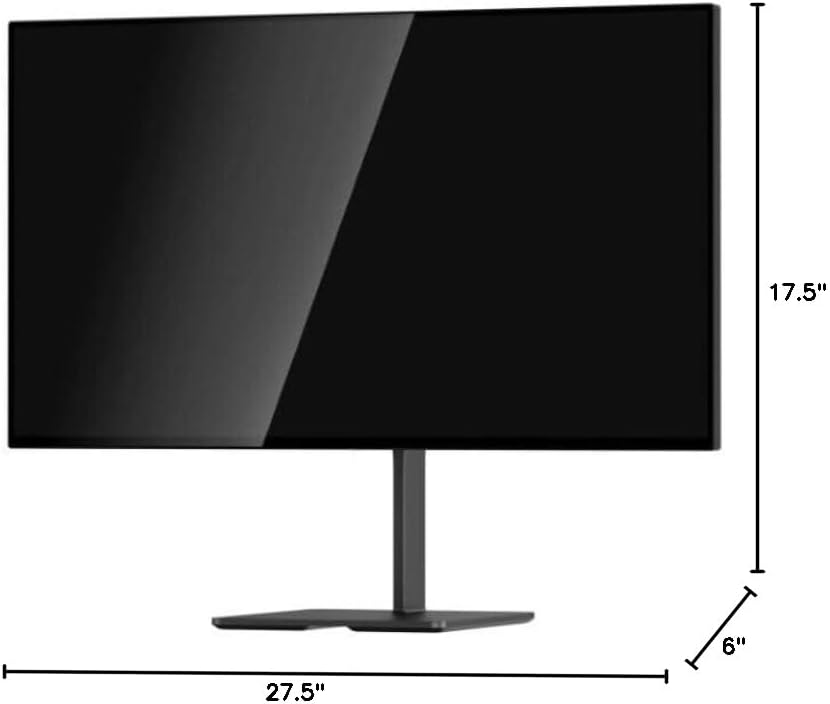
Image 8.1: Monitor dimensions.
9. 보증 및 지원
For warranty information and technical support, please refer to the official DOUGH web사이트에서 확인하거나 고객 서비스에 직접 문의하세요. 구매 증빙 자료로 구매 영수증을 보관하세요.
9.1 Coating Comparison
The DOUGH Spectrum One monitor is available in different screen finishes, including Matte, Glossy, and Gorilla Glass. Each finish offers distinct visual characteristics regarding reflections and clarity.
Video 9.1: This video demonstrates the visual differences between Matte, Glossy, and Gorilla Glass screen coatings on the Spectrum One monitor, particularly how they handle reflections from a light source.

Image 9.1: Visual comparison of Matte, Glossy, and Gorilla Glass screen coatings, illustrating how reflections appear on each surface.