
1. 서론
The ekey sLine Fingerprint Scanner Set 204710 is a state-of-the-art biometric access solution designed for secure and convenient keyless entry to buildings. This system integrates seamlessly with intercom systems, providing touch-based operation for effortless access control. It eliminates the need for traditional keys, numeric codes, or cards, offering enhanced security and ease of use for all authorized individuals.
The system is managed via the intuitive ekey bionyx app, allowing for flexible user management and smart home integration. This manual provides detailed instructions for the installation, operation, and maintenance of your ekey sLine Fingerprint Scanner Set.
2. 안전 정보
Please read all safety instructions carefully before installation and operation. Failure to follow these instructions may result in injury, damage to the device, or improper function.
- Ensure the power supply is disconnected before performing any installation or maintenance work.
- 설치는 해당 지역의 전기 규정 및 규정에 따라 자격을 갖춘 인력만이 수행해야 합니다.
- Do not expose the device to extreme temperatures, humidity, or direct sunlight beyond its specified operating conditions.
- Keep the fingerprint sensor clean and free from debris to ensure optimal performance.
- This device is designed for access control; it is not a substitute for other security measures.
3. 구성 요소 이상view
The ekey sLine Fingerprint Scanner Set 204710 includes the following main components:
- ekey sLine Fingerprint Scanner (White)
- Gira Door Station Unit 106
- ekey Control Unit with two relays
The control unit's two relays allow for the control of two separate devices, such as a front door and a garage door, or integration with an alarm system.
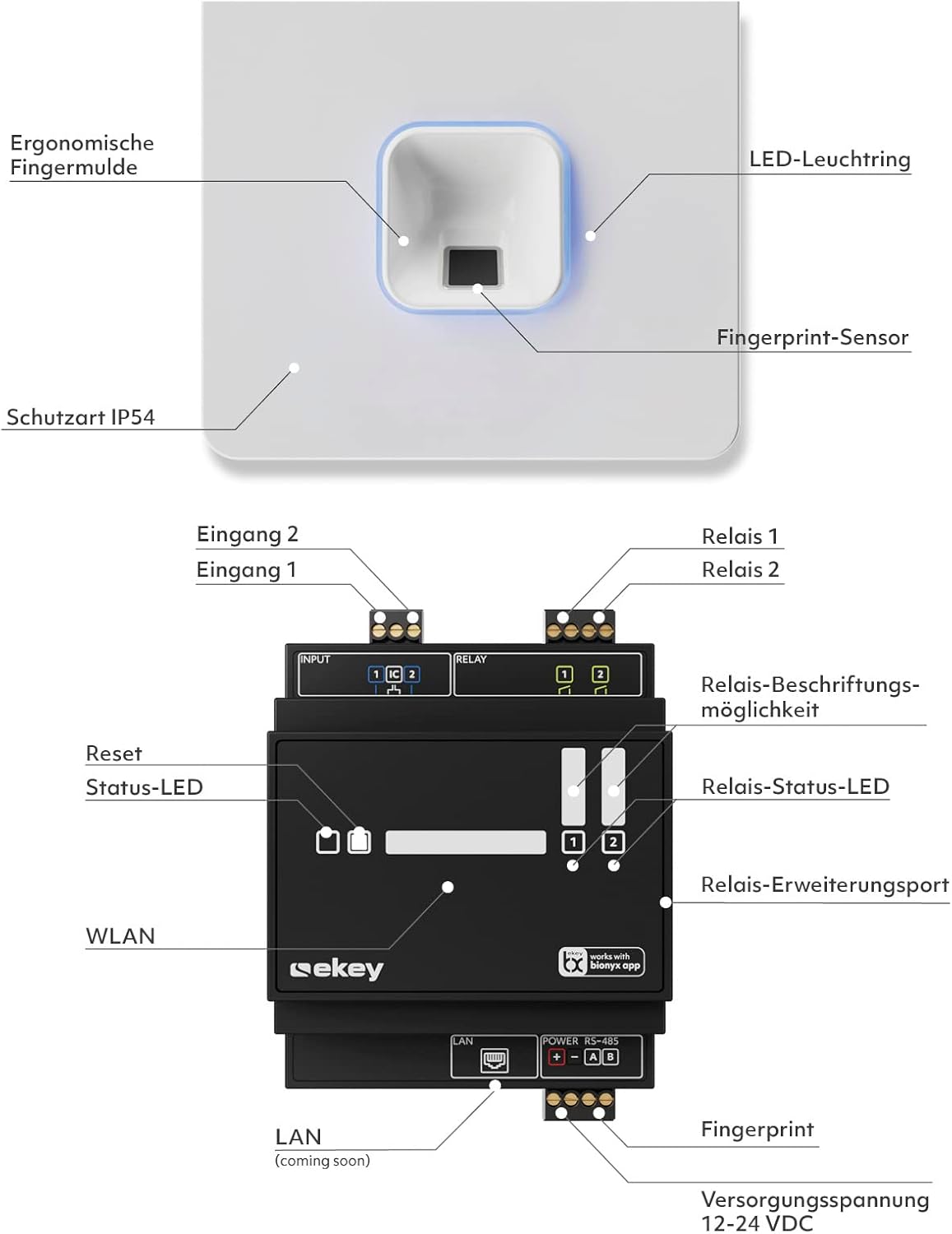
Figure 3.1: ekey sLine Fingerprint Scanner and Control Unit Diagram

Figure 3.2: ekey sLine Fingerprint Scanner
4. 설정 및 설치
The ekey sLine Fingerprint Scanner is designed for installation in the Gira door station 106. It is suitable for both outdoor and indoor use.
4.1 권장 설치 높이
For optimal ergonomic use and reliable fingerprint scanning, the recommended installation height for the fingerprint scanner is between 105 cm and 155 cm from the ground.
4.2 배선 및 연결
Connect the ekey sLine fingerprint scanner to the ekey control unit according to the wiring diagram provided with your product packaging. Ensure all connections are secure and correctly polarized. The system operates on 12-24 Volts DC.
4.3 초기 시스템 설정
The system is managed via the ekey bionyx app. Download the app from your device's app store (Google Play Store or Apple App Store).

Figure 4.1: ekey bionyx App Interface
- Power on the ekey sLine system after completing all wiring.
- Open the ekey bionyx app on your smartphone or tablet.
- Follow the on-screen instructions within the app to connect to your ekey control unit and register your system.
- Begin enrolling fingerprints for authorized users. The system supports up to 20 users initially, expandable to 100 users.
5. 운영
Operating your ekey sLine Fingerprint Scanner is simple and intuitive.
5.1 Opening the Door with Fingerprint
To open the door, simply place your registered finger on the fingerprint sensor. The system will recognize your fingerprint and activate the connected door lock, granting access. This provides worry-free access, even for children (6 years and older).
5.2 User Management via ekey bionyx App
The ekey bionyx app allows for comprehensive management of your access system:
- 사용자 추가/삭제: Easily enroll new fingerprints or delete existing ones.
- Remote Door Opening: Conveniently open your door remotely via the app.
- Access Logging: View a log of all access events for enhanced security monitoring.
- 푸시 알림: Receive push messages on demand when the door is opened.
- 스마트 홈 통합: The system is prepared for connection to Amazon Alexa voice assistant and other smart home systems, allowing for flexible expansion with new features and devices.
6. 유지관리
To ensure the longevity and optimal performance of your ekey sLine Fingerprint Scanner, follow these maintenance guidelines:
- 청소: Gently wipe the fingerprint sensor and surrounding surfaces with a soft, dry, lint-free cloth. Do not use abrasive cleaners, solvents, or excessive moisture.
- 소프트웨어 업데이트: Regularly check the ekey bionyx app for available software or firmware updates for your system. Updates often include performance improvements and security enhancements.
- 환경 보호: While suitable for outdoor use, protect the unit from direct, prolonged exposure to extreme weather conditions if possible.
7. 문제 해결
If you encounter issues with your ekey sLine Fingerprint Scanner Set, refer to the following common problems and solutions:
| 문제 | 가능한 원인 | 해결책 |
|---|---|---|
| 지문 인식 불가 | Dirty sensor, incorrect finger placement, unregistered fingerprint, dry/wet finger. | Clean the sensor. Ensure full finger contact. Re-enroll fingerprint if necessary. Moisten or dry finger slightly. |
| 문이 열리지 않는다 | No power, wiring issue, lock malfunction, control unit error. | Check power supply. Verify wiring connections. Test the door lock mechanism independently. Check control unit status lights. |
| App cannot connect to system | Bluetooth/Wi-Fi off, system not powered, app outdated, network issues. | Ensure Bluetooth/Wi-Fi is enabled. Verify system power. Update the ekey bionyx app. Check your local network connection. |
| 시스템이 응답하지 않음 | 정전 발생, 내부 오류. | Cycle power to the system (turn off, wait 30 seconds, turn on). If problem persists, contact support. |
For issues not listed here or if solutions do not resolve the problem, please contact ekey customer support.
8. 사양
| 특징 | 사양 |
|---|---|
| 제조업체 | ekey biometric systems GmbH |
| 모델 번호 | 204710 |
| 제품 치수 | 10.6 x 10.6 x 3.2cm |
| 품목 무게 | 570g |
| 색상 | White Fingerprint Scanner |
| 권tage | 12볼트(DC) |
| Number of Sub-Units | 1 |
| 포함된 구성 요소 | Intercom unit + integrated ekey sLine fingerprint electronic key, ekey control unit |
| 배터리가 필요하세요? | 아니요 |
| 첫 번째 가능한 날짜 | 21년 2023월 XNUMX일 |
9. 보증 및 지원
For warranty information and technical support, please refer to the documentation included with your product or visit the official ekey web사이트. 보증 청구를 위해 구매 증빙 자료를 보관하세요.
For further assistance, you may contact ekey customer service through their official channels.