
Sharp KC-35T7
Sharp Plasmacluster Humidifying Air Purifier
Model: KC-35T7
1. 서론
구매해주셔서 감사합니다asing the Sharp Plasmacluster Humidifying Air Purifier, Model KC-35T7. This manual provides essential information for the safe and efficient operation, maintenance, and troubleshooting of your new appliance. Please read this manual thoroughly before use and keep it for future reference.
This advanced air purifier is designed to improve your indoor air quality by reducing harmful gases such as formaldehyde and other Volatile Organic Compounds (VOCs). It features a powerful purification function, integrated humidification, and a convenient display for humidity and temperature.
2. 안전 정보
To ensure safe operation and prevent damage to the product or injury to yourself and others, please observe the following safety precautions:
- Always use the appliance with the correct voltag등급 라벨에 명시된 대로입니다.
- 공기 흡입구 또는 배출구를 막지 마십시오.
- Do not insert fingers or objects into any openings.
- Unplug the appliance before cleaning, performing maintenance, or when not in use for extended periods.
- Do not operate the appliance near flammable gases or combustible materials.
- 제품을 물과 습기로부터 멀리하십시오. 제품을 물에 담그지 마십시오.
- Ensure the water tank is properly installed before operating the humidification function. Use only clean tap water in the water tank.
- 본 기기는 신체적, 감각적 또는 정신적 능력이 저하된 사람(어린이 포함)이나 경험 및 지식이 부족한 사람이 사용하도록 의도된 것이 아니며, 안전을 책임질 사람으로부터 기기 사용에 관한 감독이나 지시를 받은 경우에만 사용할 수 있습니다.
3. 부품 식별
Familiarize yourself with the main components of your Sharp Plasmacluster Humidifying Air Purifier:

그림 3.1: 전면 View of the Air Purifier. This image displays the main body of the Sharp KC-35T7 air purifier, highlighting the control panel at the top, the air intake grille, and the Plasmacluster logo. The unit is white with black accents on the sides.
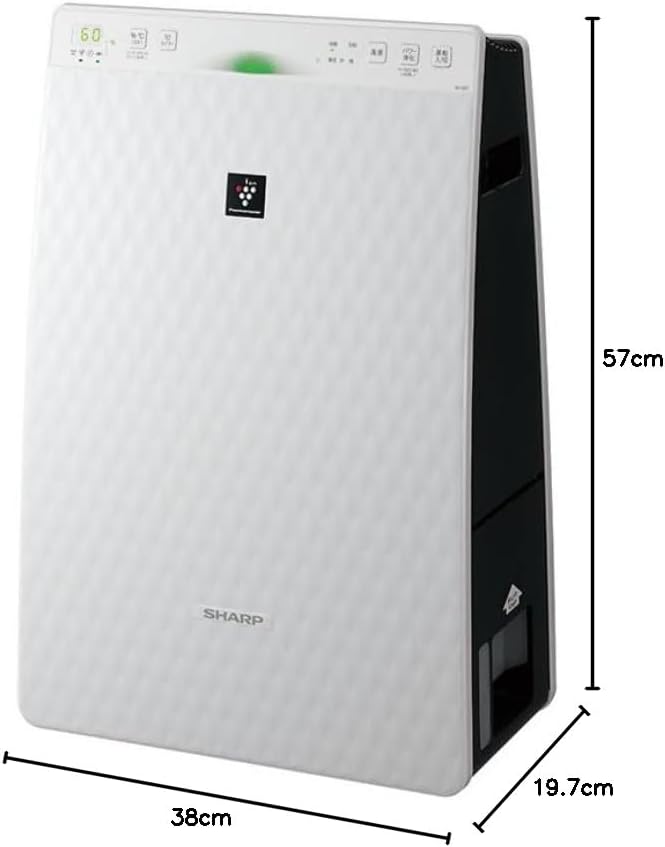
Figure 3.2: Air Purifier with Dimensions. 이 이미지는 관점을 제시합니다. view of the Sharp KC-35T7, illustrating its approximate dimensions: 38 cm (width), 19.7 cm (depth), and 57 cm (height). These measurements are crucial for proper placement and space planning.
주요 구성 요소:
- 제어판: Located on the top, with buttons for power, mode selection, fan speed, and display.
- 공기 흡입구: Located on the front and sides, where air is drawn into the unit.
- 공기 배출구: 최상층에 위치하며, 정화 및 가습된 공기가 배출됩니다.
- 수조: 가습용 탱크는 분리 가능하며, 일반적으로 측면이나 후면에 위치합니다.
- 필터: Internal filters (e.g., HEPA, deodorizing) for air purification.
4. 설정
Follow these steps for the initial setup of your air purifier:
- 짐 풀기: Carefully remove the air purifier from its packaging. Retain the packaging materials for future transport or storage.
- 필터 설치 : Open the rear panel of the unit. Remove all protective plastic bags from the filters (e.g., HEPA filter, deodorizing filter) and install them according to the markings inside the unit. Ensure they are securely in place. Close the rear panel.
- Fill Water Tank (for Humidification): Remove the water tank from the unit. Open the water tank cap and fill it with clean tap water up to the maximum fill line. Close the cap securely and reinsert the water tank into the unit until it clicks into place.
- 놓기: Place the air purifier on a flat, stable surface, ensuring there is adequate space (at least 20 cm) around the air intake and outlet for optimal airflow. Avoid placing it directly against a wall or near heat sources.
- 전원 연결: 전원 코드를 적합한 콘센트에 꽂으세요.
5. 사용 설명서
Learn how to operate your Sharp Plasmacluster Humidifying Air Purifier:
전원 켜기/끄기:
- 를 누르세요 힘 제어판의 버튼을 눌러 기기를 켜거나 끌 수 있습니다.
모드 선택:
이 장치는 일반적으로 여러 작동 모드를 제공합니다.
- 자동 모드 : The unit automatically adjusts fan speed and humidification based on detected air quality and humidity levels.
- 공기 정화 모드: Operates solely as an air purifier.
- 가습 모드: Operates with humidification function active.
- Plasmacluster Spot Mode: Concentrates Plasmacluster ions for targeted deodorization or purification.
를 누르세요 방법 button repeatedly to cycle through available modes.
팬 속도 조정:
선풍기 속도를 원하는 속도로 조절하세요.
- 를 누르세요 팬 속도 button to select between Low, Medium, High, or Silent settings.
Humidity/Temperature Display:
The display shows current room humidity and temperature. This information helps you monitor your indoor environment and adjust settings as needed.
6. 유지관리
Regular maintenance ensures optimal performance and extends the lifespan of your air purifier. Always unplug the unit before cleaning.
필터 청소 및 교체:
- 사전 필터: Clean the pre-filter (mesh filter) regularly, approximately once a month, or more often if used in a dusty environment. Use a vacuum cleaner to remove dust or wash it with water and mild detergent. Ensure it is completely dry before reinstallation.
- HEPA 필터 : The HEPA filter cannot be washed. Replace it approximately every 2-5 years, depending on usage and air quality. Refer to the indicator light on the control panel for replacement timing.
- 탈취 필터: The deodorizing filter also cannot be washed. Replace it at the same interval as the HEPA filter.
Water Tank and Humidifying Filter Cleaning:
- 수조: Clean the water tank weekly to prevent mold and bacteria growth. Rinse with clean water and use a soft brush or cloth to remove any residue.
- Humidifying Filter/Tray: Clean the humidifying filter and tray monthly. Remove any mineral deposits or slime using a soft brush and a mild descaling solution (e.g., citric acid solution) if necessary. Rinse thoroughly with clean water and ensure all parts are dry before reassembly.
외부 청소:
- Wipe the exterior of the unit with a soft, dry cloth. For stubborn stains, use a damp cloth with a mild detergent, then wipe dry. Do not use abrasive cleaners or solvents.
7. 문제 해결
공기 청정기에 문제가 발생하면 다음의 일반적인 문제와 해결 방법을 참조하세요.
| 문제 | 가능한 원인 | 해결책 |
|---|---|---|
| 장치의 전원이 켜지지 않습니다. | 전원 코드가 제대로 꽂혀 있지 않습니다. 콘센트에 전원이 들어오지 않습니다. | 전원 코드 연결을 확인하세요. 다른 기기로 콘센트를 테스트해 보세요. |
| 가습이 없습니다. | Water tank empty. Water tank not properly installed. Humidifying filter dirty. | Refill water tank. Reinstall water tank correctly. Clean humidifying filter. |
| 이상한 소음. | Filters not properly installed. Foreign object in unit. | 필터 설치 상태를 확인하십시오. 플러그를 뽑고 이물질이 있는지 검사하십시오. |
| 공기 정화 기능이 불량합니다. | Filters are dirty or clogged. Unit placed in an obstructed area. | Clean or replace filters. Ensure proper clearance around the unit. |
| 기기에서 냄새가 납니다. | Deodorizing filter saturated. Water tank/humidifying filter dirty. | Replace deodorizing filter. Clean water tank and humidifying filter. |
이러한 해결 방법을 시도한 후에도 문제가 지속되면 고객 지원팀에 문의하세요.
8. 사양
Detailed technical specifications for the Sharp Plasmacluster Humidifying Air Purifier KC-35T7:
| 특징 | 사양 |
|---|---|
| 상표 | 날카로운 |
| 모델 번호 | KC-35T7 |
| 색상 | 하얀색 |
| 제품 크기(D x W x H) | 19.7cm x 38cm x 57cm |
| 패키지 치수(L x W x H) | 63cm x 43cm x 26cm |
| 패키지 무게 | 7.88kg |
| 기타 기능 | Humidification function, Plasmacluster technology, Humidity/Temperature display |
| 필요한 배터리 | 아니요 |
9. 보증 및 지원
Your Sharp Plasmacluster Humidifying Air Purifier is covered by a manufacturer's warranty. Please refer to the warranty card included in your product packaging for specific terms and conditions, including the warranty period and coverage details.
For technical assistance, service, or to inquire about replacement parts and filters, please contact Sharp customer support. Contact information can typically be found on the manufacturer's official web사이트 또는 구매 영수증에서 확인하세요.
When contacting support, please have your product model number (KC-35T7) and serial number (if applicable) ready.
Ask a question about this manual
Ask about setup, troubleshooting, compatibility, parts, safety, or missing instructions. Manuals+ will review the question and use this page’s manual context to help answer it.