
소개
The TNW Q11S Selfie Stick Tripod with Fill Light is a versatile 2-in-1 device designed for mobile photography and videography. It functions as both a portable selfie stick and a stable tripod, featuring an integrated adjustable LED fill light and a detachable wireless remote control. This manual provides detailed instructions for setting up, operating, and maintaining your device to ensure optimal performance.
제품 끝view
Familiarize yourself with the components of your TNW Q11S Selfie Stick Tripod.

그림 1: 위에view of the TNW Q11S Selfie Stick Tripod, showing its dual functionality as a selfie stick and a tripod, along with the wireless remote control.

그림 2: The compact and lightweight design of the TNW Q11S, demonstrating its portability when folded to 152mm and weighing only 130g.
주요 구성 요소:
- 폰 홀더: 스마트폰을 안전하게 고정해줍니다.
- 확장형 막대: Allows for adjustable length for selfie stick or tripod use.
- 삼각대 베이스: Provides stability when used as a tripod.
- LED 보조 조명: Integrated light source with adjustable color temperature and brightness.
- 블루투스 원격 제어: Detachable remote for hands-free operation.
설정
1. Unfolding the Device:
- Gently pull the top phone holder upwards to extend the main rod.
- For tripod use, spread the three legs at the bottom until they lock into place, forming a stable base.
2. 스마트폰 연결하기:
- 휴대폰 거치대 뚜껑을 여세요amps.
- Carefully place your smartphone into the holder, ensuring it is centered and secure. The holder supports phones between 2.5 inches and 3.7 inches wide.
- Adjust the phone holder's angle as needed. It supports 360° rotation and 225° tilt for horizontal or vertical shooting.

그림 3: Demonstrates the flexibility of the phone holder for both horizontal and vertical shooting orientations.
3. Pairing the Bluetooth Remote Control:
- Locate the detachable Bluetooth remote control, usually integrated into the handle. Slide it out to remove.
- Press and hold the button on the remote until the indicator light flashes, indicating it is in pairing mode.
- 스마트폰에서 블루투스 설정으로 이동하여 새 기기를 검색하세요.
- Select "AB Shutter3" (or similar name) from the list of available devices to pair. The indicator light will stop flashing once successfully paired.
- The remote control has an effective range of up to 10 meters (33 feet).

그림 4: The detachable Bluetooth remote control, showing its hidden storage within the handle and its 10-meter operating range.
작동 지침
셀카봉으로 사용하기:
- Ensure the tripod legs are folded and secured.
- Extend the rod to your desired length, up to 760mm (30 inches).
- Hold the handle firmly and use the Bluetooth remote to capture photos or start videos.

그림 5: The selfie stick fully extended to its maximum length of 760mm, ready for use.
삼각대로 사용하기:
- Spread the tripod legs completely until they are stable on a flat surface.
- 막대를 원하는 높이까지 늘리세요.
- Place the tripod on a stable surface. Use the Bluetooth remote for hands-free shooting.
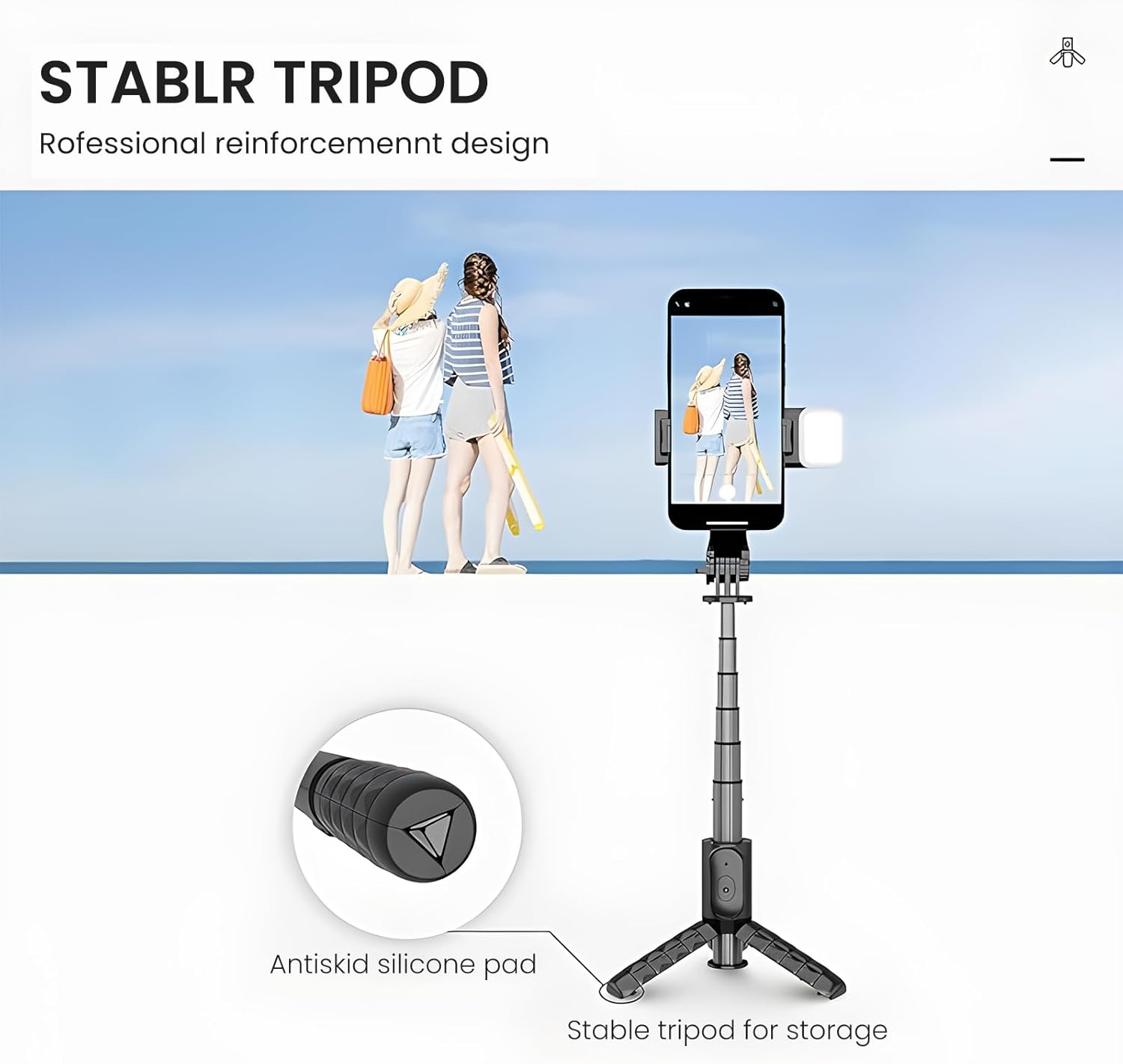
그림 6: The stable tripod base featuring antiskid silicone pads for enhanced grip and stability on various surfaces.
Using the LED Fill Light:
- 조명등의 전원 버튼을 눌러 켜세요.
- Press the button repeatedly to cycle through the 3 color temperature modes (Warm light, Natural light, White light).
- Long press the button to adjust the brightness level (0-100%). There are 9 brightness levels available.
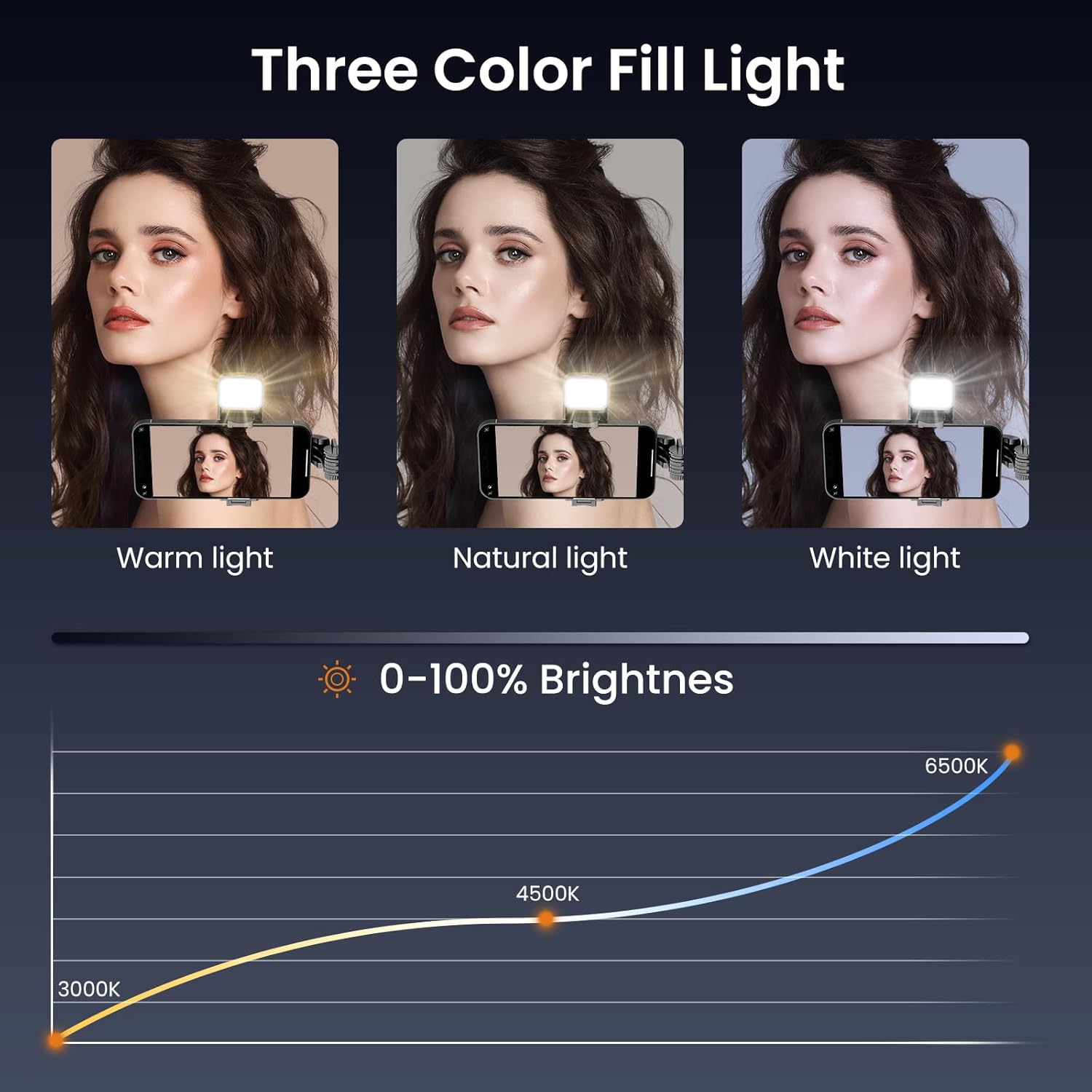
그림 7: Illustration of the three color temperature options (Warm, Natural, White) and the 0-100% brightness adjustment range of the integrated LED fill light.
Common Usage Scenarios:
- 셀카: Extend the stick and use the remote for perfect self-portraits.
- Live Streaming/Vlogging: Set up as a tripod for stable video recording.
- 영상 통화: Use as a desktop stand for hands-free communication.
- 단체 사진: Position the tripod and use the remote to include everyone.

그림 8: Examples of how the TNW Q11S can be used for different activities such as taking selfies, live streaming, watching videos, and capturing full-body shots.
유지
- 청소: 부드럽고 마른 천으로 기기를 닦으세요. 연마성 세제나 용제를 사용하지 마세요.
- 저장: When not in use, fold the device completely and store it in a cool, dry place away from direct sunlight and extreme temperatures.
- 배터리 관리(원격): If the remote control is not used for an extended period, remove its battery to prevent leakage.
문제 해결
- Q: The Bluetooth remote control does not pair with my phone.
- A: Ensure the remote is charged (if applicable) and in pairing mode (indicator light flashing). Make sure your phone's Bluetooth is enabled and try restarting both the remote and your phone. Check if "AB Shutter3" appears in your Bluetooth device list.
- Q: The fill light is not turning on or is dim.
- A: Check if the fill light has sufficient battery. Ensure it is fully charged. Press the power button firmly to turn it on and cycle through brightness levels.
- Q: The selfie stick/tripod feels unstable.
- A: Ensure all extendable sections are fully locked into place. For tripod use, make sure the legs are fully spread and placed on a flat, stable surface. The antiskid silicone pads on the tripod base should be making full contact with the surface.
명세서
| 특징 | 세부 사항 |
|---|---|
| 모델 번호 | Q11S |
| 무게 | 140그램(약 4.9온스) |
| 접힌 크기 | 152mm(약 6인치) |
| 확장된 길이 | Up to 760mm (approx. 30 inches) |
| 호환 장치 | Smartphones (iOS and Android), 2.5in-3.7in width |
| 블루투스 리모컨 범위 | 최대 10미터(33피트) |
| 필라이트 모드 | 3 Color Temperatures, 9 Brightness Levels |
| 재료 | Aluminum Alloy (rod), Antiskid Silicone (base) |
보증 및 지원
For warranty information and customer support, please refer to the product packaging or contact TNW customer service directly. Keep your purchase receipt as proof of purchase.
제조업체: TNW

