소개
This user manual provides detailed instructions for the operation and maintenance of your ZK-1002 HiFi 100WX2 TPA3116 Bluetooth 5.0 High Power Digital Amplifier Stereo Board. Please read this manual thoroughly before using the product to ensure proper functionality and safety.
안전 정보
- 전원 공급 장치 볼륨을 확인하십시오.tage는 지정된 범위(DC 5-27V) 내에 있습니다.
- 기기를 습기, 비 또는 극한 온도에 노출시키지 마십시오.
- 배치하지 마십시오 amp앰프를 직사광선이나 열원 근처에 두지 마십시오.
- 분해하거나 개조하지 마십시오. amp수리 담당자. 모든 서비스는 자격을 갖춘 담당자에게 의뢰하세요.
- 어린이의 손이 닿지 않는 곳에 보관하세요.
- 과열을 방지하려면 적절한 환기를 유지하세요.
제품 끝view
The ZK-1002 is a compact and powerful digital amplifier board designed for home theater and audio projects. It features Bluetooth 5.0 connectivity and an AUX input, delivering 100W x 2 channels of high-fidelity stereo sound.

앞쪽 view of the ZK-1002 HiFi Digital Amplifier Board, showing the volume knob, input switch, and power/speaker terminals.
패키지 내용
다음 품목이 패키지에 포함되어 있는지 확인하세요.
- 1 x ZK-1002 Digital Amp리퍼 보드
- DC 전원 케이블 1개
- 1 x Small Screwdriver (for terminal connections)
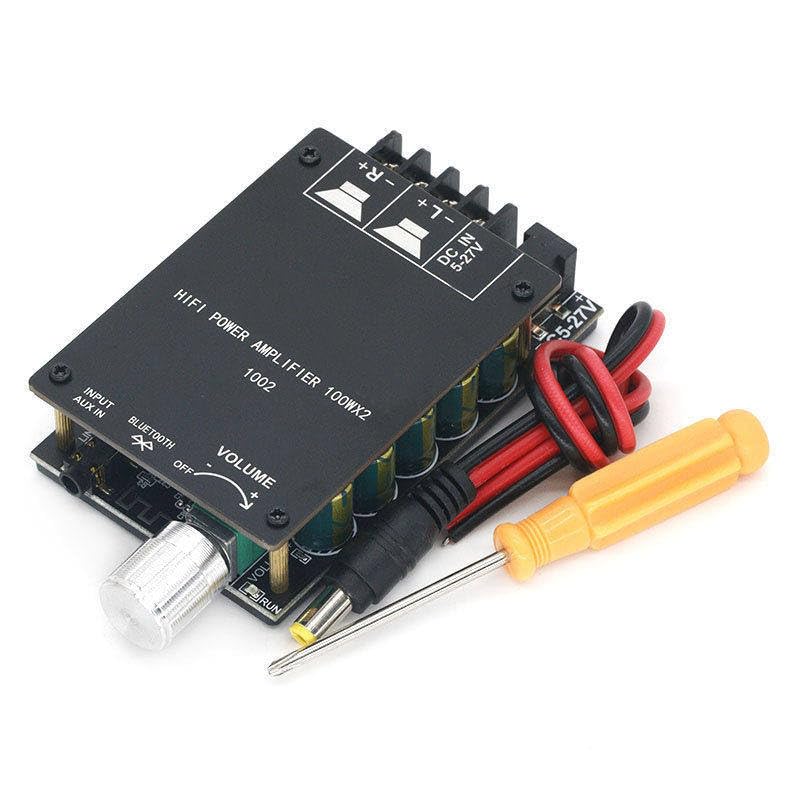
The ZK-1002 amplifier board shown with its included DC power cable and a small screwdriver for easy terminal connections.
설정
1. 전원 연결
Connect a DC power supply (5-27V) to the "DC IN 5-27V" terminal. Ensure correct polarity (+ and -).
2. 스피커 연결
Connect your passive speakers to the speaker output terminals. The board supports stereo output (Left and Right channels). Ensure correct polarity for each speaker (+ and -).
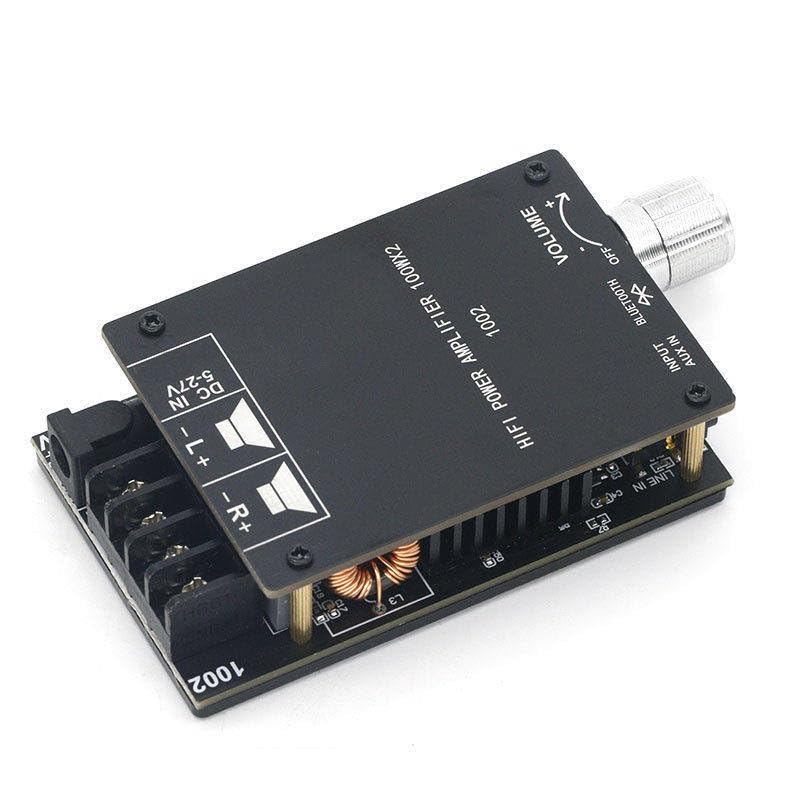
자세한 view of the ZK-1002 amplifier board, highlighting the DC power input and speaker output terminals for proper wiring.
3. 오디오 입력 연결
그만큼 amplifier supports two audio input methods: Bluetooth and AUX IN.
- 블루투스: Switch the input selector to "Bluetooth". The device will enter pairing mode.
- AUX 입력 : Connect an audio source (e.g., smartphone, MP3 player) to the "AUX IN" jack using a 3.5mm audio cable. Switch the input selector to "AUX IN".
작동 지침
전원 켜기/끄기
그만큼 amplifier powers on automatically when a DC power supply is connected. To turn off, disconnect the power supply.
볼륨 조절
Rotate the "VOLUME" knob clockwise to increase volume and counter-clockwise to decrease volume.
입력 선택
Use the "INPUT" switch to select between "Bluetooth" and "AUX IN" audio sources.
블루투스 페어링
- Switch the input selector to "Bluetooth".
- On your audio device (e.g., smartphone), enable Bluetooth and search for available devices.
- Select "ZK-1002" from the list of devices to pair.
- 페어링이 완료되면 무선으로 오디오를 스트리밍할 수 있습니다. amp리퍼.
유지
- 청소하다 amplifier board with a soft, dry cloth. Do not use liquid cleaners or solvents.
- 확인하십시오 amplifier is disconnected from power before cleaning.
- Keep the ventilation areas clear of dust and debris to maintain optimal performance.
문제 해결
| 문제 | 가능한 원인 | 해결책 |
|---|---|---|
| 사운드 출력이 없습니다 |
|
|
| 블루투스가 페어링되지 않습니다 |
|
|
| 왜곡된 소리 |
|
|
명세서
| 특징 | 세부 사항 |
|---|---|
| 모델 번호 | ZK-1002 |
| 상표 | 일반적인 |
| 장착 유형 | 표면 실장 |
| 채널 수 | 2 |
| 전력 출력 | 100W x 2 |
| 블루투스 버전 | 5.0 |
| 입력 Voltage | DC 5-27V |
| 크기(대략) | 84mm X 72mm X 24mm (L x 폭 x 높이) |
| 무게(대략) | 137g |
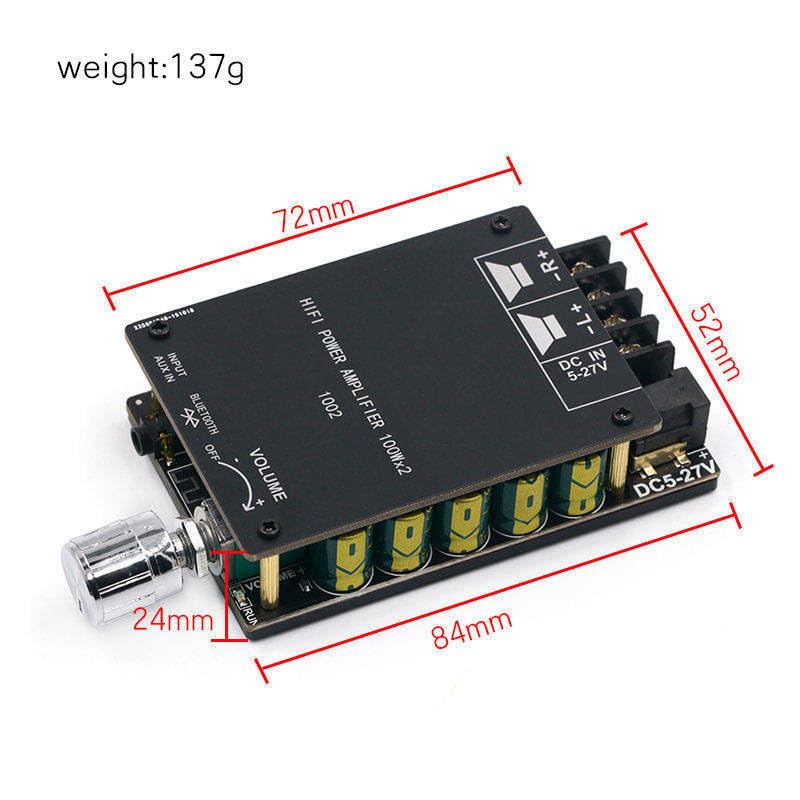
The ZK-1002 amplifier board with approximate dimensions indicated, showing its compact size.
보증 및 지원
This product is covered by a standard manufacturer's warranty. For warranty claims or technical support, please contact your retailer or the manufacturer directly. Please refer to your purchase documentation for specific warranty terms and contact information.
For further assistance, you may also visit the product page on Amazon.com: https://www.amazon.com/dp/B0CPCZJCFC


