
1. 서론
This manual provides essential information for the safe and efficient use of your Amazon Basics 24 Inch FHD 100Hz Monitor. Please read these instructions carefully before operating the device and retain them for future reference.
The Amazon Basics 24 Inch Monitor features a 23.8-inch viewable IPS panel with Full HD (1080p) resolution and a maximum refresh rate of 100Hz. It includes built-in speakers and is VESA compatible for flexible mounting options. The monitor is designed for various uses, including office work, entertainment, and gaming.

앞쪽 view of the Amazon Basics 24 Inch FHD 100Hz Monitor.
2. 패키지 내용
패키지에 모든 품목이 들어 있는지 확인하세요.
- Amazon Basics 24 Inch Monitor
- 스탠드베이스
- 스탠드 넥
- 전원 어댑터
- HDMI 케이블

Image showing the monitor's package contents: stand base, stand neck, power adapter, and HDMI cable.
3. 설정 지침
3.1 스탠드 부착하기
- Insert the stand neck into the stand base until it clicks securely into place.
- Align the assembled stand with the mounting slot on the back of the monitor. Push the stand into the slot until it locks. Ensure it is firmly attached.
3.2 연결 케이블
The monitor features multiple input ports for connectivity:
- DP 1.2 : DisplayPort input for high-resolution video and audio.
- HDMI 1.4 : HDMI input for video and audio from compatible devices.
- VGA : VGA input for analog video signals.
- 오디오 입력: 3.5mm audio input for external audio sources.
- 오디오 출력 : 헤드폰 또는 외부 스피커 연결을 위한 3.5mm 오디오 출력 단자가 있습니다.
- Connect the provided HDMI cable from your computer's video output port to the HDMI input port on the monitor. Alternatively, use a DisplayPort or VGA cable if your device supports those connections.
- Connect the power adapter to the monitor's power input port, then plug the power adapter into a wall outlet.
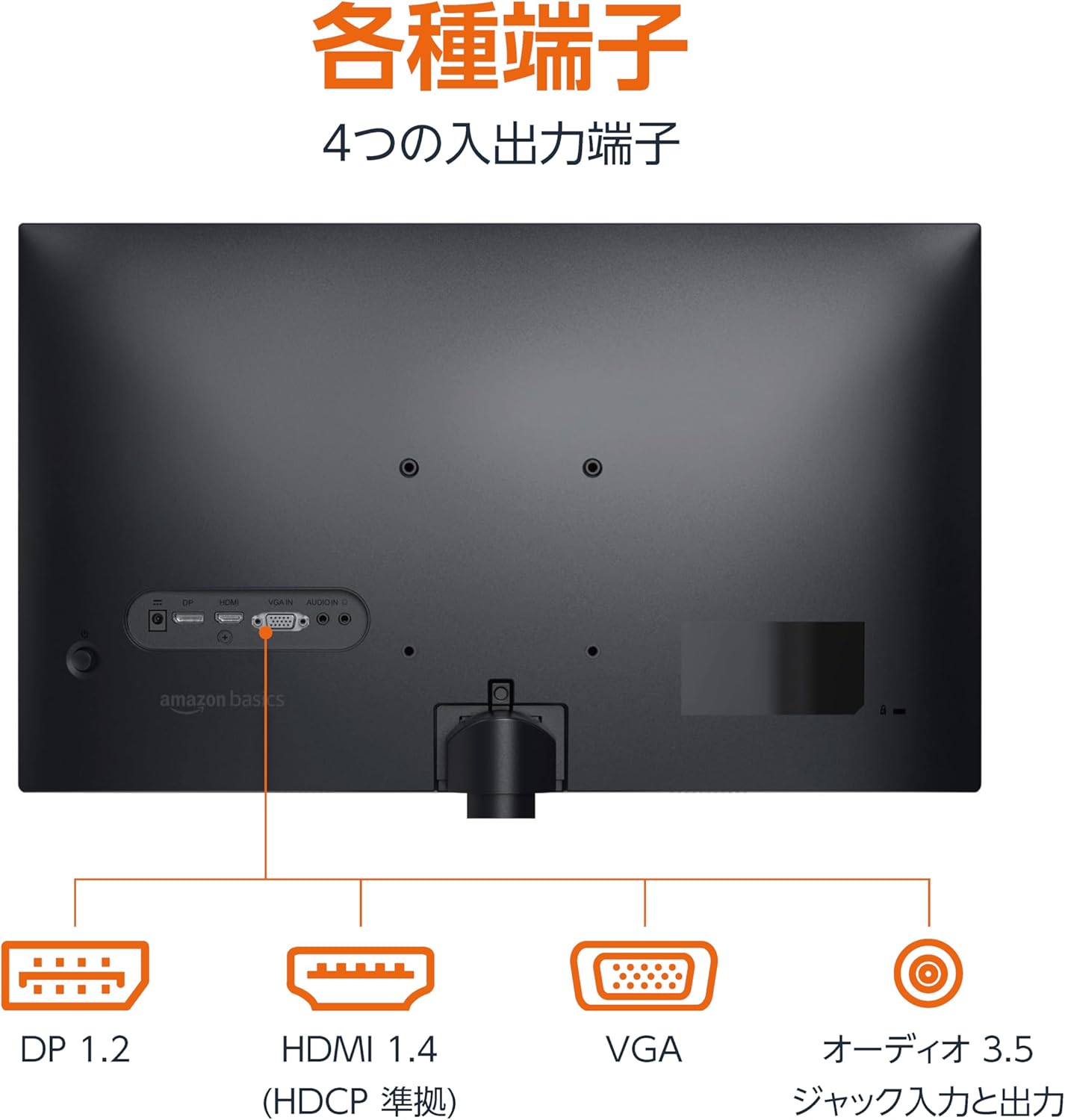
뒤쪽 view of the monitor displaying various input and output ports.
3.3 전원 켜기
Press the power button located on the back or bottom of the monitor to turn it on. The monitor will automatically detect the active input signal.
3.4 기울기 조정
The monitor allows for tilt adjustment to achieve an optimal viewing angle. Gently hold the top and bottom edges of the monitor and tilt it forward or backward. The tilt range is approximately -5° to 20°.

Monitor demonstrating its tilt adjustment capability.
3.5 Optional: VESA Mounting and Cable Lock
The monitor is VESA compatible, allowing it to be mounted on a wall or an adjustable arm (mounting hardware sold separately). Refer to the VESA mount's instructions for installation.
An optional cable lock slot is available on the rear of the monitor to secure it to a stable object, preventing theft.
3.6 설정 비디오 가이드
For a visual guide on setting up your Amazon Basics monitor, please watch the video below:
This video demonstrates the assembly of the stand, connecting cables, and basic adjustments for the Amazon Basics monitor.
4. 사용 설명서
4.1 온스크린 디스플레이(OSD) 메뉴
The monitor features an On-Screen Display (OSD) menu for adjusting various settings. Use the buttons located on the back or bottom of the monitor to navigate the menu. Common settings include:
- 밝기/대비: 디스플레이의 밝기와 대비 수준을 조정합니다.
- 색상 설정: 색온도, 색조 및 채도를 조정하세요.
- 입력 선택: Manually switch between DP, HDMI, and VGA inputs.
- 오디오: 내장 스피커 또는 연결된 헤드폰의 볼륨을 조절하세요.
- 사진 모드: Select from preset display modes (e.g., Standard, Game, Movie).
4.2 Using Built-in Speakers
The monitor includes integrated speakers. Audio will be played through these speakers when connected via HDMI or DisplayPort. If using a VGA connection, ensure an audio cable is connected to the 'AUDIO IN' port on the monitor and your computer's audio output.
5. 사양
| 특징 | 사양 |
|---|---|
| 상표 | 아마존 기본 정보 |
| 모델 번호 | 24M2020DJP |
| 화면 크기 | 24 Inches (23.8 inch view할 수 있는) |
| 패널 유형 | IPS |
| 해결 | FHD 1080p(1920 x 1080) |
| 새로 고침 빈도 | 최대 100Hz |
| 종횡비 | 16시 9분 |
| 내장 스피커 | 예 |
| VESA 호환성 | 예 |
| 입력 포트 | 1x DisplayPort 1.2, 1x HDMI 1.4, 1x VGA, 1x Audio In (3.5mm) |
| 출력 포트 | 1x Audio Out (3.5mm) |
| 제품 무게 | 2.8kg |
| 베젤 두께 | 1.44 mm (slim bezel) |
| 보증 | 1년 한정 보증 |
5.1 치수
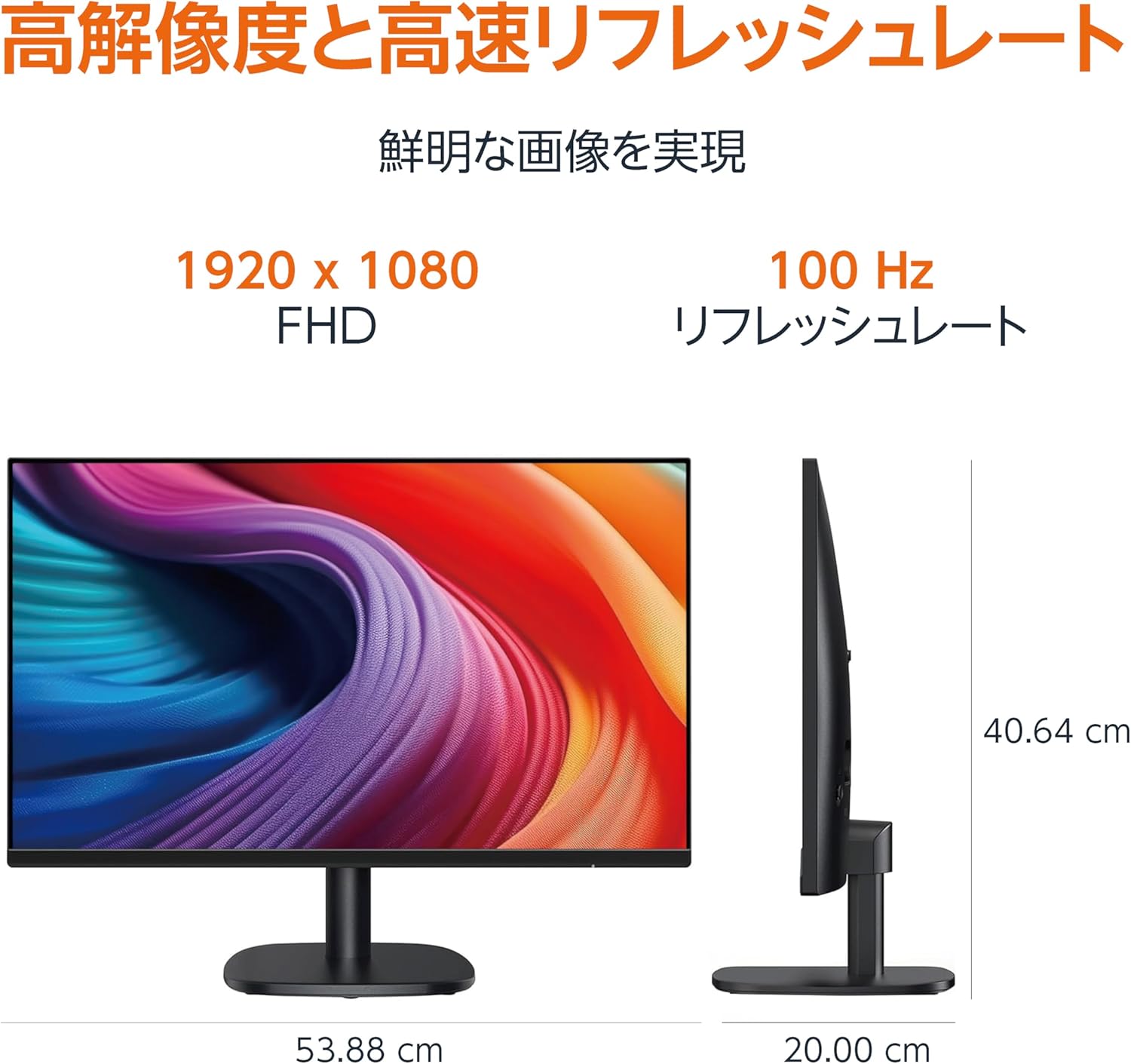
Diagram showing the monitor's dimensions (Width: 53.88 cm, Height: 40.64 cm, Depth: 20.00 cm).
5.2 Slim Bezel Design

Detail showing the monitor's slim bezel design, measuring 1.44 mm.
6. 문제 해결
모니터에 문제가 발생하면 다음의 일반적인 해결책을 참조하세요.
- 전원 없음: Ensure the power cable is securely connected to both the monitor and a working power outlet. Check if the power adapter's indicator light is on.
- 신호 없음: Verify that the video cable (HDMI, DP, or VGA) is firmly connected to both the monitor and your computer. Ensure the correct input source is selected in the monitor's OSD menu. Try restarting your computer.
- 화면 깜빡임: Check the video cable for damage or loose connections. Ensure your computer's graphics driver is up to date. Adjust the refresh rate in your computer's display settings.
- 스피커에서 소리가 나지 않습니다: If using HDMI or DisplayPort, ensure the audio output is set to the monitor in your computer's sound settings. If using VGA, confirm the 3.5mm audio cable is connected. Check the volume level on both the monitor and your computer.
- 이미지 품질 문제: Adjust brightness, contrast, and color settings via the OSD menu. Ensure the display resolution on your computer matches the monitor's native resolution (1920 x 1080).
위 단계를 시도한 후에도 문제가 지속되면 고객 지원팀에 문의하십시오.
7. 유지관리
Proper maintenance helps ensure the longevity and performance of your monitor:
- 화면 청소: 부드럽고 보풀이 없는 천으로 화면을 부드럽게 닦으세요. 잘 지워지지 않는 얼룩은 가볍게 닦아주세요.amp천에 물이나 특수 화면 세척제를 묻혀 닦아주세요. 강한 화학 물질, 알코올 또는 연마재는 사용하지 마세요.
- C 청소asing: 부드럽고 마른 천을 사용하여 모니터의 c를 닦으십시오.asing.
- 통풍: 과열을 방지하려면 모니터의 통풍구가 막히지 않았는지 확인하세요.
- 사용하지 않을 때 전원 끄기: 장시간 사용하지 않을 때는 모니터를 꺼서 에너지를 절약하고 수명을 연장하세요.
8. 보증 및 지원
This Amazon Basics monitor comes with a 1년 한정 보증 구매일로부터. 본 보증은 정상적인 사용 중에 발생한 제조상의 결함 및 제조상의 결함을 보장합니다.
For warranty claims, technical support, or further assistance, please refer to the Amazon Basics support page or contact Amazon customer service directly. Keep your proof of purchase for warranty validation.