
1. 서론
구매해주셔서 감사합니다asing the CLAYMORE Heady3 CLC-500 Headlight. This versatile headlight is designed for various outdoor activities, offering multiple lighting modes, a motion sensor, and flexible mounting options. Please read this manual carefully before use to ensure proper operation and maintenance.
2. 안전 정보
- 눈 부상을 예방하려면 광선을 직접 쳐다보지 마세요.
- Keep the device away from water and moisture unless specifically designed for waterproof use (check specifications).
- Do not attempt to disassemble or modify the headlight. This may void the warranty and pose safety risks.
- 지정된 충전 용량만 사용하세요tage (USB 5V 1A).
- 어린이의 손이 닿지 않는 곳에 보관하세요.
- 극단적인 온도와 직사광선을 피하세요.
3. 패키지 내용
모든 항목이 있는지 확인하세요.
- CLAYMORE Heady3 CLC-500 Headlight
- USB-C 충전 케이블
- 머리띠
- 사용 설명서 (본 문서)
4. 제품 오버view
Familiarize yourself with the components of your CLAYMORE Heady3 CLC-500 Headlight.
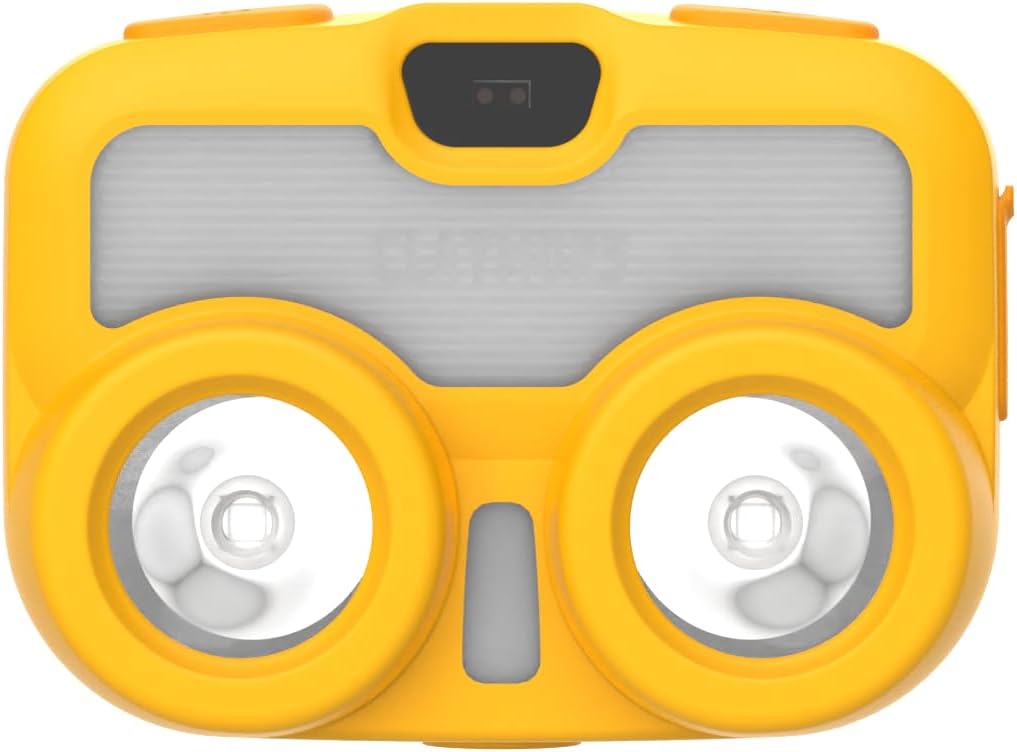
그림 4.1: 전면 View. This image shows the front of the CLAYMORE Heady3 CLC-500 Headlight, highlighting the two main light sources and the central sensor area.

그림 4.2: 상단 View. This image displays the top side of the headlight, featuring the power button (left), the P-SENSOR label, and the mode/motion sensor button (right).

그림 4.3: 측면 View. This image illustrates the side of the headlight, clearly showing the USB-C charging port with its protective cover.
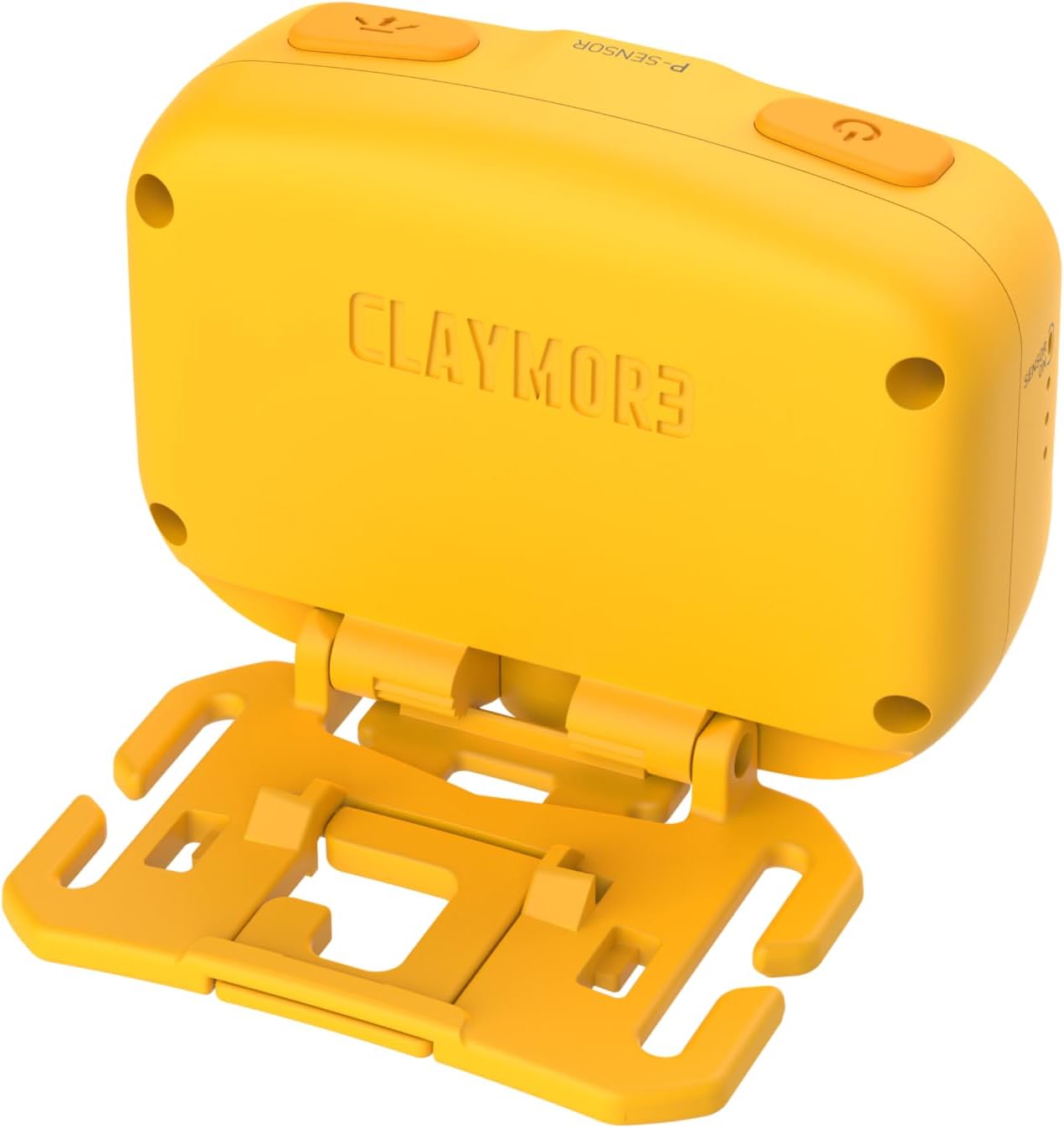
그림 4.4: 뒤로 View. This image presents the rear of the headlight, showing the CLAYMORE branding and the integrated mounting bracket for various attachments.
5. 설정
5.1 헤드라이트 충전
- Locate the USB-C port on the side of the headlight (refer to Figure 4.3).
- Connect the provided USB-C cable to the headlight and the other end to a USB power source (e.g., wall adapter, power bank, computer USB port). Ensure the power source provides 5V 1A.
- 충전 표시등은 충전 상태를 보여줍니다(예: 빨간색은 충전 중, 녹색은 완충 시).
- 완전히 충전하는 데는 일반적으로 몇 시간이 걸립니다.
5.2 장착 옵션
The CLAYMORE Heady3 offers multiple ways to attach and use the light:
- 머리띠: Attach the headlight to the included headband for traditional headlamp 사용.
- 훅: Utilize the integrated hook on the mounting bracket to hang the light from tents, branches, or other suitable fixtures.
- 악어 클립: Attach the light to a bag, pocket, or other gear using an alligator clip (may require an additional accessory, not specified as included).
- 삼각대 나사 구멍: The headlight features a tripod screw hole for mounting on standard tripods or other compatible accessories, offering stable positioning.
6. 사용 설명서
6.1 전원 켜기/끄기
- To turn on the headlight, press and hold the power button (left button on top, refer to Figure 4.2).
- 헤드라이트를 끄려면 전원 버튼을 다시 길게 누르세요.
6.2 조명 모드 변경
The CLC-500 features 6 lighting modes:
- Cool White (5700K, 6500K): Bright, clear light for general illumination.
- White (4200K): Neutral white light.
- 따뜻한 흰색(3000K): Softer, warmer light for comfortable ambiance.
- 빨간불: Preserves night vision and is less disruptive in dark environments.
- Diffused Light: Provides a wide, even spread of light.
- 집중된 빛: Concentrated beam for long-distance illumination.
To cycle through the lighting modes, short press the mode button (right button on top, refer to Figure 4.2) while the light is on.
6.3 밝기 조절 (어둡게 하기)
The brightness can be adjusted from 15 lumens to 500 lumens.
- While the light is on in any mode, press and hold the mode button to continuously adjust the brightness. Release the button when the desired brightness level is reached.
6.4 모션 센서 기능
The motion sensor allows for hands-free operation, enabling you to turn the light on/off or dim it with a wave of your hand.
- To activate the motion sensor, double-press the mode button. An indicator light (if present, not specified) may confirm activation.
- Once activated, wave your hand in front of the sensor (located centrally on the front, refer to Figure 4.1) to toggle the light on/off or to dim it, depending on the specific mode.
- To deactivate the motion sensor, double-press the mode button again.
7. 유지관리
- 청소: Wipe the headlight with a soft, dry cloth. Do not use abrasive cleaners or solvents.
- 배터리 관리 : To prolong battery life, charge the device regularly, even if not in frequent use. Avoid fully discharging the battery for extended periods. Store in a cool, dry place.
- 저장: When storing for long periods, ensure the battery is partially charged (around 50%) and recharge every 3-6 months.
8. 문제 해결
- 불이 켜지지 않음:
- 배터리가 충전되었는지 확인하십시오. 전원에 연결하고 충전 표시등을 확인하십시오.
- 전원 버튼을 몇 초간 길게 눌러서 짧게 누르는 것이 아닌지 확인하세요.
- 충전되지 않는 조명:
- USB-C 케이블에 손상이 없는지 확인하고 제대로 연결되어 있는지 점검하십시오.
- 다른 USB 전원이나 벽면 어댑터를 사용해 보세요.
- 동작 센서가 반응하지 않습니다:
- Ensure the motion sensor function is activated (double-press mode button).
- Clean the sensor area on the front of the headlight.
- 손과 센서 사이에 장애물이 없는지 확인하십시오.
9. 사양
| 모델 | 씨엘씨-500 |
| 크기(대략) | 68 x 51 x 37mm(2.7 x 2.0 x 1.5인치) |
| 무게(대략) | 82g(2.9온스) |
| 명도 | 15~500루멘 |
| 조명 색온도 | Cool: 5700K, 6500K / White: 4200K / Warm: 3000K / Red |
| 입력 | USB 5V 1A |
| 배터리 유형 | 리튬폴리머(1개 포함) |
| 재료 | 알류미늄 |
| 특별 기능 | 모션 센서 |
10. 보증 및 지원
This product comes with a standard manufacturer's warranty. For specific warranty terms and conditions, please refer to the documentation provided at the time of purchase or contact your retailer. For technical support or service inquiries, please contact the manufacturer or your local distributor.