
위미우스 P63
WiMiUS P63 프로젝터 사용 설명서
모델: P63
브랜드: WiMiUS
1. 제품 오버view
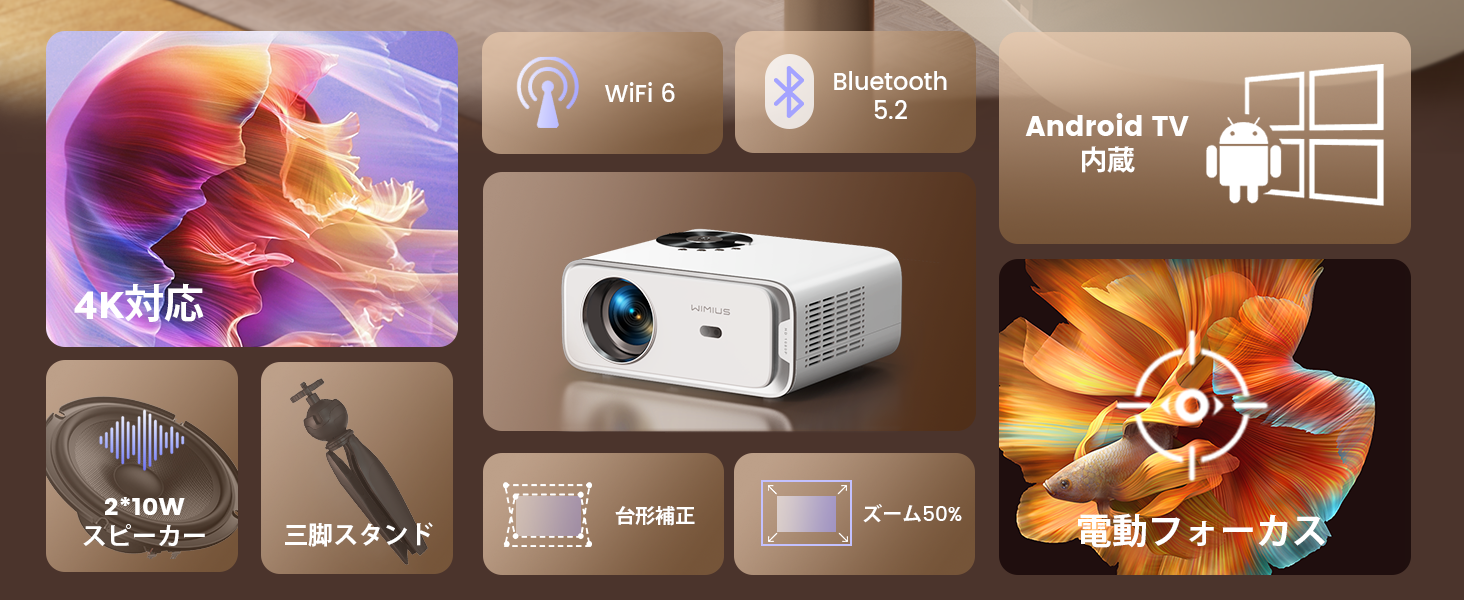
The WiMiUS P63 projector is a compact and versatile device designed for home entertainment and presentations. It integrates Android TV OS, providing access to a wide range of streaming applications directly from the projector. With native 1080P resolution, 4K support, and 750 ANSI lumens brightness, it delivers clear and vibrant images. Advanced features like electric focus, automatic keystone correction, and digital zoom enhance user convenience and picture quality.

Image 1.1: The WiMiUS P63 Projector, a compact and powerful device for home entertainment.

Image 1.2: The WiMiUS P63 Projector shown with its remote control and included tripod, highlighting its portability and ease of setup.
2. 설정 지침
2.1 언박싱 및 초기 검사
Carefully remove all components from the packaging. Verify that all accessories are present according to the packing list. Inspect the projector for any signs of damage.
Video 2.1: An unboxing demonstration for a similar projector model (GC357B), showing the contents of the package including the projector unit, power cable, AV cable, HDMI cable, dust removal tools, filter, and remote control. This video provides a general idea of what to expect when unboxing your WiMiUS P63 projector.
2.2 전원 연결
Connect the power cable to the projector's power input port and then plug it into a power outlet. The projector will typically power on or enter standby mode.
2.3 원격 제어 페어링
To ensure full functionality, pair the remote control with the projector. Follow the on-screen instructions or the steps outlined in the video below.
Video 2.2: A demonstration of how to pair the remote control with the projector. This process typically involves pressing specific buttons on the remote simultaneously until a pairing confirmation appears on the screen.
2.4 Initial Placement and Adjustment
Place the projector on a stable surface or mount it using a compatible tripod or ceiling mount. The WiMiUS P63 features automatic keystone correction and electric focus for quick image setup.
Video 2.3: A general setup video for a similar projector model (GC357B) showing installation in a car, demonstrating its compact size and ease of setup for various environments. This video illustrates the projector's versatility in different mounting scenarios.

Image 2.1: The projector shown mounted on a ceiling, illustrating flexible installation options for optimal view각도를 나타냅니다.
3. 사용 설명서
3.1 Navigating Android TV OS
The WiMiUS P63 comes with Android TV OS pre-installed, offering a user-friendly interface to access various applications. Use the remote control to navigate through menus, select apps, and adjust settings.

Image 3.1: The projector displaying the Android TV interface with various streaming apps like Netflix, YouTube, and Prime Video, ready for selection.
이미지 3.2: 자세한 view of the Android TV interface, showcasing the wide array of applications available for streaming and entertainment.
3.2 Image Adjustment (Focus, Keystone, Zoom)
The projector features one-key electric focus and automatic keystone correction. You can also adjust the screen size from 50% to 100% using the zoom function without moving the projector.

Image 3.3: A visual representation of the automatic keystone correction and electric focus features, ensuring a perfectly rectangular and sharp image.

Image 3.4: This image highlights the one-key electric focus, automatic keystone correction, and zoom capabilities, allowing for flexible image adjustments.
3.3 연결 옵션
The P63 projector offers multiple connectivity options including HDMI, USB, AV, and 3.5mm audio. It also supports high-speed WIFI 6 and Bluetooth 5.2 for wireless connections.

Image 3.5: An illustration of the various input and output ports on the projector, including HDMI, USB, and audio jacks, for connecting external devices.
Video 3.1: A demonstration of connecting a mobile phone via Bluetooth to a similar projector model. This process allows the projector to act as a Bluetooth speaker or to stream audio from your phone.
4. 유지관리
4.1 Cleaning the Filter and Internal Lens
Regular cleaning of the air filter and internal lens is crucial for maintaining optimal performance and image quality. The filter should be cleaned monthly or as needed. The internal lens can be gently cleaned with a dry cotton swab or one moistened with alcohol.
Video 4.1: A guide on how to remove and clean the internal lens and dust filter of a similar projector model (P65). This maintenance step helps prevent dust accumulation and ensures clear projection.
5. 문제 해결
If you encounter any issues with your WiMiUS P63 projector, please refer to the following common troubleshooting tips:
- 전원 없음: 프로젝터와 전원 콘센트에 전원 케이블이 제대로 연결되어 있는지 확인하십시오. 다른 콘센트에 연결해 보십시오.
- 이미지 없음: Check the input source. Make sure the correct HDMI or other input is selected. Verify that the lens cap is removed.
- 흐릿한 이미지: Use the electric focus function on the remote control to adjust the image sharpness. Ensure the projector is placed at an appropriate distance from the screen.
- Image Distorted (Trapezoid Shape): The projector features automatic keystone correction. If the image is still distorted, manually adjust the keystone settings in the projector menu.
- 소리 없음: Check the volume settings on both the projector and the connected device. Ensure that the audio output is correctly configured. If using Bluetooth, verify the connection.
- Wi-Fi/블루투스 연결 문제: Ensure the projector is within range of your Wi-Fi router or Bluetooth device. Restart both the projector and the device you are trying to connect.
보다 자세한 문제 해결 방법이나 지속적인 문제가 발생하는 경우 고객 지원팀에 문의하십시오.
6. 사양
| 특징 | 사양 |
|---|---|
| 상표 | 위미어스 |
| 모델 번호 | 피63 |
| 운영 체제 | 안드로이드 티비 |
| 명도 | 750 ANSI 루멘스 |
| 네이티브 해상도 | 1280 x 800 |
| 최대 디스플레이 해상도 | 3840 x 2160 pixels (4K Supported) |
| 연결 기술 | WIFI6, Bluetooth 5.2, HDMI, USB |
| HDMI 포트 | 2 |
| 폼 팩터 | 포켓 |
| 제품 치수 | 24.5 x 20 x 11cm |
| 제품 무게 | 2.76 킬로그램 |
| 특별 기능 | Android TV, Tripod Included, Electric Focus, Auto Keystone, Zoom, Built-in 2*10W HiFi Speakers |
7. 보증 및 지원
WiMiUS provides dedicated customer service and technical support for the P63 projector. In the event of initial defects or natural failures, refunds or exchanges are available (free exchange/refund guarantee).
지원 관련 문의는 다음 연락처로 문의해 주십시오. support01@wimius.com
Ask a question about this manual
Ask about setup, troubleshooting, compatibility, parts, safety, or missing instructions. Manuals+ will review the question and use this page’s manual context to help answer it.