
Micromax J3
Micromax J3 Keypad Mobile User Manual
모델: J3
소개
This manual provides essential information for the safe and efficient operation of your Micromax J3 Keypad Mobile. Please read it thoroughly before using the device.

이미지: 앞면과 뒷면 view of the Micromax J3 Keypad Mobile, showcasin세련된 파란색 디자인이 특징입니다.
패키지 내용
패키지에 모든 품목이 들어 있는지 확인하세요.
- One Micromax J3 Transceiver (Mobile Phone)
- 하나의 배터리
- 하나의 충전기
- 사용 설명서 (본 문서)
설정
1. Inserting the Battery and SIM Card
- 휴대폰의 뒷면 커버를 조심스럽게 제거하세요.
- Insert your SIM card(s) into the designated slot(s). Ensure the gold contacts face downwards.
- Insert the 800 mAh Lithium Ion battery into the battery compartment, aligning the contacts.
- 뒤쪽 덮개를 제자리에 딸깍 소리가 날 때까지 다시 끼웁니다.
2. 배터리 충전
처음 사용하기 전에 배터리를 완전히 충전하십시오.
- 충전기를 휴대폰의 충전 포트에 연결하세요.
- 충전기를 전원 콘센트에 꽂으세요.
- 화면의 배터리 표시등은 충전 진행 상황을 보여줍니다.
- 완전히 충전되면 충전기를 분리하세요.

Image: Graphic illustrating the 800 mAh battery capacity and power saving mode for extended usage.
작동 지침
전원 켜기/끄기
- 전원을 켜려면 전원/통화 종료 화면이 켜질 때까지 버튼을 누릅니다.
- 전원을 끄려면 전원/통화 종료 button until the power off options appear, then select 'Power off'.
기본 탐색
- 사용하세요 탐색 키 (Up, Down, Left, Right) to move through menus.
- 를 누르세요 중앙/확인 버튼을 눌러 옵션을 선택합니다.
- 를 누르세요 뒤로/지우기 button to go back to the previous screen or delete characters.
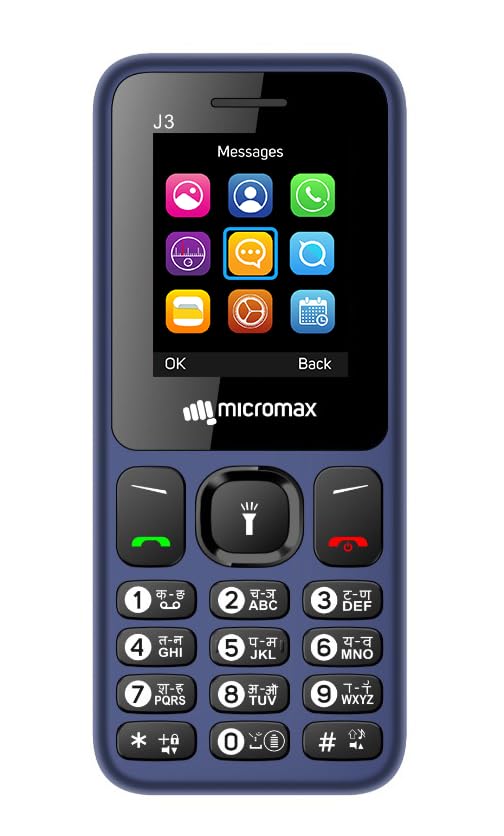
이미지: 앞면 view of the Micromax J3, displaying the keypad and the main screen with various application icons.
전화 걸기
- 키패드를 사용하여 전화번호를 입력하세요.
- 를 누르세요 전화/녹색 통화를 시작하려면 버튼을 클릭하세요.
- 통화를 종료하려면 End Call/Red 단추.
Auto Call Recording
The Micromax J3 supports automatic call recording, organized folder-wise. Refer to the phone's settings menu for activation and management of recorded calls.
Using the Bright Torch
The phone features a built-in bright torch. Typically, this can be activated by long-pressing a specific key (e.g., the '0' key or a dedicated torch button) or through the phone's menu.

이미지: 측면 view of the Micromax J3, highlighting the bright torch feature in operation.
무선 FM 라디오
The Micromax J3 includes a wireless FM radio. Access the FM radio application from the main menu to scan for stations and enjoy listening without needing headphones as an antenna.
Regional Language Support
The device supports 22 regional languages for reading and writing, along with a number talk-back feature. Navigate to the phone's language settings to select your preferred language.
유지
- Keep the phone dry. Liquids can corrode electronic circuits.
- 휴대전화를 극한의 온도에 노출시키지 마세요.
- Clean the phone with a soft, dry cloth. Avoid using harsh chemicals.
- Handle the phone with care to prevent drops and impacts.
- Regularly check for software updates if available, though basic phones typically have limited update cycles.
문제 해결
| 문제 | 가능한 해결책 |
|---|---|
| 전화기의 전원이 켜지지 않습니다. | 배터리가 올바르게 삽입되었는지, 완전히 충전되었는지 확인하십시오. 최소 30분 동안 휴대폰을 충전해 보세요. |
| 전화를 걸거나 받을 수 없습니다. | Check if the SIM card is properly inserted. Verify network signal strength. Contact your service provider if issues persist. |
| 통화 중 음질이 좋지 않습니다. | Ensure the microphone and speaker are not obstructed. Adjust call volume. Move to an area with better network coverage. |
| 배터리가 빨리 소모됩니다. | Activate power saving mode. Reduce screen brightness. Close unused applications. |
| Torch light not working. | Ensure the torch function is enabled in settings or via the shortcut key. Check battery level. |
명세서
| 특징 | 세부 사항 |
|---|---|
| 모델 | Micromax J3 |
| 운영 체제 | 스프레드트럼 |
| 숫양 | 32메가바이트 |
| 내부 저장소 | (Not specified, typically low for basic phones) |
| 화면 크기 | 4.49cm(1.77인치) |
| 디스플레이 해상도 | 720p (Note: This resolution typically refers to video playback, not native screen resolution for a basic phone.) |
| 배터리 용량 | 800mAh 리튬 이온 |
| 연결성 | 블루투스, USB |
| 오디오 잭 | 3.5mm (XNUMXmm) |
| 특별 기능 | Power Saving Mode, FM Radio (Wireless), Bright Torch, Auto Call Recording (Folder-wise), 22 Regional Language Support, Anti-theft, Number Talk Back |
| 치수(길이x너비x높이) | 15 x 0.8 x 5.5cm |
| 품목 무게 | 200g |
| 폼 팩터 | 술집 |
| 색상 | 파란색 |
| 제조업체 | Bhagwati Products Ltd |

Image: A collage highlighting key features of the Micromax J3, such as screen size, durable battery, wireless FM radio, and multi-language support.
보증 및 지원
보증 정보
The Micromax J3 Keypad Mobile comes with a 1년 보증 from the date of purchase. This warranty covers manufacturing defects. Please retain your purchase receipt as proof of purchase. The warranty does not cover damage caused by misuse, accidents, unauthorized repairs, or normal wear and tear.
고객 지원
For any queries, technical assistance, or warranty claims, please contact Micromax customer support. Refer to the official Micromax web웹사이트 또는 제품 포장에서 최신 연락처 정보를 확인하세요.
제조업체: 바그와티 제품 주식회사
Ask a question about this manual
Ask about setup, troubleshooting, compatibility, parts, safety, or missing instructions. Manuals+ will review the question and use this page’s manual context to help answer it.