
1. 서론
This manual provides instructions for the CLNCBJ RMT-JR01 remote control. This remote is designed as a direct replacement for various JVC TV models, offering immediate functionality without the need for programming or pairing. Please read this manual carefully to ensure proper use and to understand the features of your new remote control.

Image 1.1: The CLNCBJ RMT-JR01 remote control, a direct replacement for JVC TV models.
2. 설정
2.1 배터리 설치
The RMT-JR01 remote control requires two (2) AA 1.5V alkaline batteries for operation. Batteries are not included with the remote control.
- 리모콘 뒷면에서 배터리함을 찾으세요.
- 배터리 덮개를 아래로 밀어서 엽니다.
- Insert two (2) AA 1.5V alkaline batteries, ensuring that the positive (+) and negative (-) terminals align correctly with the markings inside the compartment.
- 배터리 덮개를 제자리에 밀어 넣어 딸깍 소리가 날 때까지 밀어 넣습니다.

Image 2.1: Proper insertion of AA batteries into the remote control's battery compartment.
2.2 초기 사용
Once batteries are correctly installed, the CLNCBJ RMT-JR01 remote control is ready for immediate use. No programming or pairing is required. Point the remote control towards your JVC TV and begin operation.
3. 사용 설명서
The RMT-JR01 remote control features a standard layout for easy navigation and control of your JVC TV. Below is a general overview of the key functions.

Image 3.1: Diagram illustrating the main buttons and their functions on the RMT-JR01 remote control.
- 전원 버튼 (●): TV를 켜거나 끕니다.
- 수면 버튼: Activates the TV's sleep timer function.
- 입력 버튼: 사용 가능한 입력 소스(HDMI, AV 등)를 순환합니다.
- 메뉴 버튼: TV의 메인 메뉴에 접속합니다.
- 정보 버튼: 현재 프로그램이나 입력에 대한 정보를 표시합니다.
- Navigation Keys (Up, Down, Left, Right) & OK Button: 메뉴를 탐색하고 선택 사항을 확인하는 데 사용됩니다.
- 돌아가기 버튼: 이전 메뉴 또는 화면으로 돌아갑니다.
- 볼륨 높이기/낮추기(VOL +/-)TV의 볼륨을 조절합니다.
- 음소거 버튼: TV 오디오를 음소거하거나 음소거 해제합니다.
- 채널 위/아래(CH +/-): TV 채널을 바꿉니다.
- 숫자 키(0-9)채널 번호를 직접 입력하세요.
- Media Playback Controls (Play, Pause, Stop, Rewind, Fast Forward): Control media playback if supported by the TV and source.
- Dedicated Input Buttons (HDMI, PC, TV, Video, Comp, Music): Directly select specific input sources.
For specific functions related to your JVC TV model, refer to your TV's original user manual.
4. 유지관리
4.1 리모콘 청소
리모컨을 청소하려면 부드럽고 마른 천을 사용하세요. 잘 지워지지 않는 오염은 가볍게 닦아주세요.amp천에 물이나 순한 비연마성 세제를 묻혀 닦으십시오. 강한 화학 물질, 용제 또는 연마재는 리모컨 표면이나 내부 부품을 손상시킬 수 있으므로 사용하지 마십시오.
4.2 배터리 교체
Replace batteries when the remote control's responsiveness decreases or if it stops functioning. Always replace both batteries at the same time with new AA 1.5V alkaline batteries. Do not mix old and new batteries, or different types of batteries, as this can lead to leakage or malfunction. Dispose of used batteries according to local regulations.
5. 문제 해결
If you experience issues with your CLNCBJ RMT-JR01 remote control, please refer to the following common solutions:
- 리모컨이 응답하지 않음:
- Ensure the remote has fresh AA 1.5V alkaline batteries installed correctly (check polarity).
- Verify there are no obstructions between the remote control and the TV's infrared sensor.
- Make sure you are within the effective operating range (up to 10 meters / 30 feet) and pointing the remote directly at the TV.
- Test the remote by pointing it at a smartphone camera; if you see a light flashing from the remote's IR emitter when pressing buttons, the remote is likely transmitting a signal.
- 작동하지 않는 특정 버튼:
- This remote is a direct replacement and should function identically to the original. If a specific button does not work, ensure your TV model supports that function.
- Clean the remote control, especially around the buttons, to ensure no debris is preventing proper contact.
- 간헐적 작업:
- This could indicate low battery power. Replace both batteries with new ones.
- 적외선 신호를 방해할 수 있는 강한 광원(예: 직사광선, 형광등)이 있는지 확인하십시오.
이러한 해결 방법을 시도한 후에도 문제가 지속되면 고객 지원팀에 문의하세요.
6. 사양
| 모델 이름: | RMT-JR01 |
| 상표: | CLNCBJ |
| 연결 기술 : | 적외선 (IR) |
| 호환 장치: | Television (JVC TVs) |
| 필요한 배터리 수: | AA 배터리 2개 |
| 최대 범위: | 10미터 (약 30피트) |
| 품목 무게: | 0.19 파운드 |
| 치수(길이 x 너비 x 높이): | 8.58인치 길이 x 2.55인치 너비 x 1.14인치 높이(217mm x 64.8mm x 29mm) |
| 특징: | 인체공학적 디자인 |
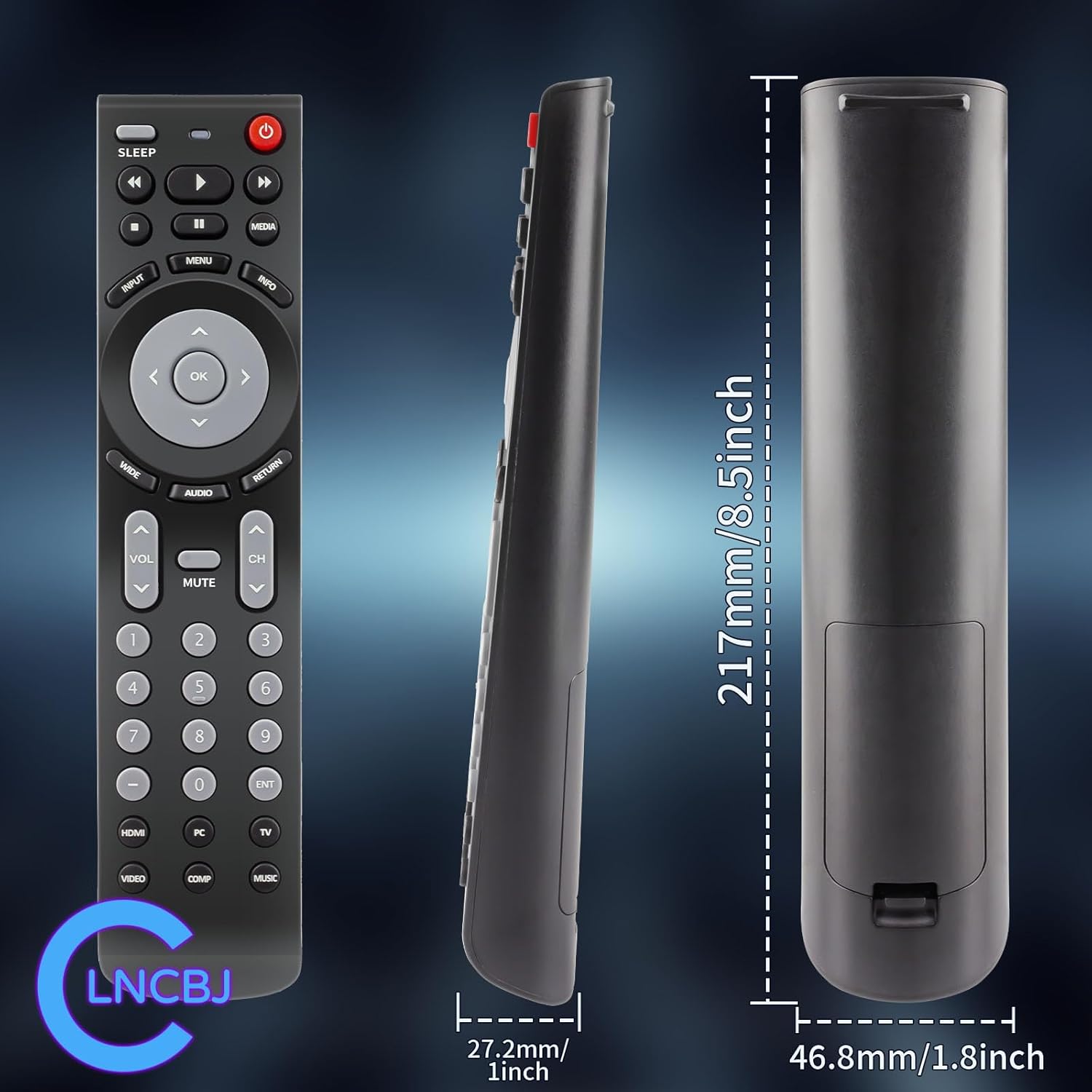
Image 6.1: Physical dimensions of the CLNCBJ RMT-JR01 remote control.
7. Compatible JVC TV Models
The CLNCBJ RMT-JR01 remote control is compatible with the following JVC TV models:
- BC50R
- EM28T
- EM32FL
- EM32T
- EM32TS
- EM37T
- EM39FT
- EM39T
- EM55FT
- JLC32BC3000
- JLC32BC3002
- JLC37BC3000
- JLC37BC3002
- JLC42BC3000
- JLC42BC3002
- JLC47BC3000
- JLC47BC3002
- JLE32BC3001
- JLE37BC3001
- JLE42BC3001
- JLE42BC3500
- JLE47BC3001
- JLE47BC3500
This list is based on the provided product information. If your model is not listed but is a JVC TV, the remote may still be compatible as a direct replacement for the RMT-JR01 original remote.
8. 보증 및 지원
8.1 반품 정책
This product is subject to a 30-day return policy for refund or replacement, as per the retailer's terms and conditions.
8.2 고객 지원
For any questions, concerns, or issues regarding your CLNCBJ RMT-JR01 remote control, please contact the seller directly through the platform where the purchase was made. Providing your order details will help expedite the support process.