
소개
This user manual provides essential information for the setup, operation, and maintenance of your CLNCBJ RE20QP215 Universal Remote Control. Designed as a direct replacement for various RCA TV models, this remote offers hassle-free operation without the need for complex programming or pairing. Simply insert batteries, and it's ready for use.
제품 끝view
The CLNCBJ RE20QP215 remote control is designed for intuitive use, featuring a clear button layout and a comfortable grip. It replaces your original RCA TV remote, providing full functionality for your television, and in some cases, compatible DVD players and VHS combos.
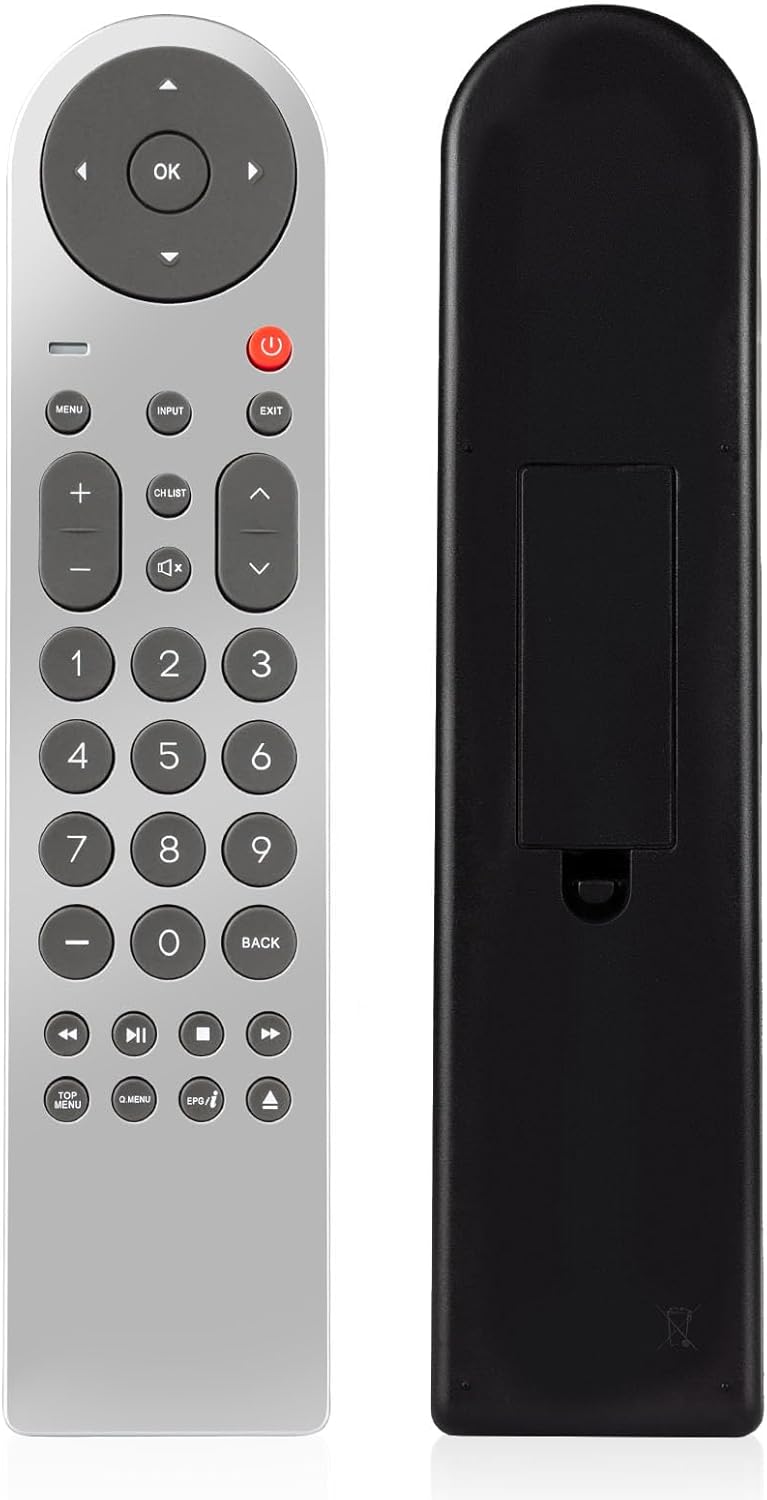
이미지: 앞면과 뒷면 views of the CLNCBJ RE20QP215 remote control, showcasing its sleek design and battery compartment.
버튼 기능

이미지: 자세한 view of the remote control with key buttons labeled for easy identification and understanding of their functions.
- 텔레비젼 힘: TV를 켜거나 끕니다.
- Selection Key (OK/Directional Pad): 메뉴를 탐색하고 선택 사항을 확인합니다.
- 메뉴: TV의 메인 메뉴에 접속합니다.
- 입력: Changes the video input source.
- 출구: 현재 메뉴나 기능을 종료합니다.
- 볼륨 조절 키(+/-): 오디오 볼륨을 조절합니다.
- 무음: 오디오를 음소거하거나 음소거 해제합니다.
- Channel Keys (Up/Down): 텔레비전 채널을 바꿉니다.
- 숫자 키(0-9): 직접 채널 진입.
- 뒤쪽에: 이전 화면이나 채널로 돌아갑니다.
- 재생 컨트롤(재생, 일시 정지, 정지, 되감기, 빨리 감기): For compatible DVD/VHS functions.
호환 모델
This remote control is compatible with a wide range of RCA TV models, including but not limited to: LED24G45RQ, LED28G45RQ, LED32G30RQD, LED32G30TRQ, LED40G45RQ, LED42C45RQ, LED20G30RQD, LED20G30RQ, LED48G45RQ, PLD55A55RQ, LED46C45RQ, LED50B45RQ, LED55C55R120Q, LED55G55R120Q, LED58G45RQ, RE20QP215, WX14241, WX14413, LED24G45RQD, LED40HG45RQ, PLD32A30RQ, PLD50A45RQ.
설정
배터리 설치
The CLNCBJ RE20QP215 remote control requires two (2) AAA 1.5V alkaline batteries (not included) for operation. Follow these steps to install the batteries:
- 리모콘 뒷면에 있는 배터리함 덮개를 찾으세요.
- 덮개를 아래로 밀거나 래치(있는 경우)를 눌러 보관 공간을 엽니다.
- AAA 배터리 2개를 넣고 양극(+)과 음극(-) 단자가 배터리함 내부의 표시기와 올바르게 맞춰졌는지 확인합니다.
- 배터리 덮개를 제자리에 밀어 넣어 딸깍 소리가 날 때까지 밀어 넣습니다.

Image: The open battery compartment of the remote, illustrating where to insert the AAA batteries.
프로그래밍이 필요하지 않습니다
This remote control is pre-programmed and ready to use with compatible RCA TV models immediately after battery installation. No additional programming, pairing, or code entry is necessary.
설정 비디오 가이드
Video: A demonstration of unboxing the remote and installing batteries, showing the simple setup process.
작동 지침
Once batteries are installed, point the remote control directly at your RCA TV and press the desired function button. Ensure there are no obstructions between the remote and the TV's infrared receiver.
- 전원 켜기/끄기: 를 누르세요 힘 TV를 켜거나 끄는 버튼입니다.
- 채널 탐색: 사용하세요 채널 업/다운 buttons to change channels sequentially. For direct access, use the 숫자 키.
- 볼륨 조절: 음량을 조절하려면 다음을 사용하세요. 볼륨 높이기/낮추기 버튼.
- 입력 선택: 를 누르세요 입력 button to cycle through available video input sources (e.g., HDMI 1, AV, Component).
- 메뉴 탐색: 사용하세요 메뉴 button to open the TV's on-screen display (OSD) menu. Navigate using the 방향 패드 and confirm selections with OK.
유효 범위
The remote operates effectively up to 30 feet (approximately 9 meters) from the television, provided there is a clear line of sight between the remote's infrared emitter and the TV's receiver. Fast response times, typically under 0.5 seconds, ensure a smooth user experience.

Image: The remote control demonstrating its effective operating range of up to 30 feet from the television.
유지
- 청소: 리모컨은 부드럽고 마른 천으로 닦으십시오. 연마성 세제, 왁스 또는 용제를 사용하지 마십시오.
- 배터리 교체: Replace batteries when the remote's response becomes sluggish or stops working. Always replace both batteries at the same time with new ones of the same type (AAA 1.5V alkaline).
- 저장: 리모컨을 장기간 사용하지 않을 경우, 누액 및 손상을 방지하기 위해 배터리를 제거하십시오.
문제 해결
| 문제 | 가능한 원인 | 해결책 |
|---|---|---|
| 원격이 작동하지 않습니다. | 배터리가 방전되었거나 잘못 설치되었습니다. | Replace batteries with new AAA 1.5V alkaline batteries, ensuring correct polarity. |
| 리모컨의 범위가 제한적이거나 응답이 간헐적입니다. | Weak batteries; Obstruction between remote and TV; Remote not pointed directly at TV. | Replace batteries; Remove any objects blocking the line of sight; Point the remote directly at the TV's IR receiver. |
| 특정 버튼이 작동하지 않습니다. | Dirty contacts under the button; Remote malfunction. | 리모컨 표면을 청소하십시오. 문제가 지속되면 리모컨을 교체하는 것을 고려해 보세요. |
| 리모컨으로 TV를 제어할 수 없습니다. | TV model is not compatible. | Verify your TV model is listed in the "Compatible Models" section. This remote is specifically for RCA TVs. |
명세서
- 모델 번호: RE20QP215
- 상표: CLNCBJ
- 제품 크기: 9.05 x 3.15 x 0.79인치(230 x 80 x 20mm)
- 품목 무게: 2.89 온스(82그램)
- 전원: AAA 2V 알카라인 배터리 1.5개(포함되지 않음)
- 특징: 프로그래밍이 필요하지 않습니다
- 색상: 실버와 블랙
- 지원되는 최대 장치 수: 1 (primarily TV, with some DVD/VHS combo functions)
- 호환 장치: Television, DVD/Blu-ray Player (for specific RCA models)

Image: Visual representation of the remote control's dimensions for reference.