1. 서론
This manual provides comprehensive instructions for the installation, operation, and maintenance of the Uniview IPC672LR-AX4DUPKC 2MP IR WDR 2D/3D DNR LightHunter Active Deterrence Outdoor Network Ultra 265 PoE PTZ Dome Camera. This advanced surveillance camera is designed for outdoor security applications, offering high-resolution imaging, robust night vision capabilities, and intelligent deterrence features.
Key features include LightHunter illumination for superior low-light performance, Wide Dynamic Range (WDR) for clear images in varying light conditions, and advanced noise reduction (2D/3D DNR). It supports Ultra 265 video compression for efficient storage and bandwidth usage, and features a built-in microphone and speaker for two-way audio, along with an alarm light for active deterrence. The camera's motorized zoom lens allows for flexible field of view 조정.
2. 안전 정보
Please read all safety instructions carefully before installation and operation to prevent damage and ensure proper functioning.
- 전원 공급 장치: Use only the specified Power over Ethernet (PoE) or external power supply. Ensure the power source meets the camera's voltag요구사항
- 설치 환경: Install the camera in a stable location that can support its weight. Avoid direct exposure to extreme temperatures, humidity, or corrosive environments. Ensure proper ventilation.
- 물과 습기: The camera is rated IP66 for outdoor use, providing protection against dust and powerful water jets. However, do not immerse the camera in water.
- 청소: Disconnect power before cleaning. Use a soft, dry cloth. Do not use strong detergents or abrasive cleaners.
- 서비스: 카메라를 분해하거나 개조하지 마십시오. 모든 정비는 자격을 갖춘 기술자에게 맡기십시오.
3. 패키지 내용
포장을 풀 때 모든 품목이 들어 있고 상태가 양호한지 확인하세요.
- 유니view IPC672LR-AX4DUPKC PTZ Dome Camera
- 장착 브래킷 및 나사
- 방수 커넥터 키트
- 드릴링 템플릿
- 빠른 시작 가이드
- 보증 카드(해당되는 경우)
4. 제품 오버view
The IPC672LR-AX4DUPKC camera integrates advanced features for reliable surveillance.
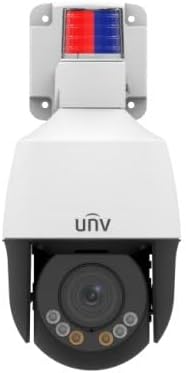
그림 4.1: 전면 view of the IPC672LR-AX4DUPKC camera, showing the dome lens, IR illuminators, and the active deterrence alarm light at the top.
- Motorized Zoom Lens: 2.8-12mm AF automatic focusing lens for flexible field of view.
- IR 조명기: Provides infrared light for night vision up to 50m (164 ft).
- 따뜻한 빛: Additional illumination for color night vision up to 10m (33 ft).
- 알람 라이트: Integrated red and blue alarm light for active deterrence.
- 내장 마이크 및 스피커: 양방향 음성 통신을 가능하게 합니다.
- 이더넷 포트(PoE): 네트워크 연결 및 전원 공급용입니다.

Figure 4.2: Feature icons highlighting LightHunter technology, WDR, Ultra H.265 compression, Edge Storage, Built-in Microphone, and Power over Ethernet (PoE).
고급 기능:
- LightHunter Illumination: Enhances low-light performance for clear images in challenging conditions.
- Optical WDR (Wide Dynamic Range): Up to 120 dB for balanced exposure in scenes with both bright and dark areas.
- 2D/3D DNR (Digital Noise Reduction): Reduces image noise for cleaner video streams.
- Ultra 265 Compression: Efficient video compression standard, also supporting H.265, H.264, and MJPEG.
- Triple Streams: Allows for multiple video streams at different resolutions and bitrates.
- ROI(관심 영역): Focuses encoding resources on specific areas for higher quality.
5. 설정 및 설치
Follow these steps for proper installation of your camera.
5.1 카메라 장착
- 위치를 선택하세요: 원하는 것을 제공하는 야외 위치를 선택하십시오. viewing angle and is within range of your network infrastructure. Consider the camera's IP66 rating for weather resistance.
- 표면 준비: Use the provided drilling template to mark the screw holes on the mounting surface.
- 드릴 구멍: Drill pilot holes according to the template. Insert wall anchors if mounting on masonry or drywall.
- 장착 브래킷 부착: 제공된 나사를 사용하여 장착 브래킷을 표면에 고정하십시오.
- 카메라 부착: Mount the camera onto the bracket, ensuring it is securely fastened.
5.2 네트워크 및 전원 연결
The camera supports Power over Ethernet (PoE) for simplified installation, requiring only a single Ethernet cable for both power and data.

Figure 5.1: An Ethernet cable, used for both power and data with PoE-enabled cameras.
- 이더넷 케이블 연결: Connect one end of an Ethernet cable to the camera's Ethernet port. Use the waterproof connector kit to ensure a sealed connection for outdoor use.
- PoE 스위치/NVR에 연결: Connect the other end of the Ethernet cable to a PoE-enabled network switch or a Network Video Recorder (NVR) with PoE ports.
- Alternative Power (if not using PoE): If PoE is not available, connect a compatible 12V DC power adapter (not included) to the camera's power input.
- 네트워크 구성: Refer to the camera's Quick Start Guide or the full user manual (available online) for initial network configuration, including setting up IP addresses and accessing the camera's web 인터페이스.
6. 카메라 작동
Once installed and configured, you can begin operating your Uniview PTZ Dome Camera.
6.1 라이브 접속 View
- Via NVR/DVR: If connected to an NVR, access the live view directly through the NVR's interface or connected monitor.
- 을 통해 Web 브라우저: Enter the camera's IP address into a web browser on a computer connected to the same network. Log in using your credentials.
- 모바일 앱을 통해: 공식 유니 앱을 다운로드하세요view mobile application (if available) and add your camera for remote view주고받음.

그림 6.1: 예ample of a multi-camera surveillance feed displayed on a monitor.
6.2 PTZ 제어 및 줌
The camera features Pan, Tilt, and Zoom (PTZ) capabilities with a 2.8-12mm motorized zoom lens.
- 팬/틸트: Use the PTZ controls in your NVR interface, web browser, or mobile app to remotely adjust the camera's horizontal (pan) and vertical (tilt) view각도를 나타냅니다.
- 줌: Utilize the zoom controls to optically zoom in or out, adjusting the focal length from 2.8mm (wide) to 12mm (telephoto). The automatic focusing (AF) ensures clear images at all zoom levels.

Figure 6.2: Remote monitoring of camera feeds via a tablet device.
6.3 Night Vision and Active Deterrence
- IR 나이트 비전 : The camera automatically switches to IR mode in low light, providing clear black and white images up to 50m (164 ft).
- 따뜻한 빛: For enhanced color night vision, the camera can utilize its warm light illuminator up to 10m (33 ft).
- 능동적 억제: Configure motion detection or other events to trigger the built-in alarm light and audible warnings via the speaker, deterring intruders.
7. 유지관리
정기적인 유지관리를 통해 카메라의 최적의 성능과 수명을 보장할 수 있습니다.
- 렌즈 세척: Gently wipe the lens with a soft, lint-free cloth. For stubborn dirt, use a lens cleaning solution designed for optical surfaces. Do not use abrasive materials.
- 주택 청소: 카메라 하우징을 청소하세요.amp 옷감. 가혹한 화학 물질을 피하십시오.
- 펌웨어 업데이트: 정기적으로 제조업체를 확인하십시오 website (Uniview) for firmware updates. Updating firmware can improve performance, add new features, and enhance security.
- 케이블 검사: Regularly inspect all cables and connections for signs of wear or damage, especially for outdoor installations.
8. 문제 해결
일반적인 문제와 해결 방법은 이 섹션을 참조하세요.
| 문제 | 가능한 원인 | 해결책 |
|---|---|---|
| 전원이 없습니다 | No PoE power; faulty power adapter; loose connection. | Verify PoE switch/NVR is supplying power; check power adapter and connections. |
| 비디오 피드 없음 | Network issue; incorrect IP address; camera offline; firewall blocking. | Check network cable; verify camera's IP address; restart camera/NVR/router; check firewall settings. |
| 이미지 품질이 좋지 않음 | Dirty lens; improper focus; low bandwidth; insufficient lighting. | Clean lens; adjust focus/zoom; check network bandwidth; ensure adequate lighting or IR/warm light is active. |
| PTZ Control Not Working | Software issue; camera malfunction; network latency. | Restart camera; update firmware; check network connection stability. |
9. 사양
Detailed technical specifications for the IPC672LR-AX4DUPKC camera.
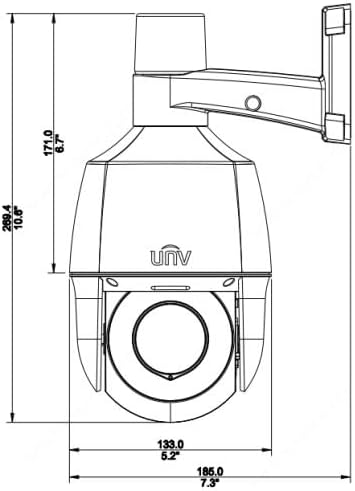
Figure 9.1: Dimensional drawing of the camera, indicating its physical size.
| 특징 | 세부 사항 |
|---|---|
| 모델 번호 | IPC672LR-AX4DUPKC |
| 비디오 캡처 해상도 | 2MP |
| 렌즈 | 2.8-12mm AF Automatic Focusing and Motorized Zoom Lens |
| 나이트 비전 범위 | Up to 50 m (164 ft) IR, 10m (33 ft) warm light |
| 연결 기술 | 유선(PoE) |
| 연결 프로토콜 | Wi-Fi (for certain functions/setup, primarily wired for operation) |
| 비디오 압축 | 울트라 265, H.265, H.264, MJPEG |
| 오디오 | 내장 마이크 및 스피커 |
| 다이나믹 레인지 | Up to 120 dB Optical WDR |
| 소음 감소 | 2D/3D DNR |
| 침투 방지 등급 | IP66 |
| 폼 팩터 | 둥근 천장 |
| 치수(길이 x 너비 x 높이) | 5.2 x 5.2 x 10.6 인치 |
| 제조업체 | 유니view |
| 추천 용도 | 야외 보안 |
| 경고 유형 | 모션 전용 |
| 포토 센서 기술 | CMOS |
10. 보증 및 지원
For warranty information, please refer to the warranty card included with your product or contact the seller/manufacturer directly. Technical support may be available through the manufacturer's official web사이트 또는 고객 서비스 채널.
제조업체: 유니view


