
제품 끝view
The Roxicosly Super Strong Vibrating Alarm Clock, Model CR1027, is a compact, cordless, and USB-rechargeable device designed to provide effective wake-up alerts. It is particularly suitable for heavy sleepers, individuals with hearing impairments, and travelers. Key features include adjustable vibration intensity, dual alarm settings with weekday/weekend modes, a snooze function, and a child lock to prevent accidental changes.

Image: The Roxicosly vibrating alarm clock, designed for heavy sleepers, shown with its strong vibration feature.
설정
장치 충전하기
The alarm clock is equipped with a powerful 3000mAh rechargeable battery. Before initial use, or when the battery indicator shows low power, connect the device using the provided USB-C cable to a suitable power source (e.g., USB wall adapter, computer USB port). A full charge can last up to 160 days on the lowest vibration and alarm setting.

Image: The alarm clock connected via USB-C cable for charging, highlighting its 3000mAh battery.

Image: Close-up of the alarm clock display showing the battery indicator.
시간 설정
- Long press the "TIME/SNOOZE" button to enter time setting mode.
- Press "+" or "-" to set the day of the week, then press "TIME/SNOOZE" to save.
- Press "+" or "-" to set the hour, then press "TIME/SNOOZE" to save.
- Press "+" or "-" to set the minute, then press "TIME/SNOOZE" to save.
Video: Demonstrates how to set the time, including day, hour, and minute, on the Roxicosly alarm clock.
Setting AM/PM and Daylight Saving Time (DST)
- Press the "+" button to toggle Daylight Saving Time (DST) on/off.
- Press the "-" button to switch between AM and PM time formats (12H/24H).
Video: Illustrates how to adjust AM/PM and DST settings on the alarm clock.
작동 지침
알람 설정
- Press the "Alarm 1" button to turn on Alarm 1. Press "Alarm 1" again to enter alarm setting mode.
- Press "+" or "-" to set the desired alarm time (hour and minute), then press "Alarm 1" to save.
- Press "+" or "-" to select the alarm mode: 소리 만, 진동만, 또는 소리 + 진동. Press "Alarm 1" to save.
- Press "+" or "-" to set the alarm volume (U01-U05), then press "Alarm 1" to save.
The device supports dual alarms (Alarm 1 and Alarm 2) and allows customization for all 7 days, weekdays (Mon-Fri), or weekends (Sat-Sun).

Image: A man sleeping with the vibrating alarm clock under his pillow, illustrating the three available alarm modes: Buzzer Only, Vibrator Only, and Buzzer + Vibrator.

Image: The alarm clock displaying dual alarm settings and options for all 7 days, weekdays, or weekends.
Video: Guide on how to set an alarm, including time, mode (sound/vibration), and volume.
진동 강도 조정
The vibration intensity can be customized to High, Medium, or Low to suit individual preferences and sleeping habits. This setting is adjusted during the alarm setup process.
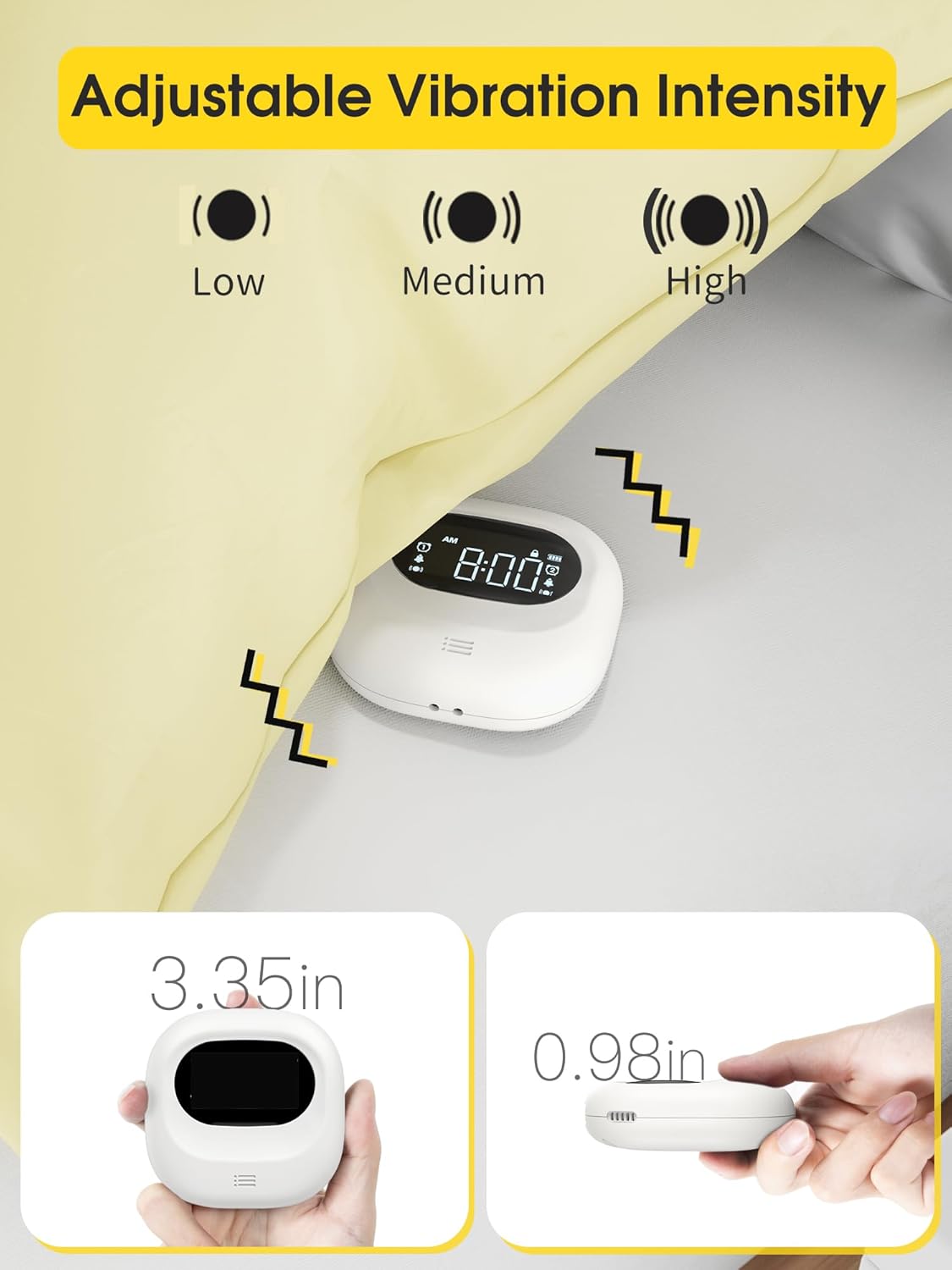
Image: The alarm clock illustrating the three adjustable vibration intensity levels: Low, Medium, and High.
스누즈 기능
When the alarm sounds, press the "TIME/SNOOZE" button to activate the snooze function. The snooze icon will flash on the display, providing a temporary pause before the alarm sounds again.
Video: Demonstrates how to use the snooze function and turn off the alarm for the day.
아동 잠금
To prevent accidental button presses or changes to settings, especially while sleeping, engage the child lock feature. This is typically a sliding switch located on the back of the device.

Image: The alarm clock highlighting the child lock feature to prevent unintended adjustments.
자동 디스플레이 끄기
The display automatically turns off after 30 seconds to avoid disturbing sleep with light, ensuring a dark sleeping environment.

Image: The alarm clock display transitioning to off after 30 seconds to ensure no light disturbance at night.
유지
- 청소: 부드럽고 마른 천으로 기기를 닦으세요. 연마성 세제나 용제는 사용하지 마세요.
- 배터리 관리 : Recharge the device when the low battery indicator appears. Avoid fully depleting the battery frequently to prolong its lifespan.
- 저장: 장기간 사용하지 않을 때는 알람시계를 서늘하고 건조한 곳에 보관하십시오.
문제 해결
| 문제 | 가능한 원인 | 해결책 |
|---|---|---|
| 경보음이 울리지 않거나 진동이 없습니다 | Alarm is off, volume is too low, vibration mode not selected, or low battery. | Ensure alarm is activated, check volume settings, verify vibration mode is on, and charge the device. |
| 디스플레이가 어둡거나 꺼져 있습니다 | Auto display off feature is active, or low battery. | Press any button to temporarily illuminate the display. Charge the device if the battery is low. |
| 설정을 변경할 수 없습니다 | 어린이 보호 잠금 기능이 작동 중입니다. | Disengage the child lock switch on the back of the device. |
| Time format is incorrect (e.g., military time) | Incorrect time format setting. | Refer to the "Setting AM/PM/DST" section to adjust the 12H/24H time format. |
명세서
- 상표: 록시코슬리
- 모델 번호: CR1027
- 색상: 하얀색
- 디스플레이 유형: 액정표시장치
- 전원: Battery Operated, Rechargeable Battery (3000mAh Lithium Polymer, included)
- 제품 크기: 3"W x 3"H (approx. 3.35" x 3.35" x 1" as per feature bullets)
- 품목 무게: 0.3파운드 / 4.8온스
- 재료: 아크릴로 니트릴 부타디엔 스티렌
- 특별 기능: Adjustable Volume, Battery Indicator, Cordless, Dual Alarm, Loud Alarm, Adjustable Vibration Intensity, Child Lock, Auto Display Off, 12/24H Time Format, DST
- 제조업체: Wuhan Luekefang E-commerce Co., Ltd
보증 및 지원
The Roxicosly Super Strong Vibrating Alarm Clock comes with an 18개월 보증 from the date of purchase, covering manufacturing defects. For product support, technical assistance, or warranty claims, please contact the manufacturer or seller directly through your purchase platform. Please retain your proof of purchase for warranty validation.
Contact information for the seller (Wismco) can typically be found on your order details page or the product listing on the platform where it was purchased.