
AULA F99 (Grey+White - Graywood Switch)
AULA F99 무선 기계식 키보드 사용 설명서
Model: F99 (Grey+White - Graywood Switch) | Brand: AULA
1. 서론
Thank you for choosing the AULA F99 Wireless Mechanical Keyboard. This high-performance keyboard is designed for versatility and an enhanced typing experience, featuring multi-device connectivity, hot-swappable switches, and customizable RGB backlighting. This manual provides detailed instructions to help you set up, operate, and maintain your keyboard.

Figure 1.1: AULA F99 Wireless Mechanical Keyboard (Black&Grey&White variant)
2. 주요 특징
- 다중 장치 연결: Supports BT5.0, 2.4GHz wireless, and USB wired modes, allowing connection to up to five devices simultaneously.
- 핫스왑 가능 디자인: Easily replace 3-pin/5-pin switches and keycaps without soldering. Comes with a keycap/switch puller.
- 사전 윤활 처리된 선형 스위치: Equipped with smooth, quiet, and quick-response Leobog Greywood V3 switches for a pleasant typing experience.
- RGB 백라이트: Features 16 RGB lighting effects and supports 16.8 million customizable colors via driver software, including music rhythm lighting effects.
- 고급 구조: Incorporates an extended integrated silicone pad and PCB single key slotting for optimized resilience, stability, and a softer, more elastic feel.
- Five Layers of Sound-Damp에닝: Internal filling silencer layers effectively reduce cavity noise and provide a solid feel.
- 대용량 배터리: Built-in 8000mAh battery for extended wireless usage (approx. 53 hours with backlight on, 400 hours with backlight off).
- 컴팩트한 96% 레이아웃: 99 keys layout saves desktop space while retaining essential arrow keys and a number pad.
- PBT 키캡: Durable double-shot PBT keycaps ensure characters remain vibrant, clear, and fade-resistant.
- N 키 롤오버: Ensures all key presses are registered simultaneously, crucial for fast-paced gaming.

그림 2.1: 이상view of AULA F99 Keyboard's key features.
3. 설정 가이드
3.1 패키지 내용
시작하기 전에 패키지에 모든 품목이 들어 있는지 확인하세요.
- AULA F99 무선 기계식 키보드
- 키캡 풀러
- USB-C to USB-A 케이블
- 영어 매뉴얼(이 문서)
- 추가 2개의 회색 사전 윤활 선형 스위치
3.2 키보드 연결
The AULA F99 keyboard offers three connection modes:
- USB 유선 모드:
Connect the provided USB-C cable to the keyboard's USB-C port and the other end to your computer's USB-A port. The keyboard will automatically be recognized and powered.
- 2.4GHz 무선 모드:
Locate the 2.4GHz USB dongle, usually stored in a slot on the top edge of the keyboard. Plug the dongle into an available USB port on your device. Switch the keyboard to 2.4GHz mode using the physical switch (refer to the "Operating Instructions" section for switch location). The keyboard should connect automatically.
- Bluetooth 5.0 모드:
Switch the keyboard to Bluetooth mode using the physical switch. On your device (PC, tablet, smartphone, etc.), enable Bluetooth and search for new devices. Select "AULA F99" from the list of available devices to pair. The keyboard can store up to five Bluetooth connections.

Figure 3.1: Illustration of the three connection modes: USB-C, 2.4GHz, and Bluetooth.
4. 사용 설명서
4.1 장치 간 전환
To switch between connected devices (especially in Bluetooth mode), use the combination keys involving the Fn key. Refer to the keyboard's markings or the full PDF manual for specific key combinations to cycle through paired Bluetooth devices or switch to 2.4GHz/wired mode.
4.2 RGB 백라이트 제어
The AULA F99 features extensive RGB backlighting customization.
- Fn + Shift (right): 라이트 바 모드를 전환하거나 바 백라이트를 끕니다.
- Fn + \: Switch between 15 RGB light effects.
- Fn + 탭: 조명 색상을 전환합니다.
- Fn + ↑: 조명의 밝기를 높입니다.
- Fn + ↓: 조명 밝기를 낮추세요.
- Fn + ←: 조명 속도를 낮춥니다.
- Fn + →: 조명 속도를 높입니다.

Figure 4.1: Demonstrating 16.8 Million RGB Backlight capabilities and controls.
4.3 Macro Customization and Software
The keyboard supports macro customization, allowing you to record and edit macros, customize key functions, and access 16.8 million light colors. It also supports cool music rhythm lighting effects.
To utilize these advanced features, you will need to download and install the official driver software. Please note that the driver currently supports Windows systems.
중요한: Run the driver in wired mode for proper functionality.

Figure 4.2: Customization options available through the driver software.
5. 유지관리
5.1 청소
To keep your keyboard in optimal condition, regularly clean it. Use a soft, lint-free cloth to wipe down the keycaps and chassis. For dust and debris between keys, use compressed air. Avoid using harsh chemicals or abrasive materials.
5.2 스위치 및 키캡 교체
The AULA F99 is hot-swappable, allowing for easy replacement of switches and keycaps.
- 키캡 제거: Use the included keycap puller to gently pull keycaps straight up.
- 스위치 제거 : Use the included switch puller to carefully grip the switch from its top and bottom clips, then pull it straight out.
- 설치: Align the new switch's pins with the PCB's holes and press firmly until it clicks into place. For keycaps, align and press down.

Figure 5.1: Close-up of hot-swappable sockets and pre-lubed switches.
6. 문제 해결
| 문제 | 가능한 원인 | 해결책 |
|---|---|---|
| 무선 모드에서 키보드가 응답하지 않습니다. | Low battery, incorrect mode selected, dongle not connected, or Bluetooth not paired. | Charge the keyboard. Ensure the correct mode (2.4GHz/BT) is selected via the physical switch. Re-insert the 2.4GHz dongle or re-pair Bluetooth. Try wired mode to confirm keyboard functionality. |
| RGB lighting not working or behaving unexpectedly. | Incorrect lighting mode selected, driver issue, or low battery. | Use Fn key combinations to cycle through lighting effects and adjust brightness. Ensure the keyboard is charged. If using custom effects, ensure the driver is installed and running in wired mode. |
| 키가 인식되지 않거나 입력이 지연됩니다. | Loose switch, software conflict, or wireless interference. | Check if any switches are loose and re-seat them. Try connecting via USB wired mode to rule out wireless interference. Ensure no conflicting software is running. Update keyboard drivers if available. |
| Cannot connect to multiple devices. | Incorrect pairing procedure or device limit reached. | Ensure you are following the correct pairing procedure for each device. The keyboard supports up to five Bluetooth connections. If you have reached the limit, you may need to unpair an old device. |
7. 사양
| 특징 | 세부 사항 |
|---|---|
| 모델 번호 | Grey+White - Graywood Switch |
| 연결 기술 | BT5.0, 2.4GHz, USB-C |
| 키보드 설명 | 기계적 |
| 키의 개수 | 99 |
| 키캡 재질 | 더블샷 PBT |
| 스위치 유형 | Pre-lubed Linear (Leobog Greywood V3) |
| 백라이트 | RGB(16.8만 가지 색상) |
| 배터리 용량 | 8000mAh |
| 배터리 사용 시간 (백라이트 켜짐 기준) | 약 53시간 |
| 배터리 사용 시간 (백라이트 꺼짐 기준) | 약 400시간 |
| 제품 치수 | 5.78 x 1.67 x 15.38 인치 |
| 품목 무게 | 3.31파운드 |
| 호환 장치 | Laptop, PC, Gaming Console (PS/Xbox), Tablet, Smartphone |
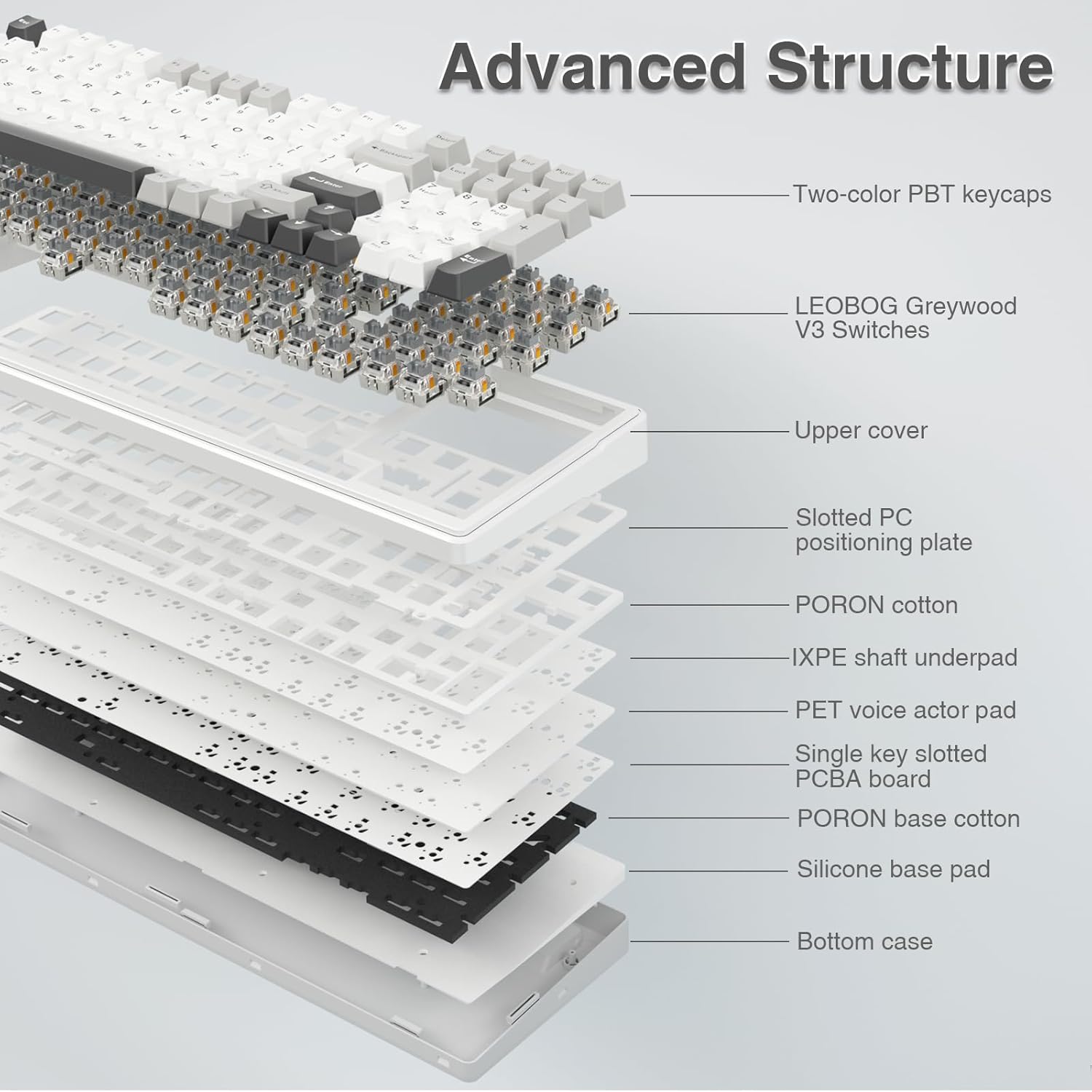
Figure 7.1: Diagram illustrating the advanced internal structure of the AULA F99 keyboard.

Figure 7.2: Visual representation of the 8000mAh high-capacity battery.
8. 보증 및 지원
보증 정보 및 기술 지원에 대해서는 공식 AULA를 참조하십시오. web사이트를 방문하거나 제품을 구매한 소매점에 문의하세요. 보증 청구를 위해 구매 증빙 자료를 보관하세요.
You can also find additional resources and a downloadable PDF user manual at the following link: AULA F99 User Manual (PDF).