
1. 서론
Welcome to the KRUPS Sensation C10 EA910A10 Superautomatic Coffee Machine user manual. This guide provides comprehensive instructions for the safe and efficient operation, maintenance, and troubleshooting of your new coffee machine. Please read this manual thoroughly before first use and keep it for future reference.
2. 중요 안전 지침
안전한 작동을 위해 항상 다음 기본 안전 예방 조치를 따르세요.
- 기기를 사용하기 전에 모든 지침을 읽으세요.
- 기기, 전원 코드 또는 플러그를 물이나 다른 액체에 담그지 마십시오.
- 이 제품은 가정용으로만 사용하도록 설계되었습니다.
- 볼륨을 확보하세요tag기기에 표시된 e는 귀하의 주 전원에 해당합니다.tage.
- 청소 전이나 사용하지 않을 때는 항상 전원 콘센트에서 기기의 플러그를 뽑아 두세요.
- 코드나 플러그가 손상된 경우 또는 기기가 오작동하거나 어떤 식으로든 손상된 경우에는 기기를 작동하지 마십시오.
- 작동 중에는 어린이가 제품 가까이에 두지 않도록 하십시오.
- 제조업체가 권장하는 액세서리만 사용하세요.
- Avoid contact with hot surfaces, such as the coffee spouts or steam nozzle.
3. 제품 구성품
Familiarize yourself with the main components of your KRUPS Sensation C10 EA910A10 coffee machine:
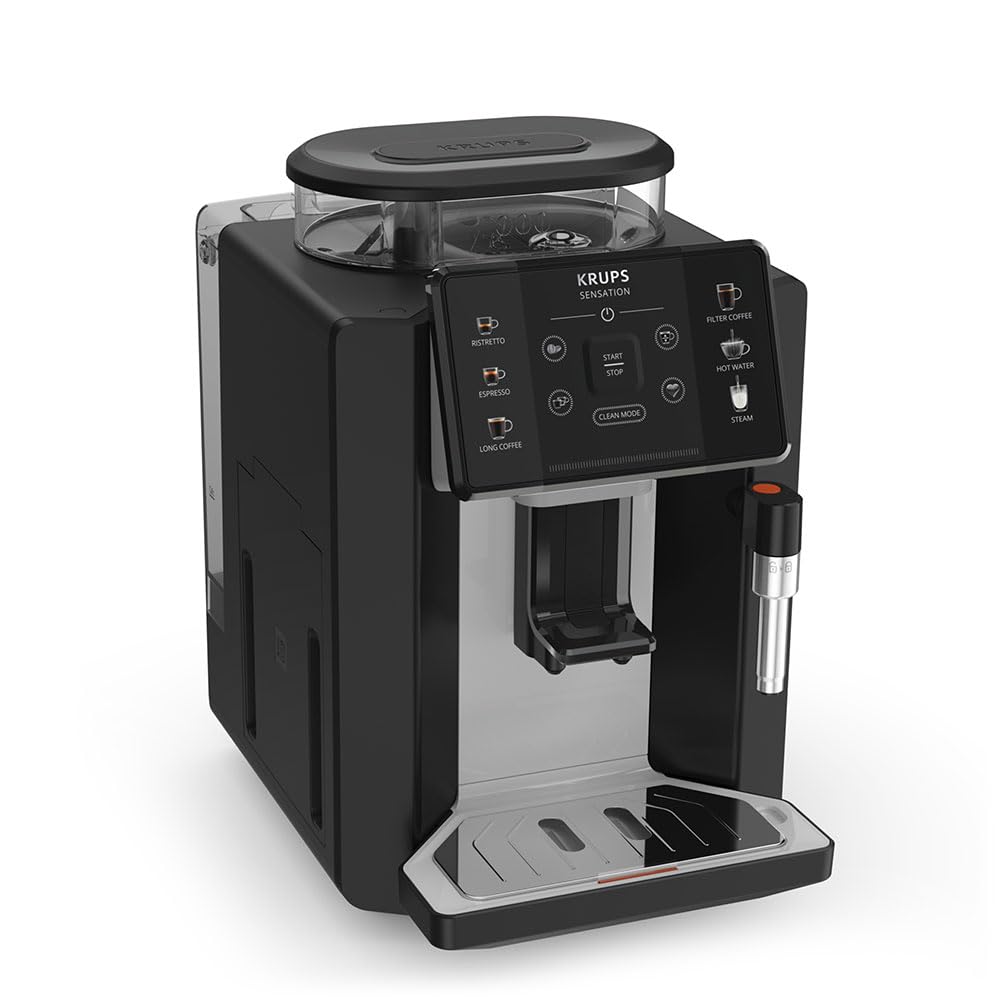
이미지: 오른쪽 앞면 view of the KRUPS Sensation C10 EA910A10 Superautomatic Coffee Machine, showing the bean hopper, control panel, coffee spouts, and drip tray. Two cups of coffee are being dispensed.
- 뚜껑이 있는 콩통
- 수조
- Control Panel (Touchscreen)
- Coffee Spouts (Adjustable)
- 물받이 (격자 포함)
- 커피 찌꺼기 용기
- Steam Nozzle / Hot Water Spout
- 전원 코드 연결
4. 초기 설정
4.1. 풀기
- 커피 머신의 포장을 조심스럽게 꺼내세요.
- 보호 필름과 스티커를 포함한 모든 포장재를 제거하십시오.
- 기계를 물과 열원에서 멀리 떨어진, 안정적이고 평평하며 내열성이 있는 표면에 놓으세요.
4.2. 첫 사용 준비
- 물탱크 헹구기: Remove the water tank, rinse it thoroughly with fresh water, and fill it to the MAX level. Reinsert the tank securely.
- 빈 호퍼 채우기: 원두 투입구 뚜껑을 열고 신선한 커피 원두를 넣으세요. 분쇄된 커피는 원두 투입구에 넣지 마세요.
- 전원 연결: Plug the power cord into the machine and then into a grounded electrical outlet.
- 초기 헹굼 주기: The machine will prompt you to perform an initial rinse cycle. Follow the instructions on the touchscreen. This primes the system and cleans internal components.
5. 사용 설명서
5.1. 제어판 오버view

Image: A hand interacting with the intuitive touchscreen control panel of the KRUPS Sensation C10 EA910A10, highlighting its ease of use.
The KRUPS Sensation C10 EA910A10 features an intuitive touchscreen control panel for easy operation. Key functions include:
- 리스트레토: For a very short, concentrated espresso.
- 에스프레소: For a classic espresso shot.
- 롱 커피: For a larger volume of coffee.
- 필터 커피: For a milder, filter-style coffee.
- 뜨거운 물: 차나 다른 따뜻한 음료를 위해.
- 증기: 우유 거품을 만드는 데 사용.
- 시작/중지: To begin or end a brewing cycle.
- 클린 모드: Initiates cleaning cycles.
- Coffee Strength/Volume Adjustment: Icons to customize your drink.
5.2. 커피 만들기
To brew a coffee beverage:
- Ensure the water tank is filled and the bean hopper contains sufficient beans.
- Place a cup under the coffee spouts. Adjust the spout height if necessary.
- Select your desired coffee type (e.g., Espresso, Long Coffee) from the touchscreen.
- Adjust coffee strength and volume using the on-screen options if desired.
- Press the "Start" button to begin brewing.
- The machine will grind the beans, brew the coffee, and dispense it into your cup.
- The machine will automatically stop when the brewing is complete.

Image: A selection of coffee beverages, including espresso, long coffee, and a milk-based drink, demonstrating the versatility of the KRUPS Sensation C10 EA910A10.
5.3. 온수 기능
- 뜨거운 물 추출구 아래에 컵을 놓습니다.
- Select the "Hot Water" option on the touchscreen.
- Press "Start" to dispense hot water. Press "Stop" to cease dispensing.
5.4. Steam Function (for milk frothing)
- 주전자에 차가운 우유를 채워 넣으세요.
- 스팀 노즐을 우유에 넣으세요.
- Select the "Steam" option on the touchscreen.
- Press "Start" to activate the steam. Move the pitcher up and down to froth the milk.
- Press "Stop" when desired froth is achieved.
- 중요한: Clean the steam nozzle immediately after use to prevent milk residue buildup.
6. 유지관리 및 청소
정기적인 청소와 유지관리를 통해 커피 머신의 최적의 성능과 수명을 보장하세요.
6.1. 매일 청소
- 물받이와 커피찌꺼기 용기: 매일 또는 기계에서 지시할 때마다 물받이와 커피 찌꺼기 용기를 비우고 헹구세요.
- 커피 주둥이: 커피 주둥이를 광고로 닦으세요amp 옷감.
- 수조: 매일 물탱크를 깨끗한 물로 헹구세요.
6.2. 석회질 제거
The machine will indicate when descaling is required. Follow the on-screen instructions and use a KRUPS-approved descaling solution.

Image: A hand inserting a cleaning tablet into the designated slot of the KRUPS Sensation C10 EA910A10, illustrating the ease of the cleaning process.
6.3. 정수 필터 교체
If your machine uses a water filter, replace it every 2-3 months or as indicated by the machine to ensure optimal water quality and prevent limescale buildup.
7. 문제 해결
일반적인 문제와 해결 방법은 아래 표를 참조하세요.
| 문제 | 가능한 원인 / 해결책 |
|---|---|
| 기기가 켜지지 않습니다. | Check if the power cord is securely plugged into the machine and the electrical outlet. Ensure the outlet is functional. |
| 커피는 제공되지 않습니다. | Water tank empty: Fill the water tank. Bean hopper empty: Fill with coffee beans. Coffee grounds container full: Empty and clean. Descaling required: Perform descaling cycle. |
| 커피가 너무 약해요. | Adjust coffee strength settings on the control panel. Check if the bean hopper is sufficiently filled. Ensure fresh beans are used. |
| 기계에서 물이 샐 수 있습니다. | Check if the water tank is correctly inserted. Ensure the drip tray is properly positioned. If leakage persists, contact customer support. |
| "Clean Mode" alert persists. | Perform the indicated cleaning cycle (e.g., descaling, rinsing). Ensure all removable parts are clean and correctly reinserted. |
| Steam nozzle not frothing milk effectively. | Clean the steam nozzle thoroughly after each use to prevent blockages. Ensure cold milk is used. |
| Grinder is unusually loud or not grinding. | Check for foreign objects in the bean hopper. Ensure the bean hopper is not empty. Contact customer support if the issue persists. |
8. 기술 사양
| 특징 | 사양 |
|---|---|
| 모델 번호 | EA910A10 |
| 상표 | 크루프 |
| 권tage | 145 볼트 |
| 힘 | 1450 와트 |
| 재료 | 강철 |
| 제품 무게 | 7.5kg |
| 인터페이스 | 터치스크린 |

Image: The KRUPS Sensation C10 EA910A10 coffee machine with indicated dimensions: 24 cm width, 34.6 cm depth, and 36.4 cm height.
9. 보증 정보
Your KRUPS Sensation C10 EA910A10 Superautomatic Coffee Machine is covered by a manufacturer's warranty. Please refer to the warranty card included in your product packaging for specific terms, conditions, and duration. Keep your proof of purchase for warranty claims.
10. 고객 지원
For further assistance, technical support, or spare parts, please contact KRUPS customer service. Contact details can typically be found on the KRUPS official web웹사이트 또는 제품과 함께 제공된 보증서에서 확인할 수 있습니다.