1. 서론
This manual provides instructions for the use and maintenance of your new replacement remote control for various Hitachi Smart TV models. This remote is designed to function as a direct replacement for your original remote, offering essential control over your television.
Please note that as a replacement unit, some advanced or specific functions present on your original remote might not be fully supported. It is recommended to verify compatibility with your specific TV model.
2. 제품 오버view
The replacement remote control features a standard layout for easy navigation and control of your Hitachi Smart TV. It is typically supplied in either black or white color, chosen at random.
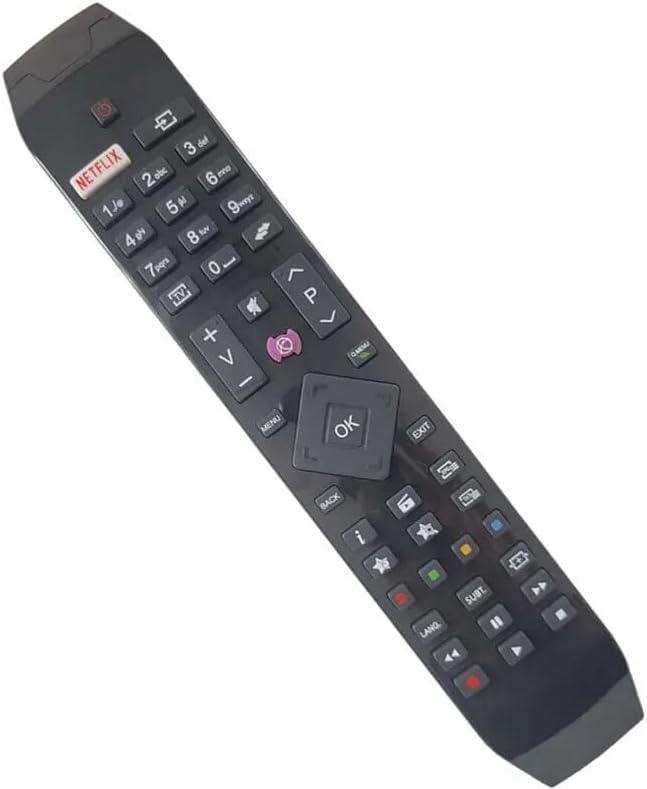
그림 2.1: 각도 view of the replacement remote control, highlighting its ergonomic design and button layout.

그림 2.2: 정면 view of the replacement remote control, detailing the arrangement of function buttons.
The remote includes dedicated buttons for common functions such as Power, Volume Up/Down, Channel Up/Down, Mute, and a central navigation pad with an OK button. It also features quick access buttons for streaming services like Netflix and other smart TV functionalities.
3. 설정
3.1 배터리 설치
- 리모콘 뒷면에서 배터리함을 찾으세요.
- 배터리 덮개를 밀어서 엽니다.
- AAA 배터리 2개(포함되지 않음)를 넣고 양극(+)과 음극(-) 단자가 수납 공간 내부 표시와 올바르게 맞춰졌는지 확인합니다.
- 배터리 덮개를 단단히 닫으세요.
3.2 초기 사용
Once batteries are installed, the remote control is ready for use. Point the remote directly at your Hitachi Smart TV and press the Power button to turn on the television. No pairing or programming is typically required for this replacement remote.
4. 사용 설명서
This remote control provides standard functionality for your Hitachi Smart TV. Below are common operations:
- 전원 버튼: TV를 켜거나 끕니다.
- 볼륨 버튼(+/-): TV 볼륨을 높이거나 낮춥니다.
- Channel Buttons (P+/-): TV 채널을 위아래로 바꿉니다.
- 음소거 버튼: TV 오디오를 음소거하거나 음소거 해제합니다.
- 탐색 패드(위/아래/왼쪽/오른쪽/확인): Used to navigate menus and confirm selections on the TV screen.
- 넷플릭스 버튼: Direct access to the Netflix application (if supported by your TV model).
- 메뉴/홈 버튼: Accesses the TV's main menu or smart home screen.
- 뒤로/종료 버튼: 이전 화면으로 돌아가거나 메뉴를 종료합니다.
- 숫자 버튼(0-9): 채널을 직접 입력하거나 다른 숫자로 선택할 수 있습니다.
For specific advanced functions or smart TV features, refer to your Hitachi TV's original user manual.
5. 호환성
This replacement remote control is compatible with various Hitachi Smart TV models. Known compatible models include, but are not limited to:
- 43HL15W69
- 43HL5W69
- 48HB6W62A
- 49HB5W62
- 49HB6W62H
- 32HB6T41A
- 43HB5T62
- 43HK4W64
- 43HK5W64
If your specific TV model is not listed, it is recommended to compare your original remote with the images provided or contact the seller for confirmation of compatibility.
6. 유지관리
6.1 배터리 교체
Replace batteries when the remote's response becomes sluggish or stops working. Always replace both batteries at the same time with new ones of the same type (AAA). Do not mix old and new batteries, or different types of batteries.
6.2 청소
리모컨을 청소하려면 부드럽고 마른 천으로 살살 닦아주세요. 잘 지워지지 않는 얼룩은 약간 거친 천으로 닦아내세요.amp cloth can be used, but ensure no moisture enters the remote. Do not use abrasive cleaners or solvents.
6.3 보관
리모컨은 직사광선과 극한 온도 변화를 피해 서늘하고 건조한 곳에 보관하십시오. 장기간 사용하지 않을 경우 배터리 누액을 방지하기 위해 배터리를 제거하는 것이 좋습니다.
7. 문제 해결
- 리모컨이 응답하지 않음:
- 배터리가 올바른 극성에 맞게 올바르게 삽입되었는지 확인하세요.
- 배터리를 새 것으로 교체하세요.
- 리모컨과 TV의 적외선 센서 사이에 장애물이 없는지 확인하세요.
- 리모컨을 TV에 직접 대세요.
- 일부 기능이 작동하지 않습니다.
- As a replacement remote, certain advanced or specific functions of your original TV remote may not be supported. This is normal.
- Verify that the function you are trying to use is standard for a TV remote.
- 원격 근무는 간헐적으로 이루어집니다.
- 배터리가 부족할 수 있습니다. 배터리를 교체하세요.
- 배터리 접점이 깨끗하고 부식되지 않았는지 확인하세요.
위의 단계를 따른 후에도 문제가 지속되면 판매자에게 문의하여 추가 지원을 받으십시오.
8. 사양
| 상표 | 일반적인 |
| 제조업체 | 일반적인 |
| 호환 장치 | Hitachi Smart TVs (e.g., 43HL15W69, 43HL5W69, 48HB6W62A, 49HB5W62, 49HB6W62H, 32HB6T41A, 43HB5T62, 43HK4W64, 43HK5W64) |
| 특징 | 인체공학적 |
| 색상 | Black/White (randomly sent) |
| 지원되는 최대 장치 수 | 5 (as a universal remote, though this is a replacement for specific TVs) |
| 전원 | AAA 배터리 2개(포함되지 않음) |
| 재료 | ABS 플라스틱 |
9. 보증 및 지원
Specific warranty information for this replacement remote control is not provided in the product details. For any warranty claims, technical support, or further inquiries, please contact the seller directly through your purchase platform.
It is recommended to retain your purchase receipt as proof of purchase for any support requests.


