
소개
This manual provides comprehensive instructions for the installation, operation, and maintenance of your Hugolog 2K 3MP Indoor Pan/Tilt Security Camera. Please read this manual thoroughly before use to ensure proper functionality and safety.
제품 끝view
The Hugolog 2K 3MP Indoor Pan/Tilt Security Camera is designed for indoor monitoring, offering high-resolution video, advanced motion tracking, and smart detection features. It is suitable for use as a baby monitor, pet camera, or general home security device.

Figure 1: Hugolog 2K 3MP Indoor Pan/Tilt Security Camera (Model HU-PWR6-B)
주요 특징
- Smart Motion Tracking & Auto-Focus and Zoom: AI-powered tracking follows movement; digital zoom up to 3X for detailed views.
- 2K HD and Starlight Night Vision: 3MP 2K resolution with a Starlight Sensor for enhanced color night vision (40X better than standard cameras) and f/1.4 aperture for clear night footage.
- Smart Motion and Sound Detection & Instant Notification: Advanced AI Human and Pet Detection reduces false alerts. Records and sends push alerts for motion, human presence, or crying babies.
- Two-Way Talk & Alarm Siren: Enables clear two-way communication and features an alarm siren that activates with motion.
- US Cloud Storage & SD Card Storage: Supports encrypted cloud storage in the US and a built-in microSD slot (up to 128GB) for local storage.
- Alexa와 호환: Integrates with Amazon Alexa for voice control and view주고받음.
패키지 내용
모든 품목이 들어 있는지 확인하기 위해 상자를 푼 후 패키지 내용물을 확인하세요.
- 휴골로그 2K 3MP 실내 팬/틸트 보안 카메라
- 전원 어댑터
- 설치 부속품 (나사, 벽 앵커)
- 사용자 설명서
설치 가이드
1. 카메라 전원 켜기
- 전원 어댑터를 카메라의 전원 포트에 연결합니다.
- 전원 어댑터를 벽면 콘센트에 꽂으세요. 카메라 전원이 켜지고 시작 시퀀스가 시작됩니다.
2. Installing the Hugolog Connect App
- Download the "Hugolog Connect" app from your smartphone's app store (iOS App Store or Google Play Store).
- 새 계정을 등록하거나 이미 계정이 있는 경우 로그인하세요.
3. 앱에 카메라 추가하기
- Open the Hugolog Connect app and tap the "+" icon to add a new device.
- Follow the on-screen instructions to connect your camera to your Wi-Fi network. Ensure your phone is connected to a 2.4GHz Wi-Fi network during setup.
- 안내에 따라 휴대폰 화면에 표시된 QR 코드를 카메라 렌즈로 스캔하세요.
- 연결되면 카메라 이름을 지정하고 라이브 방송을 시작할 수 있습니다. view주고받음.

Figure 2: Hugolog Connect App interface for device management.
4. Installing a MicroSD Card (Optional)
For local video storage, insert a microSD card (up to 128GB, not included) into the designated slot on the camera. Ensure the camera is powered off before inserting or removing the card.

Figure 3: MicroSD card slot location on the camera.
5. 카메라 장착
The camera can be placed on a flat surface or mounted to a wall or ceiling using the provided mounting accessories. Choose a location with a clear view and stable Wi-Fi signal.

그림 4: 예ample of camera placement in a nursery.
작동 지침
살다 View 및 팬/틸트 제어
Access the live feed through the Hugolog Connect app. Use the on-screen controls to pan (355° horizontally) and tilt (90° vertically) the camera lens to view 방의 다른 영역들.

Figure 5: Pan and tilt functionality for wide area coverage.
Smart Motion Tracking and Auto-Focus
Enable Smart Motion Tracking in the app settings. The camera will automatically follow detected human or pet movement within its field of view. The auto-focus feature ensures clear images during movement and zooming.

Figure 6: Camera demonstrating auto-tracking of subjects.
나이트 비전
The camera automatically switches to Starlight Color Night Vision in low-light conditions, providing clear, full-color video even in near darkness. This feature is significantly enhanced compared to standard infrared night vision.

Figure 7: Visual comparison of Starlight Color Night Vision clarity.
Two-Way Audio and Alarm Siren
Use the two-way talk feature in the app to communicate with individuals near the camera. The built-in alarm siren can be manually activated or set to trigger automatically upon detection of suspicious activity.

그림 8: 카메라를 통한 양방향 오디오 통신.
AI Detection and Notifications
Configure AI detection settings in the app to specify alerts for humans, pets, or sound events (e.g., crying baby). Receive instant push notifications on your smartphone when an event is detected.

Figure 9: AI detection filtering for relevant alerts.
클라우드 및 로컬 스토리지
녹화된 푸tage can be stored securely in the US Cloud (subscription may be required after trial) or locally on a microSD card. Access and review recordings via the Hugolog Connect app.

Figure 10: Easily review 앱의 타임라인을 통해 기록된 이벤트들.
알렉사 통합
Connect your Hugolog camera to Amazon Alexa for convenient voice control. Use commands like "Alexa, show me the [camera name]" to view 호환되는 Alexa 지원 기기에서 실시간 영상을 시청할 수 있습니다.

Figure 11: Integrating the camera with Amazon Alexa for smart home control.
수면 모드
Activate Sleep Mode via the Hugolog App to temporarily disable camera recording and live viewing for privacy. You can also manually rotate the camera lens downwards.

Figure 12: Sleep Mode feature for privacy control.
Multi-Device Support and Sharing
The Hugolog Connect app supports viewing up to 16 cameras simultaneously and allows sharing live views with up to 20 users. This is ideal for family monitoring or collaborative security.
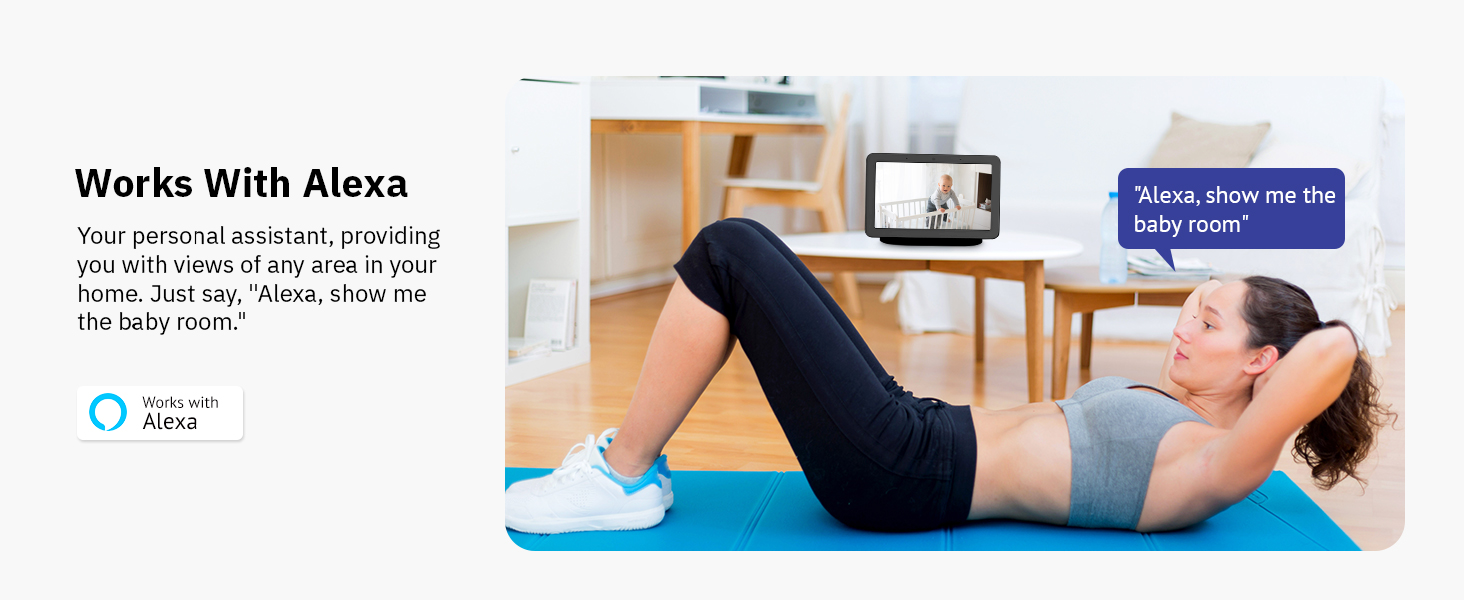
그림 13: 다중 장치 view기능을 공유하고 활용합니다.
유지
- 청소: 카메라 렌즈와 본체는 부드럽고 마른 천으로 닦으십시오. 강한 화학 약품이나 연마성 재질은 사용하지 마십시오.
- 소프트웨어 업데이트: Regularly check the Hugolog Connect app for firmware updates to ensure optimal performance and security.
- 놓기: Ensure the camera is placed in a stable, dry environment, away from direct sunlight, heat sources, and strong electromagnetic fields.
문제 해결
| 문제 | 가능한 원인 | 해결책 |
|---|---|---|
| 카메라가 Wi-Fi에 연결되지 않음 | 와이파이 비밀번호가 잘못됐거나, 5GHz 네트워크를 사용 중이거나, 신호가 약합니다. | 2.4GHz Wi-Fi 비밀번호가 올바른지 확인하십시오. 카메라를 라우터 가까이로 이동하십시오. 카메라와 라우터를 재시작하십시오. |
| 잦은 오경보 | Sensitive motion detection, environmental factors (e.g., shadows, moving branches). | Adjust motion detection sensitivity in the app. Utilize AI Human/Pet Detection to filter irrelevant movements. |
| Poor night vision clarity | Obstructions near the lens, insufficient ambient light for color night vision. | Clear any obstructions. Ensure some ambient light is available for optimal Starlight Color Night Vision. |
| 양방향 오디오 문제 | Microphone/speaker blocked, low volume settings, network latency. | Check for obstructions. Adjust volume in the app. Ensure stable internet connection. |
명세서
| 특징 | 세부 사항 |
|---|---|
| 모델 번호 | HU-PWR6-B |
| 비디오 캡처 해상도 | 3MP(2K) |
| 실내/실외 사용 | 실내 |
| 연결 프로토콜 | 와이파이(2.4GHz) |
| 전원 | 코드식 전기 |
| 팬/틸트 범위 | 355° 팬, 90° 틸트 |
| 나이트 비전 | 별빛색 야간 투시경 |
| 저장 옵션 | MicroSD Card (up to 128GB), US Cloud Storage |
| 호환 장치 | 아마존 알렉사 |
| AI 기능 | Human/Pet Detection, Motion Tracking |
| 품목 무게 | 13.1 온스 |
| 치수 | 6.65 x 3.82 x 3.78인치(패키지) |
보증 및 지원
For warranty information, please refer to the documentation included with your product or visit the official Hugolog website. For technical support, troubleshooting assistance, or to report any issues, please contact Hugolog customer service through their official channels.
제조업체: 휴고로그
온라인 지원: Visit the Hugolog Store on Amazon

Figure 14: Hugolog customer support team ready to assist.