
WEWATCH S3
위워치 S3 스마트 프로젝터 사용 설명서
모델 : S3
브랜드: 위워치
1. 서론
Thank you for choosing the WEWATCH S3 Smart Projector. This projector integrates an Android operating system, offering a seamless entertainment experience with built-in streaming applications. It features 4K Ultra-HD resolution, 500 ANSI lumens brightness, 20000:1 contrast, electronic focus, 4-point keystone correction, and versatile connectivity options including dual-band WiFi and Bluetooth. This manual provides essential information for setting up, operating, maintaining, and troubleshooting your projector to ensure optimal performance and longevity.
2. 안전 정보
프로젝터를 사용하기 전에 모든 안전 지침을 주의 깊게 읽으십시오. 나중에 참조할 수 있도록 이 설명서를 보관하십시오.
- 전원 공급 장치: 제공된 전원 어댑터만 사용하세요. 볼륨을 확인하세요.tage는 프로젝터의 요구 사항을 충족합니다.
- 통풍: 환기구를 막지 마십시오. 프로젝터 주변의 공기 흐름이 원활하여 과열을 방지하십시오.
- 액체 노출: Do not expose the projector to rain, moisture, or any liquids. Avoid placing objects filled with liquids, such as vases, on the projector.
- 청소: 청소하기 전에 프로젝터의 플러그를 뽑으세요. 부드럽고 마른 천을 사용하세요. 액체 또는 에어로졸 세척제는 사용하지 마세요.
- 놓기: 프로젝터를 안정적이고 평평한 표면에 놓으십시오. 직사광선이 비치는 곳, 열원 근처, 먼지나 습기가 많은 환경에 두지 마십시오.
- 눈 보호: l을 사용할 때 프로젝터 렌즈를 직접 쳐다보지 마십시오.amp 밝은 빛이 눈 손상을 유발할 수 있으므로 조명을 켜 두십시오.
- 서비스: 이 제품을 직접 수리하려고 하지 마십시오. 모든 서비스는 자격을 갖춘 서비스 담당자에게 문의하십시오.
3. 패키지 내용
상자를 푼 후 패키지 내용물을 확인하세요.
- WEWATCH S3 Smart Projector
- 원격 제어
- 전원 어댑터
- HDMI 케이블
- 사용자 설명서
4. 제품 오버view
Familiarize yourself with the components and ports of your WEWATCH S3 projector.

앞쪽 view of the WEWATCH S3 Smart Projector, showcasin렌즈와 세련된 디자인이 돋보입니다.
연결 포트

뒤쪽 view of the WEWATCH S3 Projector, highlighting the various input and output ports including LAN, USB, HDMI, AV, and headphone jack.
The projector is equipped with multiple ports for diverse connectivity:
- LAN 포트(1개): 유선 인터넷 연결용.
- USB 포트(x2): USB 드라이브 또는 기타 USB 장치를 연결하는 데 사용합니다.
- HDMI 포트(x2): 노트북, 게임 콘솔, TV 스틱 등의 장치를 연결하는 데 사용됩니다.
- AV 포트(1개): For connecting older audio/video devices.
- 헤드폰 잭(3.5mm): 외부 오디오 장치 또는 헤드폰을 연결하는 데 사용합니다.
5. 설정
5.1 배치 및 화면 크기
Position the projector on a stable surface. The projection distance determines the screen size. You can achieve a large screen size of up to 300 inches.
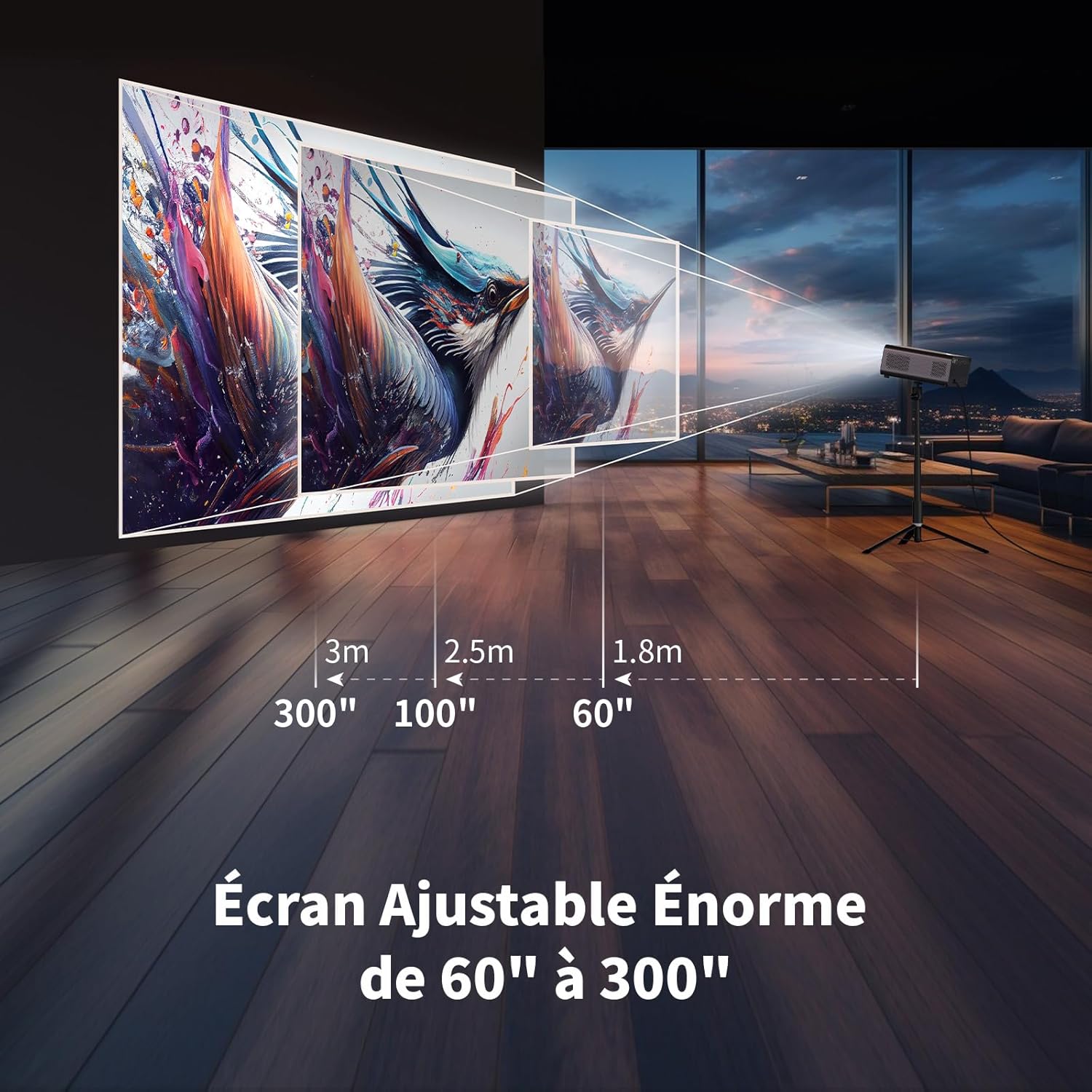
Illustration showing recommended projection distances for various screen sizes, from 60 inches at 1.8m to 300 inches at 3m.
5.2 전원 연결
전원 어댑터를 프로젝터의 전원 입력 단자에 연결한 다음 벽면 콘센트에 꽂으세요. 프로젝터 또는 리모컨의 전원 버튼을 눌러 전원을 켜세요.
5.3 Electronic Focus
Achieve a clear image quickly using the electronic focus function. Use the F+ and F- buttons on the remote control to adjust the focus until the image is sharp.

Image demonstrating the remote control's F+ and F- buttons for electronic focus adjustment, and the visual effect of keystone correction on the projected image.
5.4 키스톤 보정
The projector supports 4-point keystone correction and automatic vertical correction to ensure a rectangular image, regardless of the projection angle. Adjust these settings in the projector's menu if needed.
5.5 줌 기능
The zoom function allows you to reduce the image size from 100% to 80% without moving the projector. This can be adjusted via the projector's settings menu.

Visual representation of the projector's zoom function, showing how the image size can be reduced from 100% to 50% without physically moving the projector.
6. 운영
6.1 Android OS and Built-in Applications
The WEWATCH S3 features an integrated Android operating system, providing direct access to popular streaming services like Netflix, YouTube, Prime Video, Disney+, and KODI. When using these applications, switch the remote control to mouse mode for optimal navigation. Remember to switch back to normal mode after use.

A user relaxing and watching content projected from the WEWATCH S3, showing the Android interface with icons for Netflix, YouTube, Prime Video, and other streaming applications.
6.2 Wireless Connectivity (WiFi & Bluetooth)
The projector supports dual-band 2.4G+5G WiFi for fast and stable connections with iOS, Android, and Windows devices. Bluetooth functionality allows you to connect external speakers for enhanced audio or Bluetooth headphones for private listening.

A person holding a smartphone, wirelessly mirroring its content to the WEWATCH S3 projector, demonstrating the 2.4/5G WiFi and Bluetooth capabilities for seamless content sharing.
6.3 외부 장치 연결
Utilize the HDMI, USB, LAN, and AV ports to connect various external devices such as TV sticks, USB drives, laptops, gaming consoles, or older media players for diverse content playback.
6.4 블루투스 스피커 모드
The projector can function as a standalone Bluetooth speaker. Connect your smartphone or other Bluetooth-enabled devices to the projector to play music, utilizing its built-in HiFi 5W speaker.
7. 유지관리
7.1 먼지통 청소
The WEWATCH S3 features a hidden dust box designed to prevent dust from entering the projector. Regularly clean the dust box to maintain optimal performance and image quality.

상세한 view of the WEWATCH S3 Projector showing the hidden dust box compartment and the internal fan system, with arrows indicating airflow for cooling.
7.2 일반 관리
- Keep the projector clean and free from dust.
- 사용하지 않을 때에는 프로젝터를 시원하고 건조한 곳에 보관하세요.
- 렌즈를 직접 만지지 마십시오. 필요한 경우 렌즈 클리닝 천을 사용하십시오.
8. 문제 해결
프로젝터에 문제가 발생하면 다음의 일반적인 문제와 해결 방법을 참조하세요.
| 문제 | 가능한 원인 | 해결책 |
|---|---|---|
| 이미지가 투영되지 않았습니다 | Power cable loose; Input source incorrect; Lens cap on. | Check power connection; Select correct input source (HDMI, USB, etc.); Remove lens cap. |
| 흐릿한 이미지 | Focus not adjusted; Projector too far/close; Keystone not adjusted. | Adjust electronic focus (F+/F-); Adjust projection distance; Perform keystone correction. |
| 소리가 나지 않습니다 | Volume too low; Muted; External speaker not connected properly. | Increase volume; Unmute; Check external speaker connection or try built-in speaker. |
| 와이파이/블루투스 연결 문제 | 잘못된 비밀번호; 기기가 범위를 벗어남; 간섭. | Verify password; Move device closer; Reduce interference from other devices. |
| Apps not working correctly | Remote not in mouse mode; App needs update; Internet connection issue. | Switch remote to mouse mode; Check for app updates; Verify internet connection. |
9. 사양
Detailed technical specifications for the WEWATCH S3 Smart Projector:
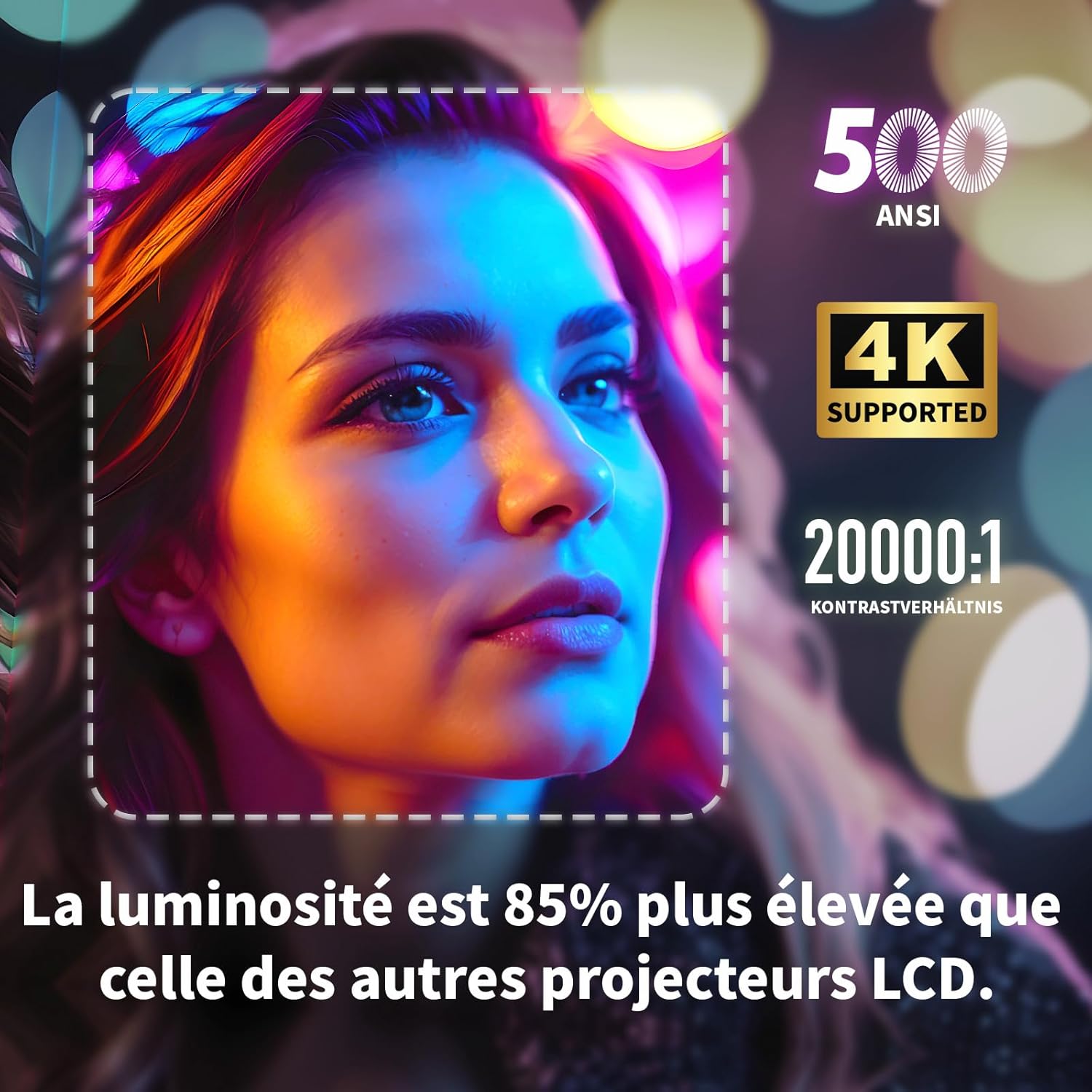
Visual highlighting key specifications: 500 ANSI lumens, 4K support, and 20000:1 contrast ratio, indicating 85% higher brightness than other LCD projectors.
| 특징 | 사양 |
|---|---|
| 상표 | 위워치 |
| 모델 번호 | S3 |
| 색상 | 회색 |
| 디스플레이 해상도 | 3840 x 2160(4K 울트라 HD) |
| 명도 | 500 ANSI 루멘스 |
| 대비율 | 20000시 1분 |
| 운영 체제 | Android OS (with built-in Netflix, YouTube, Prime Video, Disney+, KODI) |
| 연결 기술 | Bluetooth, Ethernet, HDMI, Wi-Fi (2.4G+5G dual-band) |
| 특별 기능 | Electronic Focus, 4-Point Keystone Correction, Automatic Vertical Correction, Zoom (80%-100%), Built-in Speakers, Dust-proof Design |
| 화면 크기 | 최대 300인치 |
| 오디오 | Integrated HiFi 5W Speaker, Bluetooth Speaker Mode |
| 치수 | 24.3L x 24.9W x 10.5Hcm |
| USB 포트 | 2 |
10. 보증 및 지원
WEWATCH products come with a standard manufacturer's warranty. For detailed warranty information, technical support, or service inquiries, please refer to the warranty card included in your package or visit the official WEWATCH web해당 사이트입니다. 고객 지원팀에 문의하실 때는 제품 모델 번호(S3)와 구매 정보를 준비해 주시기 바랍니다.
Ask a question about this manual
Ask about setup, troubleshooting, compatibility, parts, safety, or missing instructions. Manuals+ will review the question and use this page’s manual context to help answer it.