
소개
Thank you for choosing the HyperGear Stealth2 ANC Wireless Headphones. This manual provides detailed instructions for setting up, operating, and maintaining your headphones to ensure optimal performance and longevity. Please read this manual thoroughly before use.

Image: HyperGear Stealth2 ANC Wireless Headphones, Bone color, showcasing key features like Active Noise Cancelling, 40mm Neodymium Drivers, Deep HD Stereo Sound, up to 24-hour playing time, rapid charge, and lightweight foldable design.
패키지 내용
패키지에 모든 품목이 들어 있는지 확인하세요.
- HyperGear Stealth2 ANC Wireless Headphones
- USB-C 충전 케이블
- 사용 설명서 (본 문서)
제품 끝view
헤드폰의 다양한 구성 요소와 제어 기능을 숙지하십시오.

Image: Detailed diagram of the HyperGear Stealth2 ANC Wireless Headphones, highlighting the on-ear controls. Labels include Power On/Off, Enter Pairing Mode, Volume Up/Next Track, Play/Pause/Answer/End Call, Reject Call, Activate Voice Assistant, Gaming Mode On/Off, Volume Down/Previous Track, and Active Noise Cancellation On/Off. Also shows Quick Pairing and Auto Reconnection features.
온이어 컨트롤:
- 전원 버튼: Press and hold to power on/off. Press and hold to enter pairing mode.
- 볼륨 높이기 / 다음 트랙 버튼: 누르면 볼륨이 커집니다. 길게 누르면 다음 곡으로 넘어갑니다.
- 다기능 버튼(재생/일시 정지): Press to play/pause audio. Press to answer/end calls. Press and hold to reject calls. Double-press to activate voice assistant. Triple-press to toggle Gaming Mode.
- 볼륨 낮추기/이전 트랙 버튼: 누르면 볼륨이 줄어듭니다. 길게 누르면 이전 트랙으로 이동합니다.
- ANC 버튼: Press to toggle Active Noise Cancellation on/off.
설정
1. 헤드폰 충전
처음 사용하기 전에 헤드폰을 완전히 충전하십시오.
- 제공된 USB-C 충전 케이블을 헤드폰의 충전 포트에 연결하세요.
- 케이블의 다른 쪽 끝을 USB 전원(예: 벽면 어댑터, 컴퓨터 USB 포트)에 연결합니다.
- LED 표시등에 충전 상태가 표시됩니다. 완전 충전에는 일반적으로 약 1시간 30분이 소요됩니다.
- A 10-minute rapid charge can provide approximately 3 hours of playback.
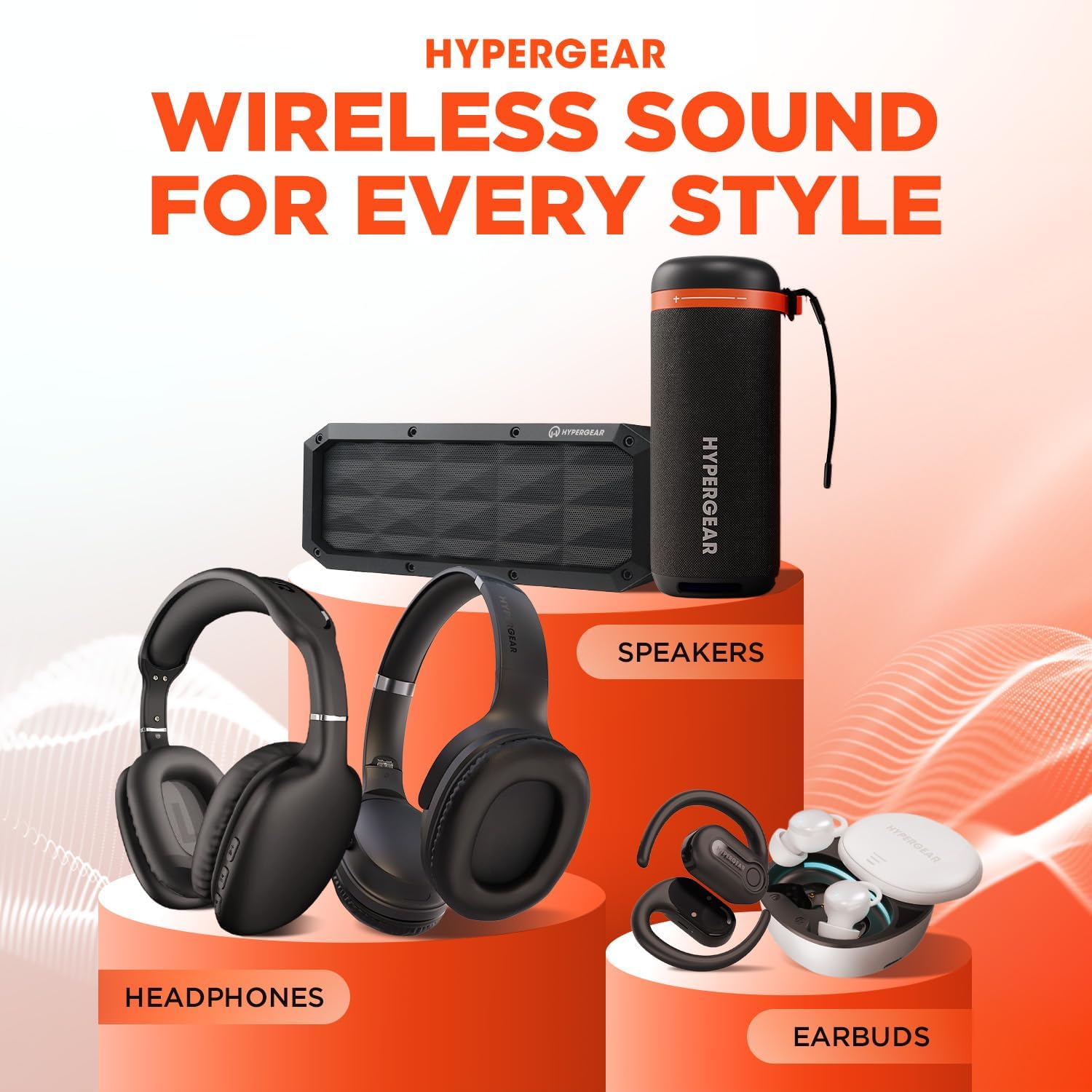
Image: A person wearing HyperGear Stealth2 ANC Wireless Headphones on an airplane, illustrating battery life: 18 hours with ANC on, 24 hours with ANC off. Also highlights rapid charge: 10 minutes of charging provides 3 hours of playback.
2. 블루투스 페어링
무선 오디오를 위해 헤드폰을 기기와 페어링하세요.
- 헤드폰이 충전되어 있고 전원이 꺼져 있는지 확인하세요.
- LED 표시등이 파란색과 빨간색으로 깜박여 페어링 모드를 나타낼 때까지 전원 버튼을 길게 누릅니다.
- 기기(스마트폰, 태블릿, 컴퓨터)에서 Bluetooth를 활성화하고 사용 가능한 기기를 검색하세요.
- Select "HyperGear Stealth2" from the list of found devices.
- Once connected, the LED indicator will show a solid blue light or flash slowly.
빠른 페어링: The headphones are designed for instant connection with your device in seconds after initial pairing.
자동 재 연결 : The headphones will remember and automatically reconnect to the last paired device when powered on and within range.
작동 지침
전원 켜기/끄기
- 전원을 켜려면 LED 표시등이 켜질 때까지 전원 버튼을 길게 누르세요.
- 전원을 끄려면 LED 표시등이 꺼질 때까지 전원 버튼을 길게 누르세요.
능동 잡음 제거 (ANC)
- 전용 ANC 버튼을 눌러 액티브 노이즈 캔슬링을 켜거나 끕니다.
- When ANC is active, ambient noise is significantly reduced, providing a quieter listening experience.
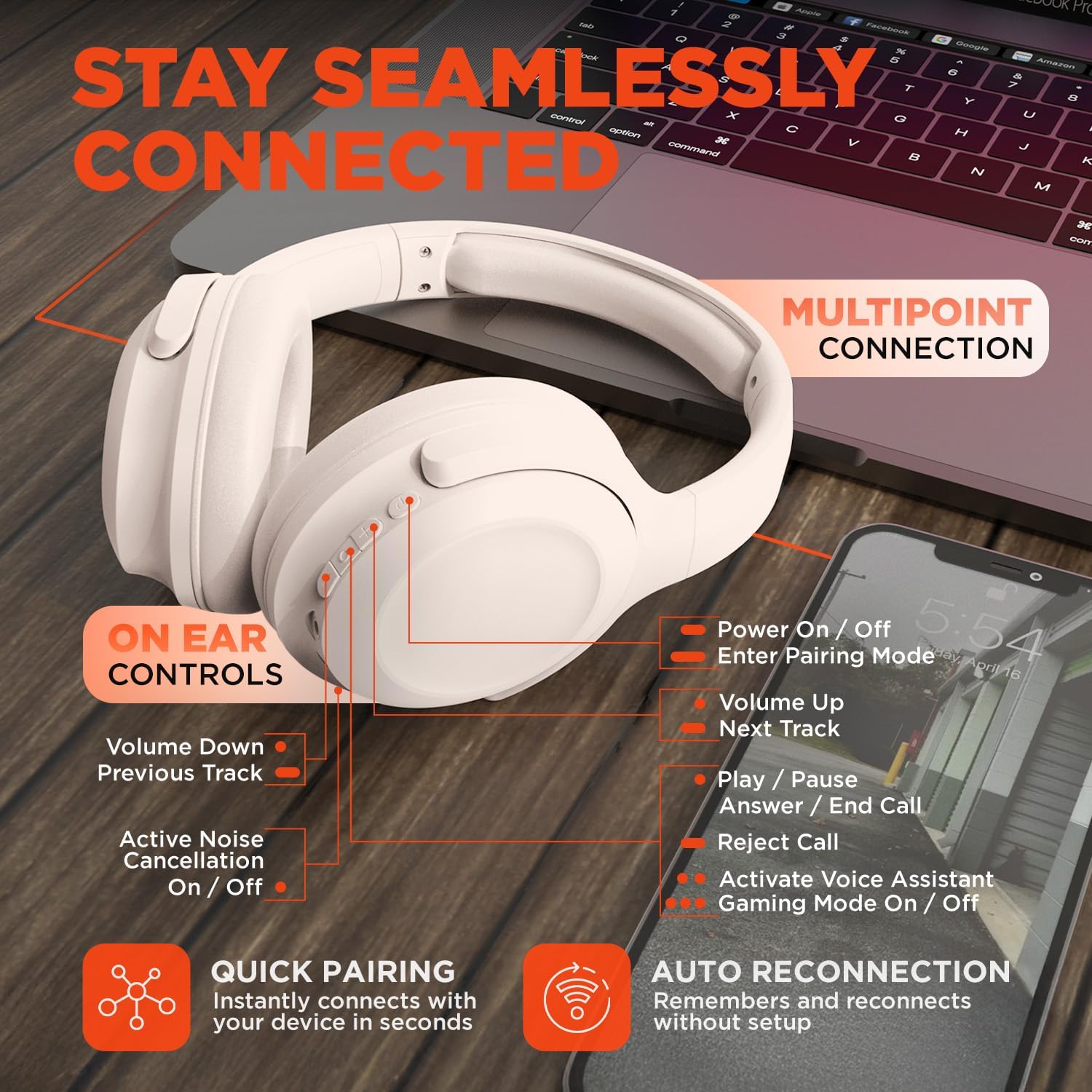
Image: HyperGear Stealth2 ANC Wireless Headphones highlighting "Pure Sound Anywhere" with Dual ANC Microphones for blocking unwanted noise and Adaptive Sound Control for real-time environment adjustment. Also shows compatibility with Siri and Google Assistant, and use cases for exercise, gaming, and travel.
오디오 재생 및 통화
- 재생/일시 중지: 다기능 버튼을 한 번 누릅니다.
- 다음 트랙: 볼륨 높이기 버튼을 길게 누르세요.
- 이전 트랙 : 볼륨 낮추기 버튼을 길게 누릅니다.
- 볼륨 조절: 볼륨 높이기 또는 볼륨 낮추기 버튼을 누르세요.
- 전화 받기/종료: 다기능 버튼을 한 번 누릅니다.
- 전화 거부: 다기능 버튼을 길게 누릅니다.
음성 지원
- 다기능 버튼을 두 번 누르면 기기의 음성 비서(Siri, Google Assistant 등)가 활성화됩니다.
게임 모드
- Triple-press the Multi-function button to toggle the no-lag Gaming Mode. This mode optimizes audio synchronization for enhanced gameplay.
다 지점 연결
The headphones support multipoint connection, allowing them to be connected to two Bluetooth devices simultaneously.
- "블루투스 페어링" 섹션에 설명된 대로 헤드폰을 첫 번째 장치와 페어링합니다.
- 첫 번째 기기에서 Bluetooth를 비활성화합니다.
- 헤드폰을 다시 페어링 모드로 전환하고 두 번째 기기와 페어링하세요.
- 첫 번째 기기에서 Bluetooth를 다시 활성화하세요. 이제 헤드폰이 두 기기에 모두 연결되었을 것입니다.
- Audio will play from the device that is actively playing content.

Image: HyperGear Stealth2 ANC Wireless Headphones positioned between a laptop and a smartphone, demonstrating the multipoint connection feature. This allows the headphones to stay seamlessly connected to multiple devices.
유지
헤드폰을 제대로 관리하면 수명과 성능을 유지할 수 있습니다.
- Keep the headphones dry. Do not expose them to water or excessive moisture. They are not water resistant.
- 이어컵과 헤드밴드는 부드럽고 마른 천으로 닦으세요. 강한 화학 물질이나 연마재는 사용하지 마세요.
- 사용하지 않을 때는 헤드폰을 서늘하고 건조한 곳에 보관하세요. 접이식 디자인으로 컴팩트하게 보관할 수 있습니다.
- 극한의 온도를 피하세요.
- 헤드폰을 분해하거나 개조하려고 하지 마십시오. 그럴 경우 보증이 무효화됩니다.
문제 해결
문제가 발생할 경우 다음의 일반적인 해결 방법을 참조하십시오.
| 문제 | 해결책 |
|---|---|
| 헤드폰의 전원이 켜지지 않습니다. | 헤드폰이 완전히 충전되었는지 확인하십시오. USB-C 케이블을 사용하여 전원에 연결하십시오. |
| 기기와 페어링할 수 없습니다. |
|
| 소리가 나지 않거나 볼륨이 작습니다. |
|
| ANC는 효과적이지 않습니다. |
|
명세서
| 특징 | 세부 사항 |
|---|---|
| 모델명 | HyperGear Stealth2 ANC Headphones |
| 모델 번호 | 15860 |
| 연결 기술 | 무선(블루투스) |
| 블루투스 버전 | 5.2 |
| 블루투스 범위 | 10 미터 |
| 오디오 드라이버 크기 | 40mm |
| 주파수 범위 | 20Hz - 20,000Hz |
| 소음 제어 | 능동 소음 제거 |
| 배터리 수명 | 최대 24시간(ANC 꺼짐) |
| 충전 시간 | 2시간 |
| 충전 포트 | USB-C |
| 재료 | 플라스틱 |
| 품목 무게 | 0.38킬로그램(13.3온스) |
| 제품 치수 | 7.88 x 2.25 x 10.51 인치 |
| 방수 레벨 | 방수가 되지 않음 |
| 한국어: | 633755158605 |
보증 및 지원
HyperGear products are designed for reliability and performance. For warranty information and customer support, please refer to the warranty card included with your purchase or visit the official HyperGear web대지.
반품 정책: This product typically includes a 30-day return policy for refunds or replacements. Please check your purchase details for specific terms.
제조업체: 하이퍼기어